Chapter 45: Terraform 3-Tier Architecture in a Single Availability Zone
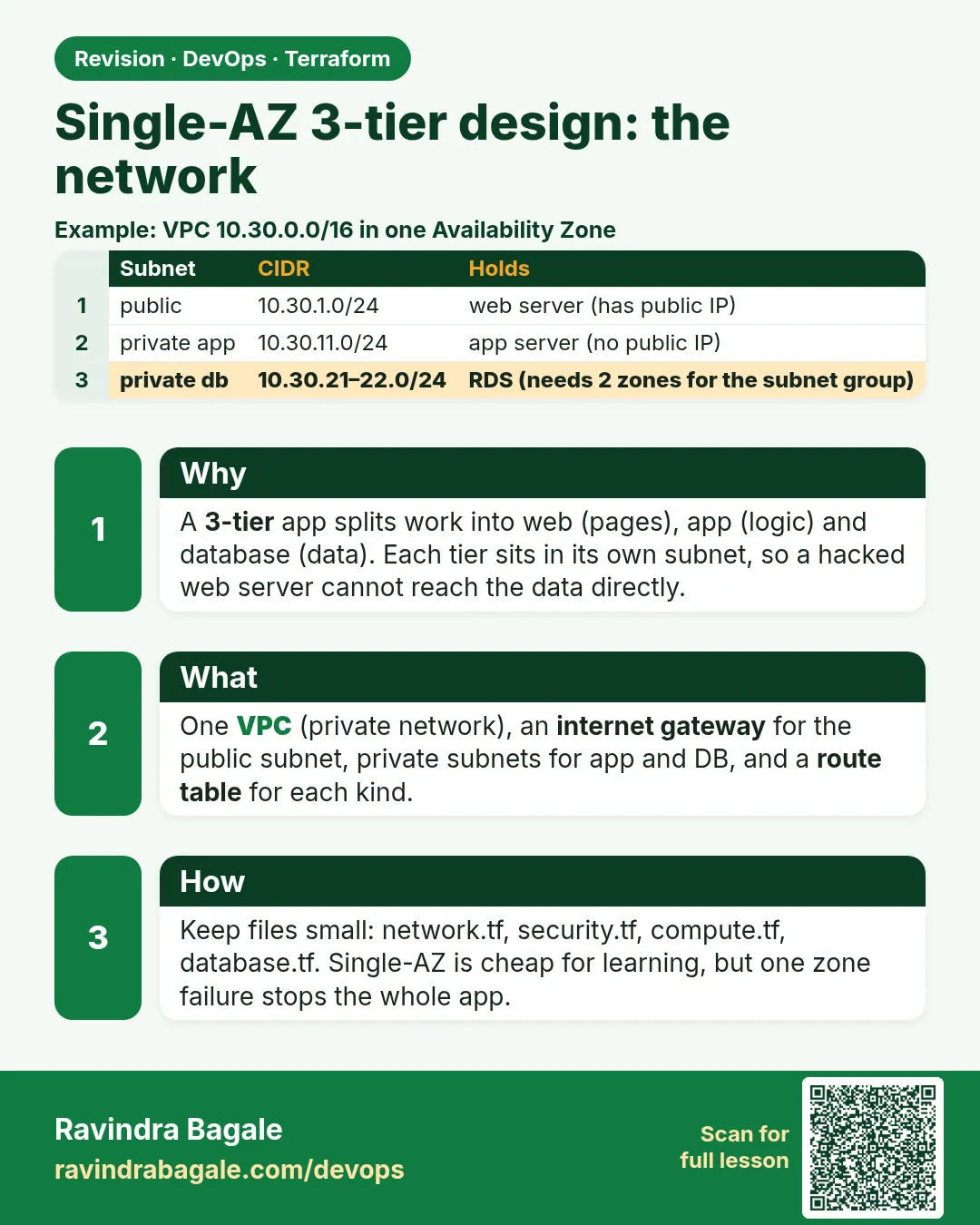
45.1 The single-AZ 3-tier design, file layout and network
Story. Suppose we are on an Infosys client team building a first internal HR portal for 200 staff. They want the classic three layers: a web server that users reach, an app server hidden in a private subnet, and a database in its own subnet. To keep it simple and cheap for a pilot, everything runs in one Availability Zone. This chapter builds that layout; the next chapter makes it survive a zone failure.
Steps
- Create the folder and the files in the layout.
- Write versions.tf, variables.tf and network.tf.
- Run terraform init and terraform validate.
- Run terraform plan and read the 12 network resources.
File layout
three-tier-single-az/
├── versions.tf
├── variables.tf
├── network.tf
├── security.tf
├── compute.tf
├── db.tf
└── outputs.tf
# ---- versions.tf ----
terraform {
  required_version = ">= 1.6"
  required_providers {
    aws = {
      source  = "hashicorp/aws"
      version = "~> 5.0"
    }
  }
}

provider "aws" {
  region = var.region
}

# ---- variables.tf ----
variable "region" {
  type    = string
  default = "ap-south-1"
}

variable "project" {
  type    = string
  default = "tier1az"
}

variable "instance_type" {
  type    = string
  default = "t3.micro"
}

variable "db_username" {
  type    = string
  default = "appadmin"
}

# ---- network.tf ----
data "aws_availability_zones" "available" {
  state = "available"
}

locals {
  az_a = data.aws_availability_zones.available.names[0]
  az_b = data.aws_availability_zones.available.names[1]
}

resource "aws_vpc" "main" {
  cidr_block           = "10.30.0.0/16"
  enable_dns_support   = true
  enable_dns_hostnames = true
  tags = {
    Name = "${var.project}-vpc"
  }
}

resource "aws_internet_gateway" "igw" {
  vpc_id = aws_vpc.main.id
}

resource "aws_subnet" "public" {
  vpc_id                  = aws_vpc.main.id
  cidr_block              = "10.30.1.0/24"
  availability_zone       = local.az_a
  map_public_ip_on_launch = true
  tags = {
    Name = "${var.project}-public-a"
  }
}

resource "aws_subnet" "app" {
  vpc_id            = aws_vpc.main.id
  cidr_block        = "10.30.11.0/24"
  availability_zone = local.az_a
  tags = {
    Name = "${var.project}-app-a"
  }
}

resource "aws_subnet" "db_a" {
  vpc_id            = aws_vpc.main.id
  cidr_block        = "10.30.21.0/24"
  availability_zone = local.az_a
  tags = {
    Name = "${var.project}-db-a"
  }
}

resource "aws_subnet" "db_b" {
  vpc_id            = aws_vpc.main.id
  cidr_block        = "10.30.22.0/24"
  availability_zone = local.az_b
  tags = {
    Name = "${var.project}-db-b"
  }
}

resource "aws_eip" "nat" {
  domain = "vpc"
}

resource "aws_nat_gateway" "nat" {
  allocation_id = aws_eip.nat.id
  subnet_id     = aws_subnet.public.id
  depends_on    = [aws_internet_gateway.igw]
}

resource "aws_route_table" "public" {
  vpc_id = aws_vpc.main.id
  route {
    cidr_block = "0.0.0.0/0"
    gateway_id = aws_internet_gateway.igw.id
  }
}

resource "aws_route_table" "private" {
  vpc_id = aws_vpc.main.id
  route {
    cidr_block     = "0.0.0.0/0"
    nat_gateway_id = aws_nat_gateway.nat.id
  }
}

resource "aws_route_table_association" "public" {
  subnet_id      = aws_subnet.public.id
  route_table_id = aws_route_table.public.id
}

resource "aws_route_table_association" "app" {
  subnet_id      = aws_subnet.app.id
  route_table_id = aws_route_table.private.id
}
What each line does
required_providers { aws = { version = "~> 5.0" } }— Pins the AWS provider to any 5.x release.provider "aws" { region = var.region }— Every resource is created in the region from variables.tf (Mumbai, ap-south-1, by default).locals { az_a = ...names[0] }— Names the first zone once so every resource uses the same one.enable_dns_hostnames = true— Needed for RDS and instance DNS names.aws_subnet "public" ... map_public_ip_on_launch = true— The web subnet; servers here get public IPs.aws_subnet "app"— Private app subnet: no public IPs.aws_subnet "db_a" / "db_b"— DB subnets. db_b is in AZ-b only because a DB subnet group must cover two zones; the database still runs in AZ-a.aws_eip "nat" domain = "vpc"— A fixed public IP for the NAT gateway.aws_nat_gateway "nat" subnet_id = public— The NAT sits in the public subnet so private servers can download updates.depends_on = [aws_internet_gateway.igw]— The NAT needs the internet gateway first.route_table "public" → gateway_id— Public route: internet traffic goes to the IGW.route_table "private" → nat_gateway_id— Private route: internet traffic goes out through NAT, nothing comes in.aws_route_table_association— Attaches each route table to its subnet. DB subnets get none, so they keep only the local VPC route.
When it is green.
$ terraform plan -target=aws_route_table_association.app
Plan: 12 to add, 0 to change, 0 to destroy.
When it is red.
Error: creating EC2 NAT Gateway: InvalidSubnetID.NotFound
  -- or --
Error: creating EC2 Subnet: InvalidParameterValue: Value (ap-south-1a) for parameter availabilityZone is invalid
Fix. Use the data source for zone names instead of typing them, and make sure the NAT references aws_subnet.public.id. Check you are in the region set in variables.tf.
What: every term in plain English
- 3-tier architecture — An application split into a web layer, an app (business logic) layer and a data layer, each in its own subnet with its own security group.
- public subnet — A subnet whose route table sends 0.0.0.0/0 to an internet gateway. Only the web tier lives here.
- private subnet — A subnet with no route to the internet gateway. Servers here have no public IP.
- NAT gateway — A managed AWS device in the public subnet that lets private servers start outbound connections (for dnf updates) while blocking inbound ones.
- Elastic IP — A fixed public IPv4 address. A NAT gateway needs one.
- route table association — The link that tells AWS which route table a subnet uses. Without it the subnet uses the VPC main route table.
- availability zone (AZ) — One isolated data centre group inside a region, for example ap-south-1a in Mumbai.
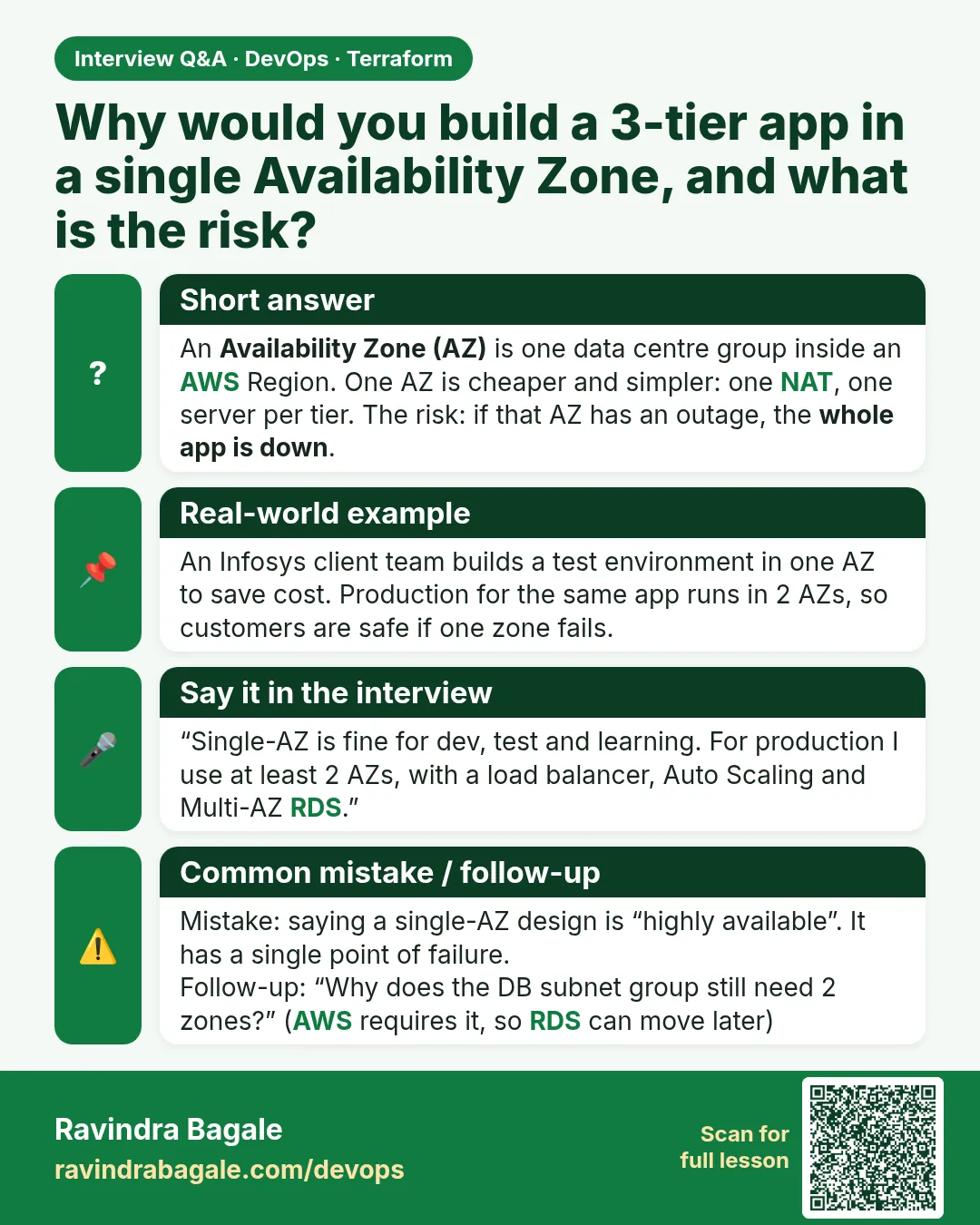
- single-AZ — Every server sits in one zone. Cheap and simple, but one zone outage stops the whole app.
Example 1: Draw the picture first, then list resources
At a Tata Consultancy Services client workshop, architects draw the boxes on a whiteboard before anybody writes HCL. Every box becomes a Terraform resource, so the drawing becomes your checklist.
- Draw VPC, three subnet types, IGW and NAT.
- Write one resource per box.
- Count the resources and compare with the plan later.
VPC 10.30.0.0/16 (ap-south-1)
  public subnet  10.30.1.0/24  ap-south-1a  -> web EC2, NAT gateway
  app subnet     10.30.11.0/24 ap-south-1a  -> app EC2 (no public IP)
  db subnet a    10.30.21.0/24 ap-south-1a  -> RDS lives here
  db subnet b    10.30.22.0/24 ap-south-1b  -> required by DB subnet group only
Internet gateway  -> attached to VPC
Route tables      -> public (0.0.0.0/0 to IGW), private (0.0.0.0/0 to NAT)
# after writing network.tf, count network resources in the plan
terraform plan -no-color | grep -c "will be created"
Output
13
What it shows: VPC, IGW, 4 subnets, EIP, NAT, 2 route tables and 3 associations make 13. If your count differs, a box is missing or extra.
Example 2: Create the seven-file folder
Infosys project templates keep one concern per file. Reviewers open network.tf for routing questions and never scroll through 600 lines.
- Create the folder.
- Create seven empty files.
- Run terraform fmt to confirm the folder is valid.
mkdir -p three-tier-single-az && cd three-tier-single-az
touch versions.tf variables.tf network.tf security.tf compute.tf db.tf outputs.tf
touch app_user_data.sh web_user_data.sh.tftpl
ls -1
Output
app_user_data.sh
compute.tf
db.tf
network.tf
outputs.tf
security.tf
variables.tf
versions.tf
web_user_data.sh.tftpl
What it shows: The two boot scripts sit beside the .tf files. Terraform reads them with file() and templatefile().
Example 3: Pick zones from data, not hard-coded names
Wipro teams reuse the same code for Mumbai and Hyderabad. Reading zone names from a data source means the code works in any region without edits.
- Read available zones with a data source.
- Name the first two in locals.
- Use local.az_a everywhere except db_b.
data "aws_availability_zones" "available" {
  state = "available"
}

locals {
  az_a = data.aws_availability_zones.available.names[0]
  az_b = data.aws_availability_zones.available.names[1]
}
# terraform.tfvars for a Hyderabad copy: only region and project change
region  = "ap-south-2"
project = "hrportal-hyd"
Output
$ terraform console
> local.az_a
"ap-south-1a"
> local.az_b
"ap-south-1b"
What it shows: terraform console shows what a local resolves to before planning. az_b is used only by the second DB subnet.
Example 4: Check the routes after apply
The most common 3-tier bug is a private subnet with no NAT route, so dnf hangs at boot. Read the route tables from the CLI instead of guessing.
- Apply the network.
- Ask AWS for routes of the private route table.
- Confirm the NAT gateway target.
RT=$(terraform state show aws_route_table.private | awk '/^ *id /{print $3}' | tr -d '"')
aws ec2 describe-route-tables --route-table-ids $RT \
  --query "RouteTables[0].Routes[].[DestinationCidrBlock,NatGatewayId,GatewayId]" --output table
Output
---------------------------------------------------
|               DescribeRouteTables               |
+--------------+-------------------------+--------+
|  10.30.0.0/16|  None                   |  local |
|  0.0.0.0/0   |  nat-0a1b2c3d4e5f67890  |  None  |
+--------------+-------------------------+--------+
What it shows: local covers traffic inside the VPC. The 0.0.0.0/0 line must point to nat-..., never to igw-..., for the private table.
Example 5: Know the bill before you apply
A NAT gateway costs money every hour even when idle. Freshers at a Capgemini bootcamp once left one running for a month. Know the cost and destroy after practice.
- List the paid parts.
- Plan a short lab window.
- Destroy the same day.
Paid hourly in this lab (Mumbai, approximate):
  NAT gateway        ~ USD 0.056 per hour + data processed
  Elastic IP on NAT  included while attached
  2 x t3.micro EC2   free tier eligible for new accounts
  db.t3.micro RDS    free tier eligible for new accounts
Rule: apply, test, destroy within one session.
Output
A 3-hour lab costs well under one US dollar for the NAT gateway.
What it shows: Always check the AWS pricing page for your region; prices change.
Command cheat sheet
| Command | What it does | When to use it |
|---|---|---|
terraform fmt -recursive |
Formats all files | Before every commit |
terraform validate |
Checks syntax and references | After each new file |
terraform plan -out tfplan |
Saves a plan | Before apply |
terraform state list |
Lists created resources | After apply |
aws ec2 describe-route-tables |
Shows routes | Debug routing |
terraform console |
Evaluates expressions | Check variables |
Verify: did it work?
-
Thirteen network resources
terraform state list | grep -cE "aws_(vpc|internet_gateway|subnet|eip|nat_gateway|route_table)"Output
13 -
App subnet has no public IP mapping
aws ec2 describe-subnets --filters Name=tag:Name,Values=hrportal-app --query "Subnets[0].MapPublicIpOnLaunch"Output
false -
NAT is available
aws ec2 describe-nat-gateways --query "NatGateways[0].State" --output textOutput
available
When it is red 1
Error: creating EC2 NAT Gateway: InvalidSubnet: subnet-0abc is not a public subnet
Cause. The NAT gateway was placed in the private app subnet.
Fix, step by step
- Set subnet_id = aws_subnet.public.id on the NAT gateway.
- Plan again; the NAT will be replaced.
When it is red 2
Error: creating EC2 Subnet: InvalidSubnet.Conflict: The CIDR '10.30.11.0/24' conflicts with another subnet
Cause. Two subnets use the same CIDR block.
Fix, step by step
- Give each subnet a unique /24.
- Keep a CIDR table in a comment at the top of network.tf.
When it is red 3
Error: creating EC2 Subnet: InvalidParameterValue: Value (ap-south-1d) for parameter availabilityZone is invalid
Cause. The zone does not exist in that region.
Fix, step by step
- Run aws ec2 describe-availability-zones --region ap-south-1.
- Use a listed zone name in var.az.
Cleanup
terraform destroy -auto-approve
rm -f tfplan
Ravindra Bagale's Tip
Name every resource with the project prefix, for example hrportal-app. When ten teams share one AWS account, tags are how you find your own servers.
Practice tasks
Easy Draw it
Why: Plan before code.
What to do: Draw the VPC with every subnet, gateway and route table.
- One box per resource.
Check: A drawing with 13 network boxes.
Easy Count resources
Why: Match plan to design.
What to do: Run plan and count "will be created" lines for network.tf.
- Use grep -c.
Check: 13.
Medium Second region copy
Why: Reuse code.
What to do: Create a tfvars file for ap-south-2 and run plan.
- Only change variables.
Check: Plan shows ap-south-2 zones.
Medium Prove NAT works
Why: Test outbound.
What to do: From the app server (Session Manager) run curl -I https://aws.amazon.com.
- Needs the NAT route.
Check: HTTP/2 200 or 301.
Easy Say it in two lines
Why: If you can say it simply, you understand it.
What to do: Write two short lines about this lesson for a fresher.
- Write the problem it solves.
- Write the one command or file you use.
- Read it aloud.
Check: A fresher understands it without a question.
Easy Start a safe lab folder
Why: Practice needs a throwaway place.
What to do: Make a new folder with versions.tf and a random_pet resource, so no AWS cost.
- mkdir tf-lab and cd into it.
- Add the hashicorp/random provider and one random_pet.
- Run terraform init and terraform apply.
Check: Apply complete! with 1 added.
Medium Break it on purpose
Why: You must know the red output by face.
What to do: Cause one error from the red part of this lesson and fix it.
- Follow one red section.
- Copy the exact message to your notes.
- Write the fix in one line.
Check: You fixed it without searching the web.
Medium Run it twice
Why: A second run must be quiet.
What to do: Run the same plan two times with no edits.
- Run terraform plan.
- Run it again.
- Explain any change it still shows.
Check: The second plan says No changes, or you can explain each line.
Medium Write a runbook page
Why: At 2 a.m. nobody remembers flags.
What to do: Write a one-page runbook for this lesson.
- Title, when to use, exact commands, how to check, how to undo.
Check: A teammate can follow it alone.
Medium Run it from a pipeline
Why: Real teams run Terraform from CI, not from laptops.
What to do: Run the main command of this lesson inside a GitHub Actions or Jenkins job.
- Add a job with hashicorp/setup-terraform or a Terraform Docker image.
- Give it AWS access through an IAM role, never a key in the file.
- Run init, then the command from this lesson.
Check: The job log shows the same output you saw on your laptop.
Medium Check the cost
Why: Labs left running cost real money.
What to do: Find what this lesson would cost per day if you forgot to destroy it.
- Open the AWS Pricing Calculator.
- Add each resource from your plan.
- Write the daily cost in your notes.
Check: You know the daily cost and you ran terraform destroy.
Hard Draw the flow top to bottom
Why: A drawing shows the order of work.
What to do: Draw this lesson as boxes from top to bottom.
- Start at your code, go through plan and state, end at AWS.
- Mark where each command reads or writes.
Check: Each box matches a real step you ran.
Hard Explain it like an interview
Why: Interviewers want real stories.
What to do: Record a 60 second answer about this lesson.
- Say the problem, the command, and one error you hit.
Check: Your answer has a real command and a real error message.
Homework: try at home
Try at home
Redraw the design for a food delivery app such as Swiggy: which parts go in public, app and DB subnets, and why.
Recap
- Three tiers: web public, app private, DB private.
- NAT gives private servers outbound access only.
- Every box in the drawing is one resource.
- Keep one concern per file.
- Single-AZ is cheap but has no zone failover.
FAQ
Why does the app tier need NAT at all?
To install packages and call outside APIs. Without NAT dnf install hangs.
Can I skip the internet gateway?
No. The web tier and the NAT gateway both need it.
Why /24 subnets?
256 addresses (251 usable) is plenty for a lab and easy to read.
Is single-AZ ever right for production?
Rarely. Use it for pilots and dev; production should be multi-AZ, which is the next chapter.
Interview questions
-
Explain a 3-tier architecture on AWS.
Web servers in public subnets, app servers in private subnets, database in DB subnets, linked by security groups that allow only the next tier.
-
What is the difference between an internet gateway and a NAT gateway?
IGW allows two-way internet traffic for public IPs; NAT lets private servers start outbound connections only.
-
Why put the NAT gateway in a public subnet?
It needs a route to the internet gateway and an Elastic IP.
-
What breaks in a single-AZ design?
A zone outage takes down every tier at once.
Quick quiz
Q1. Subnet type for the web tier?
public
Q2. Device that gives private servers outbound access?
NAT gateway
Q3. What does a NAT gateway need besides a subnet?
An Elastic IP
Q4. Default region in this lab?
ap-south-1
Q5. How many network resources in this design?
13
Samajla ka?
 Revision card
 Interview card