Chapter 43: Terraform Interview Questions and Capstone Project
43.4 Capstone part 2 — requirements, proof and destroy
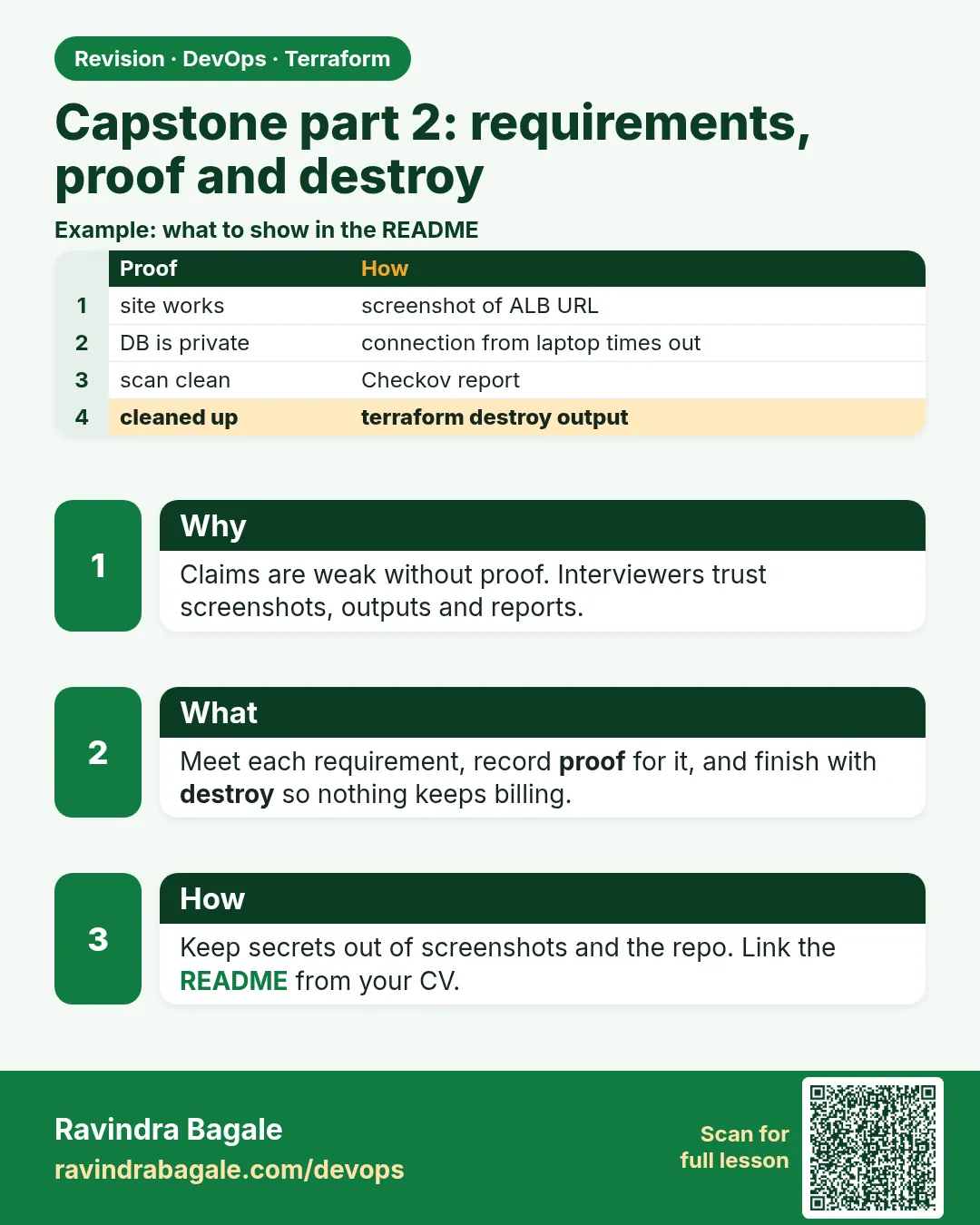
Story. An Infosys client delivery review accepts work only with evidence. For the capstone, evidence means the pipeline log, the plan summary, the browser page and the destroy output. Work through the numbered requirements in order, saving the proof for each. Finish by destroying both environments and the bootstrap bucket, so nothing keeps costing money.
Steps
- Apply bootstrap and record the bucket name.
- Write the network and web-server modules.
- Configure envs/dev and envs/prod with separate backend keys.
- Run the Jenkins job for dev and save the log.
- Run it for prod, approve, and save plan.txt.
- Open the URL and save the curl output.
- Change a tag in the console and catch it with drift-check.sh.
- Destroy prod, dev and bootstrap, and save the Destroy complete lines.
# proof commands
terraform -chdir=envs/dev output -raw web_url
curl -s "$(terraform -chdir=envs/dev output -raw web_url)"
terraform -chdir=envs/prod plan -detailed-exitcode -var-file=prod.tfvars; echo "exit=$?"
aws s3 ls s3://<state-bucket>/badge-api/ --recursive

# cleanup, in this order
terraform -chdir=envs/prod destroy -var-file=prod.tfvars
terraform -chdir=envs/dev destroy -var-file=dev.tfvars
terraform -chdir=bootstrap destroy
What each line does
terraform -chdir=envs/dev output -raw web_url— Prints the dev URL without changing folders.curl -s "$(...)"— Proves nginx serves the page.terraform -chdir=envs/prod plan -detailed-exitcode ...; echo "exit=$?"— Proves prod has no drift: exit=0.aws s3 ls s3://<state-bucket>/badge-api/ --recursive— Proves both state files live in S3.terraform -chdir=envs/prod destroy ...— Removes prod first.terraform -chdir=envs/dev destroy ...— Then dev.terraform -chdir=bootstrap destroy— Last, the state bucket; remove prevent_destroy and empty it first.
When it is green.
<h1>Badge lab - i-0abc123...</h1>
No changes. Your infrastructure matches the configuration.
exit=0
Destroy complete! Resources: 12 destroyed.
Destroy complete! Resources: 12 destroyed.
Destroy complete! Resources: 4 destroyed.
When it is red.
Error: deleting S3 Bucket (badge-tfstate-...): BucketNotEmpty: The bucket you tried to delete is not empty.
You must delete all versions in the bucket.
Fix. The state bucket keeps old versions. Destroy the environments first, then delete all object versions in the console or with the CLI, and run the bootstrap destroy again.
What: every term in plain English
- evidence — A saved log or output that proves a requirement is met.
- approval gate — A pipeline step where a person must click Proceed before prod apply.
- -detailed-exitcode — Plan exit 0 means no change, 2 means change, 1 means error.
- destroy order — Prod, then dev, then bootstrap. Never the state bucket first.
- object versions — Old copies in a versioned bucket. They block bucket delete until removed.
- Checkov — A scanner that fails the build on unsafe Terraform settings.
- proof folder — A folder in the repo with saved logs and screenshots for the reviewer.
Example 1: Jenkins pipeline for the capstone
A Wipro client review accepts only changes that went through the pipeline. This Jenkinsfile is the capstone heart.
pipeline {
  agent any
  parameters {
    choice(name: 'ENV', choices: ['dev', 'prod'], description: 'Environment')
  }
  stages {
    stage('Validate') {
      steps {
        sh 'terraform -chdir=envs/${ENV} init -input=false'
        sh 'terraform -chdir=envs/${ENV} validate'
      }
    }
    stage('Scan') {
      steps {
        sh 'checkov -d modules --quiet'
      }
    }
    stage('Plan') {
      steps {
        sh 'terraform -chdir=envs/${ENV} plan -input=false -var-file=${ENV}.tfvars -out=tfplan'
      }
    }
    stage('Approve') {
      when { expression { params.ENV == 'prod' } }
      steps {
        input message: 'Apply to prod?'
      }
    }
    stage('Apply') {
      steps {
        sh 'terraform -chdir=envs/${ENV} apply -input=false tfplan'
      }
    }
  }
}
Output
[Pipeline] stage (Validate)
Success! The configuration is valid.
[Pipeline] stage (Scan)
Passed checks: 57, Failed checks: 0, Skipped checks: 0
[Pipeline] stage (Plan)
Plan: 12 to add, 0 to change, 0 to destroy.
[Pipeline] stage (Approve)
Apply to prod?  Proceed or Abort
Approved by ravindra
[Pipeline] stage (Apply)
Apply complete! Resources: 12 added, 0 changed, 0 destroyed.
Finished: SUCCESS
What it shows: Save this console log into proof/prod-apply.log for the reviewer.
Example 2: Collect the proof
Evidence turns "it works on my side" into a pass. One script collects every proof line.
#!/usr/bin/env bash
set -euo pipefail
mkdir -p proof
for e in dev prod; do
  url=$(terraform -chdir=envs/$e output -raw web_url)
  curl -s -o /dev/null -w "$e %{http_code}\n" "$url" | tee -a proof/http.txt
  set +e
  terraform -chdir=envs/$e plan -detailed-exitcode -var-file=$e.tfvars -lock=false > /dev/null
  echo "$e drift_exit=$?" | tee -a proof/drift.txt
  set -e
done
aws s3 ls s3://badge-tfstate-111122223333/badge-api/ | tee proof/state.txt
Output
dev 200
dev drift_exit=0
prod 200
prod drift_exit=0
2026-10-25 10:02:11      18233 dev.tfstate
2026-10-25 10:20:45      18410 prod.tfstate
What it shows: Two 200s, two exit 0, two state files: that is the full proof table.
Example 3: Drift test for the capstone
The reviewer wants to see the nightly check catch a console change. Add a tag by hand and watch exit code 2.
ID=$(aws ec2 describe-instances --filters Name=tag:Name,Values=badge-dev \
  --query 'Reservations[0].Instances[0].InstanceId' --output text)
aws ec2 create-tags --resources $ID --tags Key=Owner,Value=manual
terraform -chdir=envs/dev plan -detailed-exitcode -var-file=dev.tfvars; echo "exit=$?"
terraform -chdir=envs/dev apply -var-file=dev.tfvars -auto-approve
Output
  # module.web.aws_instance.web will be updated in-place
  ~ resource "aws_instance" "web" {
      ~ tags = {
          - "Owner" = "manual" -> null
        }
    }
Plan: 0 to add, 1 to change, 0 to destroy.
exit=2
Apply complete! Resources: 0 added, 1 changed, 0 destroyed.
What it shows: In the capstone you revert through the dev pipeline. Save the output as proof/drift-test.log.
Example 4: Destroy everything in the right order
Leaving a lab running is the most common way freshers get a surprise AWS bill. Destroy in order and empty the versioned bucket.
- Destroy prod.
- Destroy dev.
- Delete every object version in the state bucket.
- Remove prevent_destroy from bootstrap.
- Destroy bootstrap.
terraform -chdir=envs/prod destroy -var-file=prod.tfvars -auto-approve
terraform -chdir=envs/dev destroy -var-file=dev.tfvars -auto-approve
aws s3api delete-objects --bucket badge-tfstate-111122223333 --delete "$(aws s3api list-object-versions \
  --bucket badge-tfstate-111122223333 --output json \
  --query '{Objects: Versions[].{Key:Key,VersionId:VersionId}}')"
terraform -chdir=bootstrap destroy -auto-approve
Output
Destroy complete! Resources: 12 destroyed.
Destroy complete! Resources: 12 destroyed.
{
    "Deleted": [
        { "Key": "badge-api/dev.tfstate", "VersionId": "3HL4kqtJ..." },
        { "Key": "badge-api/prod.tfstate", "VersionId": "Uo9Kq1n2..." }
    ]
}
Destroy complete! Resources: 4 destroyed.
What it shows: If delete markers exist, delete them too with the same command using DeleteMarkers instead of Versions.
Command cheat sheet
| Command | What it does | When to use it |
|---|---|---|
terraform output -raw NAME |
Print one output plainly | Scripts and curl |
curl -w "%{http_code}" |
Print only the HTTP status | Proof of a working site |
plan -detailed-exitcode |
Exit 2 on changes | Drift proof |
apply tfplan |
Apply the saved plan only | Pipeline apply |
aws s3api list-object-versions |
List every version | Before deleting the state bucket |
terraform destroy |
Remove all resources | End of every lab |
Verify: did it work?
-
Site works
curl -s -o /dev/null -w "%{http_code}" "$(terraform -chdir=envs/dev output -raw web_url)"Output
200 -
Nothing left
aws ec2 describe-instances --filters Name=tag:Name,Values=badge-* Name=instance-state-name,Values=running --query "length(Reservations)"Output
0 -
Bucket gone
aws s3 ls | grep -c badge-tfstateOutput
0
When it is red 1
curl: (28) Failed to connect to 13.233.10.20 port 80 after 30001 ms: Timeout was reached
Cause. nginx not ready yet, or port 80 missing in the security group, or no route to the internet gateway.
Fix, step by step
- Wait two minutes for user_data.
- Check the security group has port 80.
- Check the route table has 0.0.0.0/0 to the IGW.
When it is red 2
Check: CKV_AWS_79: "Ensure Instance Metadata Service Version 1 is not enabled"
    FAILED for resource: module.web.aws_instance.web
Cause. http_tokens is not set to required.
Fix, step by step
- Add metadata_options with http_tokens = "required".
- Run the pipeline again.
When it is red 3
Error: deleting S3 Bucket (badge-tfstate-111122223333): BucketNotEmpty
You must delete all versions in the bucket.
Cause. Old versions still exist.
Fix, step by step
- Delete all versions and delete markers.
- Run bootstrap destroy again.
Cleanup
aws s3 ls | grep badge-tfstate || echo "all clean"
Ravindra Bagale's Tip
A capstone without a destroy log is not finished. Save Destroy complete as the last line of your proof.
Practice tasks
Easy Proof table
Why: Reviewers read tables.
What to do: Make a table: requirement, command, result.
- One row per requirement.
Check: Every row has a real output.
Medium Pipeline run
Why: Changes go through Jenkins.
What to do: Run dev and prod through the Jenkinsfile.
- Approve prod by hand.
Check: Both runs end in SUCCESS.
Medium Drift drill
Why: Prove the check works.
What to do: Tag by hand, catch exit 2, revert.
- Save the log.
Check: exit=2 then exit=0.
Hard Clean destroy
Why: No surprise bill.
What to do: Destroy in order and empty the bucket.
- Prod, dev, versions, bootstrap.
Check: aws s3 ls shows no badge bucket.
Easy Say it in two lines
Why: If you can say it simply, you understand it.
What to do: Write two short lines about this lesson for a fresher.
- Write the problem it solves.
- Write the one command or file you use.
- Read it aloud.
Check: A fresher understands it without a question.
Easy Start a safe lab folder
Why: Practice needs a throwaway place.
What to do: Make a new folder with versions.tf and a random_pet resource, so no AWS cost.
- mkdir tf-lab and cd into it.
- Add the hashicorp/random provider and one random_pet.
- Run terraform init and terraform apply.
Check: Apply complete! with 1 added.
Medium Break it on purpose
Why: You must know the red output by face.
What to do: Cause one error from the red part of this lesson and fix it.
- Follow one red section.
- Copy the exact message to your notes.
- Write the fix in one line.
Check: You fixed it without searching the web.
Medium Run it twice
Why: A second run must be quiet.
What to do: Run the same plan two times with no edits.
- Run terraform plan.
- Run it again.
- Explain any change it still shows.
Check: The second plan says No changes, or you can explain each line.
Medium Write a runbook page
Why: At 2 a.m. nobody remembers flags.
What to do: Write a one-page runbook for this lesson.
- Title, when to use, exact commands, how to check, how to undo.
Check: A teammate can follow it alone.
Medium Run it from a pipeline
Why: Real teams run Terraform from CI, not from laptops.
What to do: Run the main command of this lesson inside a GitHub Actions or Jenkins job.
- Add a job with hashicorp/setup-terraform or a Terraform Docker image.
- Give it AWS access through an IAM role, never a key in the file.
- Run init, then the command from this lesson.
Check: The job log shows the same output you saw on your laptop.
Medium Check the cost
Why: Labs left running cost real money.
What to do: Find what this lesson would cost per day if you forgot to destroy it.
- Open the AWS Pricing Calculator.
- Add each resource from your plan.
- Write the daily cost in your notes.
Check: You know the daily cost and you ran terraform destroy.
Hard Draw the flow top to bottom
Why: A drawing shows the order of work.
What to do: Draw this lesson as boxes from top to bottom.
- Start at your code, go through plan and state, end at AWS.
- Mark where each command reads or writes.
Check: Each box matches a real step you ran.
Hard Explain it like an interview
Why: Interviewers want real stories.
What to do: Record a 60 second answer about this lesson.
- Say the problem, the command, and one error you hit.
Check: Your answer has a real command and a real error message.
Homework: try at home
Try at home
Present your capstone to a friend in five minutes: layout, pipeline, proof table and destroy log. Ask them to find one weak point.
Recap
- Every change runs through the pipeline with a scan and an approval for prod.
- Proof means saved output, not words.
- Drift test: manual tag gives exit 2, then revert.
- Destroy prod, dev, versions, then bootstrap.
- A capstone ends with Destroy complete.
FAQ
Can I skip the approval for dev?
Yes. Most teams approve only prod.
Where do I store the proof?
A proof folder in the repo, with no secrets in it.
What if Checkov fails on a rule I disagree with?
Skip it with a comment that explains why. Never skip silently.
How much does the capstone cost?
A few rupees per hour for two t3 instances. Destroy the same day.
Can I show this in interviews?
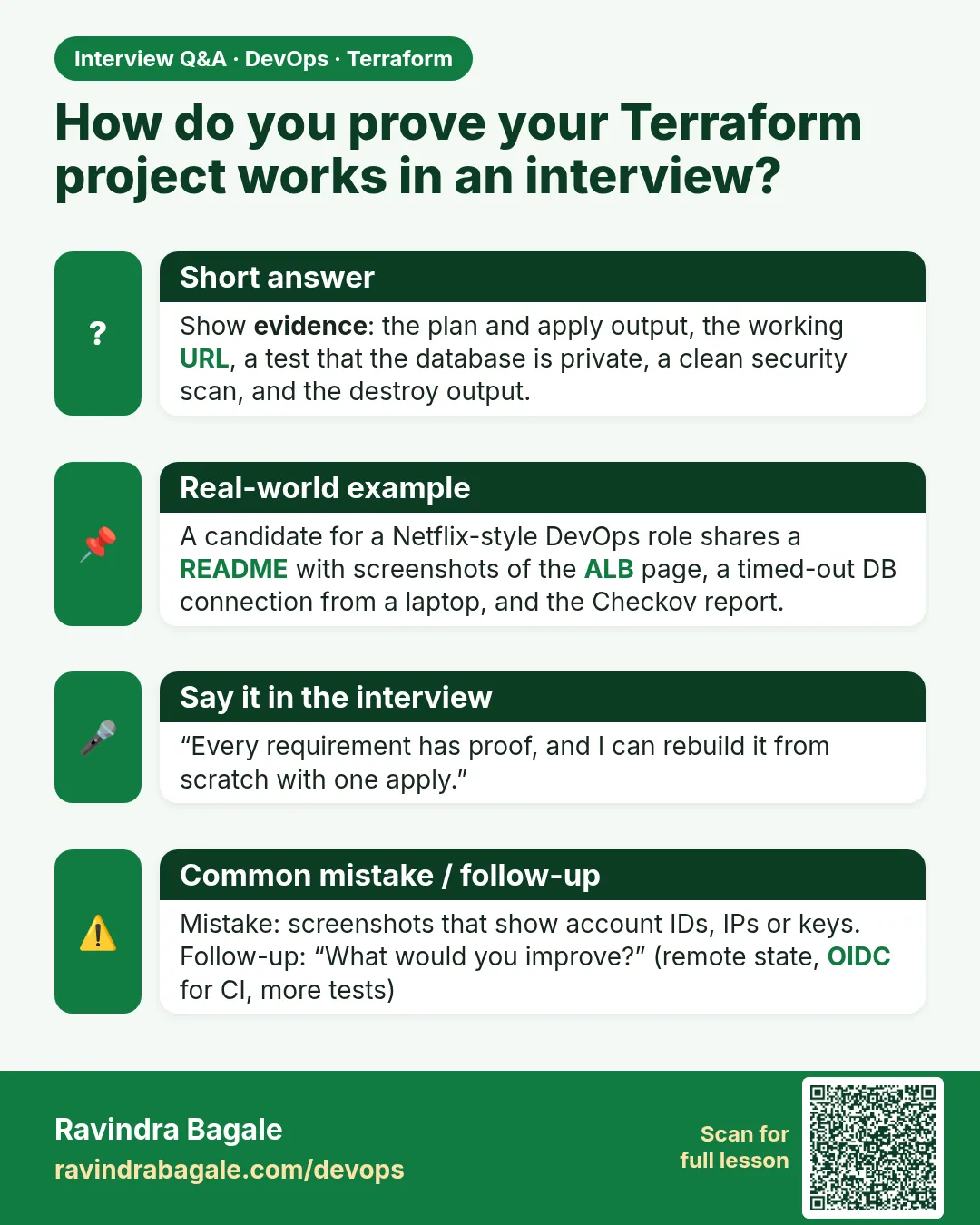
Yes. Walk through the Jenkinsfile and the proof table.
Interview questions
-
How do you prove infrastructure works?
Saved outputs: HTTP 200, clean plan exit 0, state in S3 and pipeline logs.
-
Why apply a saved plan?
It applies exactly what was reviewed, nothing new.
-
How do you gate prod?
An input approval step after the plan and scan stages.
-
Why can the state bucket not be deleted easily?
Versioning keeps old copies and prevent_destroy guards it.
-
What order do you destroy in?
Prod, then dev, then the state bucket last.
Quick quiz
Q1. Exit code for no changes with -detailed-exitcode?
0
Q2. Which stage stops for a human?
Approve
Q3. Which is destroyed last?
bootstrap
Q4. Which Checkov rule wants IMDSv2?
CKV_AWS_79
Q5. What blocks deleting a versioned bucket?
Old object versions.
Lab
- Answer the ten core questions aloud without notes.
- Answer the seven scenario questions in the stop, protect, fix, pipeline order.
- Build the capstone layout.
- Complete the capstone requirements and save proof.
- Destroy all environments and the bootstrap bucket to avoid cost.
Practice task
Record a two-minute explanation of your capstone pipeline as if to an interviewer.
Ravindra Bagale's Tip
In interviews, say what you would check before what you would run.
In short
- Interviews test state, references, versions and calm incident order.
- for_each versus count and moved blocks come up every time.
- The capstone joins modules, remote state, environments, Jenkins and drift checks.
- Proof for every step, and destroy at the end.
Samajla ka?
 Revision card
 Interview card