Chapter 43: Terraform Interview Questions and Capstone Project
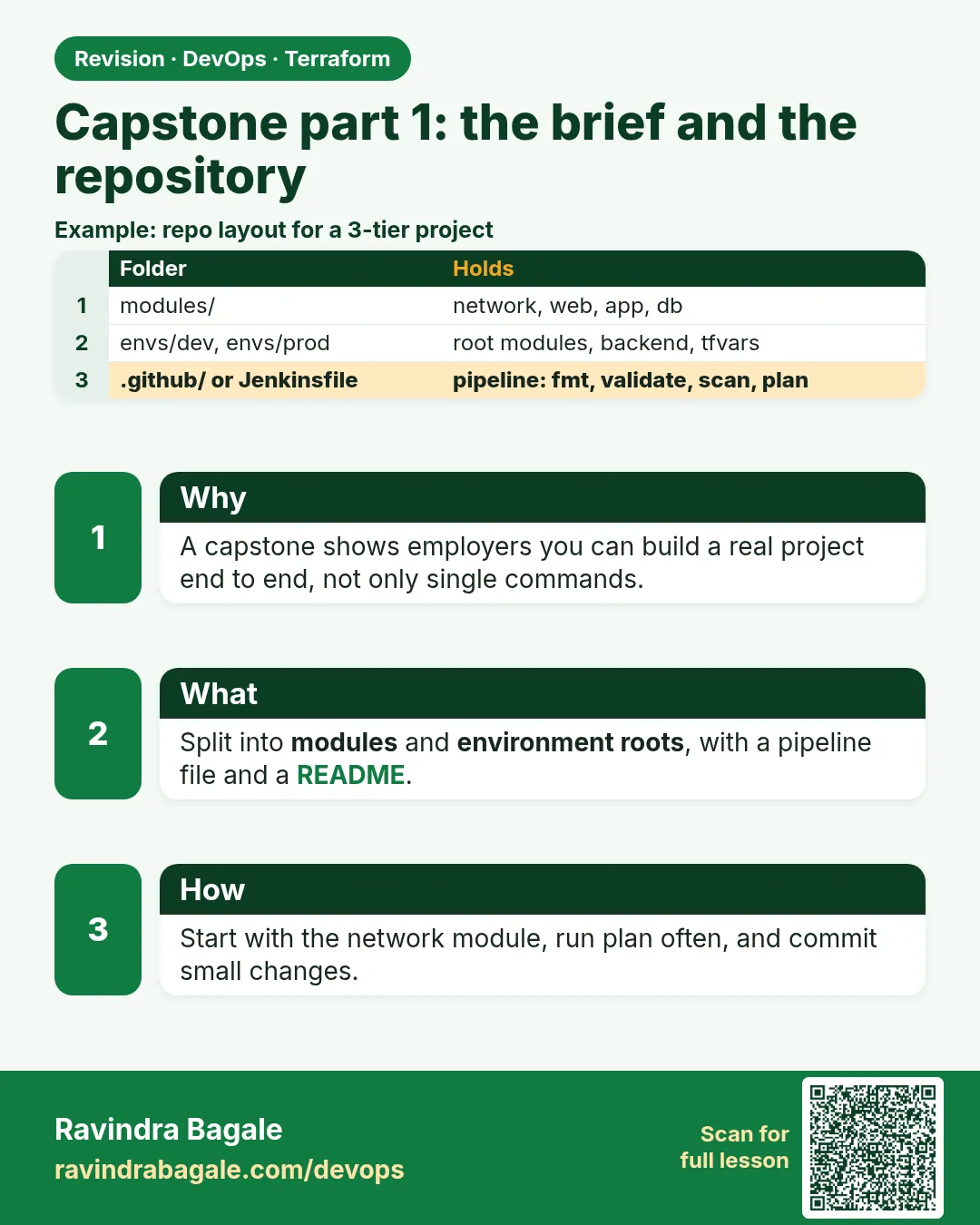
43.3 Capstone part 1 — the brief and the repository layout
Story. Your capstone mirrors what an Instagram-style feature team would ask of a new DevOps engineer in the first month. Build the badge web service on AWS fully in Terraform, with a reusable module, remote state with locking, two environments, and a Jenkins pipeline with scans and approval. Every requirement below must be shown with real output. Then destroy it all.
capstone/
  bootstrap/            # S3 state bucket, versioning, encryption, public access block
  modules/
    network/            # VPC, 2 public subnets, IGW, route table (Chapter 40 part 1)
    web-server/         # SG (HTTP only), EC2 with nginx user_data, IMDSv2, IAM role
  envs/
    dev/   backend.tf main.tf dev.tfvars
    prod/  backend.tf main.tf prod.tfvars
  Jenkinsfile           # validate, Checkov, tfsec, plan, approval, apply (Chapter 41)
  drift-check.sh        # nightly plan -detailed-exitcode (Chapter 42)
  .gitignore            # state, .terraform, personal tfvars
  README.md             # how to run, how to destroy
What each line does
bootstrap/— Creates the state bucket once; applied before anything else.modules/network/— The VPC code from Chapter 40 turned into a module.modules/web-server/— The security group, instance and role as one module.envs/dev/ and envs/prod/— Two roots with separate state keys and tfvars.Jenkinsfile— The pipeline from Chapter 41.drift-check.sh— The nightly drift job from Chapter 42..gitignore— Keeps state and personal values out of Git.README.md— Run and destroy instructions for the reviewer.
When it is green.
$ terraform -chdir=envs/dev validate
Success! The configuration is valid.
$ checkov -d . --quiet
Passed checks: 57, Failed checks: 0, Skipped checks: 0
When it is red.
$ git status
    new file:   envs/dev/terraform.tfstate
Fix. State is about to be committed. Fix .gitignore, git rm --cached the file, and confirm the remote backend is configured.
What: every term in plain English
- bootstrap — A tiny Terraform folder that creates the state bucket once, before everything else.
- module — A folder of Terraform code you call many times with different inputs.
- root module — The folder where you run terraform, such as envs/dev.
- backend key — The path of one state file inside the bucket, such as badge-api/dev.tfstate.
- tfvars — A file of input values for one environment.
- prevent_destroy — A lifecycle rule that stops terraform destroy on a resource.
- public access block — An S3 setting that blocks every public access path.
Example 1: Bootstrap the state bucket
Every Swiggy-style platform team starts with the bucket that will hold all other state. It is created once with local state.
# bootstrap/main.tf
provider "aws" {
  region = "ap-south-1"
}

data "aws_caller_identity" "me" {}

resource "aws_s3_bucket" "state" {
  bucket = "badge-tfstate-${data.aws_caller_identity.me.account_id}"
  lifecycle {
    prevent_destroy = true
  }
}

resource "aws_s3_bucket_versioning" "state" {
  bucket = aws_s3_bucket.state.id
  versioning_configuration {
    status = "Enabled"
  }
}

resource "aws_s3_bucket_server_side_encryption_configuration" "state" {
  bucket = aws_s3_bucket.state.id
  rule {
    apply_server_side_encryption_by_default {
      sse_algorithm = "AES256"
    }
  }
}

resource "aws_s3_bucket_public_access_block" "state" {
  bucket                  = aws_s3_bucket.state.id
  block_public_acls       = true
  block_public_policy     = true
  ignore_public_acls      = true
  restrict_public_buckets = true
}

output "bucket" {
  value = aws_s3_bucket.state.bucket
}
cd capstone/bootstrap
terraform init
terraform apply -auto-approve
terraform output -raw bucket
Output
Apply complete! Resources: 4 added, 0 changed, 0 destroyed.

Outputs:

bucket = "badge-tfstate-111122223333"
badge-tfstate-111122223333
What it shows: Write the bucket name into both backend.tf files. The bootstrap state stays local; keep it safe.
Example 2: The web-server module
The module holds the security group, role and instance so dev and prod use the same tested code.
# modules/web-server/variables.tf
variable "env" {
  type = string
}
variable "instance_type" {
  type    = string
  default = "t3.micro"
}
variable "subnet_id" {
  type = string
}
variable "vpc_id" {
  type = string
}

# modules/web-server/main.tf
data "aws_ami" "al2023" {
  most_recent = true
  owners      = ["amazon"]
  filter {
    name   = "name"
    values = ["al2023-ami-*-x86_64"]
  }
}

resource "aws_security_group" "web" {
  name   = "badge-${var.env}-web"
  vpc_id = var.vpc_id
  ingress {
    from_port   = 80
    to_port     = 80
    protocol    = "tcp"
    cidr_blocks = ["0.0.0.0/0"]
  }
  egress {
    from_port   = 0
    to_port     = 0
    protocol    = "-1"
    cidr_blocks = ["0.0.0.0/0"]
  }
}

resource "aws_instance" "web" {
  ami                    = data.aws_ami.al2023.id
  instance_type          = var.instance_type
  subnet_id              = var.subnet_id
  vpc_security_group_ids = [aws_security_group.web.id]
  user_data              = file("${path.module}/nginx.sh")
  metadata_options {
    http_tokens = "required"
  }
  tags = {
    Name = "badge-${var.env}"
  }
}

# modules/web-server/outputs.tf
output "web_url" {
  value = "http://${aws_instance.web.public_ip}"
}
Output
$ terraform -chdir=envs/dev validate
Success! The configuration is valid.
What it shows: Only port 80 is open. You reach the server with SSM Session Manager, not SSH.
Example 3: Two environments from one module
An Airtel-style team wants dev cheap and prod a bit bigger, with separate state so a dev mistake never touches prod.
# envs/dev/backend.tf
terraform {
  backend "s3" {
    bucket       = "badge-tfstate-111122223333"
    key          = "badge-api/dev.tfstate"
    region       = "ap-south-1"
    use_lockfile = true
  }
}

# envs/dev/main.tf
variable "env" {}
variable "instance_type" {}

module "network" {
  source = "../../modules/network"
  env    = var.env
}

module "web" {
  source        = "../../modules/web-server"
  env           = var.env
  instance_type = var.instance_type
  vpc_id        = module.network.vpc_id
  subnet_id     = module.network.public_subnet_ids[0]
}

output "web_url" {
  value = module.web.web_url
}

# envs/dev/dev.tfvars
env           = "dev"
instance_type = "t3.micro"
terraform -chdir=envs/dev init
terraform -chdir=envs/dev plan -var-file=dev.tfvars | tail -1
Output
Successfully configured the backend "s3"! Terraform will automatically
use this backend unless the backend configuration changes.

Plan: 12 to add, 0 to change, 0 to destroy.
What it shows: prod is the same folder shape with key badge-api/prod.tfstate and instance_type t3.small.
Example 4: Keep secrets and state out of Git
Reviewers fail a capstone at once if state or keys are committed. Set .gitignore first.
# .gitignore
.terraform/
*.tfstate
*.tfstate.*
crash.log
*.tfplan
tfplan
override.tf
*.auto.tfvars
git add .
git status --short
Output
A  .gitignore
A  Jenkinsfile
A  README.md
A  envs/dev/backend.tf
A  envs/dev/dev.tfvars
A  envs/dev/main.tf
A  modules/web-server/main.tf
A  .terraform.lock.hcl
What it shows: dev.tfvars has no secrets, so it can be committed. Passwords come from Secrets Manager, never from tfvars.
Command cheat sheet
| Command | What it does | When to use it |
|---|---|---|
terraform -chdir=DIR CMD |
Run in another folder | Many roots in one repo |
terraform init -backend-config=FILE |
Pass backend values at init | Same code, many accounts |
terraform validate |
Check syntax and references | Before every commit |
terraform fmt -recursive |
Format all folders | Before every commit |
checkov -d . |
Scan for unsafe settings | Pipeline and local |
git status --short |
See what will be committed | Before every push |
Verify: did it work?
-
State in S3
aws s3 ls s3://badge-tfstate-111122223333/badge-api/Output
2026-10-25 10:02:11 18233 dev.tfstate -
Module valid
terraform -chdir=envs/dev validateOutput
Success! The configuration is valid. -
No state in Git
git ls-files | grep -c tfstateOutput
0
When it is red 1
Error: Failed to get existing workspaces: S3 bucket "badge-tfstate-111122223333" does not exist.
Cause. The backend bucket name is wrong or bootstrap was not applied.
Fix, step by step
- Run terraform output -raw bucket in bootstrap.
- Copy the exact name into backend.tf.
- Run init again.
When it is red 2
Error: Unreadable module directory
Unable to evaluate directory symlink: lstat ../../modules/web-server: no such file or directory
Cause. The relative module path is wrong.
Fix, step by step
- Count the folders up from envs/dev.
- Use ../../modules/web-server.
- Run init again.
When it is red 3
Error: Instance cannot be destroyed
Resource aws_s3_bucket.state has lifecycle.prevent_destroy set
Cause. You ran destroy on bootstrap while prevent_destroy is on. This is the guard working.
Fix, step by step
- Destroy envs first.
- Remove prevent_destroy only at the very end.
Cleanup
terraform -chdir=envs/dev destroy -var-file=dev.tfvars -auto-approve
Ravindra Bagale's Tip
Write the README first: how to run and how to destroy. If you cannot write it simply, the layout is too complex.
Practice tasks
Easy Make the folders
Why: Shape first.
What to do: Create the capstone tree with empty files.
- Use mkdir -p and touch.
Check: tree shows the layout.
Medium Bootstrap
Why: State needs a home.
What to do: Apply bootstrap and note the bucket name.
- Check versioning is Enabled.
Check: aws s3api get-bucket-versioning shows Enabled.
Medium Dev plan
Why: Prove the module works.
What to do: Init and plan envs/dev.
- Use dev.tfvars.
Check: Plan shows 12 to add.
Hard Prod differs
Why: Same code, other values.
What to do: Add envs/prod with t3.small and its own state key.
- Plan both and compare.
Check: Only size and names differ.
Easy Say it in two lines
Why: If you can say it simply, you understand it.
What to do: Write two short lines about this lesson for a fresher.
- Write the problem it solves.
- Write the one command or file you use.
- Read it aloud.
Check: A fresher understands it without a question.
Easy Start a safe lab folder
Why: Practice needs a throwaway place.
What to do: Make a new folder with versions.tf and a random_pet resource, so no AWS cost.
- mkdir tf-lab and cd into it.
- Add the hashicorp/random provider and one random_pet.
- Run terraform init and terraform apply.
Check: Apply complete! with 1 added.
Medium Break it on purpose
Why: You must know the red output by face.
What to do: Cause one error from the red part of this lesson and fix it.
- Follow one red section.
- Copy the exact message to your notes.
- Write the fix in one line.
Check: You fixed it without searching the web.
Medium Run it twice
Why: A second run must be quiet.
What to do: Run the same plan two times with no edits.
- Run terraform plan.
- Run it again.
- Explain any change it still shows.
Check: The second plan says No changes, or you can explain each line.
Medium Write a runbook page
Why: At 2 a.m. nobody remembers flags.
What to do: Write a one-page runbook for this lesson.
- Title, when to use, exact commands, how to check, how to undo.
Check: A teammate can follow it alone.
Medium Run it from a pipeline
Why: Real teams run Terraform from CI, not from laptops.
What to do: Run the main command of this lesson inside a GitHub Actions or Jenkins job.
- Add a job with hashicorp/setup-terraform or a Terraform Docker image.
- Give it AWS access through an IAM role, never a key in the file.
- Run init, then the command from this lesson.
Check: The job log shows the same output you saw on your laptop.
Medium Check the cost
Why: Labs left running cost real money.
What to do: Find what this lesson would cost per day if you forgot to destroy it.
- Open the AWS Pricing Calculator.
- Add each resource from your plan.
- Write the daily cost in your notes.
Check: You know the daily cost and you ran terraform destroy.
Hard Draw the flow top to bottom
Why: A drawing shows the order of work.
What to do: Draw this lesson as boxes from top to bottom.
- Start at your code, go through plan and state, end at AWS.
- Mark where each command reads or writes.
Check: Each box matches a real step you ran.
Hard Explain it like an interview
Why: Interviewers want real stories.
What to do: Record a 60 second answer about this lesson.
- Say the problem, the command, and one error you hit.
Check: Your answer has a real command and a real error message.
Homework: try at home
Try at home
Draw the capstone on paper: bootstrap at the top, modules in the middle, dev and prod at the bottom, with arrows for state.
Recap
- Bootstrap creates the state bucket once.
- Modules hold tested code; envs hold values.
- Each env has its own state key.
- .gitignore keeps state and plans out of Git.
- Only port 80 is open; use SSM for access.
FAQ
Why not workspaces for dev and prod?
Separate folders make the backend and access clear. Workspaces are fine for short-lived copies.
Why local state for bootstrap?
The bucket does not exist yet. Some teams move it in later with init -migrate-state.
Can I use Terraform Cloud instead?
Yes, but the capstone shows S3 so you learn how backends work.
Where does the network module come from?
Chapter 40 part 1, turned into a module with vpc_id and subnet outputs.
How big should a capstone be?
Small enough to destroy in five minutes. About 12 resources per environment.
Interview questions
-
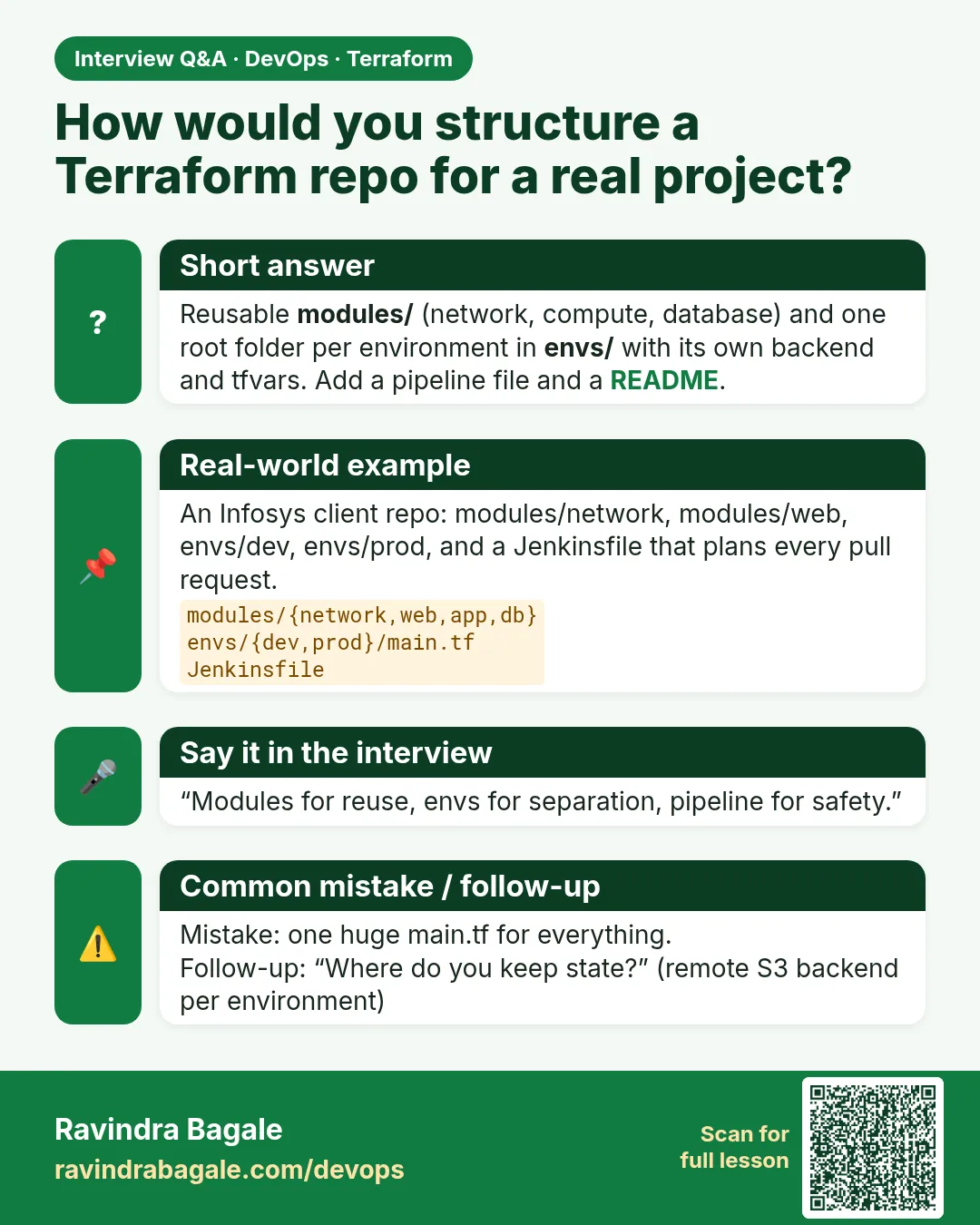
How do you lay out Terraform for many environments?
Shared modules plus one root folder per environment, each with its own state key.
-
How do you create the state bucket itself?
A small bootstrap stack with local state, versioning, encryption and a public access block.
-
Why IMDSv2?
It needs a token, which blocks many SSRF attacks on instance metadata.
-
What goes in .gitignore?
State, plan files, .terraform and personal tfvars.
-
Why not open port 22?
SSM gives shell access with IAM and logs, without an open port.
Quick quiz
Q1. Which folder is applied first?
bootstrap
Q2. Which setting keeps old state copies?
S3 versioning
Q3. Does dev share state with prod?
No.
Q4. Which lifecycle rule guards the state bucket?
prevent_destroy
Q5. Commit .terraform.lock.hcl?
Yes.
Samajla ka?
 Revision card
 Interview card