Chapter 9: GitHub Actions Hands-On
9.9b Pinning action versions
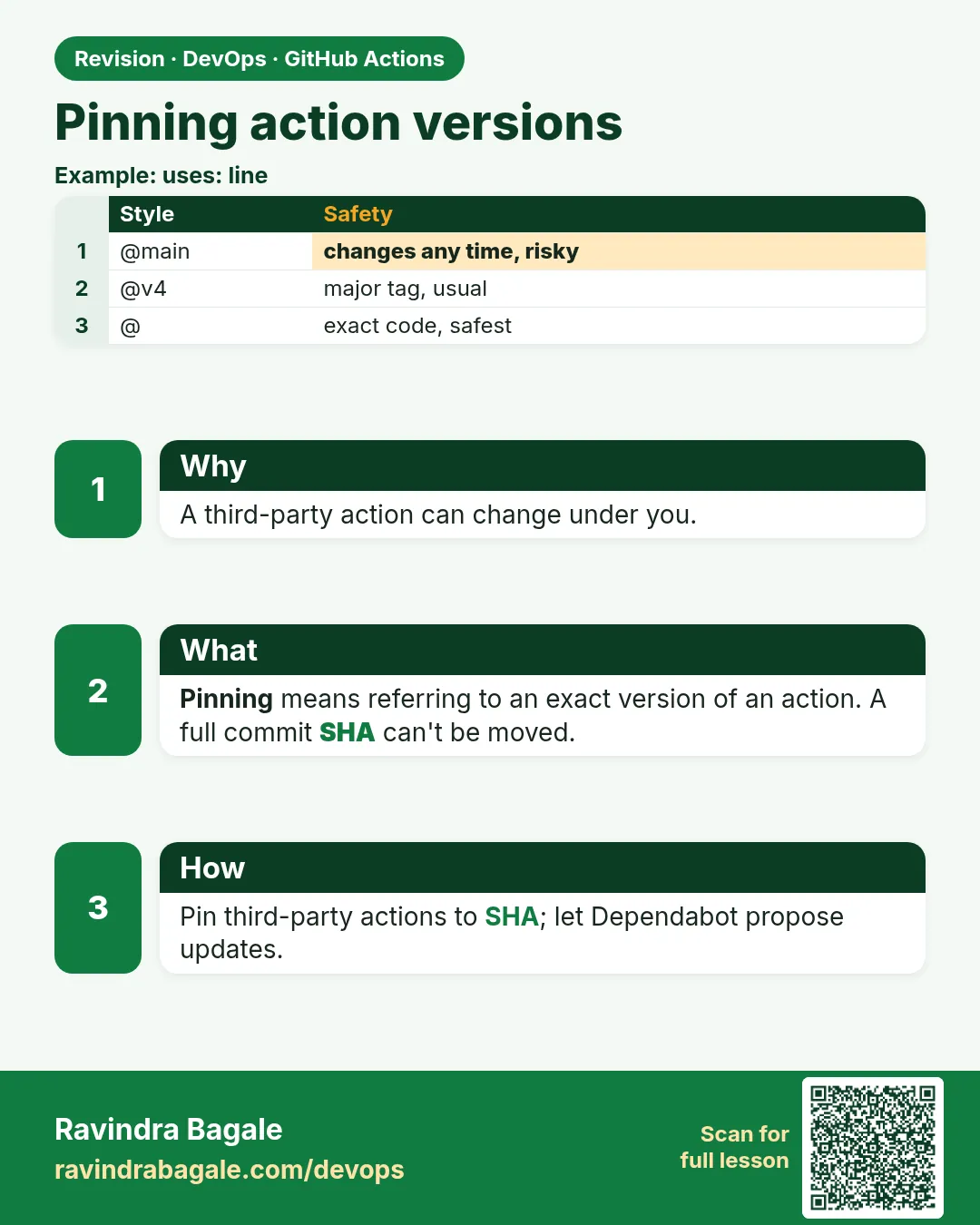
Why: the problem
Suppose we are at CRED. The workflow uses a popular third-party action with uses: some-org/some-action@main. One night the action owner account is hacked. The attacker changes the code on main to send all CI secrets to his server. Every repo that uses @main runs the bad code on its next build. This really happened in 2025 with a widely used action. The fix: pin actions to a full commit SHA, let a bot propose updates, and review them like any other code.
What we will build
You will see the three ways to point at an action (branch, tag, full SHA), pin your workflow to SHAs with a comment for the version, set up Dependabot to update them, and restrict which actions are allowed. Examples use a Python CI, a Node.js CI and a Docker image workflow.
What: every term in plain English
- Action reference — The part after @ in uses:, like @v4, @main or @a1b2c3...
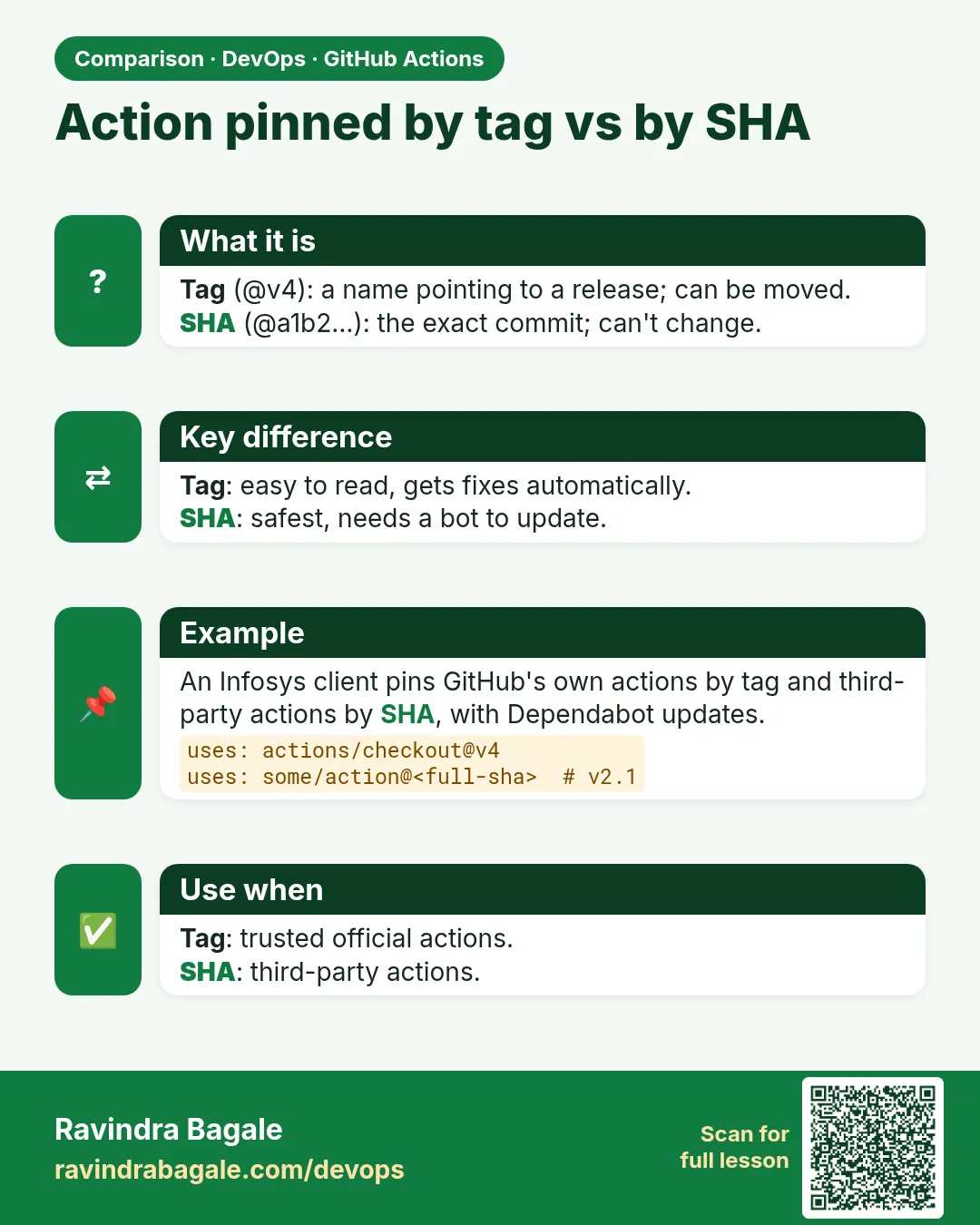
- Branch pin — @main. Moves every time the owner pushes. Least safe.
- Tag pin — @v4. Readable, but a tag can be moved by the owner.
- SHA pin — @ plus the full 40-character commit id. Cannot be changed. Safest.
- Supply chain attack — An attacker breaks a tool you depend on, so the bad code reaches you.
- Dependabot — A bot that opens pull requests to update versions, including actions.
- Allowed actions policy — A setting that lists which actions may run in the organisation.
How: step by step
-
Find the SHA for a tag
git ls-remote https://git.example.com/actions/checkout refs/tags/v4.2.2What it does: Shows the commit id for the tag.
Output
11bd71901bbe5b1630ceea73d27597364c9af683 refs/tags/v4.2.2 -
Replace the tag with the SHA
uses: actions/checkout@11bd71901bbe5b1630ceea73d27597364c9af683 # v4.2.2What it does: The comment keeps it readable.
Output
(saved) -
Add a Renovate config
vim renovate.jsonWhat it does: See Example 3. Install the Renovate app on the repo first.
Output
(saved) -
Restrict allowed actions
Org Settings > Actions > General > Allow select actionsWhat it does: Allow only verified creators and your own org.
Output
Policy saved
Example 1: Python CI pinned to full SHAs
Stack. Python
Goal. Python CI pinned to full SHAs.
.github/workflows/ci.yml
name: ci
on: [pull_request]
permissions:
  contents: read
jobs:
  test:
    runs-on: ubuntu-latest
    steps:
      - uses: actions/checkout@11bd71901bbe5b1630ceea73d27597364c9af683 # v4.2.2
      - uses: actions/setup-python@0b93645e9fea7318ecaed2b359559ac225c90a2b # v5.3.0
        with:
          python-version: "3.12"
      - run: pip install -r requirements.txt && pytest -q
What each line does
@11bd7190...683— The exact code reviewed. Nobody can change what it points to.# v4.2.2— A comment for humans and for Dependabot.permissions: contents: read— Even if an action is bad, the token can do little.
Green output
Run actions/checkout@11bd71901bbe5b1630ceea73d27597364c9af683
Syncing repository: cred-lab/rewards
Run pytest -q
12 passed in 0.88s
Expected result. Same result as before, but now immune to a moved tag or branch.
Example 2: Node
Stack. Node.js, Bash
Goal. Node.js: find unpinned actions with a quick check.
scripts/check_pins.sh
#!/usr/bin/env bash
set -euo pipefail
bad=$(grep -rhoE "uses: [^ ]+@[^ ]+" .github/workflows | grep -vE "@[0-9a-f]{40}" | grep -v "uses: ./" || true)
if [ -n "$bad" ]; then
  echo "Unpinned actions found:"
  echo "$bad"
  exit 1
fi
echo "All actions pinned to SHAs"
Workflow step
- run: bash scripts/check_pins.sh
What each line does
grep -rhoE "uses: ...@..."— Finds every uses: line.grep -vE "@[0-9a-f]{40}"— Keeps only lines not pinned to a 40-character SHA.grep -v "uses: ./"— Local actions in the same repo are fine.exit 1— Fails the check so unpinned actions cannot merge.
Green output
Unpinned actions found:
uses: actions/setup-node@v4
uses: some-org/slack-notify@main
Error: Process completed with exit code 1.
Expected result. The pull request is red until both lines are pinned.
Example 3: Renovate keeps pinned actions and Docker base images up to date
Stack. Renovate, Docker
Goal. Renovate keeps pinned actions and Docker base images up to date.
renovate.json
{
  "extends": ["config:recommended", "helpers:pinGitHubActionDigests"],
  "schedule": ["before 9am on monday"],
  "packageRules": [
    { "matchUpdateTypes": ["minor", "patch", "digest"], "groupName": "ci actions" },
    { "matchManagers": ["dockerfile"], "pinDigests": true }
  ]
}
What each line does
config:recommended— Sensible default settings.pin action digests preset— Rewrites tags to full SHAs with a version comment.schedule— Opens update pull requests once a week, on Monday morning.groupName— All action updates in one pull request.pinDigests for Dockerfile— Pins FROM images by digest too.
Green output
Pull request #88 opened by renovate
Update ci actions
- actions/checkout 11bd7190 (v4.2.2) -> 692973e3 (v4.2.3)
- docker/build-push-action 4f58ea79 (v6.9.0) -> 48aba3b4 (v6.10.0)
Expected result. You get small, reviewable update pull requests. CI runs on them like any other change.
Verify: did it work?
-
Check all uses lines
grep -rn "uses:" .github/workflowsWhat it does: Every line should have @ and 40 hex characters.
Output
ci.yml:9: uses: actions/checkout@11bd7190...683 # v4.2.2 -
Verify a SHA belongs to the tag
git ls-remote https://git.example.com/actions/setup-python refs/tags/v5.3.0What it does: Must equal the pinned SHA.
Output
0b93645e9fea7318ecaed2b359559ac225c90a2b refs/tags/v5.3.0
When it is red 1
Unable to resolve action `actions/checkout@11bd719`, unable to find version `11bd719`
Cause. A short SHA. Only full 40-character SHAs work.
Fix, step by step
- Copy the full commit id from git ls-remote.
- Push again.
When it is red 2
The action some-org/slack-notify@... is not allowed in cred-lab/rewards because all actions must be from a repository owned by your enterprise or match one of the patterns
Cause. The organisation policy blocks this action.
Fix, step by step
- Ask the platform team to review and allow it.
- Or use an approved alternative or a curl command.
When it is red 3
WARN: Config validation errors found: Invalid configuration option: packagerules
Cause. A wrong key name or case in renovate.json.
Fix, step by step
- Run npx --yes --package renovate renovate-config-validator.
- Use packageRules with a capital R.
When it is red 4
Error: Process completed with exit code 1. (check_pins.sh: Unpinned actions found: uses: docker://alpine:3.20)
Cause. Docker steps referenced by tag also count as unpinned in the script.
Fix, step by step
- Pin the image by digest: docker pull alpine:3.20 and copy the RepoDigest.
- Write uses: docker://alpine@sha256:... with a comment for the tag.
- Run the script again until it prints All actions pinned to SHAs.
Cleanup
-
Close stale Dependabot pull requests
gh pr list --author app/dependabot --json number --jq ".[].number" | xargs -n1 gh pr closeWhat it does: Only on your practice repo.
Output
✓ Closed pull request #88
Ravindra Bagale's Tip
Never pin @main. Pin the full SHA and let Dependabot update it!
@main कधीही नको. पूर्ण SHA pin करा आणि Dependabot ला update करू द्या!
@main कभी नहीं. पूरा SHA pin करो और Dependabot को update करने दो!
Practice tasks
Easy Pin one action
Why: First pin.
What to do: Pin checkout to a SHA.
- Use git ls-remote.
Check: Run is green.
Medium Pin check job
Why: Enforce it.
What to do: Add the check script as a job.
- Make it required.
Check: Unpinned PRs go red.
Hard Org policy
Why: Control third parties.
What to do: Allow only verified actions.
- Settings > Actions.
Check: An unknown action is blocked.
Easy Say pinning action versions in two lines
Why: If you can say it simply, you understand it. Juniors and interviewers both want the short version first.
What to do: Write two short lines about pinning action versions for a fresher who knows only Linux and Git basics.
- Write the problem it solves.
- Write the one workflow line or command you use for it.
- Read it aloud to a friend.
Check: A fresher understands it without asking a question.
Easy Make a throwaway practice repo
Why: Practice needs a repo you can break. If the workflow history gets messy, you delete the repo and start again.
What to do: Create a new empty repo named actions-lab with one small app and push it.
- mkdir actions-lab && cd actions-lab && git init -b main
- Add app code and a test file.
- git remote add origin https://git.example.com/ravi/actions-lab.git && git push -u origin main
Check: The Actions tab of the repo shows your first run.
Medium Do it on a second stack
Why: A CI idea must work for Node.js, Python and Java. Only the setup and test lines should change.
What to do: Repeat this lesson with a different language than the one you used first.
- If you used Python, use Node.js now.
- Change only the setup action and the test command.
- Keep the same job names.
Check: Same result, and the job names did not change.
Medium Break it on purpose
Why: You must know the red log by face. In a real outage there is no time to read slowly.
What to do: Cause one error from the "When it is red" part of this lesson and fix it.
- Follow the error section.
- Copy the exact message into your notes.
- Write the fix in one line.
Check: You fixed it using only the steps, without searching the web.
Medium Write a one-page runbook
Why: At 2 a.m. nobody remembers YAML keys. A short page saves the on-call person.
What to do: Write a one-page runbook for this lesson.
- Title, when to use, exact YAML or commands, how to check, how to undo.
Check: A teammate can follow it alone.
Hard Explain it like an interview
Why: Interviewers want real stories, not definitions.
What to do: Record a 60 second answer about this lesson.
- Say the problem, the workflow lines you wrote, and one error you hit.
Check: Your answer has a real YAML line and a real error message.
Hard Draw the flow top to bottom
Why: A drawing shows the order of work and which job waits for which.
What to do: Draw this lesson as boxes from top to bottom.
- Start at git push, go through each job and step, end at the green check or the deployed app.
Check: Each box matches a real step in your run log.
Homework: try at home
Try at home
At home, pin every action in your lab workflows to a full SHA with a version comment, add the pin check script as a job, and turn on Dependabot for actions.
Recap
- @main moves, @v4 can be moved, a full SHA cannot.
- Pin to SHA with a version comment.
- Let Dependabot propose updates.
- Restrict allowed actions at org level.
- Keep token permissions minimal.
FAQ
Is pinning to SHA annoying?
A little, but Dependabot does the updates for you.
Should I pin my own org actions too?
Yes, or at least use protected tags.
What about Docker images in steps?
Pin them by digest, like image@sha256:...
What happened in the 2025 incident?
A compromised action leaked secrets from many repos that used moving tags.
Are verified actions always safe?
Safer, not guaranteed. Still pin them.
Can I copy an action into my own repo instead?
Yes. Vendoring the action code into your org gives full control, but you must update it yourself.
Do composite or local actions need pinning?
Local actions in the same repo move with your commit, so they are already pinned by your own history.
Interview questions
-
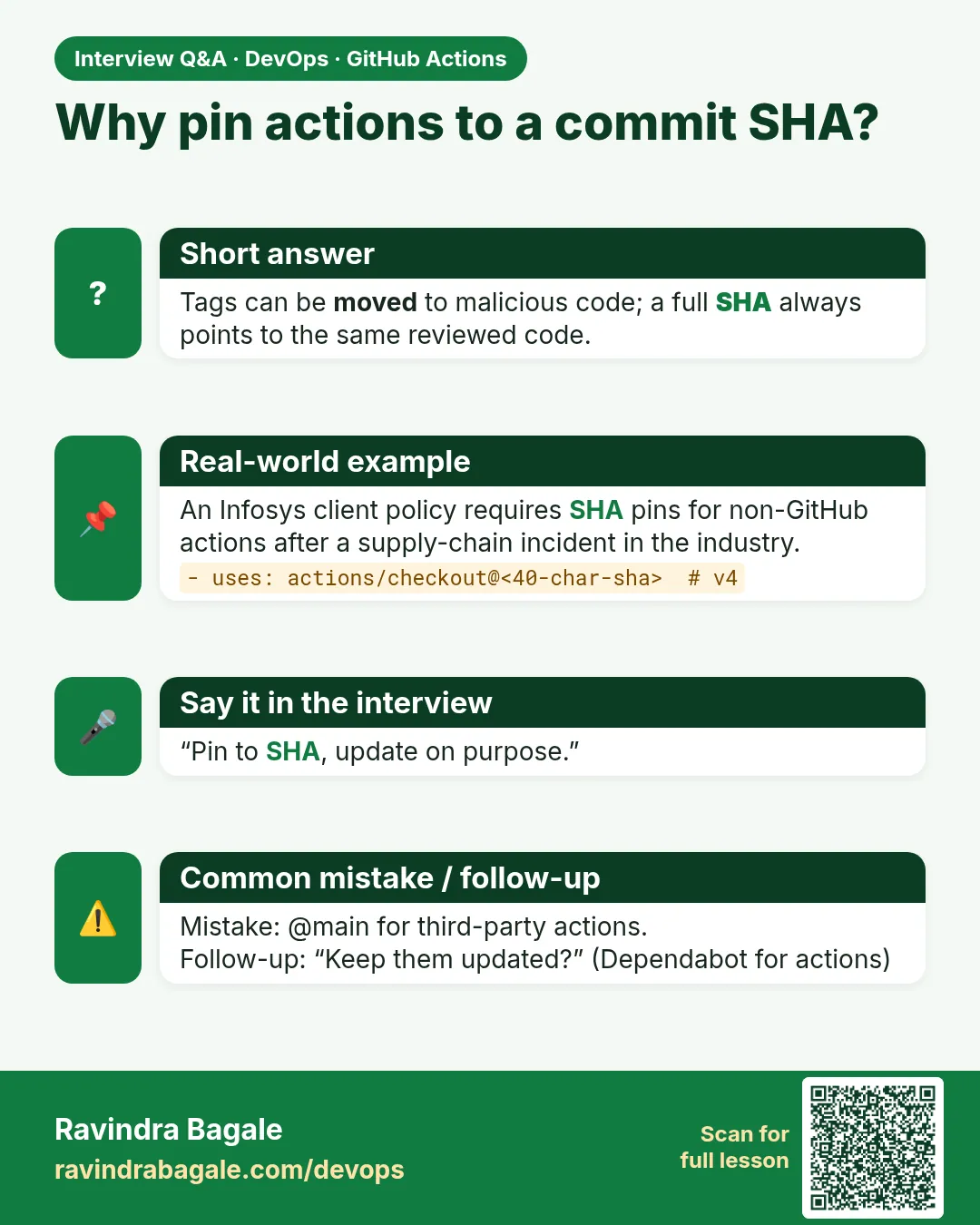
How do you secure third-party actions?
Pin to full SHA, allowlist actions, minimal permissions, review updates.
-
Tag vs SHA pinning?
Tags are readable but mutable; SHAs are immutable.
-
What is a CI supply chain attack?
An attacker compromises a dependency like an action to run code in your pipeline.
-
How do you keep pins current?
Dependabot or Renovate with grouped weekly updates.
-
How do you limit damage if an action is bad?
Read-only token, no secrets to untrusted steps, OIDC with tight trust.
Quick quiz
Q1. Safest way to reference an action?
Full commit SHA.
Q2. Why are tags not fully safe?
The owner can move them.
Q3. How do you keep SHA pins updated?
Dependabot or Renovate pull requests.
Q4. Does a short SHA work?
No, use all 40 characters.
Q5. What limits the damage of a bad action?
Least-privilege permissions on the token.
Did you understand? Let us try it once more.
 Revision card
 Interview card
 Comparison card