91.9 Roles and collections
Story (fictional teaching scenario). At a fictional hospital software vendor in Nagpur, Elena from Rome found a 600-line playbook nobody wanted to touch. She split it into roles: nginx, app, monitoring. Each role had its own tasks, defaults, templates and handlers. New projects reused the roles. For cloud and network modules they installed collections instead of writing their own.
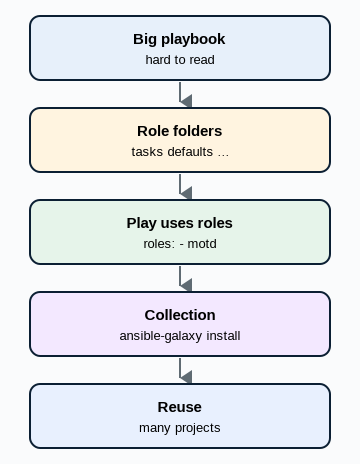
Why
Small named pieces are easier to read, test and reuse than one long file.
What
- Role — A folder with a standard layout:
tasks/main.yml,defaults/main.yml,templates/,handlers/main.ymland more. Ansible finds these files by name. - defaults — The weakest variables in the role. Callers can override them.
- Collection — A package of modules, roles and plugins with a name like
community.generaloramazon.aws. - ansible-galaxy — The command that creates roles and installs collections.
- requirements.yml — A file listing collections (with versions) your project needs.
How
- Create a role skeleton:
ansible-galaxy role init roles/motd. - Put tasks, defaults and templates in their folders.
- Call the role from a playbook under
roles:. - List needed collections in
requirements.ymland install withansible-galaxy collection install -r requirements.yml.
Example 1: Role files
# roles/motd/defaults/main.yml
motd_text: "Welcome to the lab"
# roles/motd/tasks/main.yml
- name: Write motd file
  ansible.builtin.copy:
    content: "{{ motd_text }}\n"
    dest: "out/{{ inventory_hostname }}/motd"
    mode: "0644"
Line by line: The default text is "Welcome to the lab". The task writes that text into a file. Notice no hosts: or tasks: keys — a role's task file is just a list of tasks.
Example 2: Use the role and override its default
- name: Apply roles
  hosts: web
  gather_facts: false
  roles:
    - role: motd
      vars:
        motd_text: "Welcome, team Mumbai"
Output (tested on ansible-core 2.22.0, local practice lab)
TASK [motd : Write motd file]
changed: [web2]
changed: [web1]
cat out/web1/motd
Output (tested on ansible-core 2.22.0, local practice lab)
Welcome, team Mumbai
What it means: The task name shows the role name first (motd :). The play's value beat the role default.
Example 3: Pin collections
# requirements.yml
collections:
  - name: community.general
    version: ">=10.0.0"
Output (illustrative — not run on a real server)
Installing 'community.general:...' to '~/.ansible/collections/...'
community.general was installed successfully
What it means: Everyone on the team installs the same collection range. Check the collection's own page for its current version.
Ravindra Bagale's Tip
Name every role variable with the role name first, like motd_text. Then two roles never fight over one name.
Role च्या प्रत्येक variable च्या नावाआधी role चं नाव लावा, जसं motd_text. मग दोन roles एकाच नावावर भांडत नाहीत.
Role के हर variable के नाम से पहले role का नाम लगाओ, जैसे motd_text. फिर दो roles एक नाम पर नहीं लड़ते.
Did you understand? Let us try it once more.