91.13 Troubleshooting common errors
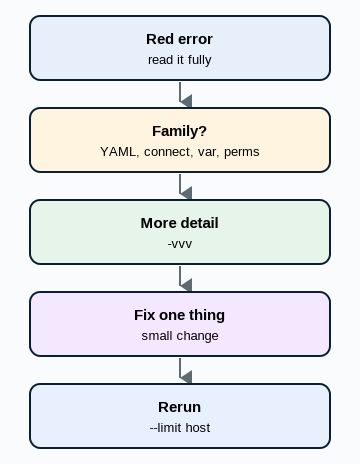
Story (fictional teaching scenario). At a fictional logistics company in Surat, Aditi's playbook failed at 2 AM with red text. Instead of guessing, she read the error from the bottom up, added -vvv for more detail, and found a missing variable in two minutes. Most Ansible errors fall into a few families. Learn them once.
Why
Panic wastes time. A short checklist finds most problems fast.
What
- YAML error — Wrong indent or colon.
--syntax-checkfinds it. - UNREACHABLE — SSH could not connect: wrong address, user, key or firewall.
- undefined variable — A
{{ name }}with no value. - Permission denied / sudo — Missing
become, or the user lacks sudo rights. - -v, -vv, -vvv, -vvvv — More and more detail.
-vvvvadds connection debugging. - ansible-doc — Shows a module's options on your own machine.
How
- Read the last red lines first.
- Decide the family.
- Rerun only the broken host with
--limitand-vvv. - Check the module options with
ansible-doc. - Fix one thing at a time.
Example 1: Undefined variable
ansible web1 -m ansible.builtin.debug -a "msg={{ missing_var }}"
Output (tested on ansible-core 2.22.0, local practice lab)
"msg": "Task failed: Finalization of task args for 'ansible.builtin.debug' failed: Error while resolving value for 'msg': 'missing_var' is undefined"
What it means: The name is spelled wrong or never set. Search your vars files for it, or give a default with {{ missing_var | default('none') }}.
Example 2: Unreachable host
Output (illustrative — not run on a real server)
web9 | UNREACHABLE! => {
    "changed": false,
    "msg": "Failed to connect to the host via ssh: ssh: connect to host 192.0.2.19 port 22: Connection timed out",
    "unreachable": true
}
What it means: Ansible never got in. Test plain ssh deploy@192.0.2.19 from the control node first. Check the address, security group or firewall, user and key.
Example 3: Look up a module's options
ansible-doc -s ansible.builtin.copy
Output (tested on ansible-core 2.22.0, local practice lab)
- name: Copy files to remote locations
  copy:
      attributes:            # The attributes the resulting filesystem object
                             # should have. To get
What it means: The short form (-s) lists every option of the module as a ready snippet. No internet needed.
Ravindra Bagale's Tip
Before you add -vvvv, try plain ssh to the host. Half of all UNREACHABLE errors are solved there.
-vvvv लावण्याआधी साधा ssh करून बघा. UNREACHABLE च्या निम्म्या errors तिथेच सुटतात.
-vvvv लगाने से पहले सीधा ssh करके देखो. UNREACHABLE की आधी errors वहीं सुलझ जाती हैं.
Did you understand? Let us try it once more.