91.1 Why Ansible — control node, managed nodes and no agent
Story (fictional teaching scenario). At a fictional online pharmacy in Nashik, Sanjay looked after 40 Linux servers. Every Monday he logged in to each one and ran the same five commands. It took the whole morning, and once he forgot server 23. Grace, a contractor from Leeds, wrote those five commands as one Ansible playbook. Now Sanjay runs one command from his laptop. Ansible logs in over SSH, does the work on all 40 servers, and prints which ones changed. Nothing extra was installed on the servers.
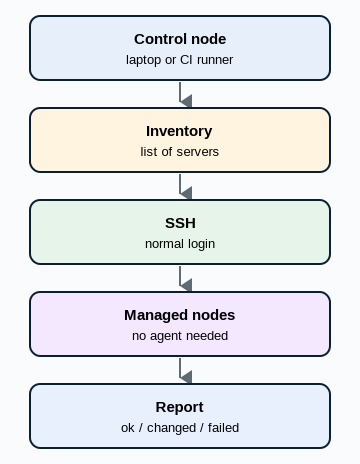
Why
Doing the same steps by hand on many servers is slow and easy to get wrong. Ansible writes those steps down once and runs them the same way on every server.
What
- Control node — The computer where you install Ansible and type commands. Usually your laptop, a jump box or a CI runner.
- Managed node — A server that Ansible configures. Ansible also calls it a host.
- Agentless — Ansible does not need its own program running on managed nodes. It connects with SSH (or WinRM for Windows) and needs Python on Linux targets for most modules.
- ansible-core — The main engine and the built-in modules. The bigger
ansiblepackage adds many community collections on top.
How
- Install Ansible only on the control node.
- Make sure you can SSH from the control node to each managed node.
- List the managed nodes in an inventory (next lesson).
- Run a command or playbook against them.
Example 1: Check the installed version
ansible --version
Output (tested on ansible-core 2.22.0, local practice lab)
ansible [core 2.22.0]
  config file = None
What it means: Line 1 shows the ansible-core version. Line 2 says no ansible.cfg file was found yet, so default settings are used.
Example 2: Install on the control node only
python3 -m pip install --user ansible-core
Output (illustrative — not run on a real server)
Successfully installed ansible-core-2.22.0 ...
What it means: Ansible is now on your control node. You did not install anything on the servers. The exact version you get depends on the day you install.
Ravindra Bagale's Tip
Install Ansible on one control node. If you start installing Ansible on every server, stop — that is not how it works.
Ansible फक्त एका control node वर install करा. प्रत्येक server वर install करायला लागलात तर थांबा — Ansible तसं चालत नाही.
Ansible सिर्फ एक control node पर install करो. हर server पर install करने लगे तो रुको — Ansible ऐसे नहीं चलता.
Did you understand? Let us try it once more.