91.11 Check mode, diff, tags and limit
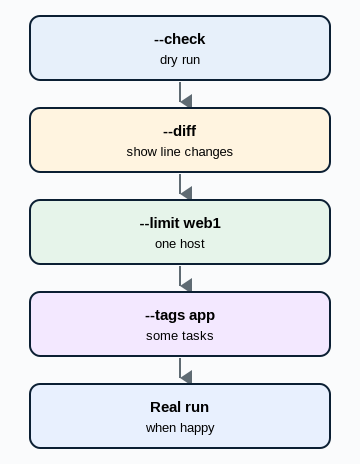
Story (fictional teaching scenario). At a fictional stock-trading app in Ahmedabad, Mei from Singapore had to change one port on Friday evening. She did not want surprises. She ran with --check --diff first to see the exact line that would change, on one host only with --limit. Next week she used tags to run only the app tasks, not the whole playbook.
Why
Seeing a change before making it is the cheapest safety net you have.
What
- --check — Dry run. Modules that support it report what they would change, without changing it.
- --diff — Shows before and after for files and templates.
- --limit — Further narrows the hosts from the play's
hosts:line. - tags — Labels on tasks.
--tags appruns only those;--skip-tagsleaves some out. - --list-tags / --list-tasks — Show what would run, without running.
How
- Run
--check --diff --limit <one host>. - Read the diff.
- Run for real on that one host.
- Then widen the limit or remove it.
Example 1: Preview a port change on one host
After changing app_port from 8080 to 9090 in group_vars/web.yml:
ansible-playbook site.yml --check --diff --limit web1
Output (tested on ansible-core 2.22.0, local practice lab)
TASK [Write config from template]
--- before: out/web1/app.conf
+++ after: .../app.conf.j2
@@ -1,3 +1,3 @@
 # managed by Ansible
-port = 8080
+port = 9090
 owner = Priya

changed: [web1]
RUNNING HANDLER [Reload app]
ok: [web1] => ...
PLAY RECAP
web1  : ok=3  changed=1  unreachable=0  failed=0  skipped=0
What it means: Only web1 was looked at. The diff shows exactly one line changing. The file itself was not changed. Watch out: in this lab the handler is a debug message, and debug runs even in check mode. Real modules like service respect check mode and only report.
Example 2: List and run tags
ansible-playbook roll.yml --list-tags
ansible-playbook roll.yml --tags app --limit web2
Output (tested on ansible-core 2.22.0, local practice lab)
      TASK TAGS: [app, lb, notify]
...
TASK [Update app]
ok: [web2] => {
PLAY RECAP
web2  : ok=1  changed=0  unreachable=0  failed=0  skipped=0
What it means: The playbook has three tags. With --tags app --limit web2 only one task ran on one host.
Ravindra Bagale's Tip
Not every module can predict changes in check mode, especially command and shell. Treat check mode as a strong hint, not a promise.
प्रत्येक module check mode मध्ये बदल सांगू शकत नाही, खास करून command आणि shell. Check mode म्हणजे चांगला अंदाज, guarantee नाही.
हर module check mode में बदलाव नहीं बता सकता, खासकर command और shell. Check mode एक अच्छा अंदाज़ है, guarantee नहीं.
Did you understand? Let us try it once more.