Chapter 46: Terraform 3-Tier Architecture Multi-AZ with ALBs Auto Scaling Bastion NAT and RDS
46.7 DB subnet group, Multi-AZ RDS standby and read replica
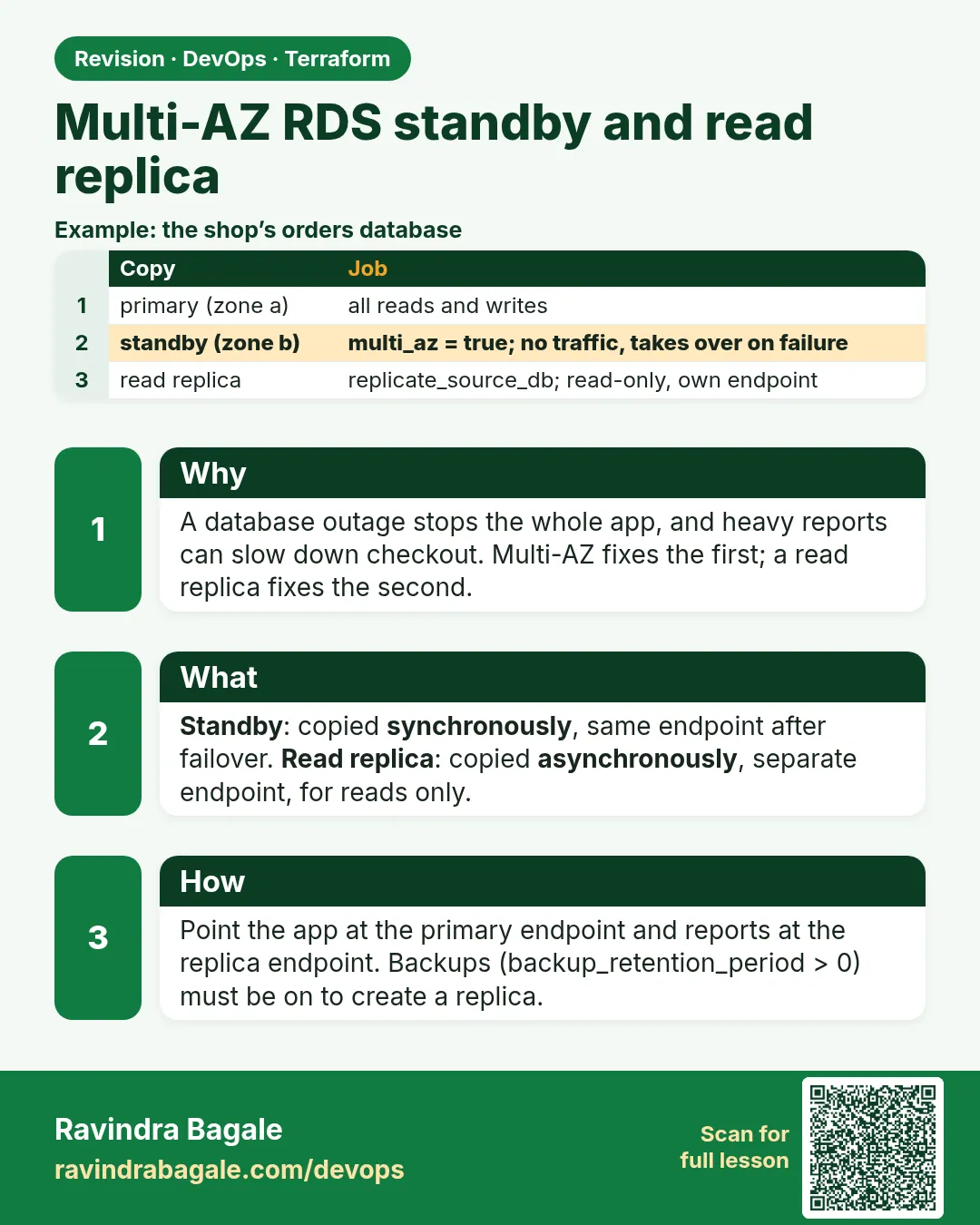
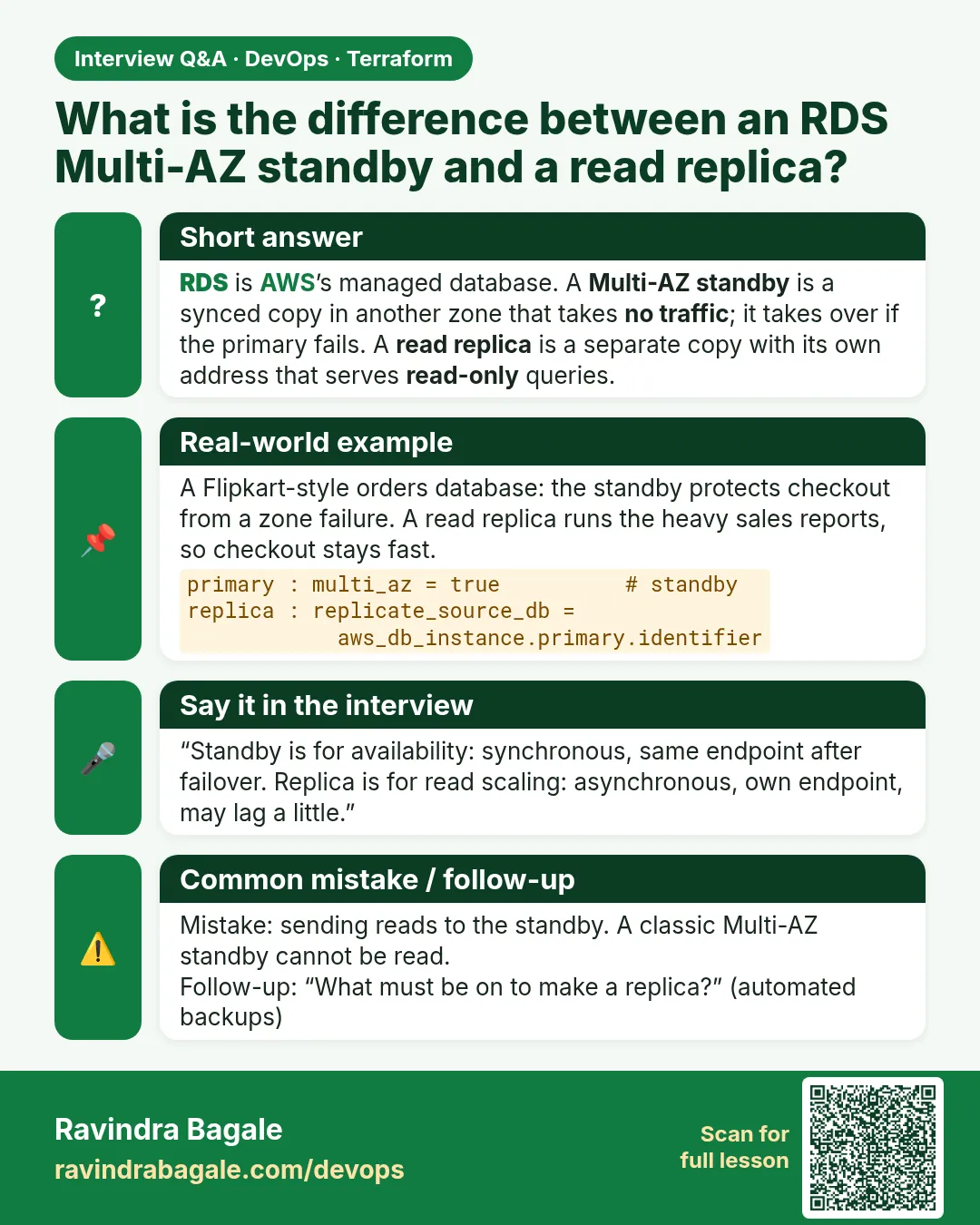
Story. Suppose we are protecting the shop's orders database. With multi_az = true, RDS keeps a standby copy in the other zone, updated synchronously; if the primary's zone fails, RDS switches the DNS name to the standby in about a minute or two, and the app reconnects to the same endpoint. The standby takes no traffic. For heavy reports we add a read replica: it is copied asynchronously, has its own endpoint, and serves only reads, so reports never slow down checkout.
Steps
- Write db.tf.
- Run terraform validate.
- After apply (about 15 to 25 minutes for RDS), check MultiAZ and the replica source.
- Optional: force a failover and watch the zone change.
# ---- db.tf ----
resource "aws_db_subnet_group" "db" {
  name       = "${var.project}-db"
  subnet_ids = [for s in aws_subnet.db : s.id]
  tags = {
    Name = "${var.project}-db-subnets"
  }
}

resource "aws_db_instance" "primary" {
  identifier                  = "${var.project}-mysql"
  engine                      = "mysql"
  engine_version              = "8.0"
  instance_class              = "db.t3.micro"
  allocated_storage           = 20
  max_allocated_storage       = 100
  storage_type                = "gp3"
  storage_encrypted           = true
  db_name                     = "shopdb"
  username                    = var.db_username
  manage_master_user_password = true
  db_subnet_group_name        = aws_db_subnet_group.db.name
  vpc_security_group_ids      = [aws_security_group.db.id]
  multi_az                    = true
  publicly_accessible         = false
  backup_retention_period     = 7
  backup_window               = "18:30-19:30"
  maintenance_window          = "sun:20:00-sun:21:00"
  skip_final_snapshot         = true
  deletion_protection         = false
}

resource "aws_db_instance" "replica" {
  identifier             = "${var.project}-mysql-replica"
  replicate_source_db    = aws_db_instance.primary.identifier
  instance_class         = "db.t3.micro"
  storage_encrypted      = true
  vpc_security_group_ids = [aws_security_group.db.id]
  availability_zone      = local.azs["b"]
  publicly_accessible    = false
  skip_final_snapshot    = true
}
What each line does
subnet_ids = [for s in aws_subnet.db : s.id]— DB subnets in both zones.max_allocated_storage = 100— Storage grows automatically up to 100 GB.manage_master_user_password = true— Password in Secrets Manager.multi_az = true— Creates the standby in the other zone.backup_retention_period = 7— Backups are required for a read replica and give point-in-time restore.backup_window = "18:30-19:30"— UTC, which is midnight to 1 a.m. India time.maintenance_window = "sun:20:00-sun:21:00"— UTC, which is Monday 1:30 to 2:30 a.m. India time. Must not overlap the backup window.replicate_source_db = aws_db_instance.primary.identifier— Makes this instance a read replica of the primary.(no username, password or db_name on the replica)— A replica copies them from the primary.availability_zone = local.azs["b"]— Places the replica in AZ-b.vpc_security_group_ids = [db]— Same rule: only the app tier connects.
To test failover after apply, run aws rds reboot-db-instance --db-instance-identifier shop3t-mysql --force-failover, then describe the instance again and see its AvailabilityZone change.
When it is green.
$ aws rds describe-db-instances --query "DBInstances[].[DBInstanceIdentifier,MultiAZ,ReadReplicaSourceDBInstanceIdentifier]"
[["shop3t-mysql", true, null],
 ["shop3t-mysql-replica", false, "shop3t-mysql"]]
When it is red.
Error: creating RDS DB Instance (read replica) (shop3t-mysql-replica): InvalidDBInstanceState:
Automated backups are not enabled for this database instance.
Fix. Set backup_retention_period to 1 or more on the primary, apply, then create the replica.
What: every term in plain English
- DB subnet group — The subnets RDS may use. Here both DB subnets, one per zone.
- Multi-AZ — RDS keeps a synchronous standby copy in another zone. If the primary fails, AWS flips the endpoint to the standby in one to two minutes.
- standby — The hidden copy in the other zone. It serves no reads; it waits for failover.
- read replica — An asynchronous read-only copy with its own endpoint, used for reports and read-heavy pages.
- replicate_source_db — The Terraform argument that makes an aws_db_instance a replica of another.
- manage_master_user_password — RDS creates the admin password and keeps it in Secrets Manager. It never appears in code.
- backup_retention_period — Days of automatic backups. Must be above 0 to create a read replica.
- failover — Switching the primary role from one zone to the standby in the other.
Example 1: Create the DB subnet group over both zones
RDS places the primary in one subnet and the standby in the other. Without two zones in the group, Multi-AZ is impossible.
- Collect both DB subnet ids.
- Create the subnet group.
- Check it in the CLI.
resource "aws_db_subnet_group" "db" {
  name       = "${var.project}-db"
  subnet_ids = [for s in aws_subnet.db : s.id]
}
aws rds describe-db-subnet-groups --db-subnet-group-name shop3t-db \
  --query "DBSubnetGroups[0].Subnets[].SubnetAvailabilityZone.Name"
Output
[
    "ap-south-1a",
    "ap-south-1b"
]
What it shows: Two zones listed means the group is ready for Multi-AZ.
Example 2: Primary with Multi-AZ and a managed password
HDFC Bank policy: no password in code, encrypted storage, standby in another zone. These four lines meet all three.
- Set multi_az = true.
- Set manage_master_user_password = true.
- Encrypt storage and keep backups.
resource "aws_db_instance" "primary" {
  identifier                  = "${var.project}-mysql"
  engine                      = "mysql"
  engine_version              = "8.0"
  instance_class              = "db.t3.micro"
  allocated_storage           = 20
  db_subnet_group_name        = aws_db_subnet_group.db.name
  vpc_security_group_ids      = [aws_security_group.db.id]
  username                    = var.db_username
  manage_master_user_password = true
  multi_az                    = true
  storage_encrypted           = true
  backup_retention_period     = 1
  skip_final_snapshot         = true
}
Output
aws_db_instance.primary: Still creating... [12m0s elapsed]
aws_db_instance.primary: Creation complete after 13m4s [id=db-ABCDEFGHIJKLMNOP]
What it shows: Multi-AZ RDS takes 10 to 15 minutes. skip_final_snapshot is only for labs.
Example 3: Add a read replica for reports
At Swiggy, finance reports run on a replica so they never slow down order writes on the primary.
- Create a second aws_db_instance.
- Point replicate_source_db at the primary.
- Do not set username or password; they come from the source.
resource "aws_db_instance" "replica" {
  identifier             = "${var.project}-mysql-ro"
  replicate_source_db    = aws_db_instance.primary.identifier
  instance_class         = "db.t3.micro"
  vpc_security_group_ids = [aws_security_group.db.id]
  storage_encrypted      = true
  skip_final_snapshot    = true
}
aws rds describe-db-instances --db-instance-identifier shop3t-mysql-ro \
  --query "DBInstances[0].[ReadReplicaSourceDBInstanceIdentifier,Endpoint.Address]"
Output
[
    "shop3t-mysql",
    "shop3t-mysql-ro.abc123xyz.ap-south-1.rds.amazonaws.com"
]
What it shows: The replica has its own endpoint. Point report queries at it; writes always go to the primary endpoint.
Example 4: Read the generated password safely
The password lives in Secrets Manager. The app reads it at runtime with its IAM role; humans fetch it only when needed, never paste it in code.
- Get the secret ARN from Terraform.
- Fetch the value with the CLI.
- Use it once, then clear your shell.
output "db_secret_arn" {
  value = aws_db_instance.primary.master_user_secret[0].secret_arn
}
aws secretsmanager get-secret-value --secret-id $(terraform output -raw db_secret_arn) \
  --query SecretString --output text | python3 -c "import sys,json; print(list(json.load(sys.stdin)))"
Output
['username', 'password']
What it shows: We print only the keys, not the value, so the password never lands in your terminal history or a screenshot.
Example 5: Connect from an app server
Only the app group may reach 3306. Testing from an app server proves the chain and the endpoint together.
- SSH to an app server through the bastion.
- Install the MySQL client.
- Connect with the primary endpoint.
sudo dnf install -y mariadb105
mysql -h $DB_ENDPOINT -u admin -p -e "SELECT @@hostname, @@read_only;"
mysql -h $DB_RO_ENDPOINT -u admin -p -e "SELECT @@read_only;"
Output
+-----------------+-------------+
| @@hostname      | @@read_only |
+-----------------+-------------+
| ip-10-6-1-23    |           0 |
+-----------------+-------------+
+-------------+
| @@read_only |
+-------------+
|           1 |
+-------------+
What it shows: read_only 0 on the primary, 1 on the replica. -p asks for the password interactively, so it never appears on the command line.
Example 6: Force a failover and watch the zone change
Interviewers at Amazon ask how you know Multi-AZ works. You prove it with a forced reboot with failover and time it.
- Note the current zone.
- Reboot with failover.
- Check the zone again.
aws rds describe-db-instances --db-instance-identifier shop3t-mysql --query "DBInstances[0].AvailabilityZone"
aws rds reboot-db-instance --db-instance-identifier shop3t-mysql --force-failover > /dev/null
aws rds wait db-instance-available --db-instance-identifier shop3t-mysql
aws rds describe-db-instances --db-instance-identifier shop3t-mysql --query "DBInstances[0].AvailabilityZone"
Output
"ap-south-1a"
"ap-south-1b"
What it shows: The endpoint name stayed the same; only the zone changed. Apps reconnect without any config change.
Command cheat sheet
| Command | What it does | When to use it |
|---|---|---|
aws_db_subnet_group |
Subnets for RDS | Before the DB |
multi_az = true |
Standby in another zone | Production |
manage_master_user_password = true |
Password in Secrets Manager | Always |
replicate_source_db |
Read replica | Reports |
aws rds reboot-db-instance --force-failover |
Test failover | Prove Multi-AZ |
aws rds wait db-instance-available |
Wait until ready | Scripts |
Verify: did it work?
-
Multi-AZ on
aws rds describe-db-instances --db-instance-identifier shop3t-mysql --query "DBInstances[0].MultiAZ"Output
true -
Replica linked
aws rds describe-db-instances --db-instance-identifier shop3t-mysql --query "DBInstances[0].ReadReplicaDBInstanceIdentifiers"Output
["shop3t-mysql-ro"] -
Not public
aws rds describe-db-instances --db-instance-identifier shop3t-mysql --query "DBInstances[0].PubliclyAccessible"Output
false
When it is red 1
Error: creating RDS DB Instance (read replica): InvalidDBInstanceState: Automated backups are not enabled for this database instance
Cause. backup_retention_period is 0 on the primary.
Fix, step by step
- Set backup_retention_period = 1 or more.
- Apply the primary first.
When it is red 2
Error: DBSubnetGroupDoesNotCoverEnoughAZs
Cause. The subnet group has subnets in only one zone.
Fix, step by step
- Add the DB subnet from the second zone.
- Check for_each over local.azs.
When it is red 3
ERROR 2003 (HY000): Can't connect to MySQL server on 'shop3t-mysql...' (110)
Cause. The client is not in the app group, or db_from_app is missing.
Fix, step by step
- Connect from an app server, not web or bastion.
- Check the 3306 rule.
Cleanup
terraform destroy -auto-approve
Ravindra Bagale's Tip
Multi-AZ is for availability, a read replica is for read scale. Interviewers mix them on purpose; say the difference in one line each.
Practice tasks
Easy Check Multi-AZ
Why: Read settings.
What to do: Confirm MultiAZ true in the CLI.
- describe-db-instances.
Check: true.
Easy Find both endpoints
Why: Primary and replica.
What to do: Output both endpoints from Terraform.
- address attribute.
Check: Two different names.
Medium Time a failover
Why: Prove HA.
What to do: Force failover and time it.
- Use time before wait.
Check: About 1 to 2 minutes.
Hard Promote the replica
Why: Disaster drill.
What to do: Promote the replica and explain what Terraform will plan next.
- aws rds promote-read-replica.
Check: Replica becomes standalone; plan shows drift.
Easy Say it in two lines
Why: If you can say it simply, you understand it.
What to do: Write two short lines about this lesson for a fresher.
- Write the problem it solves.
- Write the one command or file you use.
- Read it aloud.
Check: A fresher understands it without a question.
Easy Start a safe lab folder
Why: Practice needs a throwaway place.
What to do: Make a new folder with versions.tf and a random_pet resource, so no AWS cost.
- mkdir tf-lab and cd into it.
- Add the hashicorp/random provider and one random_pet.
- Run terraform init and terraform apply.
Check: Apply complete! with 1 added.
Medium Break it on purpose
Why: You must know the red output by face.
What to do: Cause one error from the red part of this lesson and fix it.
- Follow one red section.
- Copy the exact message to your notes.
- Write the fix in one line.
Check: You fixed it without searching the web.
Medium Run it twice
Why: A second run must be quiet.
What to do: Run the same plan two times with no edits.
- Run terraform plan.
- Run it again.
- Explain any change it still shows.
Check: The second plan says No changes, or you can explain each line.
Medium Write a runbook page
Why: At 2 a.m. nobody remembers flags.
What to do: Write a one-page runbook for this lesson.
- Title, when to use, exact commands, how to check, how to undo.
Check: A teammate can follow it alone.
Medium Run it from a pipeline
Why: Real teams run Terraform from CI, not from laptops.
What to do: Run the main command of this lesson inside a GitHub Actions or Jenkins job.
- Add a job with hashicorp/setup-terraform or a Terraform Docker image.
- Give it AWS access through an IAM role, never a key in the file.
- Run init, then the command from this lesson.
Check: The job log shows the same output you saw on your laptop.
Medium Check the cost
Why: Labs left running cost real money.
What to do: Find what this lesson would cost per day if you forgot to destroy it.
- Open the AWS Pricing Calculator.
- Add each resource from your plan.
- Write the daily cost in your notes.
Check: You know the daily cost and you ran terraform destroy.
Hard Draw the flow top to bottom
Why: A drawing shows the order of work.
What to do: Draw this lesson as boxes from top to bottom.
- Start at your code, go through plan and state, end at AWS.
- Mark where each command reads or writes.
Check: Each box matches a real step you ran.
Hard Explain it like an interview
Why: Interviewers want real stories.
What to do: Record a 60 second answer about this lesson.
- Say the problem, the command, and one error you hit.
Check: Your answer has a real command and a real error message.
Homework: try at home
Try at home
Write db.tf for a PostgreSQL 16 version of this design with Multi-AZ, a managed password and one read replica.
Recap
- DB subnet group spans both zones.
- multi_az = true gives a standby.
- A replica has its own read-only endpoint.
- RDS manages the password in Secrets Manager.
- Force failover to prove it works.
FAQ
Can I read from the standby?
No. Only a read replica serves reads (with classic Multi-AZ).
Is replica data instant?
Almost; it is asynchronous, so there can be a small lag.
Does failover change the endpoint?
No, the DNS name stays; it points to the new primary.
Why db.t3.micro?
Cheapest class that supports Multi-AZ for a lab.
Interview questions
-
Difference between Multi-AZ and a read replica?
Multi-AZ is a synchronous standby for failover; a replica is an asynchronous copy for reads.
-
How do you keep the DB password out of Terraform?
manage_master_user_password = true stores it in Secrets Manager.
-
How do you test Multi-AZ?
Reboot with force failover and check the zone changed.
-
Why does a replica need backups on the source?
RDS uses the backup and binary logs to build and feed the replica.
Quick quiz
Q1. Argument for a replica?
replicate_source_db
Q2. Where is the password kept?
Secrets Manager
Q3. Minimum backup days for a replica?
1
Q4. Flag to test failover?
--force-failover
Q5. Replica read_only value?
1
Samajla ka?
 Revision card
 Interview card