Chapter 46: Terraform 3-Tier Architecture Multi-AZ with ALBs Auto Scaling Bastion NAT and RDS
46.1 Multi-AZ 3-tier architecture: the picture and the file layout
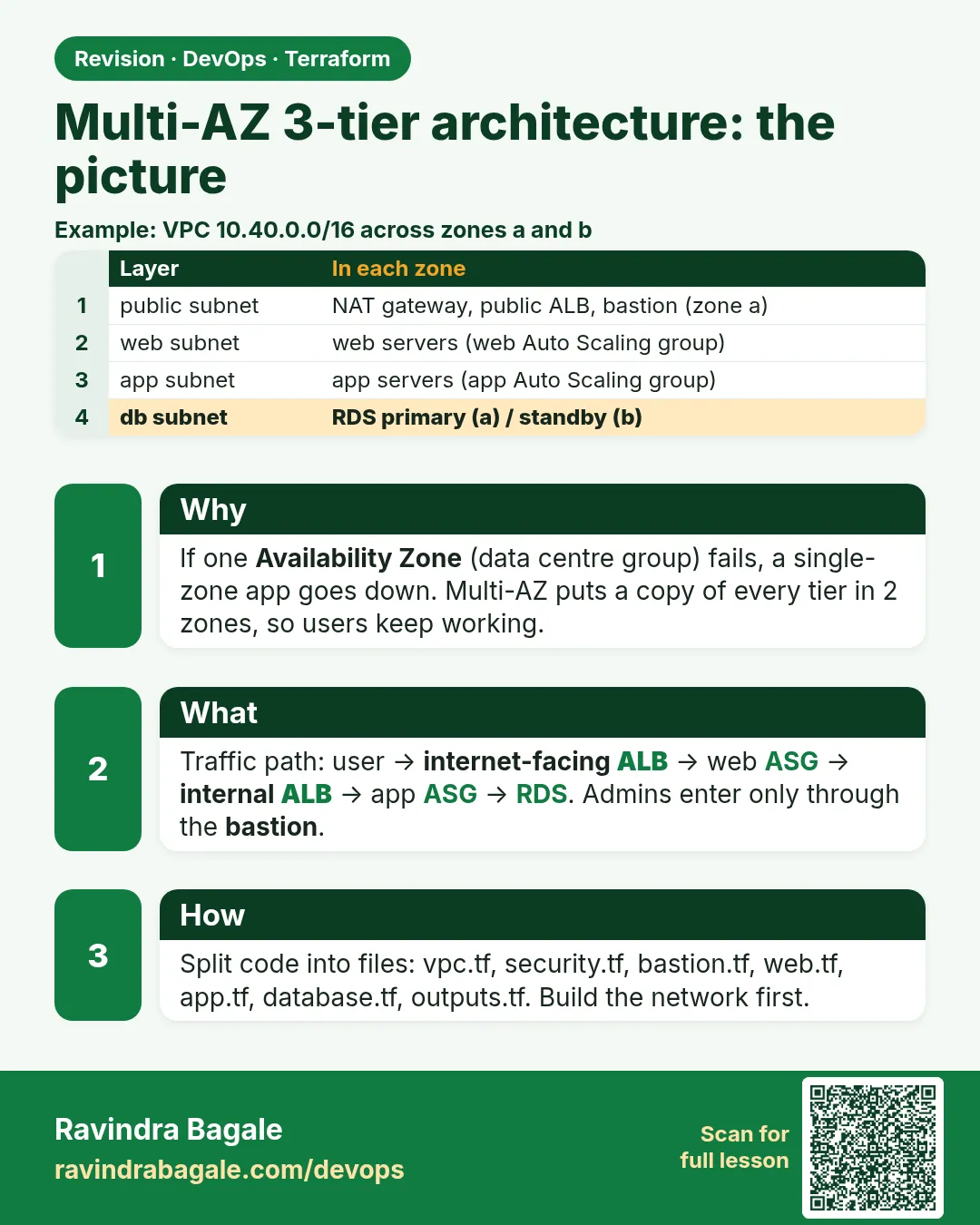
Story. Suppose we are on a Netflix-style platform team running an online shop that must stay up even if one whole AWS data centre zone goes down. Every tier therefore runs in two Availability Zones, AZ-a and AZ-b. Users reach an internet-facing load balancer in the public subnets; it sends traffic to a web Auto Scaling group in private web subnets; the web servers call an internal load balancer that spreads requests over an app Auto Scaling group; and the app writes to an RDS database that has a standby copy in the other zone plus a read replica for reports. Admins enter only through a bastion jump server. This lesson is the map; each next lesson builds one part of it.
Steps
- Study the picture: two zones, four subnet layers.
- Create the folder layout shown.
- Create an SSH key pair with ssh-keygen; keep the private key on your laptop with chmod 400.
- Write versions.tf and variables.tf.
- Run terraform init.
File layout
three-tier-multi-az/
├── versions.tf
├── variables.tf
├── network.tf        # VPC, 8 subnets, IGW, 2 NAT, route tables
├── security.tf       # 6 security groups chained
├── bastion.tf        # key pair + jump server
├── web.tf            # internet-facing ALB + web launch template + web ASG
├── app.tf            # internal ALB + app launch template + app ASG
├── db.tf             # DB subnet group + Multi-AZ RDS + read replica
├── outputs.tf
└── userdata/
    ├── web.sh.tftpl
    └── app.sh
# ---- versions.tf ----
terraform {
  required_version = ">= 1.6"
  required_providers {
    aws = {
      source  = "hashicorp/aws"
      version = "~> 5.0"
    }
  }
}

provider "aws" {
  region = var.region
}

# ---- variables.tf ----
variable "region" {
  type    = string
  default = "ap-south-1"
}

variable "project" {
  type    = string
  default = "shop3t"
}

variable "vpc_cidr" {
  type    = string
  default = "10.40.0.0/16"
}

variable "my_ip_cidr" {
  description = "Your public IP with /32, the only address allowed to SSH to the bastion"
  type        = string
  validation {
    condition     = can(cidrhost(var.my_ip_cidr, 0)) && endswith(var.my_ip_cidr, "/32")
    error_message = "Give a single address such as 203.0.113.10/32."
  }
}

variable "public_key_path" {
  type    = string
  default = "~/.ssh/shop3t.pub"
}

variable "instance_type" {
  type    = string
  default = "t3.micro"
}

variable "db_username" {
  type    = string
  default = "appadmin"
}
What each line does
required_providers { aws = { version = "~> 5.0" } }— Pins the AWS provider to any 5.x release.provider "aws" { region = var.region }— Every resource is created in the region from variables.tf (Mumbai, ap-south-1, by default).variable "project" default = "shop3t"— A prefix for every name, so resources are easy to find and never clash.variable "vpc_cidr" default = "10.40.0.0/16"— The whole VPC range; subnets are carved from it.variable "my_ip_cidr"— Your own IP; the only source allowed to SSH to the bastion. No default, so Terraform asks.validation { ... endswith(var.my_ip_cidr, "/32") }— Rejects 0.0.0.0/0 or a wide range by mistake.variable "public_key_path"— Path to your SSH public key. The private key never goes into Terraform.variable "db_username"— The master user name. The password is generated by RDS.
When it is green.
$ ssh-keygen -t ed25519 -f ~/.ssh/shop3t -N ""
$ terraform init
Terraform has been successfully initialized!
When it is red.
$ terraform plan -var my_ip_cidr=0.0.0.0/0
Error: Invalid value for variable
  Give a single address such as 203.0.113.10/32.
Fix. The validation stopped an SSH rule open to the world. Find your IP with curl -s https://checkip.amazonaws.com and pass it with /32.
What: every term in plain English
- Availability Zone (AZ) — One or more data centres inside a region with its own power and network. Mumbai (ap-south-1) has three: ap-south-1a, 1b and 1c.
- multi-AZ — Every tier has a copy in at least two zones, so one zone going dark does not stop the app.
- 3-tier architecture — Web (presentation), app (business logic) and database (data) layers, each in its own subnets and security group.
- internet-facing ALB — An Application Load Balancer with a public DNS name, placed in public subnets, that receives user traffic.
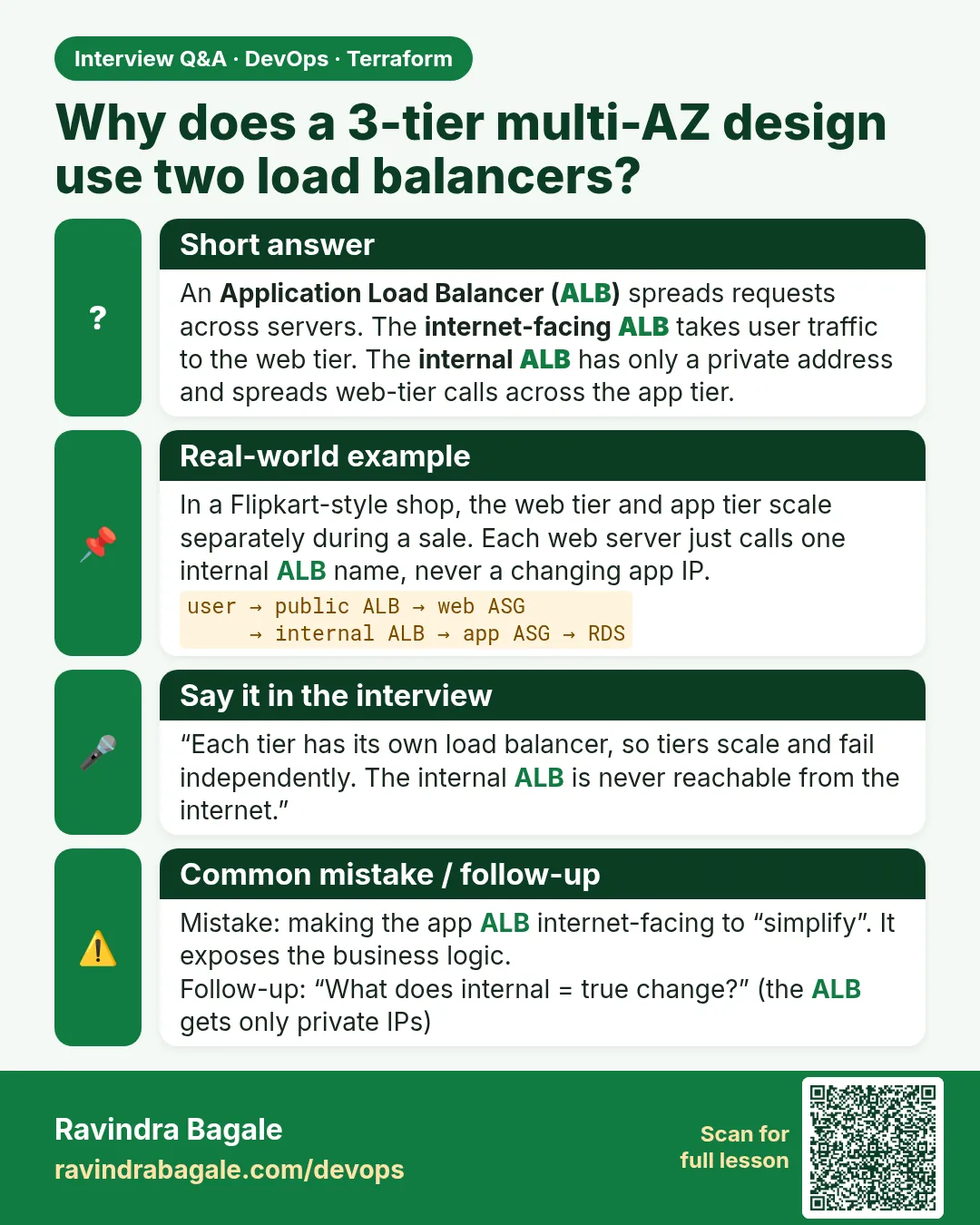
- internal ALB — A load balancer with only private IPs, reachable only inside the VPC. Web servers call the app tier through it.
- Auto Scaling group (ASG) — A group that keeps a set number of EC2 servers alive, replaces sick ones and adds more under load.
- bastion host — A small jump server in a public subnet. Admins SSH to it first, then hop to private servers.
- read replica — A read-only copy of the database that serves reports and heavy reads, so the primary stays fast.
Example 1: Turn the picture into a resource checklist
At Flipkart design reviews, the architect first lists every box on the diagram. The list becomes the checklist you compare with terraform plan, so nothing is forgotten and nothing extra sneaks in.
- Look at the picture from top to bottom.
- Write one line per box with its count.
- Add the totals; compare with the plan later.
Network   : 1 VPC, 8 subnets, 1 IGW, 2 EIP, 2 NAT, 4 route tables, 8 associations
Security  : 6 security groups + their rules
Bastion   : 1 key pair, 1 EC2
Web tier  : 1 external ALB, 1 target group, 1 listener, 1 launch template, 1 ASG, 1 policy
App tier  : 1 internal ALB, 1 target group, 1 listener, 1 launch template, 1 ASG, 1 policy
Database  : 1 DB subnet group, 1 primary (Multi-AZ), 1 read replica
terraform plan -out tfplan | tail -n 1
Output
Plan: 62 to add, 0 to change, 0 to destroy.
What it shows: If your count is very different from the checklist, a for_each map or a rule block is missing. Find it before you apply.
Example 2: Create the folder and empty files in one go
Infosys project templates keep one concern per file. A reviewer looking for NAT routes opens network.tf and nothing else.
- Create the folder and the userdata sub-folder.
- Touch every file.
- List the tree.
mkdir -p three-tier-multi-az/userdata && cd three-tier-multi-az
touch versions.tf variables.tf network.tf security.tf bastion.tf web.tf app.tf db.tf outputs.tf
touch userdata/web.sh.tftpl userdata/app.sh
find . -type f | sort
Output
./app.tf
./bastion.tf
./db.tf
./network.tf
./outputs.tf
./security.tf
./userdata/app.sh
./userdata/web.sh.tftpl
./variables.tf
./versions.tf
./web.tf
What it shows: Boot scripts live in userdata/ and are loaded with templatefile() and filebase64(), so no script is pasted inside HCL.
Example 3: Make the SSH key safely
Banks such as HDFC never let a private key enter Terraform or Git. Only the public key goes to AWS; the private key stays on your laptop with owner-only permission.
- Generate an ed25519 key pair.
- Lock the private key with chmod 400.
- Point var.public_key_path at the .pub file.
ssh-keygen -t ed25519 -f ~/.ssh/shop3t -N "" -C "shop3t-lab"
chmod 400 ~/.ssh/shop3t
ls -l ~/.ssh/shop3t ~/.ssh/shop3t.pub
Output
-r-------- 1 ravi ravi 411 Oct 25 07:40 /home/ravi/.ssh/shop3t
-rw-r--r-- 1 ravi ravi  98 Oct 25 07:40 /home/ravi/.ssh/shop3t.pub
What it shows: 400 means only you can read the private key. SSH refuses keys that other users can read.
Example 4: Find your own IP for the bastion rule
Opening SSH to 0.0.0.0/0 is the number one finding in security audits at companies like Paytm. We allow only your single address.
- Ask the AWS check service for your IP.
- Add /32.
- Pass it with -var or a tfvars file.
MYIP=$(curl -s https://checkip.amazonaws.com)
echo "my_ip_cidr = \"$MYIP/32\"" > lab.auto.tfvars
cat lab.auto.tfvars
Output
my_ip_cidr = "203.0.113.10/32"
What it shows: Files ending in .auto.tfvars are loaded automatically, so you do not need to type -var every time. Add it to .gitignore.
Example 5: Let validation block a wide open rule
A validation block catches the mistake at plan time, before any security group exists. Reviewers at Zomato add these to every shared module.
- Add validation to my_ip_cidr.
- Try a bad value.
- Read the error, then use your /32.
variable "my_ip_cidr" {
  description = "Your public IP with /32"
  type        = string
  validation {
    condition     = endswith(var.my_ip_cidr, "/32") && var.my_ip_cidr != "0.0.0.0/32"
    error_message = "Give a single address such as 203.0.113.10/32."
  }
}
terraform plan -var my_ip_cidr=10.0.0.0/8
Output
Error: Invalid value for variable
  on variables.tf line 12:
  Give a single address such as 203.0.113.10/32.
What it shows: Validation runs before Terraform talks to AWS, so the mistake costs nothing.
Example 6: Estimate the cost before you build
Two NAT gateways, two ALBs and a Multi-AZ RDS cost real money every hour. Teams at Razorpay check the rough cost first and always destroy labs the same day.
- List the hourly items.
- Multiply by the hours you will keep the lab.
- Plan to destroy at the end.
Item                      Count   Approx per hour (ap-south-1)
NAT gateway               2       about 0.056 USD each
Application Load Balancer 2       about 0.024 USD each
RDS db.t3.micro Multi-AZ  1       about 0.04 USD
RDS read replica          1       about 0.02 USD
EC2 t3.micro              5       about 0.011 USD each
Output
Roughly 0.30 USD per hour for the whole stack, plus data transfer.
A 3 hour lab costs about 1 USD. Forgetting it for a month costs about 220 USD.
What it shows: The numbers are approximate; check the AWS pricing page for today. The lesson: destroy when you finish.
Command cheat sheet
| Command | What it does | When to use it |
|---|---|---|
ssh-keygen -t ed25519 -f FILE |
Makes a key pair | Before the bastion |
chmod 400 FILE |
Owner read only | Protect the private key |
curl -s https://checkip.amazonaws.com |
Shows your public IP | For my_ip_cidr |
*.auto.tfvars |
Auto-loaded variables | Lab values |
terraform plan -out tfplan |
Saves the plan | Before every apply |
terraform destroy |
Deletes all | End of every lab |
Verify: did it work?
-
Folder has 11 files
find . -type f | wc -lOutput
11 -
Key is locked
stat -c %a ~/.ssh/shop3tOutput
400 -
Init worked
terraform init | tail -n 1Output
Terraform has been successfully initialized!
When it is red 1
Error: Invalid value for variable
  Give a single address such as 203.0.113.10/32.
Cause. my_ip_cidr is not a single /32 address.
Fix, step by step
- Run curl -s https://checkip.amazonaws.com.
- Add /32 and plan again.
When it is red 2
Permissions 0644 for '/home/ravi/.ssh/shop3t' are too open.
Cause. The private key can be read by other users.
Fix, step by step
- Run chmod 400 ~/.ssh/shop3t.
- SSH again.
When it is red 3
Error: Unsupported availability zone
Cause. The region you chose has a zone name that is not offered for this account.
Fix, step by step
- Read zones from the aws_availability_zones data source.
- Do not hard-code zone names.
Cleanup
terraform destroy -auto-approve
rm -f lab.auto.tfvars
Ravindra Bagale's Tip
Interviewers love this design. Practise drawing it on paper in two minutes: two zones side by side, four layers top to bottom, two load balancers, bastion on top, RDS at the bottom.
Practice tasks
Easy Draw it from memory
Why: Know the picture.
What to do: Draw the multi-AZ design without looking.
- Two columns for zones.
- Four rows for layers.
Check: Every box in the right row.
Easy Count resources
Why: Build the checklist.
What to do: Count resources per tier from the picture.
- Use the checklist example.
Check: A total close to 62.
Medium Add a validation
Why: Practise safe inputs.
What to do: Add validation to vpc_cidr so it must end in /16.
- endswith()
Check: Bad value fails at plan.
Medium Price a week
Why: Think about cost.
What to do: Work out the cost of keeping the lab for 7 days.
- Hourly total x 168.
Check: About 50 USD; so destroy.
Easy Say it in two lines
Why: If you can say it simply, you understand it.
What to do: Write two short lines about this lesson for a fresher.
- Write the problem it solves.
- Write the one command or file you use.
- Read it aloud.
Check: A fresher understands it without a question.
Easy Start a safe lab folder
Why: Practice needs a throwaway place.
What to do: Make a new folder with versions.tf and a random_pet resource, so no AWS cost.
- mkdir tf-lab and cd into it.
- Add the hashicorp/random provider and one random_pet.
- Run terraform init and terraform apply.
Check: Apply complete! with 1 added.
Medium Break it on purpose
Why: You must know the red output by face.
What to do: Cause one error from the red part of this lesson and fix it.
- Follow one red section.
- Copy the exact message to your notes.
- Write the fix in one line.
Check: You fixed it without searching the web.
Medium Run it twice
Why: A second run must be quiet.
What to do: Run the same plan two times with no edits.
- Run terraform plan.
- Run it again.
- Explain any change it still shows.
Check: The second plan says No changes, or you can explain each line.
Medium Write a runbook page
Why: At 2 a.m. nobody remembers flags.
What to do: Write a one-page runbook for this lesson.
- Title, when to use, exact commands, how to check, how to undo.
Check: A teammate can follow it alone.
Medium Run it from a pipeline
Why: Real teams run Terraform from CI, not from laptops.
What to do: Run the main command of this lesson inside a GitHub Actions or Jenkins job.
- Add a job with hashicorp/setup-terraform or a Terraform Docker image.
- Give it AWS access through an IAM role, never a key in the file.
- Run init, then the command from this lesson.
Check: The job log shows the same output you saw on your laptop.
Medium Check the cost
Why: Labs left running cost real money.
What to do: Find what this lesson would cost per day if you forgot to destroy it.
- Open the AWS Pricing Calculator.
- Add each resource from your plan.
- Write the daily cost in your notes.
Check: You know the daily cost and you ran terraform destroy.
Hard Draw the flow top to bottom
Why: A drawing shows the order of work.
What to do: Draw this lesson as boxes from top to bottom.
- Start at your code, go through plan and state, end at AWS.
- Mark where each command reads or writes.
Check: Each box matches a real step you ran.
Hard Explain it like an interview
Why: Interviewers want real stories.
What to do: Record a 60 second answer about this lesson.
- Say the problem, the command, and one error you hit.
Check: Your answer has a real command and a real error message.
Homework: try at home
Try at home
Draw the multi-AZ 3-tier picture for a food delivery app such as Swiggy and label which subnet each box lives in.
Recap
- Two zones, four subnet layers.
- External ALB for users, internal ALB for the app tier.
- Separate ASGs per tier.
- Bastion SSH from one /32 only.
- Estimate cost and destroy the same day.
FAQ
Why two zones and not three?
Two is the minimum for high availability and keeps the lab cheap. Production often uses three.
Why a separate internal ALB?
It lets web and app tiers scale and fail independently.
Can I skip the bastion?
Yes, if you use Session Manager. The bastion is shown because many companies still use it.
Is the private key ever in state?
No. Only the public key is uploaded.
Interview questions
-
What makes an architecture multi-AZ?
Every tier, including the database, has capacity in at least two Availability Zones.
-
Why put web servers in private subnets?
Users reach them only through the ALB, so the servers are never directly exposed.
-
What is the job of an internal ALB?
To spread traffic from the web tier across app servers inside the VPC.
-
Where does a bastion live?
In a public subnet, with SSH allowed only from known admin IPs.
Quick quiz
Q1. How many subnet layers?
Four: public, web, app, DB
Q2. Key type used here?
ed25519
Q3. Permission for the private key?
400
Q4. File type loaded automatically?
.auto.tfvars
Q5. Command at the end of every lab?
terraform destroy
Samajla ka?
 Revision card
 Interview card