Chapter 46: Terraform 3-Tier Architecture Multi-AZ with ALBs Auto Scaling Bastion NAT and RDS
46.2 VPC, public and private subnets, internet gateway, NAT gateways and route tables
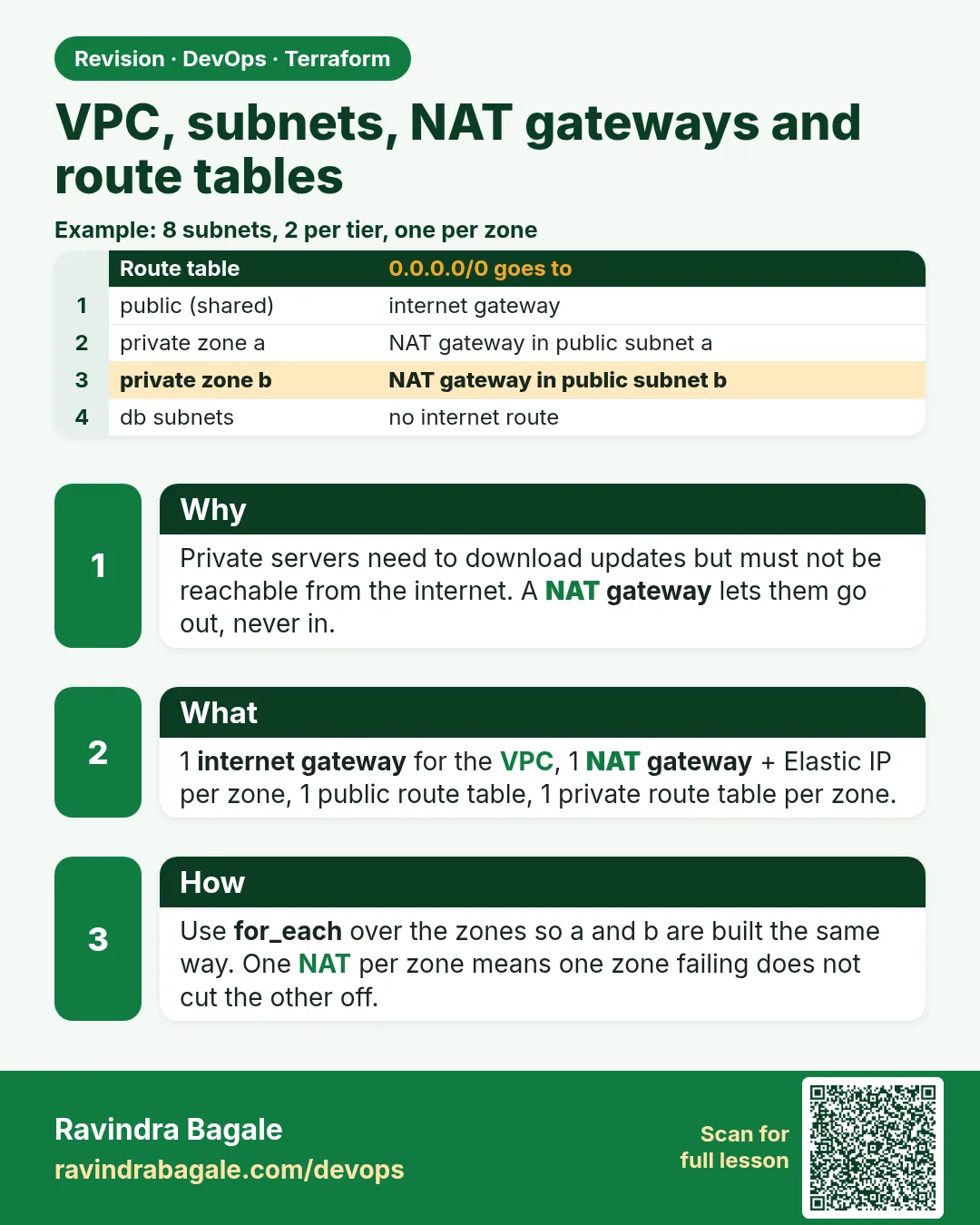
Story. Suppose we are laying the network for that shop. We need eight subnets: public, web, app and DB in each of the two zones. Public subnets route to the internet gateway. Web and app subnets are private and reach the internet only for updates, through a NAT gateway in their own zone, so a zone failure does not cut off the other zone. DB subnets get a route table with no internet route at all.
Steps
- Write network.tf.
- Run terraform validate.
- Run terraform plan -target=aws_route_table_association.db -target=aws_route_table_association.app -target=aws_route_table_association.web -target=aws_route_table_association.public to review only the network.
- Check: 8 subnets, 2 NAT, 4 route tables, 8 associations.
# ---- network.tf ----
data "aws_availability_zones" "available" {
  state = "available"
}

locals {
  azs = {
    a = data.aws_availability_zones.available.names[0]
    b = data.aws_availability_zones.available.names[1]
  }
  idx = { a = 0, b = 1 }
}

resource "aws_vpc" "main" {
  cidr_block           = var.vpc_cidr
  enable_dns_support   = true
  enable_dns_hostnames = true
  tags = {
    Name = "${var.project}-vpc"
  }
}

resource "aws_internet_gateway" "igw" {
  vpc_id = aws_vpc.main.id
  tags = {
    Name = "${var.project}-igw"
  }
}

resource "aws_subnet" "public" {
  for_each                = local.azs
  vpc_id                  = aws_vpc.main.id
  cidr_block              = cidrsubnet(var.vpc_cidr, 8, 1 + local.idx[each.key])
  availability_zone       = each.value
  map_public_ip_on_launch = true
  tags = {
    Name = "${var.project}-public-${each.key}"
  }
}

resource "aws_subnet" "web" {
  for_each          = local.azs
  vpc_id            = aws_vpc.main.id
  cidr_block        = cidrsubnet(var.vpc_cidr, 8, 11 + local.idx[each.key])
  availability_zone = each.value
  tags = {
    Name = "${var.project}-web-${each.key}"
  }
}

resource "aws_subnet" "app" {
  for_each          = local.azs
  vpc_id            = aws_vpc.main.id
  cidr_block        = cidrsubnet(var.vpc_cidr, 8, 21 + local.idx[each.key])
  availability_zone = each.value
  tags = {
    Name = "${var.project}-app-${each.key}"
  }
}

resource "aws_subnet" "db" {
  for_each          = local.azs
  vpc_id            = aws_vpc.main.id
  cidr_block        = cidrsubnet(var.vpc_cidr, 8, 31 + local.idx[each.key])
  availability_zone = each.value
  tags = {
    Name = "${var.project}-db-${each.key}"
  }
}

resource "aws_eip" "nat" {
  for_each = local.azs
  domain   = "vpc"
}

resource "aws_nat_gateway" "nat" {
  for_each      = local.azs
  allocation_id = aws_eip.nat[each.key].id
  subnet_id     = aws_subnet.public[each.key].id
  depends_on    = [aws_internet_gateway.igw]
  tags = {
    Name = "${var.project}-nat-${each.key}"
  }
}

resource "aws_route_table" "public" {
  vpc_id = aws_vpc.main.id
  route {
    cidr_block = "0.0.0.0/0"
    gateway_id = aws_internet_gateway.igw.id
  }
  tags = {
    Name = "${var.project}-rt-public"
  }
}

resource "aws_route_table" "private" {
  for_each = local.azs
  vpc_id   = aws_vpc.main.id
  route {
    cidr_block     = "0.0.0.0/0"
    nat_gateway_id = aws_nat_gateway.nat[each.key].id
  }
  tags = {
    Name = "${var.project}-rt-private-${each.key}"
  }
}

resource "aws_route_table" "db" {
  vpc_id = aws_vpc.main.id
  tags = {
    Name = "${var.project}-rt-db"
  }
}

resource "aws_route_table_association" "public" {
  for_each       = aws_subnet.public
  subnet_id      = each.value.id
  route_table_id = aws_route_table.public.id
}

resource "aws_route_table_association" "web" {
  for_each       = aws_subnet.web
  subnet_id      = each.value.id
  route_table_id = aws_route_table.private[each.key].id
}

resource "aws_route_table_association" "app" {
  for_each       = aws_subnet.app
  subnet_id      = each.value.id
  route_table_id = aws_route_table.private[each.key].id
}

resource "aws_route_table_association" "db" {
  for_each       = aws_subnet.db
  subnet_id      = each.value.id
  route_table_id = aws_route_table.db.id
}
What each line does
locals { azs = { a = ..., b = ... } }— The two zone names, keyed a and b, used by every for_each.idx = { a = 0, b = 1 }— Numbers for the CIDR maths.cidrsubnet(var.vpc_cidr, 8, 1 + local.idx[each.key])— Public a = 10.40.1.0/24, public b = 10.40.2.0/24.11 + ... / 21 + ... / 31 + ...— Web 10.40.11-12, app 10.40.21-22, DB 10.40.31-32. Easy to read in the console.map_public_ip_on_launch = true— Only public subnets give public IPs.aws_eip "nat" for_each = local.azs— One Elastic IP per NAT gateway.aws_nat_gateway "nat" subnet_id = aws_subnet.public[each.key].id— A NAT in each public subnet, so each zone is independent.aws_route_table "public" route → gateway_id— One shared public route table to the IGW.aws_route_table "private" for_each = local.azs— One private route table per zone, pointing at that zone's NAT.aws_route_table "db" (no route block)— Only the built-in local route: the database cannot reach the internet.aws_route_table_association "web" route_table_id = private[each.key]— Web subnet a uses NAT a; web subnet b uses NAT b. The same for app.
When it is green.
Plan: 26 to add, 0 to change, 0 to destroy.   (network only, with -target)
aws_nat_gateway.nat["a"]: Creation complete after 1m35s
aws_nat_gateway.nat["b"]: Creation complete after 1m45s
When it is red.
Error: creating EC2 NAT Gateway: Gateway.NotAttached:
Network vpc-... has no Internet gateway attached
Fix. The NAT was created before the internet gateway. Keep depends_on = [aws_internet_gateway.igw] on the NAT gateway.
What: every term in plain English
- VPC — Virtual Private Cloud. Your own private network in AWS, here 10.40.0.0/16.
- subnet — A slice of the VPC range that lives in one zone, for example 10.40.11.0/24 in ap-south-1a.
- cidrsubnet() — A Terraform function that carves a smaller range out of a bigger one by number.
- internet gateway (IGW) — The VPC door to the internet. Public route tables send 0.0.0.0/0 to it.
- NAT gateway — Lets private servers make outbound calls, such as dnf updates, while blocking inbound connections.
- Elastic IP (EIP) — A fixed public IPv4 address. Each NAT gateway needs one.
- route table — A list of rules saying where traffic for each destination goes.
- for_each — Creates one copy of a resource for each key in a map, here one per zone.
Example 1: Check the CIDR maths in terraform console
At Amazon India interviews, candidates are asked to split a /16. Using terraform console you see the exact ranges before creating anything.
- Open terraform console.
- Call cidrsubnet with each number.
- Compare with the plan.
terraform console
> cidrsubnet("10.40.0.0/16", 8, 1)
> cidrsubnet("10.40.0.0/16", 8, 11)
> cidrsubnet("10.40.0.0/16", 8, 21)
> cidrsubnet("10.40.0.0/16", 8, 31)
Output
"10.40.1.0/24"
"10.40.11.0/24"
"10.40.21.0/24"
"10.40.31.0/24"
What it shows: 8 new bits on a /16 give a /24. The number picks which /24. 1-2 public, 11-12 web, 21-22 app, 31-32 DB.
Example 2: Create all subnets of one layer with for_each
Writing eight subnet blocks by hand invites copy-paste mistakes. HCL teams at Wipro use one block per layer with for_each over the zones map.
- Define local.azs and local.idx.
- Write one aws_subnet per layer with for_each.
- Plan and see two of each.
data "aws_availability_zones" "up" {
  state = "available"
}

locals {
  azs = { a = data.aws_availability_zones.up.names[0], b = data.aws_availability_zones.up.names[1] }
  idx = { a = 0, b = 1 }
}

resource "aws_subnet" "web" {
  for_each          = local.azs
  vpc_id            = aws_vpc.main.id
  availability_zone = each.value
  cidr_block        = cidrsubnet(var.vpc_cidr, 8, 11 + local.idx[each.key])
  tags              = { Name = "${var.project}-web-${each.key}" }
}
terraform plan | grep "aws_subnet.web"
Output
# aws_subnet.web["a"] will be created
# aws_subnet.web["b"] will be created
What it shows: The keys a and b appear in the address, so you always know which zone a subnet belongs to.
Example 3: One NAT gateway per zone
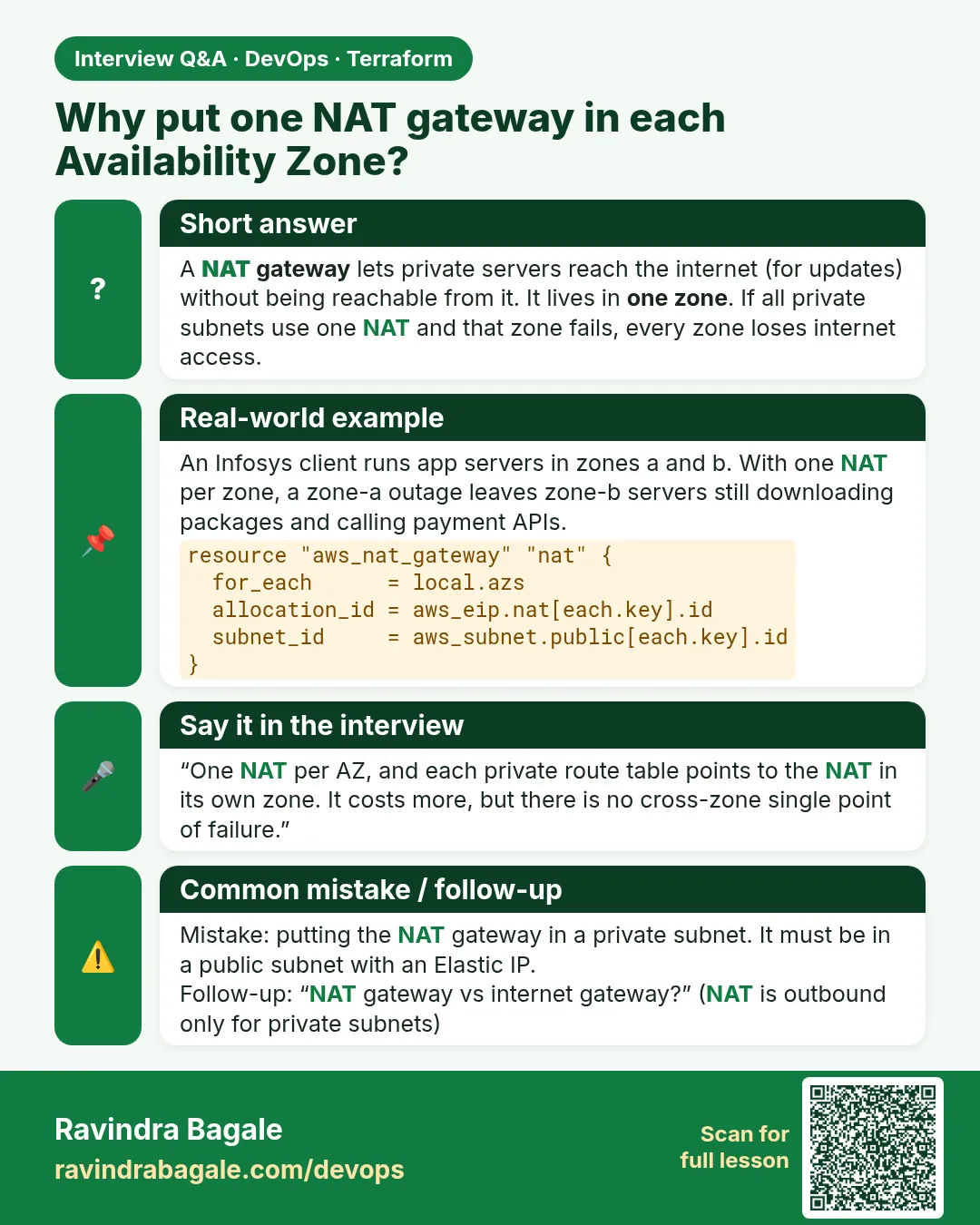
If both private zones share one NAT in zone a, a zone a outage also cuts zone b off the internet. Netflix-style designs keep zones independent.
- Create one EIP per zone.
- Create one NAT per zone in that zone public subnet.
- Point each private route table to its own NAT.
resource "aws_eip" "nat" {
  for_each = local.azs
  domain   = "vpc"
}

resource "aws_nat_gateway" "nat" {
  for_each      = local.azs
  allocation_id = aws_eip.nat[each.key].id
  subnet_id     = aws_subnet.public[each.key].id
  depends_on    = [aws_internet_gateway.igw]
}

resource "aws_route_table" "private" {
  for_each = local.azs
  vpc_id   = aws_vpc.main.id
  route {
    cidr_block     = "0.0.0.0/0"
    nat_gateway_id = aws_nat_gateway.nat[each.key].id
  }
}
Output
aws_nat_gateway.nat["a"]: Creation complete after 1m45s [id=nat-0a1b2c3d4e5f6a7b8]
aws_nat_gateway.nat["b"]: Creation complete after 1m52s [id=nat-0b2c3d4e5f6a7b8c9]
What it shows: NAT gateways take one to two minutes. depends_on makes sure the IGW exists first.
Example 4: Attach web and app subnets to the same private table
Both web and app subnets in zone a should use NAT a. Merging the two maps keeps the associations short and clear.
- Build a map of web and app subnets with their zone key.
- Associate each with route_table.private[zone].
- Plan and count associations.
locals {
  private_subnets = merge(
    { for k, s in aws_subnet.web : "web-${k}" => { id = s.id, az = k } },
    { for k, s in aws_subnet.app : "app-${k}" => { id = s.id, az = k } }
  )
}

resource "aws_route_table_association" "private" {
  for_each       = local.private_subnets
  subnet_id      = each.value.id
  route_table_id = aws_route_table.private[each.value.az].id
}
Output
# aws_route_table_association.private["app-a"] will be created
# aws_route_table_association.private["app-b"] will be created
# aws_route_table_association.private["web-a"] will be created
# aws_route_table_association.private["web-b"] will be created
What it shows: Keys like web-a read like English. That makes the plan easy to review.
Example 5: Give DB subnets no internet route
Database subnets at ICICI Bank never have a 0.0.0.0/0 route. A table with only the local route makes the database unreachable from the internet by design.
- Create a db route table with no route blocks.
- Associate both DB subnets.
- Check the routes with the CLI.
resource "aws_route_table" "db" {
  vpc_id = aws_vpc.main.id
  tags   = { Name = "${var.project}-db-rt" }
}

resource "aws_route_table_association" "db" {
  for_each       = aws_subnet.db
  subnet_id      = each.value.id
  route_table_id = aws_route_table.db.id
}
aws ec2 describe-route-tables --filters Name=tag:Name,Values=shop3t-db-rt \
  --query "RouteTables[0].Routes[].DestinationCidrBlock"
Output
[
    "10.40.0.0/16"
]
What it shows: Only the local VPC route exists. Traffic from the app subnets reaches the database; nothing else can.
Example 6: Build only the network first with -target
Debugging 62 resources at once is painful. Building the network alone first, and checking it in the console, is how Accenture lab leads teach it.
- Plan with -target on the NAT gateways and associations.
- Apply that plan.
- Run a normal plan afterwards.
terraform plan -target=aws_route_table_association.private -target=aws_route_table_association.db \
  -target=aws_route_table_association.public -out net.tfplan
terraform apply net.tfplan
terraform state list | grep -c "aws_subnet"
Output
Apply complete! Resources: 25 added, 0 changed, 0 destroyed.
8
What it shows: -target pulls in everything the targets depend on. Use it only for step-by-step builds, then run a full plan.
Command cheat sheet
| Command | What it does | When to use it |
|---|---|---|
cidrsubnet(cidr, 8, n) |
Carves a /24 | Subnet ranges |
for_each = local.azs |
One copy per zone | Subnets, NAT, tables |
aws_eip domain = "vpc" |
EIP for NAT | Before NAT |
merge(map1, map2) |
Joins maps | Associations |
terraform plan -target=ADDR |
Limits the plan | Step-by-step build |
aws ec2 describe-route-tables |
Shows routes | Verify routing |
Verify: did it work?
-
Eight subnets
aws ec2 describe-subnets --filters Name=vpc-id,Values=$(terraform output -raw vpc_id) --query "length(Subnets)"Output
8 -
Two NAT gateways available
aws ec2 describe-nat-gateways --filter Name=state,Values=available --query "length(NatGateways)"Output
2 -
DB table has one route
aws ec2 describe-route-tables --filters Name=tag:Name,Values=shop3t-db-rt --query "length(RouteTables[0].Routes)"Output
1
When it is red 1
Error: creating EC2 Subnet: InvalidSubnet.Conflict: The CIDR '10.40.11.0/24' conflicts with another subnet
Cause. Two subnets got the same number in cidrsubnet().
Fix, step by step
- Check the 1, 11, 21, 31 offsets.
- Use terraform console to print each range.
When it is red 2
Error: creating EC2 NAT Gateway: Gateway.NotAttached: Network vpc-... has no Internet gateway attached
Cause. The NAT was created before the IGW was attached.
Fix, step by step
- Add depends_on = [aws_internet_gateway.igw].
- Apply again.
When it is red 3
Error: Error creating EIP: AddressLimitExceeded: The maximum number of addresses has been reached.
Cause. The account already uses its 5 Elastic IPs in this region.
Fix, step by step
- Release unused EIPs in the console.
- Or request a quota increase.
Cleanup
terraform destroy -auto-approve
Ravindra Bagale's Tip
Pick subnet numbers you can read at a glance: 1x public, 1x web, 2x app, 3x DB. When an alert says 10.40.21.37, you instantly know it is an app server in zone a.
Practice tasks
Easy Print all ranges
Why: Know the maths.
What to do: Print all eight CIDRs in terraform console.
- cidrsubnet with 1,2,11,12,21,22,31,32.
Check: Eight /24 ranges.
Easy List subnets by zone
Why: Read for_each keys.
What to do: Run terraform state list and find the a and b keys.
- grep aws_subnet.
Check: Eight addresses with a or b.
Medium Use one NAT only
Why: Compare cost and risk.
What to do: Change the design to one NAT and write what breaks if zone a fails.
- Point both tables to nat["a"].
Check: You can explain the trade-off.
Hard Add a third zone
Why: Scale the map.
What to do: Add zone c to local.azs and idx and plan.
- names[2], idx c = 2.
Check: Plan adds 4 subnets, 1 NAT, 1 EIP.
Easy Say it in two lines
Why: If you can say it simply, you understand it.
What to do: Write two short lines about this lesson for a fresher.
- Write the problem it solves.
- Write the one command or file you use.
- Read it aloud.
Check: A fresher understands it without a question.
Easy Start a safe lab folder
Why: Practice needs a throwaway place.
What to do: Make a new folder with versions.tf and a random_pet resource, so no AWS cost.
- mkdir tf-lab and cd into it.
- Add the hashicorp/random provider and one random_pet.
- Run terraform init and terraform apply.
Check: Apply complete! with 1 added.
Medium Break it on purpose
Why: You must know the red output by face.
What to do: Cause one error from the red part of this lesson and fix it.
- Follow one red section.
- Copy the exact message to your notes.
- Write the fix in one line.
Check: You fixed it without searching the web.
Medium Run it twice
Why: A second run must be quiet.
What to do: Run the same plan two times with no edits.
- Run terraform plan.
- Run it again.
- Explain any change it still shows.
Check: The second plan says No changes, or you can explain each line.
Medium Write a runbook page
Why: At 2 a.m. nobody remembers flags.
What to do: Write a one-page runbook for this lesson.
- Title, when to use, exact commands, how to check, how to undo.
Check: A teammate can follow it alone.
Medium Run it from a pipeline
Why: Real teams run Terraform from CI, not from laptops.
What to do: Run the main command of this lesson inside a GitHub Actions or Jenkins job.
- Add a job with hashicorp/setup-terraform or a Terraform Docker image.
- Give it AWS access through an IAM role, never a key in the file.
- Run init, then the command from this lesson.
Check: The job log shows the same output you saw on your laptop.
Medium Check the cost
Why: Labs left running cost real money.
What to do: Find what this lesson would cost per day if you forgot to destroy it.
- Open the AWS Pricing Calculator.
- Add each resource from your plan.
- Write the daily cost in your notes.
Check: You know the daily cost and you ran terraform destroy.
Hard Draw the flow top to bottom
Why: A drawing shows the order of work.
What to do: Draw this lesson as boxes from top to bottom.
- Start at your code, go through plan and state, end at AWS.
- Mark where each command reads or writes.
Check: Each box matches a real step you ran.
Hard Explain it like an interview
Why: Interviewers want real stories.
What to do: Record a 60 second answer about this lesson.
- Say the problem, the command, and one error you hit.
Check: Your answer has a real command and a real error message.
Homework: try at home
Try at home
Write the network.tf for a 10.50.0.0/16 VPC with the same four layers and prove the ranges in terraform console.
Recap
- Eight subnets: four layers in two zones.
- cidrsubnet keeps ranges tidy.
- One NAT per zone keeps zones independent.
- DB subnets have no internet route.
- Build the network first, then the tiers.
FAQ
Why /24 subnets?
256 addresses per subnet is plenty for a lab and easy to read.
Does a NAT gateway need a public subnet?
Yes. It sits in the public subnet and uses the IGW.
Can I use a NAT instance instead?
Yes, it is cheaper, but you manage and patch it yourself.
Why depends_on on the NAT?
The NAT needs an attached IGW, and there is no direct reference to show that.
Interview questions
-
How does a private subnet reach the internet?
Through a NAT gateway in a public subnet, via a 0.0.0.0/0 route.
-
Why one NAT gateway per AZ?
So a zone failure does not cut off private subnets in other zones.
-
What makes a subnet public?
Its route table sends 0.0.0.0/0 to an internet gateway.
-
What does cidrsubnet do?
It calculates a smaller CIDR block from a larger one by adding bits and a number.
Quick quiz
Q1. VPC range in this lab?
10.40.0.0/16
Q2. Range of app subnet a?
10.40.21.0/24
Q3. What does a NAT gateway need?
An Elastic IP and a public subnet
Q4. Routes in the DB table?
Only local
Q5. Flag to build part of a config?
-target
Samajla ka?
 Revision card
 Interview card