17.2 Horizontal scaling (scale out)
Why more servers, not a bigger one
Vertical scaling made one cook a larger stove. The shop still has one cook. If that cook goes home, example.com is down. Horizontal scaling opens a second counter.
Horizontal scaling (scale out) means more instances of the same size. Scale in means removing some of them. The instances you already have do not have to stop. A new one launches beside them. That is why a viral reel, a New Year flood of WhatsApp messages, a YouTube video in its first hour, Netflix at 9 pm, Amazon on a sale morning, or Zomato at dinner is a horizontal problem: the spike is more of the same work, and you want more copies answering it. You do not stop the only server in the middle of the spike to change its type.
Worked example: one t3.micro at 90%, or two at about 45%
Same site, same page, same AMI. Only the number of servers changes.
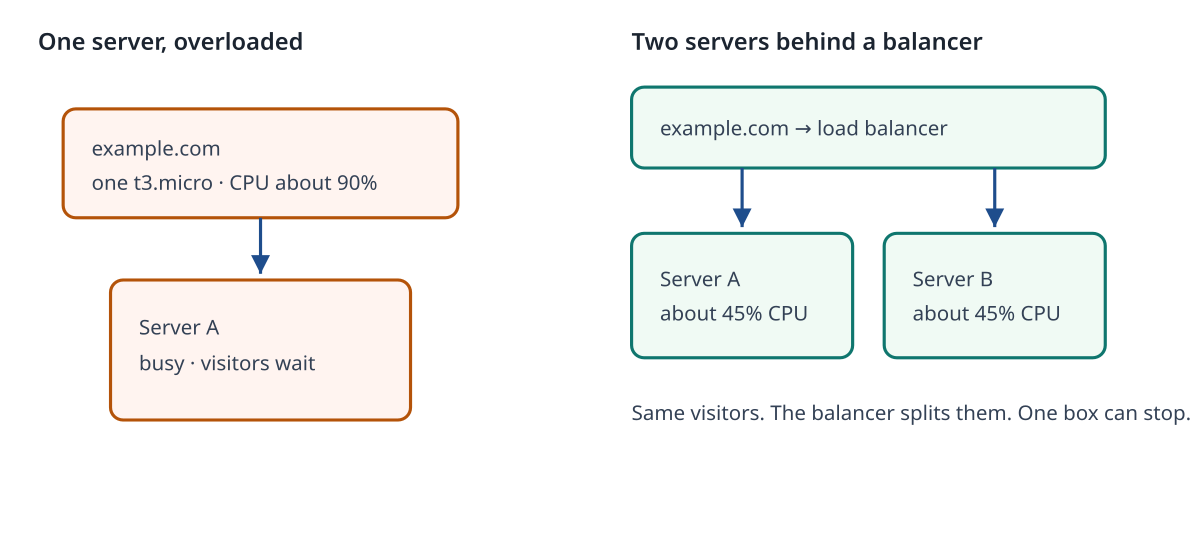
| One server | Two servers behind a load balancer | |
|---|---|---|
| Instance type | t3.micro |
two times t3.micro |
| CPU | about 90% | about 45% each, if the balancer splits the same visitors in half |
| What visitors type | example.com pointed at one public IP | example.com pointed at the load balancer |
| If you stop one instance | example.com is down | The balancer stops sending people to the dead one. The other still answers |
| Disk | The site files are on this EBS volume | Each instance has its own disk. A file saved only on instance A is invisible on instance B |
| Downtime to add the second | You are not changing the first type, so the first one keeps running | The second one boots while the first one serves |
The 45% figure is the classroom arithmetic. The same visitors, split across two equal machines, are about half the CPU if the work splits evenly and if the page is not waiting on one shared database. It will not be exactly 45.00. It is the picture you should be able to say out loud: "90 on one box, or about 45 on each of two boxes."
The app has to be stateless enough
Stateless here means the next request may land on the other instance and still work. The load balancer does not promise that the same person always reaches the same box.
- A file uploaded only to
/var/www/html/uploadson instance A is not on instance B. A real upload folder belongs in S3, not on one server's disk. - A login kept only in the memory of instance A is forgotten when the next click goes to instance B. Sessions belong in a store both servers can read, or you are not ready to scale out.
- The database is not copied onto each web server. Chapter 16 already put MySQL on RDS. Both instances use the same RDS endpoint. Two web servers, one database.
example.com in this course can scale out as a demo because the pages do not depend on a file that exists on only one disk. Say that limit in the interview. Do not claim a food-delivery app "just adds servers" if orders live on one machine's disk.
The load balancer is why example.com stays one name
People only reach the new instance if something spreads traffic. That something is a load balancer. In AWS the usual pieces are an Elastic Load Balancer and a target group.
- The balancer has one DNS name, such as
example-web-123.ap-south-1.elb.amazonaws.com. Yours will differ. Visitors do not learn two public IPs. - example.com is a DNS name you point at that balancer (Chapter 9). You do not point example.com at instance A today and instance B tomorrow.
- The target group is the list of instances that may receive requests, on port 80 for this lab. Health checks ask each instance for a page. An instance that does not answer is taken out of the list.
- An Application Load Balancer needs subnets in two Availability Zones. That is a rule of the balancer, not of your app. The instances can still be the small lab instances you already understand.
A second t3.micro with nobody pointing at it does not help visitors. It is a computer switched on in an empty room. Horizontal scaling without a balancer is only "I launched another instance".
This chapter's worked picture is:
  example.com  -->  load balancer  -->  target group
                                      --> t3.micro A   ~45% CPU
                                      --> t3.micro B   ~45% CPU
Creating the balancer is part of the manual lab in the next section, because that is when the second instance has to be attached. Read the picture now. Click it in section 17.3.
| Vertical (the section 17.1 example) | Horizontal (this example) | |
|---|---|---|
| What you add | Memory on one instance (t3.micro to t3.small) |
A second t3.micro |
| CPU story | 90% may stay near 90%, because vCPUs stayed at 2 | about 90% becomes about 45% and 45% |
| Downtime | Yes, while the instance is stopped | No, the first instance keeps serving |
| If one box dies | example.com dies | The balancer uses the one that is left |
| Disk | The same EBS volume comes back | Each instance has its own disk |
| Hard limit | The largest type in that family, and the AMI architecture | Whether the app works on more than one copy, and your account's instance quota |
| Famous-app shape | One database server made larger | The reel, the video, the sale, the dinner rush |
Lab
Chala, on paper only. Do not launch anything yet.
- Draw one box. Label it
t3.microand 90% CPU. - Write example.com with an arrow to that one box.
- Draw a load balancer.
- Draw two boxes under it. Label each
t3.microand about 45% CPU. - Write example.com with an arrow to the balancer, not to either box.
- Write one sentence: an upload that exists only on the first disk is missing on the second.
- Stop. The click-by-click launch is section 17.3.