Networking basics: client and server, IP address, IPv4 counting, static and dynamic IP, gateway
Let's start our first lecture. Before we touch AWS or Linux, we learn how two machines on the internet talk to each other. We start from something you do every day, opening Instagram on your phone, and we shrink it down to something you can try at home tonight: logging into your own WiFi router. Don't worry, you will get it slowly.
What you will learn in this class
- Why we practise on a cloud server, not VirtualBox
- Why networking comes before Linux
- Client and server: request and response
- Why every machine needs an IP address
- IPv4 and IPv6
- IPv4: 4 parts, each 0 to 255
- Counting IPs: 0.0.0.255 + 1 = 0.0.1.0
- Total IPv4: 4,294,967,296
- Why IPv4 is running short
- Static IP and dynamic IP
- Why a server needs a fixed IP
- Gateway IP and the packet's journey
- Your home router, and the homework
1. Why we practise on a cloud server, not VirtualBox
Why. This is an AWS course. In a company you will not work on your own laptop; you will work on servers that sit far away in a data center. So from day one we practise the way the job is done.
What. Almost everyone in class has a Windows laptop. To learn Linux and AWS you have two options:
- Option 1: install VirtualBox on your laptop and run Linux inside it.
- Option 2: create an AWS account and launch a Linux server in the cloud, using the AWS Free Tier offer for new accounts (check what the current offer includes when you sign up).
How we choose. We take Option 2, because "we are cloud and server people". Your laptop only becomes the screen and keyboard; the real work happens on a server in AWS.
2. Why networking comes before Linux
Why. The server you launch in AWS is not in front of you. To reach it from your laptop you go over the internet. If you don't know what an IP address is, or how a request finds a server, you will be stuck at the very first connection.
What. So we spend the first 2 to 3 days on networking basics, and only then start Linux.
How it helps later.
- You launch a server in AWS.
- AWS gives that server an IP address.
- Your laptop uses that IP to connect to the server.
- After that, every Linux command you type runs on that far-away server.
3. Client and server: Instagram request and response
Why. Every app you use works the same way. Once you see one example clearly, you understand all of them.
What. Suppose I open the Instagram app on my mobile.
- My phone sends a request to Instagram's server: "show me reels".
- The server checks its database.
- The server fetches the reels from the database.
- The server sends a response back to my phone.
- The reels play on my screen.
Figure 1. The phone sends a request, the server checks the database, and the response comes back. The same pattern works for Netflix, Amazon, Paytm, PhonePe and WhatsApp.
Same pattern, different apps.
| You do this | Request goes to | Response you get |
|---|---|---|
| Open Instagram | Instagram's server | Reels |
| Press play on Netflix | Netflix's server | The video |
| Search on Amazon | Amazon's server | Product list |
| Pay with Paytm or PhonePe | The payment server | "Payment successful" |
| Send a WhatsApp message | WhatsApp's server | The ✓✓ ticks |
Where do these servers run? A company can run its servers in its own data centers or rent them from a cloud provider such as AWS, Microsoft Azure or Google Cloud (GCP). Some companies spread their app across more than one provider, so if one provider has an outage, the app keeps working from the others. This is called multi-cloud. AWS started in 2006, the earliest of these three, which is one reason it has so much experience. As listed on AWS's global infrastructure page at the time of writing, the AWS Cloud spans 124 Availability Zones in 39 Regions.
4. Why every machine needs an IP address
Why. My phone has to send the request somewhere. On the internet, "somewhere" means an address. Humans have names, and we recognise people by their names. In the same way, machines on the internet are recognised by their IP address.
Classroom line
If any two machines on the internet want to talk to each other, they must have an IP address.
Class मधलं वाक्य
Internet वर कुठल्याही दोन machines ना एकमेकांशी बोलायचं असेल, तर त्यांच्याकडे IP address असलाच पाहिजे.
Classroom line – हिंदी
"Internet mein agar kisi do machine ko ek dusre ke sath communication karna hai, toh usko IP address hona zaroori hai."
What. An IP address is a number given to a machine on a network so that other machines can send data to it.
How the app finds the server's IP. The Instagram app does not keep the server's IP written inside it. It keeps a domain name (a name like api.example.com). When the app needs the server, the phone asks DNS (Domain Name System), "what is the IP of this name?", and DNS answers with the IP. Then the phone sends the request to that IP.
- The app knows the name, for example
api.example.com. - The phone asks DNS for the IP of that name.
- DNS replies, for example
7.7.7.7. - The phone sends the request to
7.7.7.7.
5. IPv4 and IPv6
Why two kinds? IPv4 was the first version used on the internet, and it is running out of addresses (you will see the exact numbers below). IPv6 was made to solve that.
What.
| IPv4 | IPv6 | |
|---|---|---|
| Looks like | 110.7.200.3 |
2001:db8::1 |
| Parts | 4 parts, separated by dots | 8 groups, separated by colons |
| History | the original version | standardised in the late 1990s; its use has grown a lot in recent years |
| Where you see it | everywhere, including most AWS labs | more and more mobile networks and websites |
How we learn it. IPv4 is still used everywhere and it is easier to read, so we learn IPv4 first. IPv6 will come later.
6. IPv4: four parts, each from 0 to 255
Why. You must be able to look at a number and say immediately, "this is an IP address" or "this is not".
What. An IPv4 address has 4 parts separated by dots: _ . _ . _ . _. Each part can be any number from 0 to 255. Nothing bigger.
- Lowest possible:
0.0.0.0 - Highest possible:
255.255.255.255
Figure 2. Four parts, each from 0 to 255. Any part above 255 means it is not an IP address.
How to check. Worked examples:
| Number | IP address? | Why |
|---|---|---|
192.168.0.1 |
Yes | 4 parts, all between 0 and 255 |
110.7.200.3 |
Yes | 4 parts, all between 0 and 255 |
3.3.3.3 |
Yes | 4 parts, all between 0 and 255 |
1.0.100.9 |
Yes | 4 parts, all between 0 and 255 |
256.0.7.8 |
No | the first part is 256, bigger than 255 |
10.300.2.1 |
No | the second part is 300 |
1.2.3 |
No | only 3 parts |
Classroom line
No part is bigger than 255. If you see a number above 255, it is not an IP address.
Class मधलं वाक्य
कुठलाही part 255 पेक्षा मोठा नसतो. 255 च्या वरचा number दिसला, तर तो IP address नाही.
Classroom line – हिंदी
"Koi bhi part 255 se bada nahi hai... agar 255 se bada kuch digit dikh raha hai, iska matlab hai wo IP address nahi hai."
Not every number in this range can be used on the internet. Some ranges are kept for special jobs: for example 127.0.0.1 always means "this same machine", and ranges like 192.168.x.x are kept for home and office networks. We will see these in detail later.
7. Counting IPs: what comes after 0.0.0.255?
Why. When AWS gives you a network, you will need to know how many IPs are inside it. That starts with simple counting.
What. Count only the last part first:
0.0.0.00.0.0.10.0.0.2- … keep going …
0.0.0.255
From 0 to 255 is 256 IPs.
So what is the next IP after 0.0.0.255? In class, a student said 0.0.1.256. That is wrong, because 256 is bigger than 255.
Classroom line
No. Where there is 255, write 0, and add 1 to the part on its left. So 0.0.1.0.
Class मधलं वाक्य
नाही. जिथे 255 आहे तिथे 0 लिहायचं, आणि त्याच्या डावीकडच्या part मध्ये 1 add करायचा. म्हणजे 0.0.1.0.
Classroom line – हिंदी
"Nahi... jaha pe 255 hai waha pe zero likhna hai, aur uske aage wale part mein 1 add karna hai. So 0.0.1.0."
How the rule works (like a car's odometer):
- When a part reaches 255 and you add 1, that part becomes 0.
- The part on its left goes up by 1.
- If that left part was also 255, it also becomes 0 and the next left part goes up by 1.
Figure 3. Rollover, like a car's odometer: when a part passes 255 it becomes 0 and the part on its left goes up by 1.
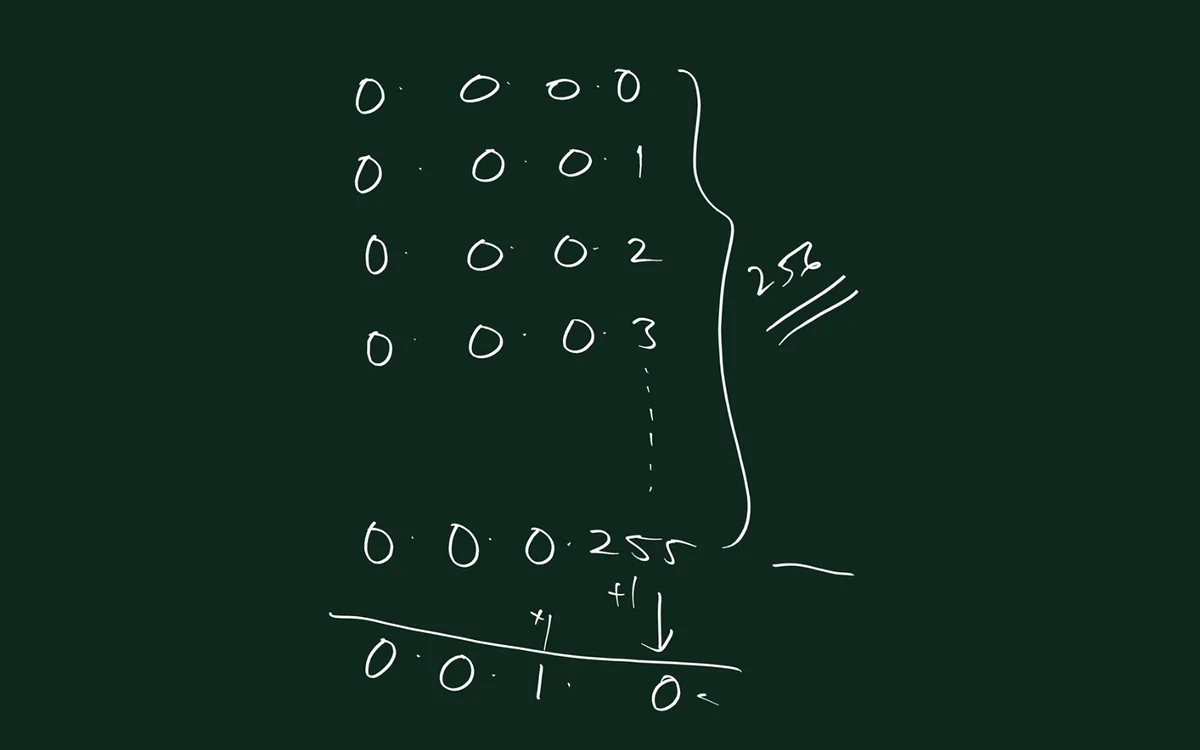
From the class board: Count IPs like a meter: 0.0.0.0 to 0.0.0.255 is 256 addresses, and the very next one is 0.0.1.0.
Worked examples:
| IP | + 1 = |
|---|---|
0.0.0.255 |
0.0.1.0 |
0.0.1.255 |
0.0.2.0 |
0.0.255.255 |
0.1.0.0 |
0.1.0.255 |
0.1.1.0 |
0.255.255.255 |
1.0.0.0 |
254.255.255.255 |
255.0.0.0 |
You keep counting like this until the very last IP, 255.255.255.255.
Ravindra Bagale's Tip
Many students write 0.0.1.256 or 0.0.0.256 as the next IP. Remember: a part never goes above 255. When it passes 255, it becomes 0 and the left part gets +1.
8. How many IPv4 addresses are there in total?
Why. This number explains why the world is running out of IPv4.
What and how, step by step on the board:
- Last part only:
0.0.0.0to0.0.0.255= 256 IPs. - Last two parts: when the third part is 0, the fourth part gives 256 IPs. When the third part is 1, another 256. … When the third part is 255, another 256. So 256 × 256 = 65,536 IPs.
- Last three parts: 256 × 256 × 256 = 16,777,216 IPs.
- All four parts: 256 × 256 × 256 × 256 = 4,294,967,296 IPs.
In Indian numbering, 4,294,967,296 is written 429,49,67,296, about 429 crore IPv4 addresses.
Figure 4. Every part has 256 values, so the total is 256 × 256 × 256 × 256 = 4,294,967,296, about 429 crore.
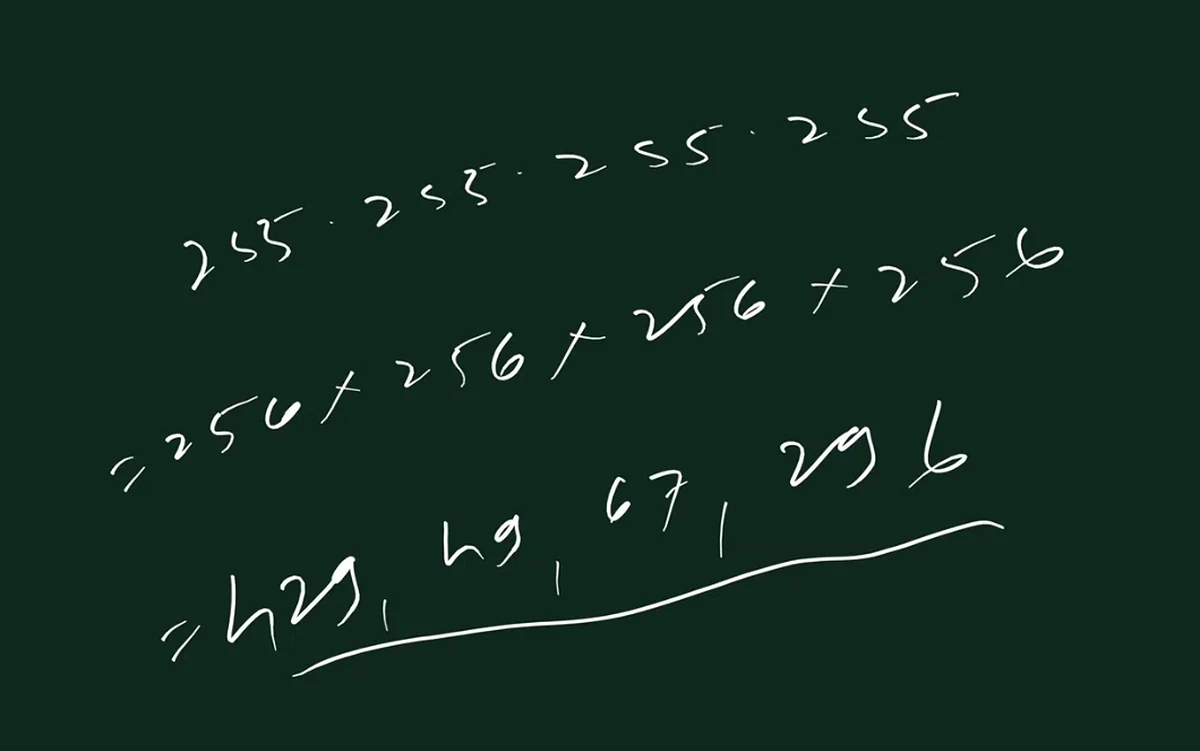
From the class board: The last address is 255.255.255.255. Each of the four parts has 256 values, so 256 × 256 × 256 × 256 = 4,294,967,296 IPv4 addresses (about 429 crore).
9. Why IPv4 is running short
Why it matters. If there are not enough addresses, new phones and servers cannot each get their own public IP. This is why tricks like dynamic IP and sharing one IP exist.
Classroom line
What's the problem now? The world's population is 800 crore, and there are only 429 crore IPs.
Class मधलं वाक्य
आता problem काय आहे? जगाची लोकसंख्या 800 कोटी, आणि IPs आहेत 429 कोटी.
Classroom line – हिंदी
"Problem kya hai abhi? Duniya ki population hai 800 crore, aur IPs hai 429 crore."
What uses IPs. It is not one IP per person. One person can need many:
- A phone with two SIMs.
- A laptop and a tablet.
- A smart TV.
- The GPS in a car, and the Android player on a car dashboard.
- Sensors and other IoT devices.
- And every server of every company.
So 429 crore is far too few. And remember, some of those 429 crore are reserved for special jobs and can never be used on the internet.
10. Static IP and dynamic IP
Why. Because IPs are few, they cannot all be given away permanently. Most devices get an IP only while they are online, and only some get a fixed one.
What. An IP address is just a number. Whether it is static or dynamic depends on how it is given to the device:
| Dynamic IP | Static IP | |
|---|---|---|
| How it is given | leased automatically by the network (DHCP) when you connect | fixed or reserved for one device |
| When you disconnect | goes back to the pool and can be given to someone else | stays with the same device |
| Who usually has it | phones, laptops, home users (clients) | servers |
| Cost | part of your normal plan | costs extra, given for a reason such as running a server |
| Board example | 3.3.3.3, later 5.5.5.5 |
7.7.7.7 |
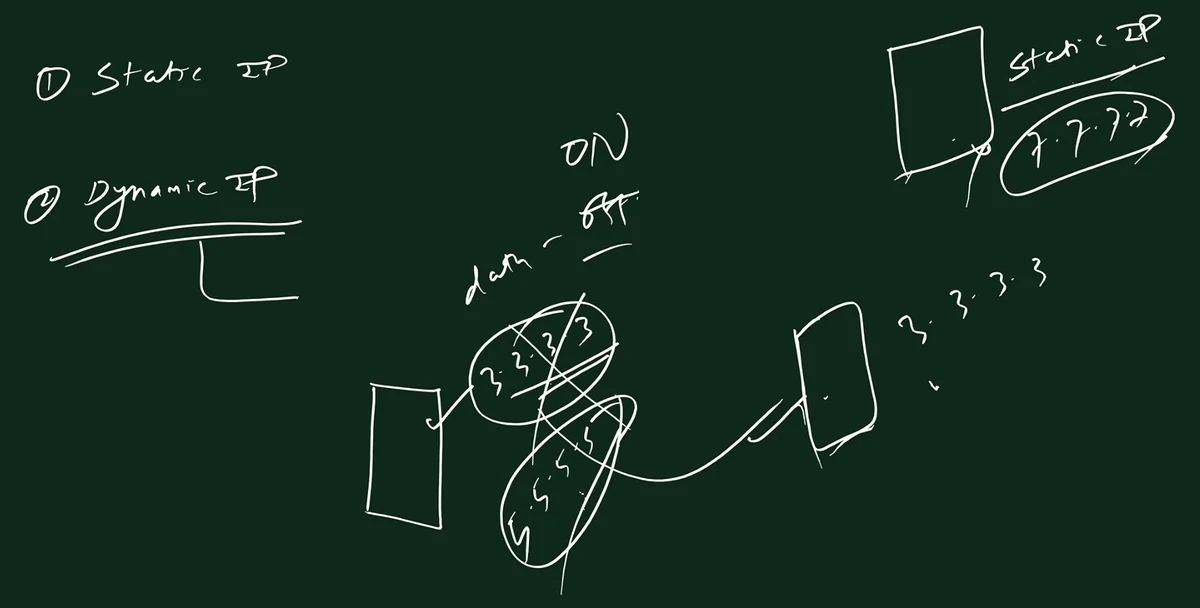
From the class board: Dynamic vs static IP: when mobile data goes off and on, the phone's dynamic IP changes (3.3.3.3 becomes 5.5.5.5) and 3.3.3.3 can be given to another phone. The server keeps its static IP, 7.7.7.7.
11. Dynamic IP: mobile data on and off
Why. This is how a few crore IPs are shared among many more devices.
What. Suppose I have a Jio SIM.
- I turn on mobile data. Only now does my phone get an IP, say
3.3.3.3. - I use WhatsApp for 30 minutes. The IP stays with my phone.
- I turn off mobile data (or switch on airplane mode, switch off the phone, or lose network).
3.3.3.3is released and goes back to the pool.- The network gives
3.3.3.3to someone else who just turned on data. - When I turn data on again, I may get a different IP, say
5.5.5.5.
Figure 5. Dynamic IP reuse: Phone A turns data off, 3.3.3.3 goes back to the pool and is given to Phone B. When Phone A comes back it gets 5.5.5.5. The server keeps its static 7.7.7.7.
Classroom line
Generally people switch off mobile data and sleep at night...
Class मधलं वाक्य
साधारण रात्री लोक mobile data off करून झोपतात...
Classroom line – हिंदी
"Generally raat ko log mobile data off karke sote hai..."
Where does that IP go at night? Not to the other side of the world. Each mobile company owns its own blocks of IPs (given through the regional registry, APNIC for India), so Jio's IPs are used only by Jio's own users.
- You switch off mobile data at night.
- Your IP goes back into Jio's pool of free IPs.
- Another Jio user who switches data on (maybe a night-shift worker, or someone waking up early) gets that IP.
- In the morning you switch data on and get whichever free IP Jio has at that moment, often a different one.
One more real-life point. Mobile companies also save IPs another way: they often give phones a private address and let many phones share one public IP (this is called carrier-grade NAT). On the board we keep 3.3.3.3 to keep the idea simple; the idea of reuse is the same.
12. Static IP: it stays
Why. Some machines must be found at the same address every time, even after a restart. That is a server's job.
What. A static IP, say 7.7.7.7, stays with the device even when it is switched off.
How you get one.
- Ask your internet provider (Jio, Airtel, Vi and others) for a static IP.
- Give a reason, such as running a server.
- It costs extra, which is why not everyone takes one.
- In AWS, the static IP is called an Elastic IP. You allocate it to your account and attach it to your server.
13. Client and server: who is who?
Why. Every network diagram has clients and servers. You must know which side is which.
What.
Classroom line
The one who sends the request first, we call the client.
Class मधलं वाक्य
जो आधी request पाठवतो, त्याला आपण client म्हणतो.
Classroom line – हिंदी
"Jo pehle request bhejta hai, usko hum client kahenge."
- The server is the big box that answers, for example Instagram's server.
- The clients are everyone who asks: the Android app, the iPhone app, a browser on a laptop, an iPad, even a car screen.
- Clients usually have dynamic IPs.
- Servers usually have static IPs.
14. Why a server needs a fixed IP: the 1 crore users story
Why. Clients can change their IP every day and nothing breaks. If a server changes its IP, lakhs of people are affected.
What happens. Suppose Instagram's server was on a dynamic IP 3.3.3.3, used by 1 crore users:
- The DNS record for the app's domain name says: the server is at
3.3.3.3. - 1 crore phones have asked DNS and remember (cache) the answer
3.3.3.3for some time. - The server restarts for maintenance and, being dynamic, comes back with a new IP,
5.5.5.5. - Phones still send requests to
3.3.3.3. Nothing is there now. For those users, the app is down. - Someone must update the DNS record to
5.5.5.5, and users keep hitting the dead address until their cached answers expire. - Firewall rules and partner systems that allowed
3.3.3.3also break and must be changed. - This would happen again after every restart.
How it is solved. Give the server a fixed IP. Then a restart changes nothing: DNS still points to the right place, and firewall rules keep working. In AWS, the normal public IP of a server can change when you stop and start it, so for a server you attach an Elastic IP, which stays the same until you release it.
Figure 6. Left: a server on a dynamic IP comes back as 5.5.5.5 after a restart, while phones still go to 3.3.3.3. Right: with a fixed IP (in AWS, an Elastic IP), the restart changes nothing.
Student question: "IP kami ahet, mhanje kadhitari kai problem yeil na?" (IPs are few, so won't there be a problem some day?)
Yes, that is why static IPs are not free for life:
- A static IP from an internet provider is given for a period.
- If the period ends or it is not paid, it goes back to the pool.
- In AWS, if you release an Elastic IP, it goes back to AWS's pool, and you usually cannot get the same one back.
15. Gateway IP: how does my phone reach the server?
Why. A student asked: "Client cha IP assign jhalela ahe, ani server sathi pan ahe, mag te connect kasa hotat?" (The client has an IP and the server also has one, so how do they actually connect?) The answer is the gateway.
What. A gateway is the door out of your network. Every packet that has to go outside your network goes to the gateway first.
Example on the board. I am in Pune, in Shivaji Nagar, on Jio.
- I turn on mobile data.
- My phone gets its IP,
3.3.3.3. - My phone also gets a gateway IP,
3.3.3.1. This is the address of the Jio tower's side of the network. - Everything my phone sends to the internet goes first to
3.3.3.1.
Classroom line
Let me remove the data center from the picture; we'll just think of it as the tower.
Class मधलं वाक्य
"Chalo, data center aahe na te concept kadun takto mi... hum tower hi samajh ke lete hai."
चला, data center ची concept मी काढून टाकतो... आपण tower च समजून घेऊ.
Classroom line
Let me remove the data center from the picture; we'll just think of it as the tower.
16. Snapchat "Hi": the packet's journey, hop by hop
Why. Now we put everything together: client IP, server IP, DNS and the gateway.
What is a packet? Data on the internet travels in small pieces called packets. Each packet carries:
| Field | Example |
|---|---|
| To IP (destination) | 8.7.7.7, the Snapchat server |
| From IP (source) | 3.3.3.3, my phone |
| Data | "Hi" |
The gateway IP is not written inside the packet. The packet is only sent to the gateway.
Classroom line
The gateway IP doesn't travel inside the packet; the packet is sent to it.
Class मधलं वाक्य
Gateway IP packet बरोबर जात नाही, packet तिकडे पाठवला जातो.
Classroom line – हिंदी
"Gateway IP jata nahi hai, wahan pe bheja jata hai."
How "Hi" reaches the server. Suppose Snapchat's server is in an AWS data center in Mumbai with IP 8.7.7.7 (this is only a "suppose" example to learn with; all IPs on this board are dummy numbers).
- I type "Hi" in Snapchat on my Jio phone in Pune.
- The app knows the server's name. The phone asks DNS for its IP and gets
8.7.7.7. - The phone makes a packet: To
8.7.7.7, From3.3.3.3, Data "Hi". - The phone sends the packet to its gateway,
3.3.3.1(the tower). - The gateway router reads the To IP,
8.7.7.7, and sends the packet to the next router on the way, for example4.4.4.1. - That router does the same: reads the To IP and sends it one step closer.
- Hop by hop, the packet reaches the network that owns
8.7.7.7, and then the Snapchat server. - The reply comes back the same way, now with To
3.3.3.3and From8.7.7.7.
Figure 7. The phone asks DNS once, then sends the packet to its gateway. Each router reads the To IP and forwards it one hop closer, until it reaches the server.
17. How do the routers know which way to send it?
Why. The tower has never heard of your message. How does it know which direction Mumbai is?
What. Two different things are working here:
- DNS is used by the phone, not by the towers. A company buys its domain name from a registrar (for example GoDaddy) and adds a DNS record that says "this name is at this IP". Your phone uses DNS to turn the name into an IP, like
8.7.7.7. - Routers forward using routes. Every network on the internet (Jio, AWS, and others) announces which IP ranges it owns. This announcing is done with a protocol called BGP. Every router builds a table from these announcements: "for this range, send it that way".
- So the tower does not need to know Snapchat. It only needs to know "
8.7.7.7is in a range owned by that network; send it to the next hop that way".
18. Your home WiFi router is your gateway
Why. You can't log into a Jio tower, but you can log into the small box at home. It does the same job, so it is the best place to see a gateway with your own eyes.
Classroom line
Has anyone ever configured the router at home? … Never. … Everyone has one at home these days.
Class मधलं वाक्य
"Kadhi koni router configuration kelay ka ghari?" … "Kadhich nahi." … "Saglyanchya ghari asel aajkal."
कधी कोणी घरी router configuration केलंय का? … कधीच नाही. … आजकाल सगळ्यांच्या घरी असेल.
Classroom line
Has anyone ever configured the router at home? … Never. … Everyone has one at home these days.
What. At home, the WiFi router is the gateway for all your devices:
| Device | IP (example) |
|---|---|
| Network | 192.168.0.0, the network address; it is not given to any device |
| WiFi router (gateway) | 192.168.0.1 |
| Your phone | 192.168.0.2 |
| Mom's phone | 192.168.0.3 |
| Laptop | 192.168.0.4 |
- All home devices send their packets to the router,
192.168.0.1. - These
192.168.x.xaddresses are private; they work only inside your home. - The router has one public IP from your internet provider, and it sends everything on to the provider's gateway.
- Your phones still reach the internet: the router swaps their private IP for its public IP on the way out (this is called NAT) and swaps it back on the way in.
Some routers use 192.168.1.1 instead of 192.168.0.1. Never use the .0 address for a device or for logging in.
Figure 8. Your home: phones get private IPs 192.168.0.2, .3, .4; the router is the gateway at 192.168.0.1 and has one public IP from the internet provider.
Ravindra Bagale's Tip
Many students type http://192.168.0.0 or put https and get nothing. .0 is the network address, not the router. Type http://192.168.0.1 exactly (http, then a colon, then two slashes). If that doesn't open, try http://192.168.1.1.
19. Homework: log into your home router
Classroom line
Go home, open your laptop, put this URL in, and the login screen should come.
Class मधलं वाक्य
घरी जा, laptop उघडा, laptop वर हा URL टाका... login screen आली पाहिजे.
Classroom line – हिंदी
"Aapne ghar jao, laptop open karo... laptop pe ye URL daal do... login screen aana chahiye."
Try at home
- Connect your laptop (or phone) to your home WiFi.
- Open a browser.
- Type
http://192.168.0.1and press Enter. - If nothing opens, try
http://192.168.1.1. - Still nothing? On a Windows laptop, open Command Prompt, run
ipconfig, and type the Default Gateway address in the browser. - The router's login screen should appear.
- Look at the sticker on the back of the router for the username and password. Generally it is
admin/admin. - If that doesn't work, the internet provider may have set it to someone's registered mobile number at home. Ask the person who got the connection.
- After login, find the WAN or Internet status page.
- Write down three things: the router's own IP (
192.168.0.1), the public IP the provider gave, and the provider's gateway IP. - Open the connected devices list and note the private IPs of your phones and laptop.
- Don't change any setting. Only look, then log out.
- Bring the three IPs to the next class.
Do this only on your own home router.
Classroom line
The username and password are on the back of your router.
Class मधलं वाक्य
Username आणि password तुमच्या router च्या मागे असतो.
Classroom line – हिंदी
"User name password aapke router ke peechhe hota hai."
Ravindra Bagale's Tip
The username and password are on the back of your router. If someone at home already changed it, don't keep guessing. Ask them, or ask your internet provider.
Recap
In short
- We practise on a cloud server in AWS, so we learn networking first to be able to reach it.
- The client sends a request first; the server checks the database and sends a response.
- Every machine on the internet needs an IP address. Apps keep a domain name; DNS gives the IP.
- IPv4 has 4 parts, each 0 to 255.
256.0.7.8is not an IP. - After 255 comes 0, and the left part gets +1:
0.0.0.255+ 1 =0.0.1.0. - 256 × 256 = 65,536. All four parts: 4,294,967,296, about 429 crore, for 800 crore people and many more devices.
- Static or dynamic depends on how the IP is given. Dynamic IPs are reused when you go offline.
- Servers need a fixed IP (in AWS, an Elastic IP), or DNS and firewall rules keep breaking.
- Your packet goes to the gateway first, then hop by hop to the server. The phone uses DNS; routers use routes announced with BGP.
- Your home router at
192.168.0.1is your gateway. Log in tonight.
Samjla ka? Tonight, log into your router and bring the three IPs. In the next class we go deeper into IPs.
Ravindra Bagale, trainer: linkedin.com/in/ravindra-bagale. All IPs on the board are dummy numbers for learning. Snapchat in AWS Mumbai is a "suppose" example, not a fact about Snapchat.