WhatsApp Architecture Explained: How WhatsApp Delivers Messages Securely
Short answer: WhatsApp's chat servers are written mainly in Erlang, a language built for millions of long-lived connections. Messages are protected with end-to-end encryption based on the Signal protocol, so WhatsApp's servers pass along messages they cannot read. Photos and videos are encrypted on your phone and uploaded to a blob store. Since Meta bought WhatsApp in 2014, it runs in Meta's data centres. In 2024 to 2026 Meta added new privacy systems (IPLS for contacts, encrypted backups) and a Rust media library on devices.
Suppose you send a photo to your mother on WhatsApp
You are in Bengaluru and send a photo of your new flat to your mother in Kolhapur. Here is what happens:
- Your phone already has a secure session with your mother's phone, set up with the Signal protocol.
- Your phone encrypts the photo with a fresh random key and uploads the encrypted file to WhatsApp's blob store.
- Your phone then sends an end-to-end encrypted message to your mother with the key and a pointer to the file.
- This message travels over your phone's always-open connection to a WhatsApp chat server (Erlang).
- If your mother's phone is online, the server pushes the message to it at once. If not, the encrypted message waits on the server until she comes online.
- Her phone downloads the encrypted photo, decrypts it with the key and shows it. You see two ticks, then two blue ticks.
What architecture style does WhatsApp use?
WhatsApp is famous for doing a lot with a small team and a simple, focused design.
- Connection servers in Erlang: each phone keeps a long-lived connection to a chat server. In 2012 one server handled over 2 million connections at once.
- End-to-end encryption by default: the server routes messages but does not hold the keys. In 2023 WhatsApp added key transparency so people can check they are talking to the right keys.
- Privacy-first storage (2024 to 2026): IPLS stores contact lists so that even WhatsApp cannot read them (2024), and Meta strengthened end-to-end encrypted backups (2026).
- Rust on billions of devices (2026): WhatsApp rewrote its media-checking library in Rust to protect users from malicious files.
- Shared Meta infrastructure: WhatsApp now runs in Meta's data centres. The detailed current server layout is not publicly shared.
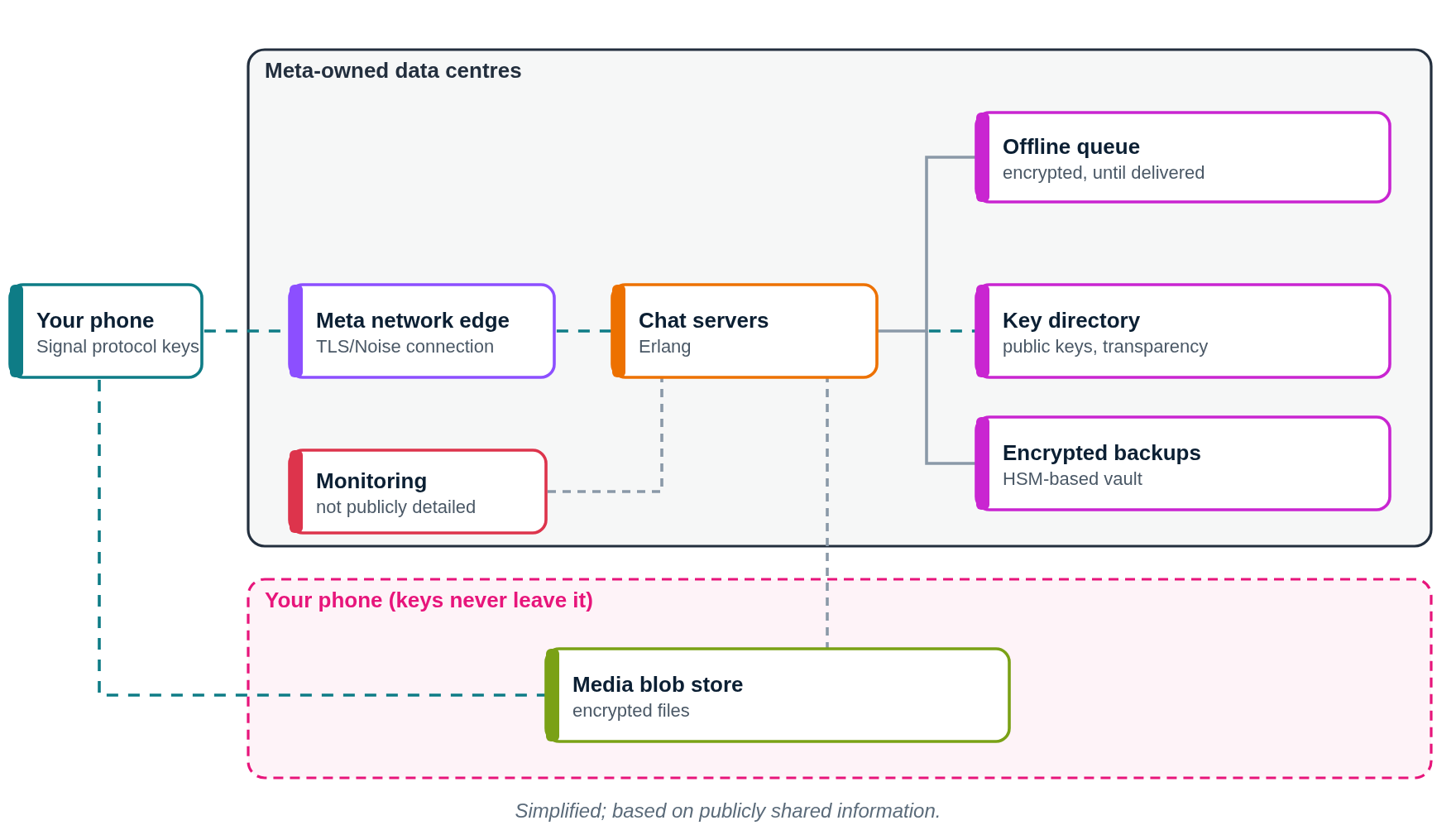
WhatsApp architecture diagram (public parts)
This diagram shows only what WhatsApp or its partners have shared publicly. Press Play to follow a request step by step.
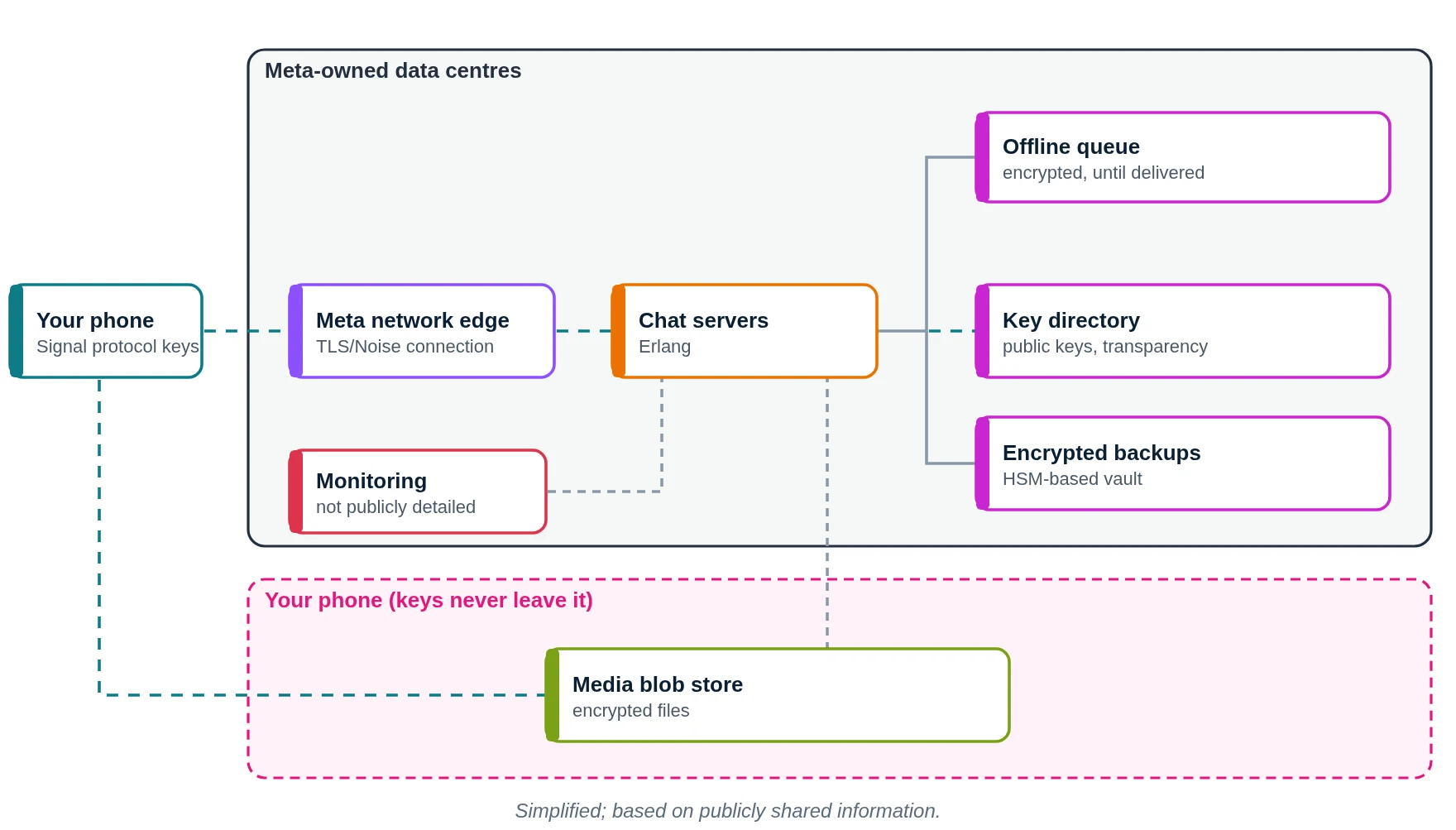
- Your phone encrypts the message with the Signal protocol.
- It travels over your always-open connection to Meta's edge.
- An Erlang chat server routes it.
- If the receiver is offline, the encrypted message waits in a queue.
- Public keys come from the key directory.
- Chat history backups can be end-to-end encrypted.
- Servers are monitored for health.
- Encrypted photos and videos sit in the blob store.
- The receiver's phone decrypts and shows it.
What does WhatsApp use? Main technologies
| Layer | What WhatsApp uses (public) | What it does in simple words |
|---|---|---|
| Server language | Erlang (on BEAM) | Handles millions of connections |
| Encryption | Signal protocol | Only sender and receiver can read |
| Key checks | Key transparency (2023) | Verify you have the right keys |
| Contacts | IPLS (2024) | Private contact storage |
| Backups | End-to-end encrypted backups (2026 update) | Protects your chat history |
| Device code | Rust media library (2026) | Checks files for malware |
| Media | Encrypted blob store | Holds encrypted photos and videos |
| Hosting | Meta data centres | Servers and storage |
Which cloud provider does WhatsApp use?
WhatsApp uses no public cloud for its main service that is publicly known. It became part of Facebook (now Meta) in 2014 and runs in Meta-owned data centres. As of 2026 WhatsApp delivers end-to-end encrypted messaging to over 3 billion people.
How it started: Erlang and FreeBSD (2011 to 2014)
- In January 2012 one server passed 2 million simultaneous TCP connections, after tuning FreeBSD and Erlang.
- By 2014 WhatsApp had scaled Erlang on FreeBSD servers, split services into partitions and handled hundreds of millions of users with a small team.
- Since then, WhatsApp has moved onto Meta's shared infrastructure. Details of that move are not publicly shared.
How does WhatsApp store data?
- Messages are stored on your phone. The server keeps an encrypted message only until it is delivered.
- Media is encrypted on your phone and stored as an encrypted blob.
- Contacts can be stored privately with IPLS (2024).
- Backups can be end-to-end encrypted (Meta, 2026).
- Database technology for the servers today is not publicly shared.
How does WhatsApp monitor its systems?
How WhatsApp monitors its servers today is not publicly shared in detail. As part of Meta, it can use Meta's shared monitoring tools, but WhatsApp's own alerting setup is not publicly shared.
If we built an app like WhatsApp on AWS (illustrative)
Please read this first
This section is a learning design by Ravindra Bagale. It is not WhatsApp's real setup. WhatsApp runs in Meta's own data centres. We use AWS here because it is what you learn in the AWS course.
Suppose you want to build "KattaChat", a chat app for a college. Here is a simple AWS layout. Real end-to-end encryption needs a proven library such as the Signal protocol; never invent your own.
1. Network: VPC, subnets, route tables, gateways
- Create one VPC with CIDR
10.0.0.0/16in the Mumbai region (ap-south-1). - Use two Availability Zones (A and B), so one AZ failing does not stop the app.
- In each AZ make three subnets: public (load balancer, NAT gateway), private app (your code) and private data (databases, cache).
- Attach one internet gateway (IGW) to the VPC. Public route table:
0.0.0.0/0 → IGW. This route is what makes a subnet public. - Private app route table:
0.0.0.0/0 → NAT gateway, so servers can download updates but nobody can connect in from the internet. - Private data route table: only the local VPC route. Use VPC endpoints to reach S3, DynamoDB and SQS without going over the internet.
2. Compute: where the code runs
- ALB with WebSocket support in the public subnets.
- Chat servers on EKS in private subnets, keeping a WebSocket per phone.
- Workers read SQS and send push notifications.
3. Storage and databases
- S3 stores encrypted photos; CloudFront delivers them.
- DynamoDB holds undelivered encrypted messages, deleted after delivery.
- ElastiCache remembers which server each online user is connected to.
- Aurora for accounts and groups.
4. Monitoring
- CloudWatch alarms on connection count and message delay.
- X-Ray traces.
- Never log message contents.
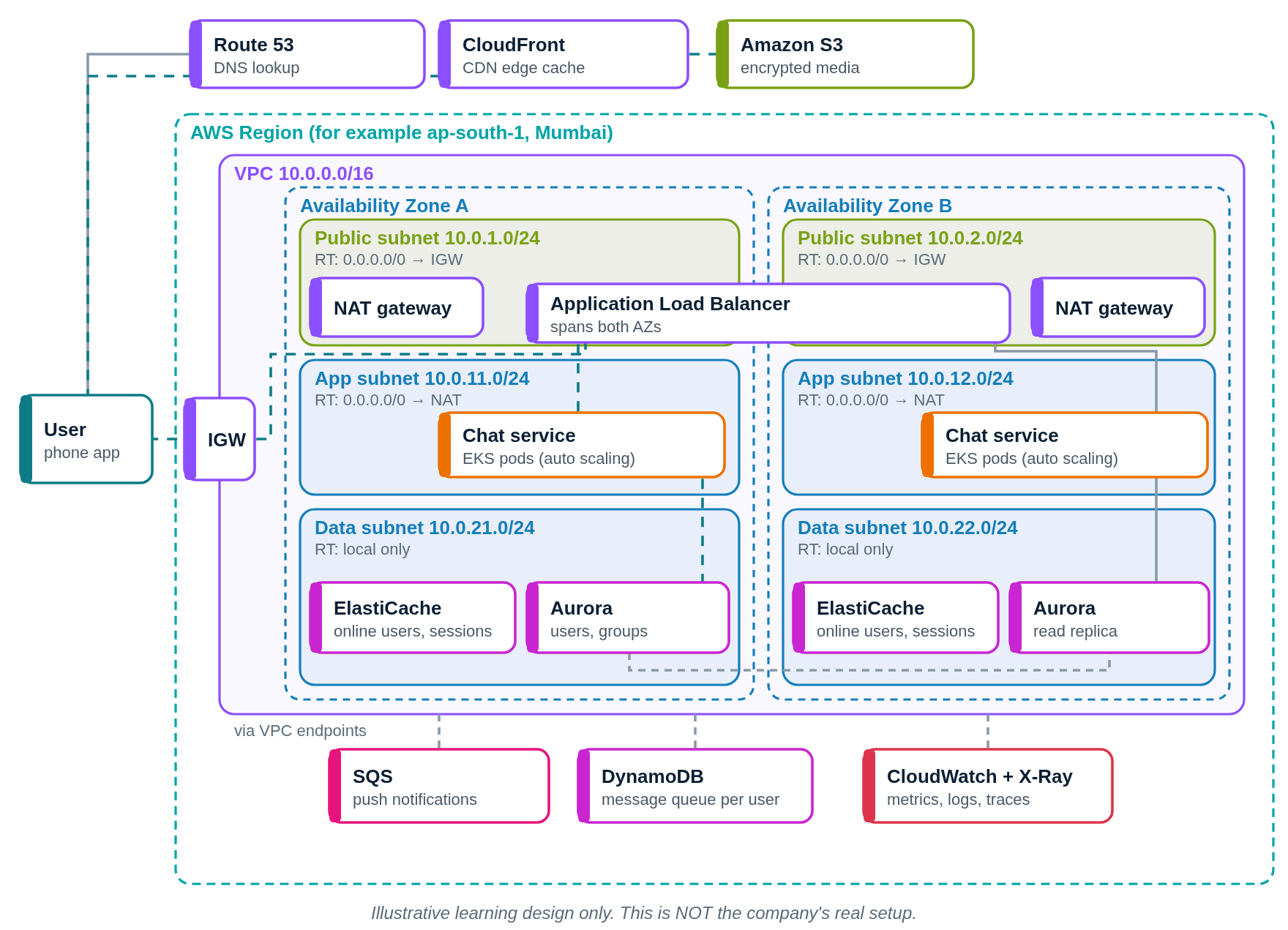
Request flow diagram
Press Play. The numbered list below the diagram lights up with each step.
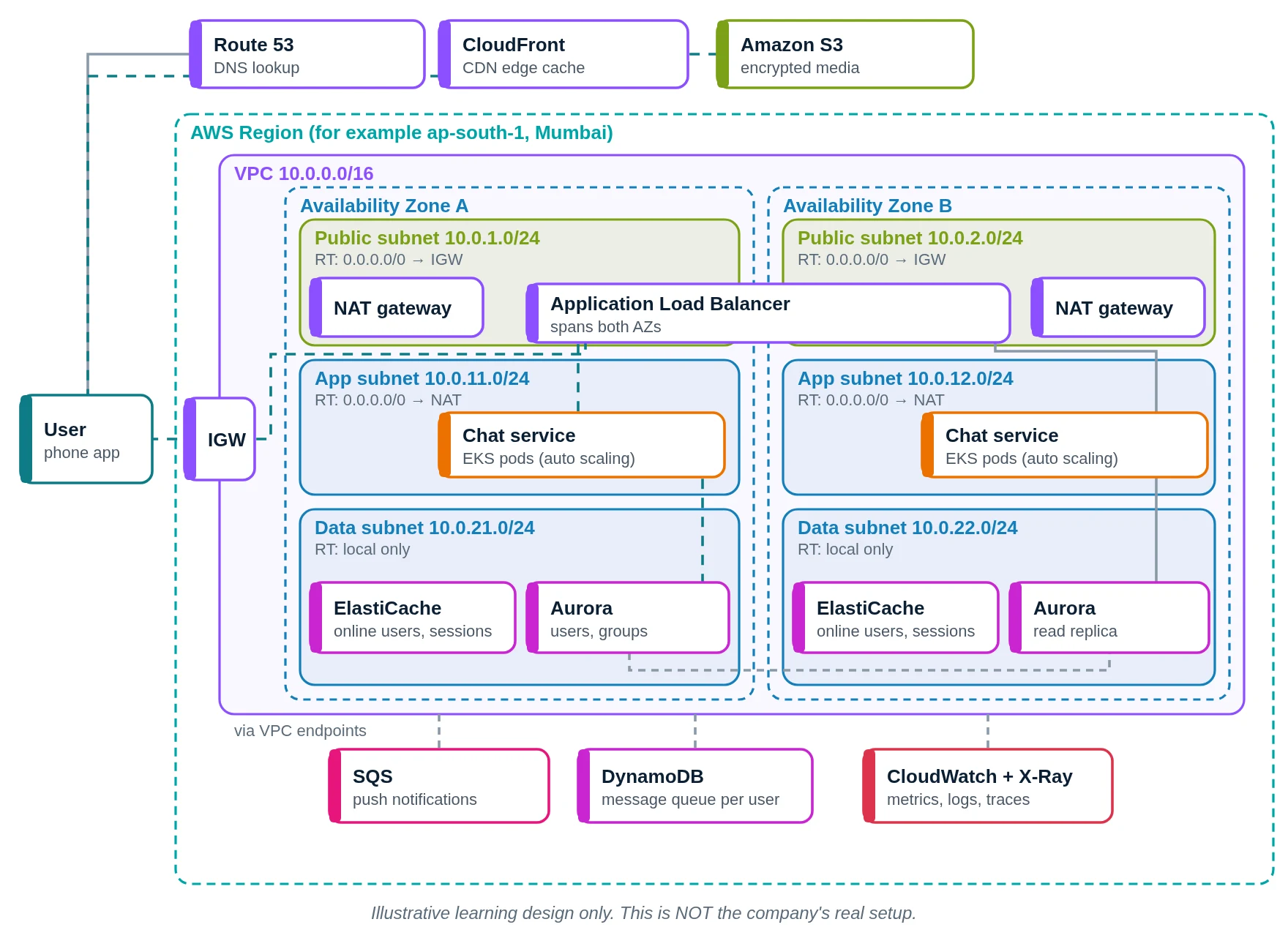
- You open KattaChat. Route 53 finds the address.
- Encrypted photos are fetched via CloudFront.
- CloudFront reads them from S3.
- Your WebSocket enters through the internet gateway.
- The ALB connects you to a chat pod.
- The chat service receives your encrypted message.
- ElastiCache says which pod your friend is on.
- If your friend is offline, DynamoDB keeps the message.
- A push notification job goes to SQS.
- CloudWatch watches delays.
- Your friend gets the message.
WhatsApp versus our AWS design
| Part | WhatsApp (public info) | Our AWS design |
|---|---|---|
| Hosting | Meta data centres | AWS, two AZs |
| Server language | Erlang | Any language on EKS |
| Encryption | Signal protocol | Signal protocol library |
| Offline messages | Encrypted queue until delivery | DynamoDB with delete on delivery |
| Media | Encrypted blob store | S3 + CloudFront |
| Monitoring | Not publicly shared | CloudWatch, X-Ray |
Quick quiz: check what you learned
Which language are WhatsApp's chat servers mainly written in?
- Erlang
- PHP
- Ruby
- Kotlin
Show answer
A. WhatsApp is famous for its Erlang servers.
Who can read a WhatsApp message?
- WhatsApp support staff
- Only sender and receiver
- Any Meta server
- The mobile network
Show answer
B. End-to-end encryption means only the two phones have the keys.
How are WhatsApp photos stored on servers?
- As plain JPG files
- Inside MySQL rows
- As encrypted blobs
- Printed in reports
Show answer
C. Media is encrypted on the phone before upload.
What did WhatsApp write in Rust (2026)?
- The Erlang VM
- Its billing system
- Its website
- A media-checking library
Show answer
D. WhatsApp shipped a Rust media consistency library to billions of devices.
Learn it properly
Build the AWS parts yourself with these free guides and lessons:
- How to create a custom VPC with subnets, internet gateway and route tables
- Public vs private subnet in AWS · 3-tier architecture project on AWS
- How to launch an EC2 instance · Install the CloudWatch agent on EC2
- AWS course: What is a VPC? Default VPC vs custom VPC
- Related architectures: YouTube Architecture Explained: Google Data Centres, VCU, Vitess · Spotify Architecture Explained: Google Cloud, Kubernetes, Bigtable · Snapchat Architecture Explained: Multicloud on AWS and Google Cloud · Flipkart Architecture Explained: Data Centres, Google Cloud, Aerospike
- All famous app architectures explained