Chapter 95: Logging with Loki, Elastic Stack and CloudWatch
95.6 LogQL — selector, line filter and JSON parser
Story (fictional teaching scenario). At a fictional Indore bakery app, Kavya and Omar from Doha first choose the lab stream, then parse its structured error records.
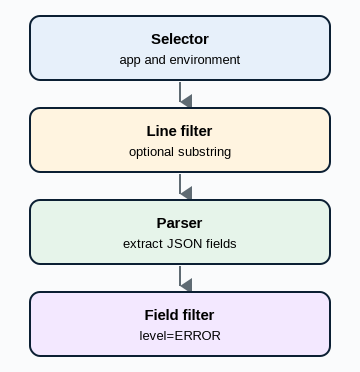
Why
Filtering the correct source before parsing reduces work and makes a query easier to explain.
What
- LogQL is Loki’s query language.
- A stream selector chooses streams by labels inside braces.
- A line filter keeps or removes lines by their text.
- A parser extracts fields from a line.
| jsonparses JSON. __error__is a pipeline error label; parser failures must not silently become valid results.
How
-
Choose the narrow origin labels first.
-
Use a cheap line filter when useful.
-
Parse the needed format and inspect parser errors.
-
Filter extracted fields after parsing.
Example 1: Search structured errors
- Read the command or request.
{app="bakery", env="lab"}
| json
| __error__=""
| level="ERROR"
- Read the result.
Output (illustrative; NOT executed against Loki, Elastic or CloudWatch)
Fictional matching events: req-demo-003 and req-demo-004.
- Line by line: Braces choose streams with both origin labels.
| jsonextracts body fields. The empty error filter excludes parser failures; inspect rejected lines separately.level="ERROR"selects the two fake error events if all six fixture events were ingested with these labels. No Loki engine was run.
Example 2: Text containment is not a structured comparison
- Read the command or request.
{app="bakery", env="lab"} |= "ERROR"
- Read the result.
Output (illustrative; NOT executed against Loki, Elastic or CloudWatch)
Any selected log line containing the case-sensitive substring ERROR can match.
- Line by line:
|=searches text, including an unrelated field that happens to contain the word. It is not identical to checking parsed level. Do not confuse stream-label matchers before the pipe with extracted fields after parsing.
Ravindra Bagale's Tip
A text match and a field comparison answer different questions.
Text match आणि field comparison वेगळे प्रश्न सोडवतात.
Text match और field comparison अलग सवालों के जवाब हैं.
Did you understand? Let us try it once more.