Chapter 90: GitHub Actions Deep Dive
90.5 Secrets, variables and OIDC to AWS
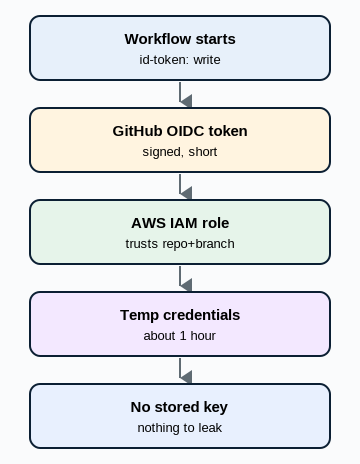
Story (fictional teaching scenario). Carlos in Austin stored an AWS access key as a repo secret in 2021 and forgot it. Two years later it was still valid, and an old fork's logs nearly exposed it. Priya in Mumbai replaced it with OIDC. Now GitHub hands AWS a short-lived signed token, AWS checks which repo and branch asked, and returns credentials that expire in about an hour. No long-lived key exists to leak. Plain settings like the region moved to variables, because they are not secret.
Why
A secret that never exists cannot leak. OIDC removes long-lived cloud keys from your repo settings.
What
- Secret — An encrypted value, read as
${{ secrets.NAME }}. Masked as***in logs. - Variable — A plain, non-secret value, read as
${{ vars.NAME }}. Good for region or app name. - GITHUB_TOKEN — A short-lived token GitHub creates for each run. Limit it with
permissions:. - OIDC — OpenID Connect. The workflow proves "I am repo X on branch main" to AWS with a signed token.
- IAM role trust policy — On AWS, it says which repo and branch may assume the role.
How
- In AWS IAM, add the GitHub OIDC identity provider (
token.actions.githubusercontent.com). - Create a role whose trust policy allows only your repo and
refs/heads/main. - In the workflow, set
permissions: id-token: writeandcontents: read. - Use
aws-actions/configure-aws-credentialswithrole-to-assume. - Delete any old access-key secrets once OIDC works.
Example 1: Secret vs variable in a step
steps:
  - run: echo "Region is ${{ vars.AWS_REGION }} and key is ${{ secrets.DEMO_API_KEY }}"
Output (illustrative)
Region is ap-south-1 and key is ***
What it shows: The variable prints normally. The secret is masked. DEMO_API_KEY is a fake name for the lesson. Still, never echo real secrets on purpose.
Example 2: OIDC login to AWS
permissions:
  id-token: write
  contents: read
jobs:
  whoami:
    runs-on: ubuntu-latest
    steps:
      - uses: aws-actions/configure-aws-credentials@v6
        with:
          role-to-assume: arn:aws:iam::123456789012:role/gha-deploy-shop
          aws-region: ap-south-1
      - run: aws sts get-caller-identity --query Arn --output text
Output (illustrative)
arn:aws:sts::123456789012:assumed-role/gha-deploy-shop/GitHubActions
What it shows: The job is now the IAM role, with temporary credentials. The account id is an example. No access key was stored anywhere.
Example 3: Trust policy condition (excerpt)
"Condition": {
  "StringEquals": {
    "token.actions.githubusercontent.com:aud": "sts.amazonaws.com",
    "token.actions.githubusercontent.com:sub": "repo:shop-org/menu-api:ref:refs/heads/main"
  }
}
What it shows: Only the menu-api repo on main can assume this role. A fork or another branch is refused. Names are examples.
Ravindra Bagale's Tip
Set permissions at the top of every workflow. Start with contents: read and add only what a job needs.
प्रत्येक workflow च्या वर permissions लिहा. contents: read ने सुरुवात करा आणि job ला लागेल तेवढंच add करा.
हर workflow के ऊपर permissions लिखो. contents: read से शुरू करो और job को जितना चाहिए उतना ही add करो.
Quick quiz
Q1. What is the difference between secrets and vars?
Secrets are encrypted and masked; vars are plain non-secret settings.
Q2. Which permission does OIDC need?
id-token: write.
Q3. Why is OIDC safer than an access-key secret?
Credentials are short-lived and only trusted for a specific repo and branch; nothing long-lived is stored.
Did you understand? Let us try it once more.