Chapter 90: GitHub Actions Deep Dive
90.1 Why GitHub Actions — beyond the first workflow
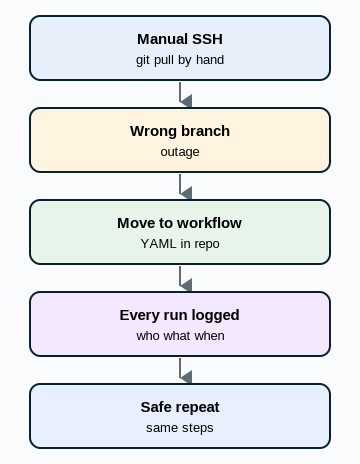
Story (fictional teaching scenario). At a Swiggy-style food app team in Pune, Kunal still deployed by SSH. He logged in to the server, ran git pull, then restarted the app. One Friday he pulled the wrong branch. Orders failed for 40 minutes. Emma, the new lead from Dublin, asked one question: "Who ran what, and when?" Nobody knew. The next week the team moved the same steps into a GitHub Actions workflow. Every deploy now had a log, a commit, a person and a green or red tick. Kunal stopped SSHing for deploys. That is the real reason teams go deep on GitHub Actions: repeatable steps with a record.
Why
Hand-run deploys depend on memory. Memory fails on a tired Friday. A workflow file lives in Git, gets reviewed, and runs the same way each time.
What
- GitHub Actions — The CI/CD system built into GitHub. It runs your YAML files when events happen.
- Workflow file — A YAML file in
.github/workflows/in your repo. - Run — One execution of a workflow, with logs for every step.
- Audit trail — The run page shows the commit, the actor and the result.
How
- Write down the manual steps you do today (pull, test, build, restart).
- Put the same steps in a workflow file.
- Push it and watch the run on the Actions tab.
- Stop doing that job by hand once the workflow is green twice.
Example 1: The smallest useful workflow
name: hello
on: push
jobs:
  say:
    runs-on: ubuntu-latest
    steps:
      - run: echo "Hello from Actions, commit $GITHUB_SHA"
Output (illustrative) (in the run log)
Hello from Actions, commit 3f9c2a1d...
What it shows: On every push, a fresh runner prints the commit id. GITHUB_SHA is a built-in variable, so you never type it.
Example 2: Find who ran a workflow with the gh CLI
gh run list --limit 3
Output (illustrative)
STATUS  TITLE          WORKFLOW  BRANCH  EVENT  ID          ELAPSED
✓       Fix menu price deploy    main    push   9011223344  1m12s
X       Add coupon     deploy    main    push   9011223300  0m48s
✓       Update README  hello     main    push   9011223201  0m09s
What it shows: Each row is one run with its result and trigger. Run ids are examples. This list is the record Kunal's team never had.
Ravindra Bagale's Tip
If you do a task by hand more than twice, write it as a workflow. The log becomes your memory.
एखादं काम दोनपेक्षा जास्त वेळा हाताने करता? मग ते workflow मध्ये लिहा. Log तुमची memory बनतो.
कोई काम दो बार से ज़्यादा हाथ से करते हो? तो उसे workflow में लिखो. Log आपकी memory बन जाता है.
Quick quiz
Q1. Where do workflow files live?
In the .github/workflows/ folder of the repo.
Q2. What does a run page give you that SSH does not?
A record of commit, actor, steps and result.
Q3. What is GITHUB_SHA?
A built-in variable holding the commit id of the run.
Did you understand? Let us try it once more.