Chapter 90: GitHub Actions Deep Dive
90.3 Triggers — push, pull_request, workflow_dispatch, schedule and paths
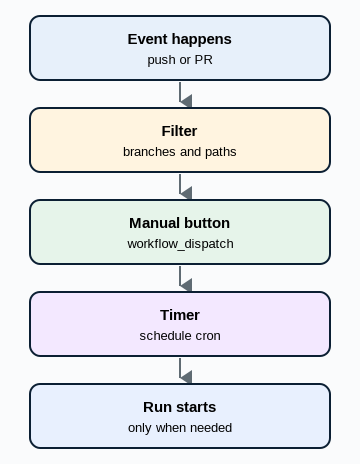
Story (fictional teaching scenario). At a Paytm-style wallet team in Noida, the docs folder changed ten times a day. Each change started a 12-minute build. Sofia from Madrid added a paths filter so builds ran only when code changed. Rahul added workflow_dispatch so the release manager could press a button for a manual deploy. A schedule ran a nightly security scan at 2 AM UTC. Same repo, fewer wasted minutes, clearer intent.
Why
Runs cost time, and on private repos they use paid minutes (approximate, check GitHub's current billing page). The right trigger runs work only when it matters.
What
- push — Runs when commits land on a branch.
- pull_request — Runs when a PR opens or updates. Good for tests before merge.
- workflow_dispatch — Adds a Run workflow button, with optional inputs.
- schedule — Runs on a cron timer. Times are in UTC.
- paths / paths-ignore — Run only when certain files change.
How
- Use
pull_requestfor tests andpushtomainfor deploys. - Add
paths-ignorefor docs-only changes. - Add
workflow_dispatchwith inputs for anything a human should start. - Write cron in UTC. 20:30 UTC is 2:00 AM in India.
Example 1: Test on PR, skip docs
on:
  pull_request:
    branches: [main]
    paths-ignore:
      - "docs/**"
      - "*.md"
Output (illustrative) (PR that changes only README.md)
No workflow runs were triggered for this pull request.
What it shows: Docs-only changes no longer start a build. Code changes still do.
Example 2: Manual button with an input, plus a nightly timer
on:
  workflow_dispatch:
    inputs:
      env:
        description: "Where to deploy"
        type: choice
        options: [staging, prod]
  schedule:
    - cron: "30 20 * * *"
jobs:
  show:
    runs-on: ubuntu-latest
    steps:
      - run: echo "Target is ${{ inputs.env || 'nightly-scan' }}"
Output (illustrative) (manual run with staging chosen)
Target is staging
What it shows: The button passed staging in. On the nightly timer there is no input, so the fallback nightly-scan prints.
Ravindra Bagale's Tip
Cron in Actions is UTC. Write the India time in a comment next to it so nobody gets confused.
Actions मधला cron UTC मध्ये असतो. शेजारी comment मध्ये India time लिहा, म्हणजे कोणाचा गोंधळ होणार नाही.
Actions का cron UTC में होता है. बगल में comment में India time लिखो, ताकि कोई confuse न हो.
Quick quiz
Q1. Which trigger adds a Run workflow button?
workflow_dispatch.
Q2. What timezone does schedule use?
UTC.
Q3. How do you skip builds for docs-only changes?
Use paths-ignore (or paths) on the trigger.
Did you understand? Let us try it once more.