Chapter 88: Amazon EKS for DevOps
88.6 Access entries and aws-auth
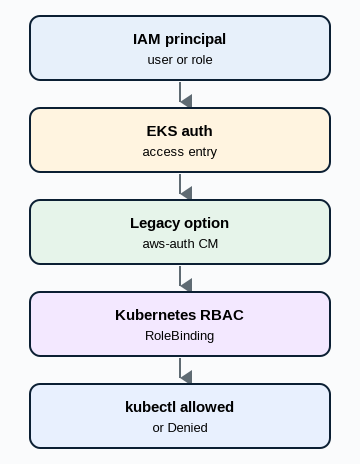
Story. Fatima joined a Deloitte-style delivery team in Hyderabad. Her IAM user could call aws eks describe-cluster but kubectl get pods returned Unauthorized. The cluster never mapped her IAM principal to a Kubernetes group. Older clusters used the aws-auth ConfigMap in kube-system. Newer EKS access management uses access entries in the EKS API. Fatima's platform lead created an access entry for her IAM role with a policy that granted cluster view. Always know which model your cluster uses.
Why
AWS IAM and Kubernetes RBAC are two doors. Passing IAM is not enough. The cluster must map your principal to Kubernetes permissions.
What
- Access entry — Current EKS API object that links an IAM principal to cluster access policies.
- aws-auth ConfigMap — Older mapping from IAM roles/users to Kubernetes groups (
system:masters, etc.). - Kubernetes RBAC — Roles and RoleBindings inside the cluster for fine app permissions.
- Cluster creator — The principal that created the cluster often starts with admin; do not rely on one human forever.
How
- Prefer access entries for new clusters when your account supports them.
- If you still maintain
aws-auth, edit carefully — a bad edit can lock everyone out. - Map humans and CI roles to least-privilege groups, not blanket
system:masters. - Test with a second admin role before you remove the first.
Example 1: List access entries (shape)
aws eks list-access-entries --cluster-name shop-lab --region ap-south-1
Output
{
    "accessEntries": [
        "arn:aws:iam::123456789012:role/shop-platform-admin"
    ]
}
What it shows: At least one IAM role is registered as an access entry. Exact ARNs are yours.
Example 2: Legacy aws-auth mapRoles shape (awareness)
apiVersion: v1
kind: ConfigMap
metadata:
  name: aws-auth
  namespace: kube-system
data:
  mapRoles: |
    - rolearn: arn:aws:iam::123456789012:role/shop-node-role
      username: system:node:{{EC2PrivateDNSName}}
      groups:
        - system:bootstrappers
        - system:nodes
What it shows: Node instance roles must be mapped so kubelet can join. Do not delete node mappings. Prefer access entries on new setups when available.
Ravindra Bagale's Tip
Never leave a single human as the only cluster admin. Keep a break-glass IAM role with a tested access entry.
एकच माणूस admin ठेवू नका. Test केलेली break-glass IAM role + access entry ठेवा.
केवल एक व्यक्ति admin न रखें. Test की हुई break-glass IAM role + access entry रखें.
Quick quiz
Q1. What is an access entry?
An EKS API mapping from an IAM principal to cluster access.
Q2. What is aws-auth?
The older ConfigMap that maps IAM roles/users to Kubernetes groups.
Q3. Why can describe-cluster work but kubectl fail?
IAM allows the EKS API call, but the cluster has no mapping or RBAC for that principal.
Did you understand? Let us try it once more.