Chapter 88: Amazon EKS for DevOps
88.2 Cluster create paths — eksctl vs Terraform
Story. Omar in Hyderabad needed a lab cluster by Monday. He used eksctl and had a small cluster in under an hour. Priya on the platform team needed prod with modules, remote state and a pull-request plan. She used Terraform (the pattern you practised in chapter 78). Both talk to the same EKS API. The tool choice is about how you want to review and reuse infrastructure — not about a different Kubernetes.
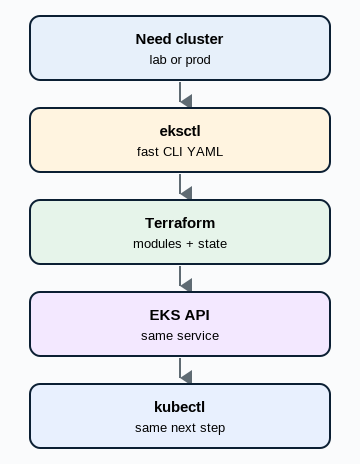
Why
A one-off lab should be fast. Production needs review, remote state and repeatable modules. Pick the path that matches the risk.
What
- eksctl — Popular CLI that creates EKS clusters and node groups from a config file.
- Terraform AWS provider — Declares cluster, IAM and networking as code (see chapter 78).
- AWS Console / CloudFormation — Also valid; teams still prefer code for prod.
- kubeconfig — Local file that points kubectl at your cluster endpoint and auth.
How
- For a short lab: write a small eksctl config and run
eksctl create cluster -f. - For prod: use Terraform modules, remote state and a plan in CI (chapter 78).
- After create:
aws eks update-kubeconfig --name ... --region .... - Verify:
kubectl get nodesandkubectl get ns.
Example 1: Shape of an eksctl config (lab)
apiVersion: eksctl.io/v1alpha5
kind: ClusterConfig
metadata:
  name: shop-lab
  region: ap-south-1
  version: "1.29"
managedNodeGroups:
  - name: ng-m5
    instanceType: t3.medium
    desiredCapacity: 2
What it shows: Cluster name, Region, Kubernetes version and one managed node group. Pin versions that AWS still supports when you run this.
Example 2: Point kubectl at EKS
aws eks update-kubeconfig --name shop-lab --region ap-south-1
kubectl get nodes -o wide
Output
NAME                                          STATUS   ROLES    AGE   VERSION
ip-10-0-1-23.ap-south-1.compute.internal      Ready    <none>   12m   v1.29.x
ip-10-0-2-44.ap-south-1.compute.internal      Ready    <none>   12m   v1.29.x
What it shows: Two worker nodes Ready. Auth went through AWS IAM into the cluster. Exact AMI and patch versions vary.
Ravindra Bagale's Tip
Use eksctl to learn. Use Terraform (chapter 78) when many people must review the same cluster definition.
शिकायला eksctl वापरा. अनेक लोकांना review हवं असेल तर Terraform (chapter 78).
सीखने के लिए eksctl. कई लोगों को review चाहिए तो Terraform (chapter 78).
Quick quiz
Q1. When is eksctl a good fit?
Fast labs and simple clusters where speed matters more than shared module review.
Q2. When is Terraform a good fit?
Production with remote state, modules and pull-request plans (chapter 78).
Q3. What does update-kubeconfig do?
Writes cluster endpoint and auth settings into your local kubeconfig for kubectl.
Did you understand? Let us try it once more.