Swiggy Architecture Explained: How Swiggy Runs Food and Grocery Delivery
Short answer: Swiggy runs on AWS. Its web front end uses server-side rendering services on EC2 and Kubernetes behind Kong and HAProxy, and static pages from S3 with CloudFront (2025). Microservices talk through Kafka, the event backbone. Transactional data sits in stores such as DynamoDB, whose change streams feed Swiggy's data lake. Real-time features run on Rill, a Flink platform on Amazon EMR.
Suppose you order groceries on Swiggy Instamart
It is Sunday evening in Gurugram. You order milk and vegetables on Instamart. In simple terms:
- The Swiggy app or website calls Swiggy's services on AWS; web pages come from server-side rendering services or from S3 through CloudFront.
- Kong and HAProxy route traffic, and can send a small percentage to a new version first.
- Order, cart and delivery microservices handle your request and publish events to Kafka.
- Transactional data is stored in databases such as DynamoDB.
- Rill (Flink) uses live events, for example to keep state in Redis or Valkey for real-time features.
- Klaxon watches business metrics in real time and alerts teams if orders suddenly drop.
What architecture style does Swiggy use?
Swiggy uses event-driven microservices with strong release safety and cost control.
- Event backbone: Kafka connects microservices and real-time analytics.
- Controlled rollouts (2025): SSR services shift traffic from 1% to 100% via Kong/HAProxy while watching latency and errors; static pages use CloudFront continuous deployment with a canary distribution.
- Cost engineering: Swiggy cut CloudFront costs by about half with smaller error pages, compression and caching, and cut ALB data costs with compression in its ingestion service (2024).
- Change data capture: DynamoDB Streams feed a CDC system that copies transactional data into the data lake.
Swiggy architecture diagram (public parts)
This diagram shows only what Swiggy or its partners have shared publicly. Press Play to follow a request step by step.
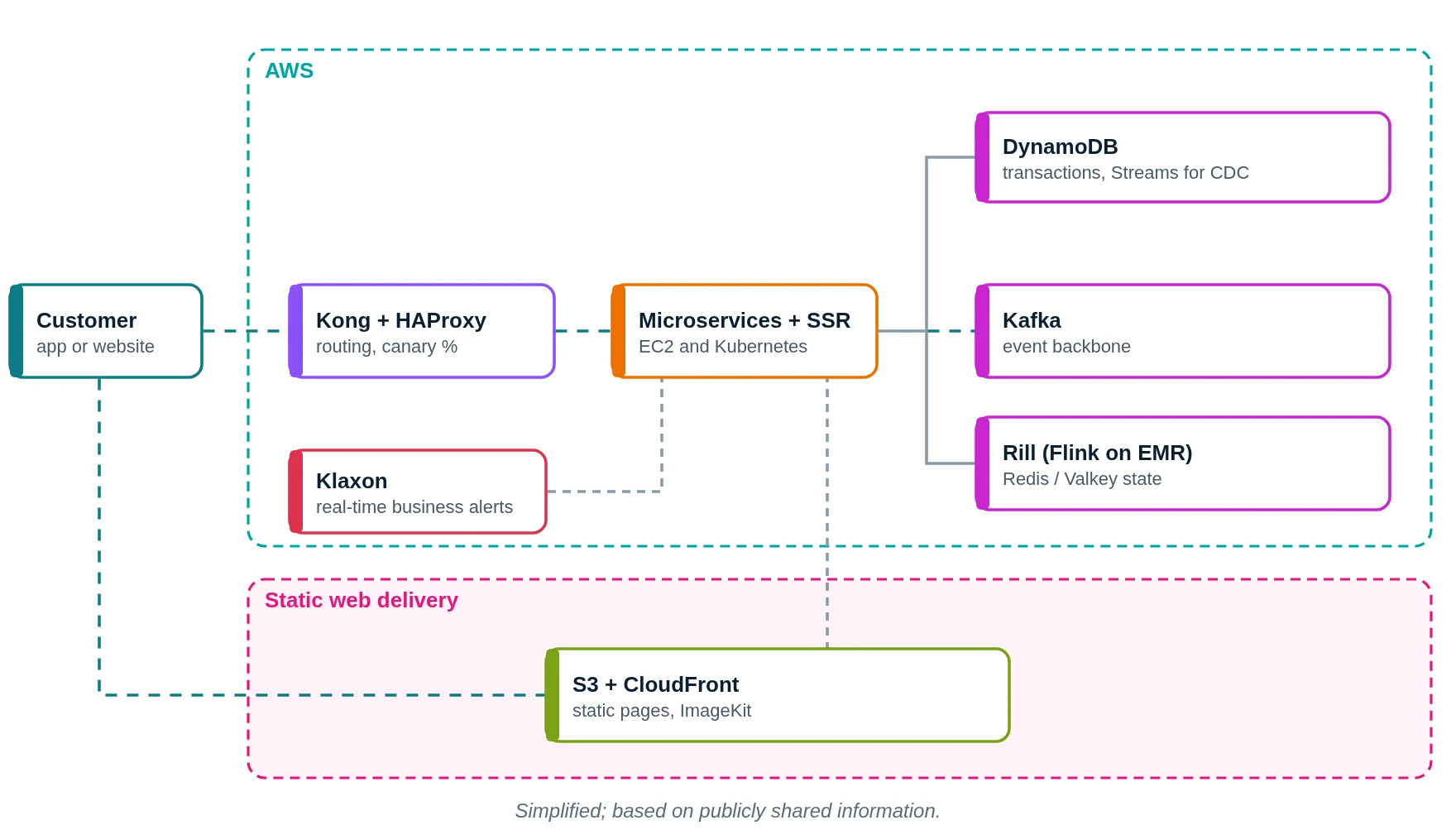
- You place an Instamart order.
- Kong and HAProxy route the request.
- Microservices handle cart, order and delivery.
- Order data is stored in DynamoDB.
- Events go onto Kafka.
- Rill processes live events.
- Klaxon watches order rates.
- Static pages come from S3 through CloudFront.
- Your groceries are on the way.
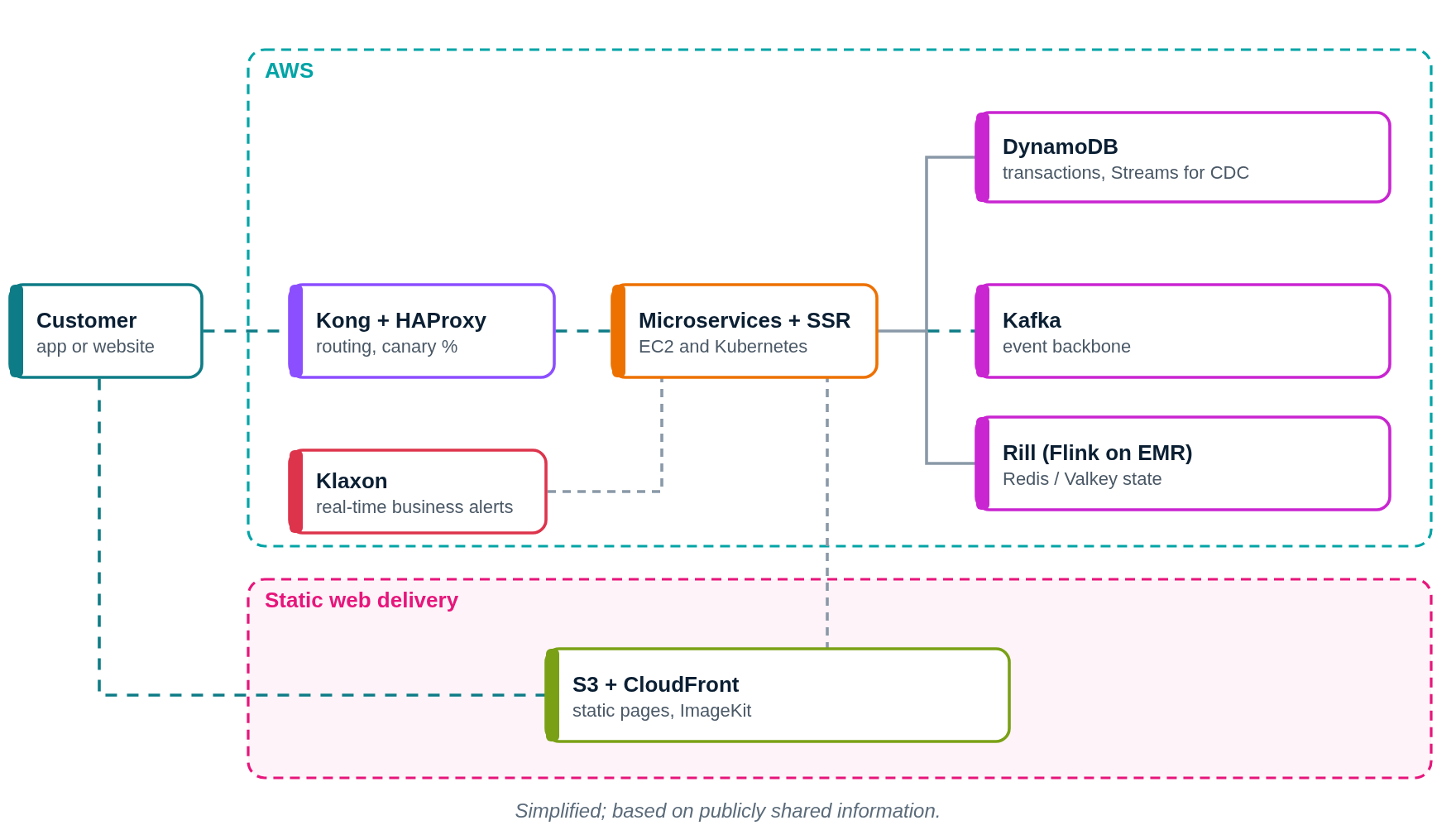
What does Swiggy use? Main technologies
| Layer | What Swiggy uses (public) | What it does in simple words |
|---|---|---|
| Cloud | AWS | Hosts Swiggy |
| Compute | EC2, Kubernetes | Microservices and SSR |
| Gateways | Kong, HAProxy, ALB | Routing and canary splits |
| Events | Kafka | Event backbone |
| Database | DynamoDB (with Streams) | Transactional data |
| Streaming | Rill: Flink on Amazon EMR | Real-time features |
| Static delivery | S3, CloudFront, ImageKit | Web pages and images |
| Alerts | Klaxon | Real-time business monitoring |
Which cloud provider does Swiggy use?
Swiggy runs on AWS (EC2, S3, CloudFront, ALB, DynamoDB, EMR, SES).
How did Swiggy cut its CloudFront bill by about half?
A set of small changes that added up to about 52% savings on CloudFront:
- Smaller error pages: one error HTML page was 179 KB. Shrinking it to about 2.1 KB alone cut daily CloudFront cost by about 30%, because error pages are served very often.
- Minify and compress: smaller HTML, CSS and JavaScript means fewer bytes sent.
- Better caching: more requests answered from the edge.
- Move heavy screens: high-traffic chat screens moved from CloudFront to ImageKit, saving another 35% a month.
How a front-end release rolls out (2025)
- For server-rendered pages, Kong and HAProxy send 1% of traffic to the new version, then more, up to 100%, while latency and errors are watched.
- For static pages in S3, CloudFront continuous deployment uses a separate canary distribution; production traffic is then shifted to a canary S3 path, starting at about 10%.
- ImageKit falls back between production and canary asset folders so users never see missing files.
How it started: logistics and serviceability
- Earlier, Swiggy re-architected its logistics systems and built a serviceability platform that decides, at high scale, which restaurants can deliver to you.
- Its "Where is my order?" system uses machine learning for delivery time prediction.
- Exact dates and details of these older systems are not publicly shared.
How does Swiggy store data?
- DynamoDB for transactional data, streamed into the data lake via CDC.
- S3 for static web assets and data lake files (Delta).
- Redis / Valkey for real-time state written by Rill.
- Other main databases are not publicly shared.
How does Swiggy monitor its systems?
- Klaxon: real-time business monitoring using Kafka, Rill, Databricks and Snowflake, with alerts by email (AWS SES).
- A unified production-changes timeline helps reduce time to detect and fix issues.
- Rollouts are watched for latency and error rates before each traffic step.
If we built an app like Swiggy on AWS (illustrative)
Please read this first
This section is a learning design by Ravindra Bagale. It is not Swiggy's real setup. Swiggy really runs on AWS. We use AWS here because it is what you learn in the AWS course.
Suppose you want to build "KiranaNow", a 20-minute grocery delivery app for one city. Here is a simple AWS layout.
1. Network: VPC, subnets, route tables, gateways
- Create one VPC with CIDR
10.0.0.0/16in the Mumbai region (ap-south-1). - Use two Availability Zones (A and B), so one AZ failing does not stop the app.
- In each AZ make three subnets: public (load balancer, NAT gateway), private app (your code) and private data (databases, cache).
- Attach one internet gateway (IGW) to the VPC. Public route table:
0.0.0.0/0 → IGW. This route is what makes a subnet public. - Private app route table:
0.0.0.0/0 → NAT gateway, so servers can download updates but nobody can connect in from the internet. - Private data route table: only the local VPC route. Use VPC endpoints to reach S3, DynamoDB and SQS without going over the internet.
2. Compute: where the code runs
- ALB with weighted target groups for canaries.
- Services on EKS.
- Events via SQS or MSK (Kafka).
3. Storage and databases
- DynamoDB for orders, with Streams.
- Aurora for stores; ElastiCache for stock and carts.
- S3 + CloudFront for images.
4. Monitoring
- CloudWatch alarms on order rate drops.
- X-Ray traces.
Request flow diagram
Press Play. The numbered list below the diagram lights up with each step.
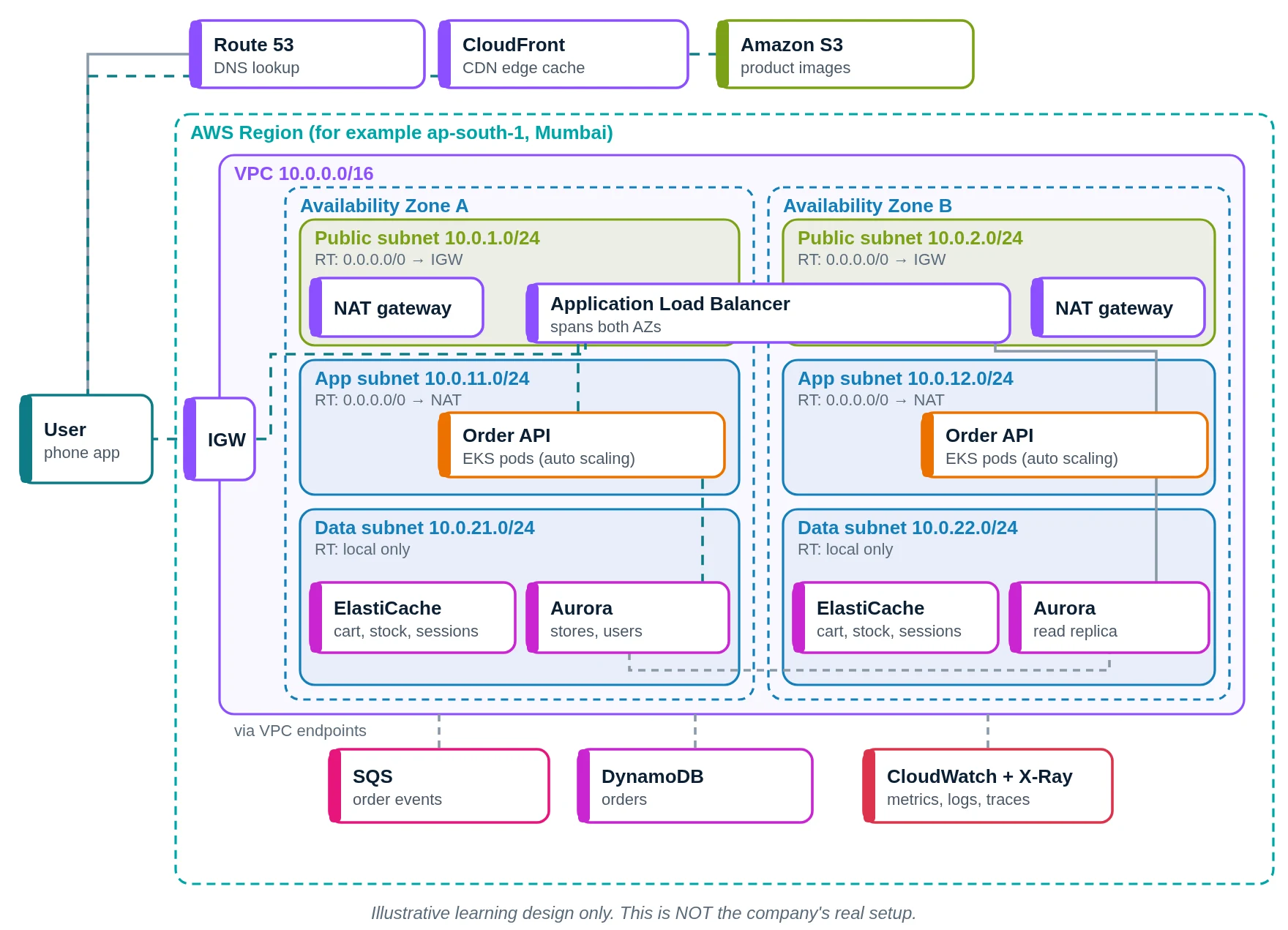
- You open KiranaNow. Route 53 answers.
- Images via CloudFront.
- From S3.
- API calls through the internet gateway.
- The ALB forwards to a pod.
- The order API runs.
- Stock from ElastiCache.
- Stores in Aurora; order in DynamoDB.
- Event to SQS.
- CloudWatch watches.
- Groceries on the way.
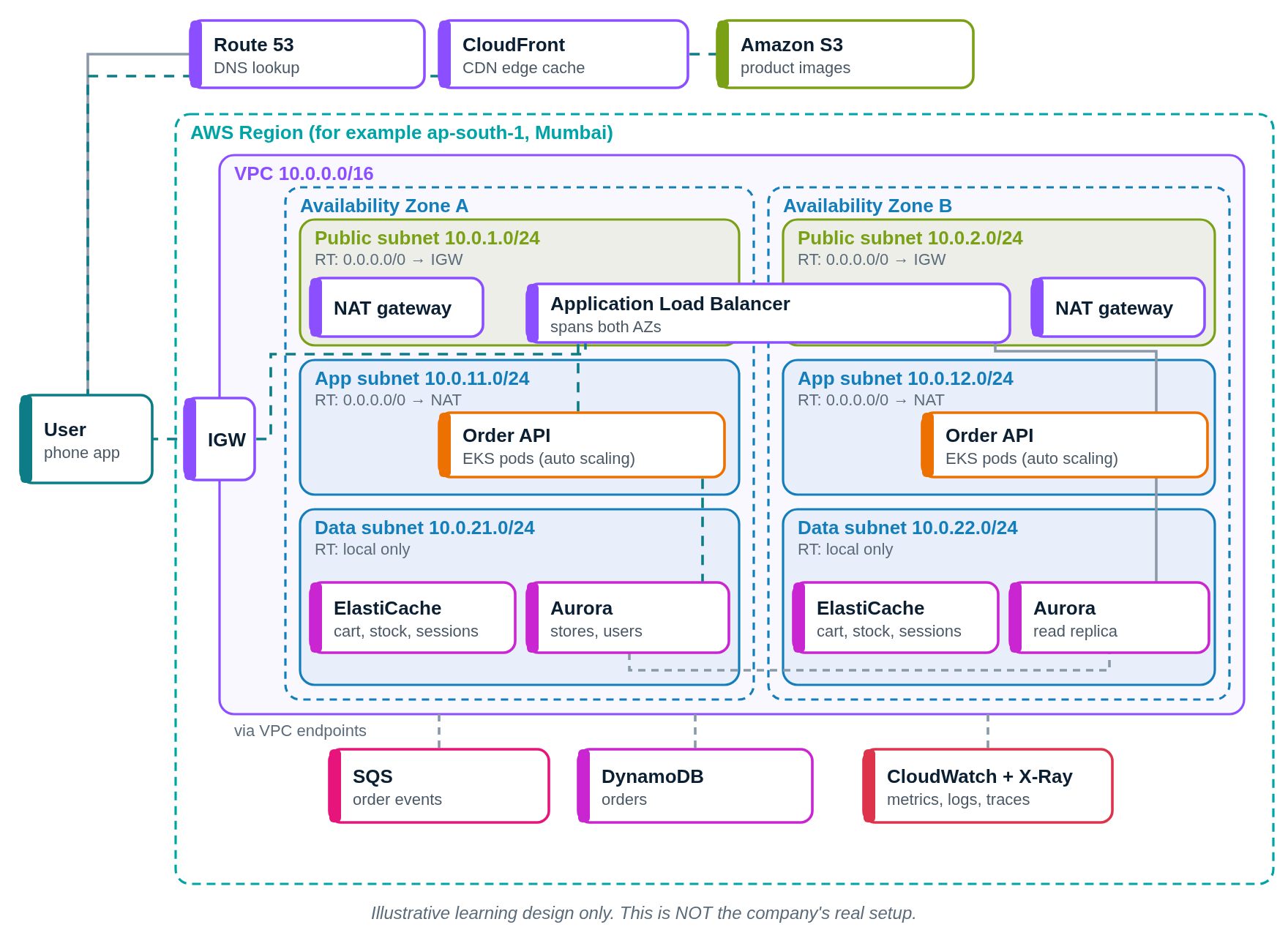
Swiggy versus our AWS design
| Part | Swiggy (public info) | Our AWS design |
|---|---|---|
| Cloud | AWS | AWS |
| Gateways | Kong, HAProxy | ALB weighted targets |
| Events | Kafka | SQS / MSK |
| Database | DynamoDB | DynamoDB, Aurora |
| Streaming | Flink on EMR (Rill) | Managed Flink |
| Monitoring | Klaxon | CloudWatch |
Quick quiz: check what you learned
Which cloud does Swiggy use?
- AWS
- Only own servers
- IBM Cloud
- Alibaba Cloud
Show answer
A. Swiggy runs on AWS services.
What is Swiggy's event backbone?
- Kafka
- FTP
- Cron
Show answer
B. Kafka connects microservices and analytics.
What is Rill?
- A delivery bike
- A payment card
- A Flink stream platform
- A CDN
Show answer
C. Rill runs Flink on Amazon EMR.
How does Swiggy release front-end changes safely?
- All at once
- Only on Sundays
- By email
- Controlled percentage rollouts
Show answer
D. Traffic moves gradually from 1% to 100%.
Learn it properly
Build the AWS parts yourself with these free guides and lessons:
- How to create a custom VPC with subnets, internet gateway and route tables
- Public vs private subnet in AWS · 3-tier architecture project on AWS
- How to launch an EC2 instance · Install the CloudWatch agent on EC2
- AWS course: What is a VPC? Default VPC vs custom VPC
- Related architectures: Zerodha Architecture Explained: Self-Hosted Go, PostgreSQL, AWS · Uber Architecture Explained: 4,000 Services, Kubernetes, Docstore · LinkedIn Architecture Explained: Kafka, FishDB, Rest.li, LLM Feed · Pinterest Architecture Explained: AWS, PinCompute on EKS, MySQL
- All famous app architectures explained