Chapter 93: AWS Lambda and Serverless for DevOps
93.11 Logs, metrics and troubleshooting
Story (fictional teaching scenario). At a fictional Aurangabad shop, Sam from London sees an error counter rise but no useful log. Asha adds a request ID and safe error category, never the full customer event.
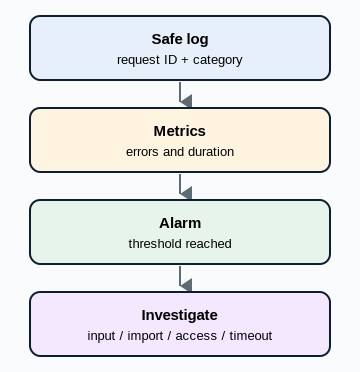
Why
You need enough evidence to diagnose failure without copying private data into logs.
What
- Log records a particular event or error.
- Metric summarizes numbers over time: Invocations, Errors, Duration, Throttles and ConcurrentExecutions are useful signals.
- Alarm notifies when a metric crosses a threshold.
- CloudWatch receives Lambda logs when the role permits it.
- Cold-start initialization duration and handler duration are different; read the runtime report fields carefully.
How
-
Log a safe request ID and outcome.
-
Monitor errors and throttles separately.
-
Set retention and restrict log readers.
-
Reproduce invalid input locally before changing cloud permissions.
Example 1: Read illustrative report fields
- Read the input and the code.
REPORT RequestId: demo-request-1 Duration: 24 ms Billed Duration: 25 ms
Memory Size: 512 MB Max Memory Used: 61 MB
- Read the result.
Output (illustrative; not executed on AWS)
Handler used about 24 ms; this sample reports 25 ms billed and a 61 MB high-water usage.
- What each part means: These are made-up teaching numbers, not an AWS run. Memory Size is configured capacity; Max Memory Used is observed usage. Do not assume every billed duration equals handler duration, especially when initialization or extensions are involved.
Example 2: Failure triage
- Read the input and the code.
ImportModuleError -> check package paths and dependencies
AccessDenied -> identify action/resource and role policy
Task timed out -> measure slow calls and configured deadline
Throttles rising -> inspect concurrency and downstream capacity
- Read the result.
Output (illustrative; not executed on AWS)
Fix the cause; do not solve every error by adding administrator permissions or raising limits.
- What each part means: An import error is not a network issue. AccessDenied is not fixed by extra memory. A timeout can occur after a side effect, so a retry still requires idempotence. The local lab tests bad input without exposing event contents.
Ravindra Bagale's Tip
Log identifiers and categories, not whole personal payloads.
Logs मध्ये ID आणि error प्रकार ठेवा, पूर्ण personal data नाही.
Logs में ID और error category रखो, पूरा personal data नहीं.
Did you understand? Let us try it once more.