Prime Video Architecture Explained: How Amazon Streams Films and Live Sport
Short answer: Prime Video runs on AWS, its sister company. For live sport such as NFL Thursday Night Football, Prime Video uses AWS Elemental MediaConnect (moving live camera feeds), MediaLive (live encoding) and MediaPackage (packaging for devices) across multiple AWS regions. Prime Video is also famous for a 2023 change where one team moved a monitoring tool from many serverless pieces to one application on Amazon ECS and cut that tool's cost by about 90%. In November 2025, Prime Video's live events were delivered through Amazon CloudFront, with caching at multiple layers.
Suppose you open Prime Video and watch a live match
It is a Thursday evening in the US, and a fan opens Prime Video on a Fire TV to watch the live NFL game. (In India you might watch a film instead, but live sport shows the architecture best.) Here is the public picture of what happens:
- Cameras at the stadium produce the live broadcast feed.
- AWS Elemental MediaConnect carries this live video feed reliably into AWS.
- AWS Elemental MediaLive encodes the feed into many qualities (for example HD on Wi-Fi, lower quality on mobile data).
- AWS Elemental MediaPackage packages the video into formats each device understands.
- The workflow runs in more than one AWS region, so one region having trouble does not stop the game.
- The Prime Video app on your TV downloads small video segments one after another and plays them.
For films and series (video on demand), the files are prepared in advance, so there is no live encoding step. The detailed design of Prime Video's on-demand catalog and delivery network is not publicly shared.
What architecture style does Prime Video use?
Prime Video mixes several styles, and its engineers have been honest that the "right" style depends on the job.
- Services on AWS: Prime Video is one of the Amazon consumer teams that moved its databases from Oracle to AWS database services in the 2019 migration.
- Managed media services for live video: instead of building encoders, the live workflow uses AWS Elemental services.
- Multi-region for resilience: live events are too important to depend on one region.
- Monolith where it fits: the Video Quality Analysis (VQA) team first built its stream-monitoring tool with AWS Step Functions, Lambda and S3. It hit scaling limits at about 5% of the expected load and was costly, because every video frame was passed through S3 and every step was a Step Functions state change.
- The fix: they put the media converter, the defect detectors and the orchestration into one process running on Amazon ECS on EC2. Data now stays in memory. Infrastructure cost for that tool dropped by over 90%.
The lesson for learners: microservices and serverless are tools, not rules. Prime Video still uses many services; it changed the design of one tool where a single process was simpler and cheaper.
Prime Video architecture diagram (public parts)
This diagram shows only what Prime Video or its partners have shared publicly. Press Play to follow a request step by step.
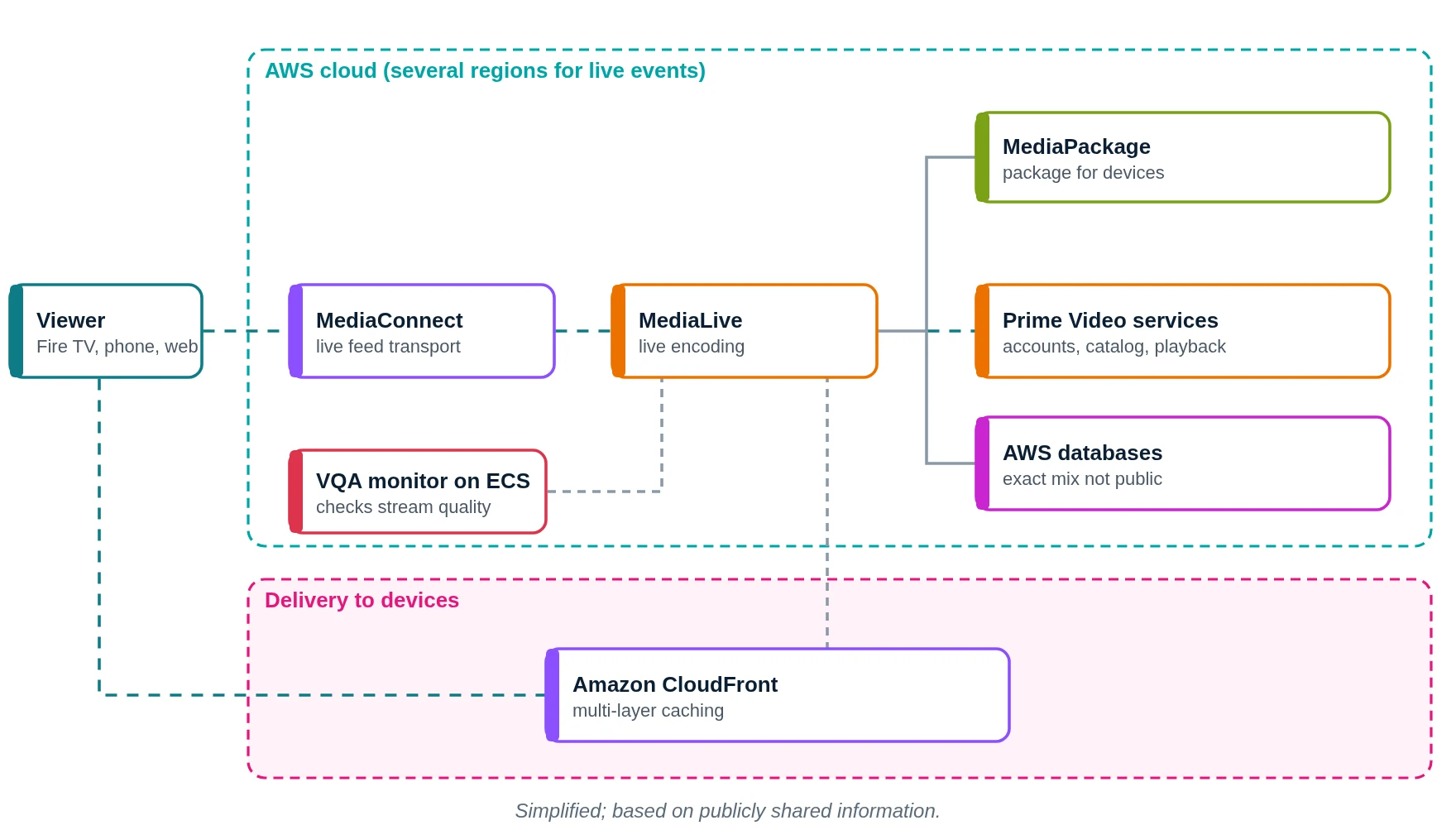
- Stadium cameras produce the live feed for viewers like you.
- MediaConnect carries the live feed into AWS.
- MediaLive encodes it into many qualities.
- MediaPackage prepares formats for each device.
- Prime Video services check your account and start playback.
- Account and catalog data live in AWS databases.
- The VQA monitor on ECS watches the stream for defects.
- CloudFront delivers video segments from edge locations.
- The match plays on your screen.
What does Prime Video use? Main technologies
| Layer | What Prime Video uses (public) | What it does in simple words |
|---|---|---|
| Cloud | AWS | Everything runs on Amazon's cloud |
| Live transport | AWS Elemental MediaConnect | Moves live feeds into AWS |
| Live encoding | AWS Elemental MediaLive | Turns one feed into many qualities |
| Packaging | AWS Elemental MediaPackage | Formats for TVs, phones, browsers |
| Delivery | Amazon CloudFront (2025) | Sends video to millions of viewers |
| Ad insertion | AWS Elemental MediaTailor (2017) | Targeted ads in streams |
| Quality monitoring | Single-process app on Amazon ECS / EC2 | Finds video and audio defects |
| Databases | AWS database services (2019 migration) | Account and business data |
Which cloud provider does Prime Video use?
Prime Video uses AWS. Some public facts:
- In November 2025 live events like Thursday Night Football and NBA on Prime used CloudFront's elastic capacity and caching at multiple layers.
- In 2019 Prime Video was among the Amazon teams that moved from Oracle to AWS databases.
- Prime Video uses AWS Elemental services, including MediaTailor for ad insertion during the 2017 NFL games.
- Since 2022, NFL's Thursday Night Football has been delivered globally on AWS.
What was the famous 90% cost cut?
In March 2023, Prime Video cut the cost of its audio/video monitoring service by 90%. Here is the story in simple steps:
- The team needed a tool that watches thousands of live streams and spots problems like frozen video, block corruption or audio-video sync issues.
- Version 1: AWS Step Functions orchestrated small Lambda functions; frames were saved to S3 between steps.
- Problem 1: Step Functions charges per state change, and there were many state changes every second for each stream.
- Problem 2: passing every frame through S3 was costly.
- Version 2: one ECS task did the conversion, detection and orchestration in memory.
- To scale, they run several copies, each with a subset of detectors, behind a light request router.
- Result: over 90% lower infrastructure cost for this tool, and better scaling.
How does Prime Video store data?
- Business and account data moved to AWS database services in the 2019 Oracle migration; which exact database each Prime Video service uses is not publicly shared.
- In the VQA redesign, intermediate video frames are no longer stored in S3; they stay in memory.
- Live video is delivered through CloudFront with caching at multiple layers (2025). How the film catalog files are stored is not publicly shared in detail.
How does Prime Video monitor its systems?
- The VQA service itself is a monitoring system: it checks live streams for audio and video defects.
- For live events, the multi-region design lets teams switch paths if one fails (2022).
- General internal monitoring tools are not publicly shared in detail.
If we built an app like Prime Video on AWS (illustrative)
Please read this first
This section is a learning design by Ravindra Bagale. It is not Prime Video's real setup. Prime Video uses AWS, but its real design and scale are much larger and partly not public. We use AWS here because it is what you learn in the AWS course.
Suppose you want to build "ShivFlix", a streaming app for Marathi films and local cricket matches. Here is a simple AWS layout.
1. Network: VPC, subnets, route tables, gateways
- Create one VPC with CIDR
10.0.0.0/16in the Mumbai region (ap-south-1). - Use two Availability Zones (A and B), so one AZ failing does not stop the app.
- In each AZ make three subnets: public (load balancer, NAT gateway), private app (your code) and private data (databases, cache).
- Attach one internet gateway (IGW) to the VPC. Public route table:
0.0.0.0/0 → IGW. This route is what makes a subnet public. - Private app route table:
0.0.0.0/0 → NAT gateway, so servers can download updates but nobody can connect in from the internet. - Private data route table: only the local VPC route. Use VPC endpoints to reach S3, DynamoDB and SQS without going over the internet.
2. Compute: where the code runs
- Application Load Balancer across both public subnets.
- Playback and catalog APIs on Amazon EKS (or ECS, like the Prime Video VQA team) in private subnets.
- For live matches: MediaConnect → MediaLive → MediaPackage, then CloudFront to viewers.
- For films: AWS Elemental MediaConvert converts uploads in S3 into HLS/DASH segments.
3. Storage and databases
- S3 for master files and encoded segments; CloudFront for delivery.
- Aurora for accounts and plans.
- DynamoDB for watch history and "continue watching".
- ElastiCache for home page rows.
4. Monitoring
- CloudWatch alarms on MediaLive input loss, CloudFront 5xx and API latency.
- X-Ray traces for the playback API.
- Keep a second MediaLive pipeline (standard channel) for live events.
Request flow diagram
Press Play. The numbered list below the diagram lights up with each step.
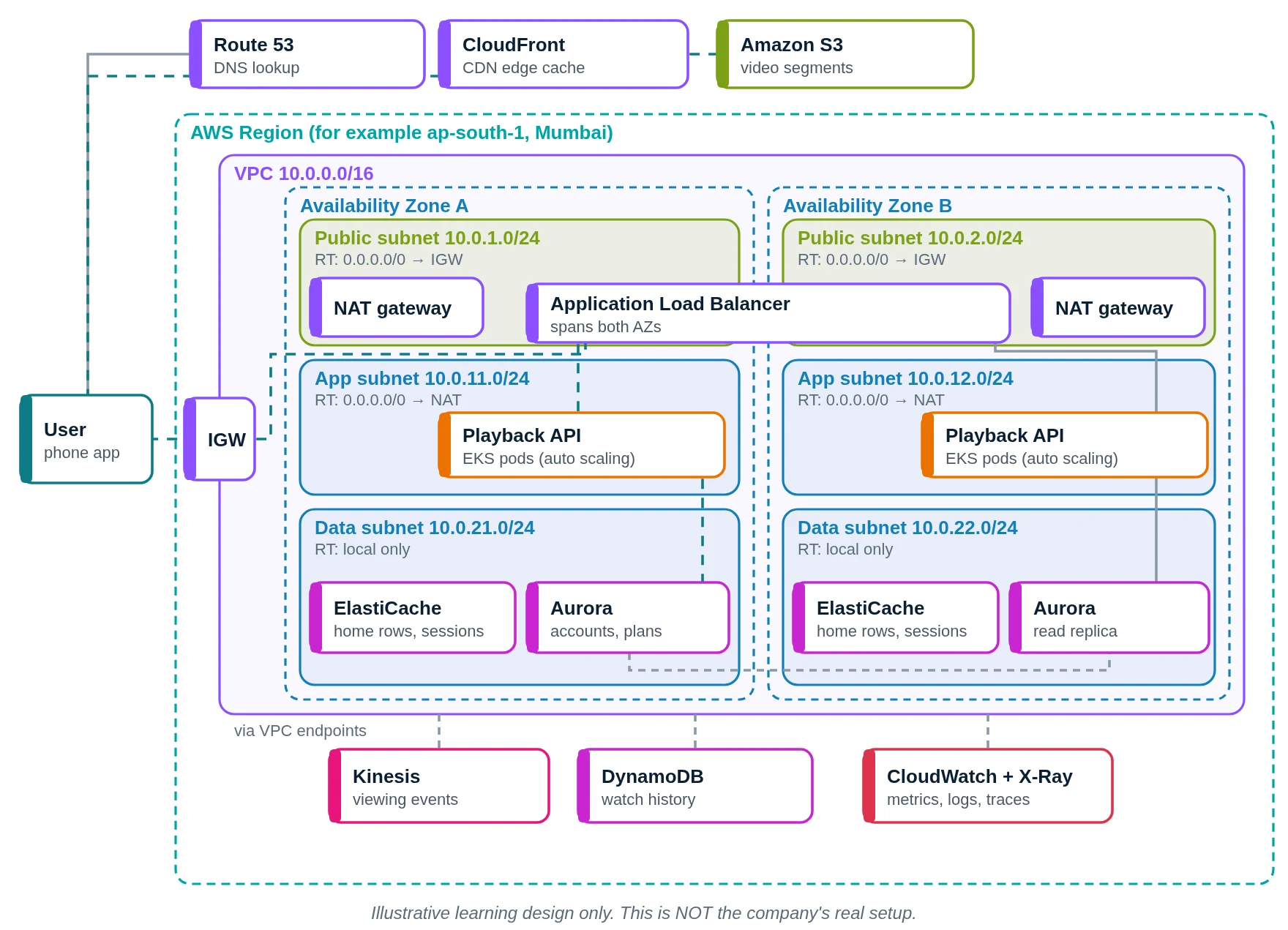
- You open ShivFlix. Route 53 finds the address.
- Video segments and posters come from CloudFront.
- On a miss, CloudFront fetches the segment from S3 (or MediaPackage for live).
- API calls enter the VPC through the internet gateway.
- The ALB picks a healthy playback API pod.
- The playback API checks your plan and device.
- Home rows come from ElastiCache.
- Plan from Aurora; "continue watching" from DynamoDB.
- Play and pause events go into Kinesis.
- CloudWatch and X-Ray record health.
- Your app starts playing the video.
Prime Video versus our AWS design
| Part | Prime Video (public info) | Our AWS design |
|---|---|---|
| Cloud | AWS, multiple regions for live | AWS, one region, two AZs |
| Live video | MediaConnect, MediaLive, MediaPackage | Same AWS Elemental services |
| Delivery | CloudFront with multi-layer caching (2025) | CloudFront |
| Monitoring tool | VQA monolith on ECS | CloudWatch alarms |
| Databases | AWS databases (exact mix not public) | Aurora, DynamoDB |
| Lesson | Pick the simplest design that scales | Start simple, split later |
Quick quiz: check what you learned
Which service encodes Prime Video live sport feeds?
- AWS Elemental MediaLive
- Amazon Simple Queue Service
- Amazon Route 53 resolver
- AWS Identity Center
Show answer
A. MediaLive does the live encoding.
Why was the first VQA design so costly?
- It used too many big GPUs
- Frames went through S3 often
- It ran on Google Cloud too
- It stored video in RDS
Show answer
B. Many Step Functions state changes and S3 frame transfers drove the cost.
Where does the new VQA tool run?
- On AWS Lambda functions
- On a Kubernetes cluster
- On Amazon ECS as one app
- On laptops in the office
Show answer
C. It became a single-process application on ECS.
Why run live events in more than one region?
- To get cheaper storage
- To avoid writing code
- To use fewer AWS services
- So one region failing is OK
Show answer
D. Multi-region keeps the game running if one region has trouble.
Learn it properly
Build the AWS parts yourself with these free guides and lessons:
- How to create a custom VPC with subnets, internet gateway and route tables
- Public vs private subnet in AWS · 3-tier architecture project on AWS
- How to launch an EC2 instance · Install the CloudWatch agent on EC2
- AWS course: What is a VPC? Default VPC vs custom VPC
- Related architectures: Airbnb Architecture Explained: AWS, Rails to Services, Kubernetes · Facebook Architecture Explained: Meta Data Centres, TAO and MySQL · WhatsApp Architecture Explained: Erlang, Encryption, Meta Servers · YouTube Architecture Explained: Google Data Centres, VCU, Vitess
- All famous app architectures explained