86.3 Application CR — repo, path, destination
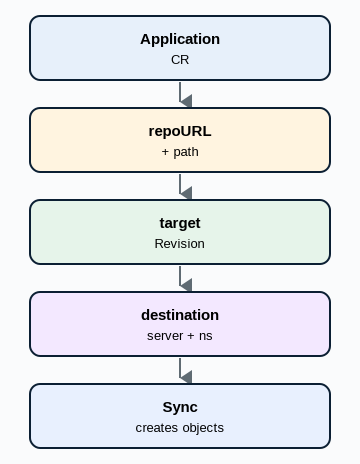
Story. A Swiggy-style team in Pune kept shop manifests under apps/shop-api in https://git.example.com/shop/deploy.git. Meera created one Argo CD Application named shop-api. The Application told Argo CD three things: which Git repo, which folder path, and which cluster namespace to write into.
Why
Argo CD will not guess which folder is your app. The Application CR is the contract.
What
- Application — Custom resource (
argoproj.io/v1alpha1) that links Git to a destination. - source.repoURL — Git repository URL (HTTPS or SSH).
- source.path — Folder inside the repo that holds manifests or a chart.
- source.targetRevision — Branch, tag or commit (for example
mainorHEAD). - destination.server — API server. In-cluster is often
https://kubernetes.default.svc. - destination.namespace — Where objects are created.
- project — Argo CD AppProject name (
defaultfor labs).
How
- Commit manifests to Git.
- Write an Application manifest (or use
argocd app create). - Apply it into the
argocdnamespace. - Sync once (manual) and read status.
Example 1: Application YAML
apiVersion: argoproj.io/v1alpha1
kind: Application
metadata:
  name: shop-api
  namespace: argocd
spec:
  project: default
  source:
    repoURL: https://git.example.com/shop/deploy.git
    targetRevision: HEAD
    path: apps/shop-api
  destination:
    server: https://kubernetes.default.svc
    namespace: shop
  syncPolicy:
    syncOptions:
      - CreateNamespace=true
kubectl apply -f shop-api-app.yaml
Output
application.argoproj.io/shop-api created
What it shows: The Application object exists. It does not deploy until you sync (unless automation is on).
Example 2: Create with the CLI
argocd app create shop-api \
  --repo https://git.example.com/shop/deploy.git \
  --path apps/shop-api \
  --dest-server https://kubernetes.default.svc \
  --dest-namespace shop \
  --sync-option CreateNamespace=true
argocd app get shop-api
Output
Name:               shop-api
Project:            default
Server:             https://kubernetes.default.svc
Namespace:          shop
URL:                https://git.example.com/shop/deploy.git
Path:               apps/shop-api
Sync Status:        OutOfSync
Health Status:      Missing
What it shows: Argo CD sees Git but the cluster does not have the objects yet — OutOfSync / Missing until the first sync.
Ravindra Bagale's Tip
Name the Application after the app, not after yourself. shop-api is clear; meera-test is not.
Application ला app नुसार नाव द्या. shop-api स्पष्ट आहे; meera-test नाही.
Application का नाम app के हिसाब से रखें. shop-api साफ है; meera-test नहीं.
Quick quiz
Q1. Which three source fields matter most?
repoURL, path and targetRevision.
Q2. What is destination.namespace?
The Kubernetes namespace where Argo CD creates the app objects.
Q3. Does creating an Application always deploy immediately?
No. You must sync, unless automated sync is enabled.
Did you understand? Let us try it once more.