Public and private IP, NAT, ports, IP classes, loopback, HTTP vs HTTPS, and why 255
Let's start. Yesterday we learnt what an IP address is, how to count IPv4 addresses, and the difference between static and dynamic IP. Today we answer one simple question: if there are only about 429 crore IPv4 addresses, how is the whole world still online? On the way we will see your home router, ports, the web server, SSH, IP classes, localhost, and why free WiFi is never really free. We finish with the reason every part of an IP stops at 255. Don't worry, you will get it slowly.
What you will learn in this class
- Recap: 4,294,967,296 IPv4 addresses
- Why dynamic IP alone is not enough
- Public IP and private IP
- Talking without internet, by distance
- How your router does NAT
- Why IPv4 has not run out yet
- Router public IP: static or dynamic?
- WiFi and mobile data together
- Mobile hotspot: your phone as a router
- Ports, and the default ports 80 and 443
- Web server and
/var/www/html - SSH on port 22
- URL syntax: protocol rules
- IP classes A to E, and CIDR
- How many devices fit in a network
- Private ranges and cloud work
- Who hands out IP addresses
- Loopback,
127.0.0.1and localhost - HTTP vs HTTPS, and free WiFi
- Binary: why each part stops at 255
- Homework
Classroom line
Does anyone have a question on what we did yesterday?
Class मधलं वाक्य
"Kaal jevdha zalay tyachyat kunala kay question aahe ka?"
काल जेवढं झालंय, त्यात कोणाला काही question आहे का?
Classroom line
Does anyone have a question on what we did yesterday?
1. Recap: IPv4 and the 4,294,967,296 problem
Why. Everything today grows from one problem, so first we put that problem back on the board.
What. An IPv4 address has 4 parts, each from 0 to 255, so it runs from 0.0.0.0 to 255.255.255.255.
- One part: 256 values (0 to 255).
- Two parts: 256 × 256 = 65,536.
- Three parts: 256 × 256 × 256 = 16,777,216.
- Four parts: 256 × 256 × 256 × 256 = 4,294,967,296, about 429 crore.
The world has 800+ crore people, and each person uses more than one device. So IPv4 addresses are short.
How we handled it so far.
| Who gets it | Why | |
|---|---|---|
| Static IP | servers | clients must find the server at the same address every time; the domain name (bought from a registrar such as GoDaddy) points to it through DNS |
| Dynamic IP | clients: phones, laptops | given while you are online, taken back when you disconnect, then given to someone else |
The app on your phone does not keep the server's IP inside it. It keeps a domain name, and DNS turns that name into the server's static IP.
2. Why dynamic IP alone is not enough
Why. Even if every phone gives its IP back at night, there are still far more devices online at the same moment than 429 crore addresses. Reuse over time is not enough.
Classroom line
Dynamic IP does not completely solve the IP problem... so IPs were again split into two types: Public IP and Private IP.
Class मधलं वाक्य
"Dynamic IP completely IP cha jo problem ahe to solve karat nahi... tyasathi IP che parat don types aale, ek Public IP aani ek Private IP."
Dynamic IP मुळे IP चा problem पूर्ण solve होत नाही... म्हणून IP चे परत दोन types आले: एक Public IP आणि एक Private IP.
Classroom line
Dynamic IP does not completely solve the IP problem... so IPs were again split into two types: Public IP and Private IP.
What. So now we have two pairs of words. Static and dynamic tell you how long an address stays with a device. Public and private tell you where the address works.
3. Public IP and private IP
Why. If every phone, laptop and TV in every home needed its own public IP, IPv4 would have finished long ago. Private IPs let a whole house share one public IP.
What.
| Public IP | Private IP | |
|---|---|---|
| Works where | on the whole internet | only inside your own network (home, office, AWS VPC) |
| Who gives it | your internet provider (ISP) | your router (or AWS inside a VPC) |
| Unique? | unique in the whole world | the same numbers are reused in every home |
| Board example | 3.3.3.3 |
192.168.0.2, 192.168.0.3 |
How it looks at home (the board drawing).
- The ISP line (Jio Fiber, Airtel Fiber, or a local cable operator) comes into your home router.
- The ISP gives the router one public IP, say
3.3.3.3. - Inside the house, the router is the gateway at
192.168.0.1. - The router gives your devices private IPs: phone
192.168.0.2, second phone192.168.0.3, laptop192.168.0.4, TV192.168.0.5. 192.168.0.0is the network address. It names the whole network and is never given to a device or the router.- The circle around the router and the devices is your private network.
Figure 1. Your home: the ISP gives the router one public IP (3.3.3.3). Inside the private network the router is 192.168.0.1 and the devices are .2, .3, .4, .5.
Do devices on a private IP get internet? Yes. Your phone on 192.168.0.2 watches reels every day. A private IP cannot travel on the public internet by itself, so the router swaps it for its own public IP on the way out (this swap is called NAT) and swaps it back on the way in. We trace that swap step by step in section 5.
Ravindra Bagale's Tip
Many students write the router as 192.168.0.0. .0 is the network address. The router is usually 192.168.0.1 (some brands use 192.168.1.1), and devices start from .2.
4. Talking without internet: it depends on distance
Why. Before we see how the internet works, ask a smaller question: suppose the ISP cable is cut. Can two devices still talk?
What. The board question. Two friends sit in the same room. One wants to send a file to the other. There is no internet and no data pack. How?
- A student said SMS. But SMS needs a recharge and a mobile network, so no.
- Students then said Bluetooth, mobile hotspot, and file-sharing apps like ShareIt. Yes, these work without internet.
How far each one reaches (rough typical values):
| Distance | What works | Note |
|---|---|---|
| about 1 m | infrared | old phones and TV remotes; must point at each other |
| about 10 m | Bluetooth | file sharing, earphones |
| about 100 m | WiFi, mobile hotspot, LAN | a local network; devices get private IPs |
| 500 m to 1 km | walkie-talkie | radio voice only, no files; it is not IP networking |
| several km | your own cable | copper LAN cable runs about 100 m per run; for longer, fibre cable |
| anywhere in the world | the internet | when laying your own cable is not possible |
Classroom line
If you are rich, you can lay a cable even 10 kilometres long.
Class मधलं वाक्य
तुम्ही श्रीमंत असाल तर 10 kilometer पर्यंत पण cable टाकू शकता.
Classroom line – हिंदी
"Agar aap amir ho toh aap 10 kilometer tak bhi cable daal sakte hai."
Figure 2. How far devices can talk without internet: infrared about 1 m, Bluetooth about 10 m, WiFi about 100 m, your own cable for longer, and the internet when you can't lay a cable.
So what is the internet? It is mostly cables: fibre cables on land and under the sea, joining the networks of ISPs, companies and cloud providers. The mobile tower or your WiFi is only the last wireless hop to your phone.
5. How your phone reaches Google through the router (NAT)
Why. Your phone has a private IP, yet it gets answers from Google. Something has to translate. That something is the router, and the trick is NAT (Network Address Translation).
What. Inside the home, devices talk to each other directly over WiFi. Anything going outside stops at the router first. When you search "weather Pune" on Google, the packet does not go straight to Google. It goes to the router.
How. Step by step (board numbers):
- Your phone
192.168.0.2searches "weather Pune". It builds a packet: From192.168.0.2:50001, To8.8.8.8:443(on the board, Google is8.8.8.8). - The packet goes to the router,
192.168.0.1. Inside the house, the router finds your phone by its MAC address; the MAC is used only inside the local network. - The router writes one line in its NAT table: inside
192.168.0.2:50001↔ outside3.3.3.3:40001. - The router changes the From address to its public IP: From
3.3.3.3:40001, To8.8.8.8:443. - The packet travels over the internet to Google.
- Google answers: From
8.8.8.8:443, To3.3.3.3:40001. Google only ever sees3.3.3.3. - The router looks up
3.3.3.3:40001in the NAT table and finds192.168.0.2:50001. - The router changes the To address back to
192.168.0.2:50001and hands the answer to your phone.
Two people searching at the same time. Your sister on 192.168.0.3 searches "cricket score" at the same moment. The router writes a second line: 192.168.0.3:50001 ↔ 3.3.3.3:40002. Both answers come back to the same public IP 3.3.3.3, but on different ports, so the router never mixes up your weather with her cricket score.
| Inside (private IP:port) | Outside (public IP:port) | Search |
|---|---|---|
192.168.0.2:50001 |
3.3.3.3:40001 |
weather Pune |
192.168.0.3:50001 |
3.3.3.3:40002 |
cricket score |
Figure 3. The router's NAT table: each private IP:port is swapped for the public IP 3.3.3.3 with its own port. The answer from 8.8.8.8 comes back to that port and is handed to the right phone.
Figure 4. Animation: the packet leaves the phone From 192.168.0.2, the router swaps it to From 3.3.3.3, it reaches 8.8.8.8, and the answer comes back the same way.
Ravindra Bagale's Tip
In interviews many students say "the router remembers a request ID". Say it correctly: the router keeps a NAT table that maps private IP and port to public IP and port. This same idea comes back in AWS as the NAT Gateway for private subnets.
6. Why IPv4 has not run out yet: every home reuses the same private IPs
Why. 429 crore addresses, 800+ crore people, many devices each, and still everyone is online. Here is the trick.
What.
- In my home, the router has public IP
3.3.3.3, and my devices are192.168.0.2,192.168.0.3, … - In your home, the router has public IP
5.5.5.5, and your devices are also192.168.0.2,192.168.0.3, … - There is no clash, because private IPs never leave their own network. Only the routers' public IPs go on the internet.
- So crores of homes use the same
192.168.0.xnumbers again and again. - Mobile companies do the same at a bigger scale: many phones share one public IP (carrier-grade NAT).
Figure 5. Two homes use the same private IPs 192.168.0.2 and .3 without any clash. On the internet only their public IPs, 3.3.3.3 and 5.5.5.5, are seen.
How you can see it yourself. Everyone on the same home WiFi who searches "my IP" on Google sees the same public IP: the router's. You will test this in the homework.
How many devices fit on one home router? A home network like 192.168.0.x (in AWS terms, a /24) has 256 addresses, .0 to .255:
192.168.0.0is the network address. Not usable.192.168.0.255is the broadcast address. Not usable.- That leaves 254 usable addresses,
.1to.254. - The router takes one (
.1), so about 253 devices can join.
7. Is the router's public IP static or dynamic?
Why. A student asked: "Router cha public IP static aste ki dynamic aste?" (Is the router's public IP static or dynamic?)
What.
- Most home routers get a dynamic public IP. Today it may be
3.3.3.3; after a restart or a few days, it may change. - The main reason: ISPs save scarce IPv4 addresses, and dynamic is cheaper for everyone.
- If you need a fixed one (for example, to run a server from home), you can buy a static IP from your ISP.
- Being a client does not force an IP to be dynamic. Dynamic is simply the cheaper and more common choice for homes.
8. WiFi and mobile data, both on
Why. Everyone keeps both on. Which one does the phone use?
What.
- If WiFi is connected and working, the phone prefers WiFi.
- If the WiFi has no internet, the phone falls back to mobile data.
- On mobile data alone, your phone gets its address from the mobile company. Often this is also a private address behind a shared public IP (carrier-grade NAT).
9. Mobile hotspot: your phone becomes a router
Why. When you turn on hotspot for a friend, your phone does exactly what the home router does.
What.
- Your phone broadcasts its own WiFi name.
- It gives private IPs to the devices that connect.
- It sends their traffic out through its own mobile-data address, using NAT, just like the home router.
- If your friend searches "cricket score", the website sees your phone's public address, not your friend's private IP.
How many devices? A hotspot allows only a few devices, often about 5 to 10, set by the phone maker. A phone's CPU, battery and RAM are not built to serve many devices like a real router.
Privacy on someone's hotspot. The hotspot owner's phone carries all your traffic. On plain HTTP they could read what you send. On HTTPS the content is encrypted. We come back to this in section 20.
10. Ports: the IP reaches the server, the port reaches the app
Why. One server can run many programs at once: a website, a database, a remote-login service. The IP only takes you to the machine. Something must say which program inside it.
What. A port is a number from 0 to 65,535 (that is 65,536 ports) that the operating system gives to a program on the network.
- The browser opens
http://3.3.3.3/login.html(orhttps://instagram.com/login.html; suppose this as a board example). - If you typed a name, DNS first turns the name into the IP.
- The request reaches the server
3.3.3.3. The IP's job is done here. - The port number says which program on
3.3.3.3should get the request.
Building and flat. The IP is the building address; the port is the flat number inside the building. The courier needs both.
Ravindra Bagale's Tip
A network port is not a hardware pin on the CPU and not the USB port on your laptop. It is a logical number in the operating system (TCP or UDP). Think building = IP, flat number = port.
11. Default ports: 80 and 443
Why. Nobody types :80 in the browser, yet it works. The browser adds it for you.
What.
| You type | The browser actually uses |
|---|---|
http://3.3.3.3 |
http://3.3.3.3:80 |
https://3.3.3.3 |
https://3.3.3.3:443 |
http://3.3.3.3:8080 |
port 8080, because you typed it |
So http://3.3.3.3:80 and http://3.3.3.3 open the same page.
Common ports you will use in this course:
| Port | Program |
|---|---|
| 22 | SSH (remote login to the server) |
| 80 | HTTP (website) |
| 443 | HTTPS (secure website) |
| 3306 | MySQL database |
| 9000 | php-fpm (PHP behind Nginx) |
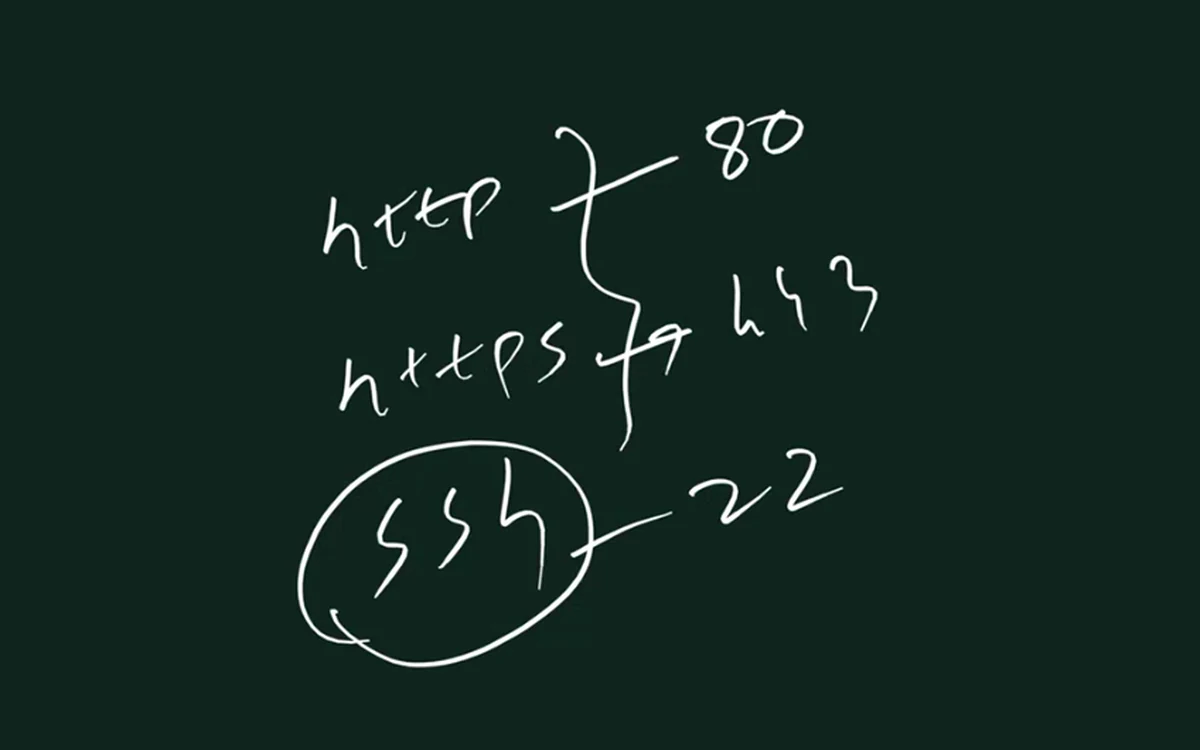
From the class board: Default ports to remember: HTTP uses 80, HTTPS uses 443 and SSH uses 22.
12. The web server: who listens on 80 and 443?
Why. Opening port 80 is not enough. A program must be running and listening on it, or the browser gets nothing.
What. That program is the web server. Examples: Apache, Nginx, Tomcat, IIS, Gunicorn, Uvicorn.
How a request for login.html is served (Apache):
- The browser asks
http://3.3.3.3/login.html. - The request reaches port 80 on
3.3.3.3. - Apache is listening on port 80.
- Apache's default web folder (document root) is
/var/www/html. - Apache sends back the file
/var/www/html/login.html.
On Amazon Linux, Nginx's default web folder is /usr/share/nginx/html instead.
You will do this yourself in the lab:
sudo yum install httpd -ysudo service httpd start- Put your page at
/var/www/html/login.html. - Open
http://<your-server-IP>/login.htmlin the browser.
13. SSH on port 22: managing the whole server
Why. Visitors only need your website files. You, the admin, need the whole server: install software, create folders, read logs.
What. SSH stands for Secure Shell. It runs on port 22 and gives you a command line on the server from your laptop.
How the board drawing works:
- The server
3.3.3.3is a big box. The website is one small folder inside it,/var/www/html. - Visitors come through port 80 or 443 and only reach that folder.
- The admin opens PowerShell on the laptop and connects with SSH on port 22.
- Now the admin is inside the whole server and can run commands, for example
mkdir ravi.
Figure 6. One server, 3.3.3.3. Visitors reach only the website folder through ports 80 and 443. The admin reaches the whole server through SSH on port 22.
Why SSH needs extra care.
| What was hacked | What is affected |
|---|---|
| The website | that site and its data |
| SSH | the whole server: every file, every site on it, every setting |
That is why a hacked SSH login is the most dangerous kind. In AWS, protect it:
- In the security group, allow port 22 only from My IP, not from everywhere (
0.0.0.0/0). - Log in with a key pair, not a password.
- Keep the private key file safe and never share it.
Classroom line
Any question here?
Class मधलं वाक्य
"Ithe kai question?"
इथे काही question?
Classroom line
Any question here?
14. URL syntax: a protocol is a set of strict rules
Why. A protocol is a set of rules both sides follow exactly. One wrong character and the browser does not understand you.
What. Read http://3.3.3.3:80/login.html piece by piece:
httpis the protocol. Notfttp, nothtp.://is a colon and two slashes.3.3.3.3is the server's IP (or a domain name).:separates the IP from the port.80is the port./login.htmlis the file you want.
Figure 7. Every piece of a URL has a fixed place: protocol, colon and two slashes, IP or name, colon, port, then the file path.
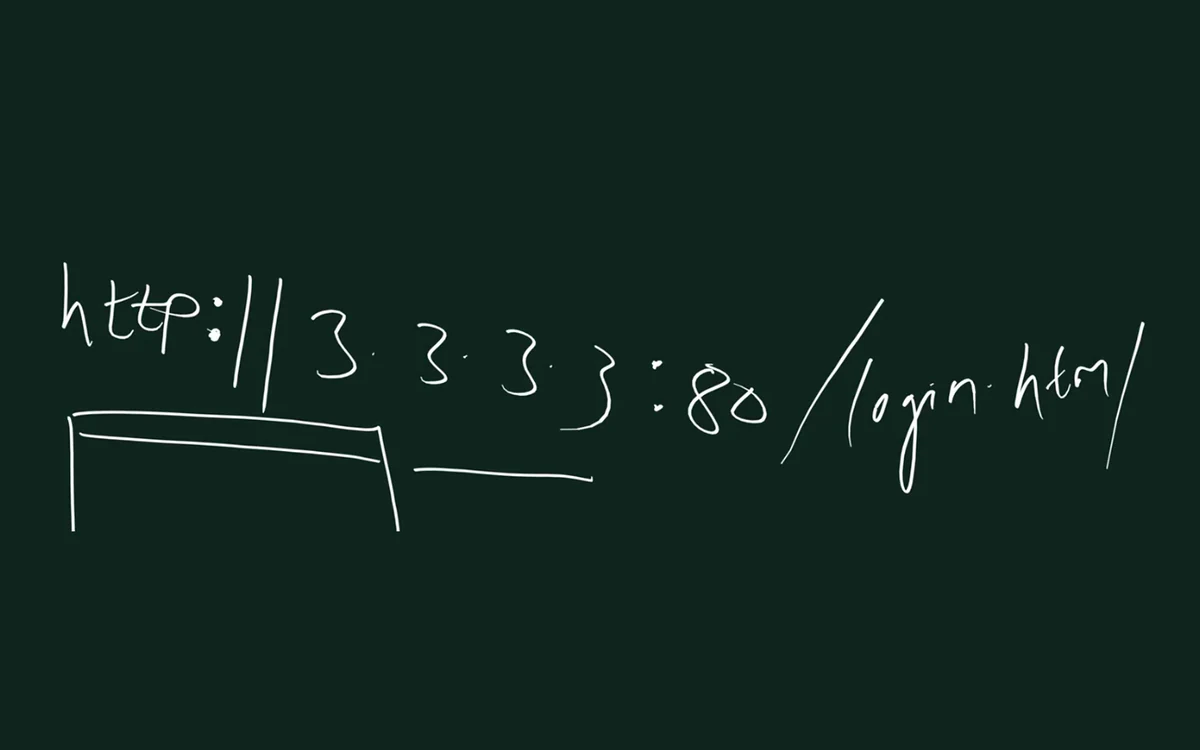
From the class board: Reading a URL piece by piece: protocol (http), then ://, then the IP address (3.3.3.3), then : and the port (80), then / and the path (login.html).
Classroom line
After HTTP you must write a colon... a semicolon won't work, a comma won't work... you must write two slashes.
Class मधलं वाक्य
HTTP नंतर colon च लिहायचा... semicolon लिहिला तर नाही चालणार, comma लिहिला तर नाही चालणार... दोन slash लिहायलाच पाहिजेत.
Classroom line – हिंदी
"HTTP ke baad colon hi likhna hai... semi-colon likha, nahi chalega. Comma likha, nahi chalega... do slash likhna hi hai."
15. IP classes A to E
Why. In the early internet, IPs were handed out in fixed-size blocks called classes. The first part of the IP tells you the class. You will still hear these names in interviews and at home routers.
What. Look only at the first part of the IP:
| Class | First part | Network and host parts | Used for |
|---|---|---|---|
| A | 0 to 127 (usable 1 to 126) | N.H.H.H | very large networks |
| B | 128 to 191 | N.N.H.H | medium networks |
| C | 192 to 223 | N.N.N.H | small networks, like a home |
| D | 224 to 239 | – | multicast (one sender, many receivers) |
| E | 240 to 255 | – | reserved, experimental |
N is the network part (same for every device in that network). H is the host part (different for each device).
0.x.x.xis reserved, and127.x.x.xis inside class A but reserved for loopback (section 19). So class A hosts use 1 to 126.- Only classes A, B and C are given to normal devices.
Worked examples:
| IP | First part | Class |
|---|---|---|
10.0.0.5 |
10 | A |
127.0.0.1 |
127 | A range, but reserved for loopback |
172.16.4.20 |
172 | B |
192.168.0.2 |
192 | C |
224.0.0.5 |
224 | D (multicast) |
Figure 8. The first part of the IP decides the class: A 0 to 127 (127 is loopback), B 128 to 191, C 192 to 223, D 224 to 239 multicast, E 240 to 255 reserved.
How it is done today: CIDR. Classes are history. Modern networks, and AWS VPC, use CIDR: a slash number says how many bits are the network part. /8 is like class A, /16 like class B, /24 like class C, but you can choose any size, for example /20.
16. How many devices fit in a network
Why. When you make a network in AWS you choose its size. So you must know how many devices each size holds.
What.
- A home router uses a class C style network,
192.168.0.x. Only the last part changes, 0 to 255: 256 addresses, 254 usable (.0network,.255broadcast). - A class B style network changes the last two parts: 256 × 256 = 65,536 addresses.
- A home router is not built for that many devices. Big offices and malls use enterprise network equipment.
- In AWS, a
/24subnet has 256 addresses, and AWS keeps 5 of them in every subnet, so 251 are usable for your servers.
| Network | Addresses | Usable |
|---|---|---|
192.168.0.0/24 (home) |
256 | 254 (253 devices plus the router) |
AWS subnet /24 |
256 | 251 (AWS keeps 5) |
/16 (class B style) |
65,536 | 65,534 |
17. Private IP ranges, and why cloud work is mostly private
Why. You must recognise a private IP on sight, because in AWS almost every server you build will have one.
What. These three ranges are private (RFC 1918). Everything else, except the reserved blocks, is public and handed out through ISPs and cloud providers.
| Range | Class style | Example |
|---|---|---|
10.0.0.0 to 10.255.255.255 |
A | 10.0.1.25 |
172.16.0.0 to 172.31.255.255 |
B | 172.31.5.10 |
192.168.0.0 to 192.168.255.255 |
C | 192.168.0.2 |
Watch out: 172.15.0.1 and 172.32.0.1 are not private. Only 172.16 to 172.31 is.
Classroom line
Our whole working life goes in private IPs... most of our work stays in private IPs.
Class मधलं वाक्य
आपलं पूर्ण आयुष्य private IP मध्ये जातं... आपलं जास्त काम private IP मध्येच असतं.
Classroom line – हिंदी
"Apna jo poora life hai, yeh private IP mein jata hai... Apna zyada kaam private IP mein rehta hai."
How a big app uses them. Suppose an app like Instagram runs on 100,000 servers (a "suppose" number to learn with):
- Only the front-door servers and load balancers face the internet with public IPs.
- The app servers and databases talk to each other on private IPs.
- In AWS this becomes a VPC with public subnets (front door) and private subnets (everything else).
18. Who hands out IP addresses?
Why. If every country or company just picked any IP, two machines could get the same address and the internet would break.
Classroom line
These IPs don't belong to any one country... they are the whole world's property.
Class मधलं वाक्य
हे IPs कोणत्या एका देशाचे नाहीत... ही पूर्ण जगाची property आहे.
Classroom line – हिंदी
"Ye IPs kisi ek desh ke nahi hai... poori world ki property hai."
What. The chain:
- IANA manages the whole IP address space for the world.
- IANA gives large blocks to five regional registries. For India and the Asia-Pacific region it is APNIC.
- APNIC gives blocks to ISPs and cloud providers (Jio, Airtel, AWS and others).
- The ISP gives one IP from its block to your router or phone.
- IPv4 has run out at the registries, so IPv4 blocks are now also bought and sold between companies on a transfer market.
Does an IP tell your location? The numbers inside an IP do not mean ISP, state or district. But because registries record which ISP got which block, location services map whole blocks to a rough city and ISP. So your public IP can reveal roughly where you are and which ISP you use.
19. Loopback and localhost: 127.0.0.1
Why. On one server, programs often need to talk to each other: the web server to PHP, PHP to the database. Sending that out to the internet and back would be slow and unsafe.
What. The whole range 127.0.0.0 to 127.255.255.255 is loopback: traffic sent there never leaves the machine. 127.0.0.1 is the one everyone uses, and localhost is its name.
How it works on one server (board drawing):
- A visitor reaches Nginx on port 80.
- Nginx passes PHP work to php-fpm at
127.0.0.1:9000. (On Amazon Linux php-fpm may use a socket file instead of port 9000; the idea is the same.) - php-fpm asks MySQL at
127.0.0.1:3306. - All of this stays inside the server. Same IP, different ports.
- You could use
127.0.0.2or127.0.0.3, but normally everyone uses127.0.0.1and separates programs by port.
Figure 9. Inside one server, Nginx (80), php-fpm (9000) and MySQL (3306) talk to each other on 127.0.0.1. That traffic never leaves the machine.
Try it on your server: curl http://localhost shows the page your web server is hosting, without going through the internet.
20. HTTP vs HTTPS: what others can see
Why. On someone's hotspot or a cafe's WiFi, every packet of yours passes through their device. What they can read depends on HTTP or HTTPS.
What.
| HTTP | HTTPS | |
|---|---|---|
| Data travels as | plain text | encrypted |
| Port | 80 | 443 |
| Needs | nothing extra | an SSL/TLS certificate on the server |
| WiFi owner can read your password? | yes | no, only scrambled data |
Example. You log in to a site on cafe WiFi.
- On
http://example.com, your username and password travel as plain text. The WiFi owner could read them. - On
https://example.com, the same login travels encrypted. The WiFi owner sees only scrambled data. - Payment and shopping apps (PhonePe, Paytm, Flipkart, Amazon) use HTTPS, so public WiFi is far safer than it used to be. Still, be careful.
Figure 10. Animation: on HTTP the password crosses the cafe WiFi as readable text; on HTTPS it crosses as scrambled data, and the WiFi owner sees only the site name.
21. Free WiFi in the mall: who is paying?
Classroom line
Nobody buys anyone tea or vada pav for free, so who gives free WiFi without any benefit?
Class मधलं वाक्य
कोणी कोणाला फुकट चहा पाजत नाही, वडापाव खाऊ घालत नाही, मग फायदा नसताना free WiFi कोण देतंय?
Classroom line – हिंदी
"Koi kisi ko chai nahi pilata, vada pav nahi khilata, toh kaun Wi-Fi free mein de raha hai bina fayde ka?"
What the free WiFi owner can see, even with HTTPS:
- The From and To IPs of every packet, because the router needs them to deliver it.
- Which sites you visit, mainly from your DNS lookups and from the site name your browser sends at the start of an HTTPS connection.
- When and how much you use.
What they cannot see with HTTPS: your messages, passwords and page content.
An IP alone does not always tell the app, because many sites share the same big content-delivery servers. The lesson stays: free WiFi can see which sites, not what you send.
22. See your own phone's traffic
Why. Seeing your own packets makes all of today's ideas real.
What. Packet-capture apps on Android (for example "PCAPdroid" or older "Packet Capture" apps) create a local VPN on your phone and show your own phone's connections: which apps talk to which servers, and on which ports.
- Install a packet-capture app from the Play Store on your own phone.
- Start a capture.
- Open a few apps.
- See which IPs and ports each app uses, and which connections are HTTP or HTTPS.
Use it only on your own phone. Watching other people's traffic without their permission is not okay.
23. Why each part of an IP stops at 255: binary
Why. Since the last class we have said "no part goes above 255". Today we see why.
What. Humans count in decimal (0 to 9). Machines understand only binary: 0 and 1. So every IP is stored in binary.
The board question: "Kiti zero use karu?" (How many zeros should I use?) Students guessed 4, 8, 16, 32. The answer is 8 bits (8 binary digits) for each part. 8 bits = 1 byte.
0.0.0.0in binary is00000000.00000000.00000000.00000000.- The next IP,
0.0.0.1, is00000000.00000000.00000000.00000001. - An IPv4 address is 4 parts × 8 bits = 32 bits.
Classroom line
This is the quality of our studying... this all happens because of rote learning. If you understand it, this never happens.
Class मधलं वाक्य
"He aahe aaplya abhyasachi quality... He ratta marlyamule asa hota sagla. Samjhun ghetla tar asa kadhi hotach nahi."
ही आहे आपल्या अभ्यासाची quality... हे सगळं रट्टा मारल्यामुळे होतं. समजून घेतलं तर असं कधी होतच नाही.
Classroom line
This is the quality of our studying... this all happens because of rote learning. If you understand it, this never happens.
Counting in binary, 0 to 15:
| Decimal | Binary | Decimal | Binary |
|---|---|---|---|
| 0 | 0 | 8 | 1000 |
| 1 | 1 | 9 | 1001 |
| 2 | 10 | 10 | 1010 |
| 3 | 11 | 11 | 1011 |
| 4 | 100 | 12 | 1100 |
| 5 | 101 | 13 | 1101 |
| 6 | 110 | 14 | 1110 |
| 7 | 111 | 15 | 1111 |
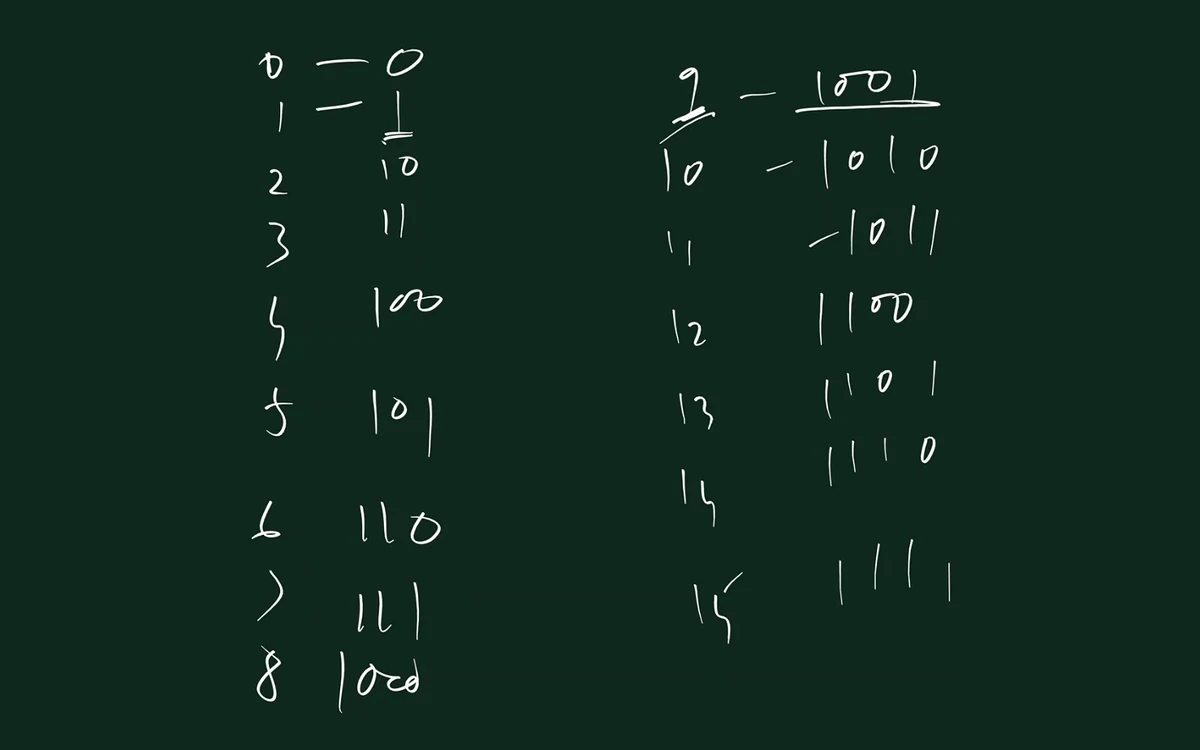
From the class board: Counting in binary: decimal 0 to 15 next to their binary forms, from 0, 1, 10, 11 up to 1111. Four bits give 16 values, 0 to 15.
The biggest 8-bit number. Fill all 8 bits with 1: 11111111. Each place has a value, starting from the right: 1, 2, 4, 8, 16, 32, 64, 128.
128 + 64 + 32 + 16 + 8 + 4 + 2 + 1 = 255
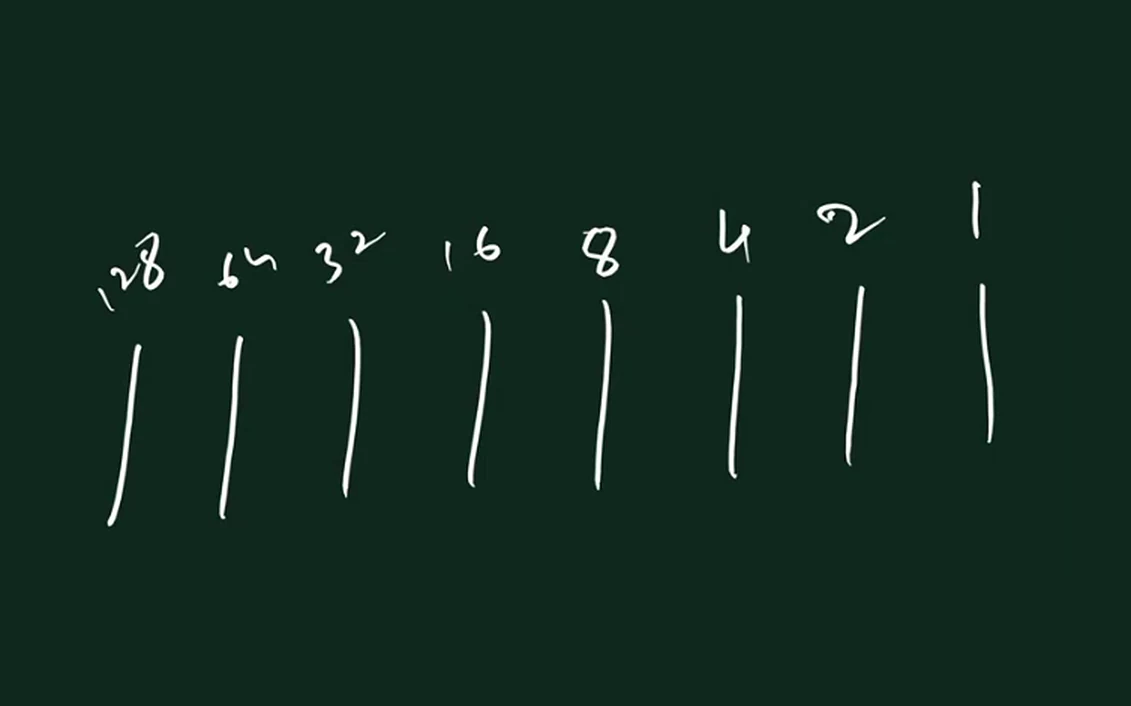
From the class board: One IP part is 8 bits, with place values 128, 64, 32, 16, 8, 4, 2, 1. Set every bit to 1 and add them: 128+64+32+16+8+4+2+1 = 255. That is why each part stops at 255.
Figure 11. Animation: eight bits, place values 128 to 1. When all eight are 1, they add up to 255. 256 would need a 9th bit.
So:
- One part has 8 bits, so it can hold 0 (
00000000) to 255 (11111111). - 256 in binary is
100000000. That needs a 9th bit, which an IPv4 part does not have. - That is why
256.0.7.8is never an IP address.
24. Homework: try at home
Try at home
Test 1: many devices, one public IP
- Turn on the mobile hotspot on your phone.
- Ask 2 or 3 friends to connect to it.
- Everyone opens Google and searches "my IP".
- Compare: everyone sees the same public IP, your phone's.
- That is NAT: private IPs behind one public IP.
Test 2: find your own private IP
- On a Windows laptop, open Command Prompt and run
ipconfig. - Look for IPv4 Address (for example
192.168.0.4) and Default Gateway (for example192.168.0.1). - On Linux, run
ip addrand look at the line starting withinet. - Check: does your IP fall in one of the three private ranges?
- Now search "my IP" on Google. The public IP you see is different from your private IP.
Test 3 (optional): localhost
- If a web server is running on your laptop or server, open
http://localhost. - On your AWS server you can run
curl http://localhost. - The page comes from the same machine, through
127.0.0.1.
Ravindra Bagale's Tip
Many students search "my IP" and write down the 192.168.x.x address from ipconfig as their public IP. They are two different things: ipconfig shows the private IP your router gave you; Google shows the public IP of your router.
Recap
In short
- IPv4 has 4,294,967,296 addresses, about 429 crore, for 800+ crore people. Dynamic IP alone does not solve it.
- Public IPs work on the internet; private IPs work only inside your network and are reused in every home.
- Your router is
192.168.0.1, devices start at.2, and.0is the network address. - The router does NAT: private IP:port ↔ public IP:port, so private devices still reach the internet.
- A
/24home network has 254 usable addresses; with the router, about 253 devices. - Without internet, distance decides: infrared, Bluetooth, WiFi, your own cable. The internet itself is mostly fibre.
- The IP reaches the server; the port (0 to 65,535) reaches the program. 80 HTTP, 443 HTTPS, 22 SSH, 3306 MySQL, 9000 php-fpm.
- SSH is Secure Shell; a hacked SSH login exposes the whole server.
- Classes: A, B, C for hosts, D multicast, E reserved. Today AWS uses CIDR (
/16,/24). - Private ranges:
10.x,172.16to172.31,192.168.x. IANA → APNIC → ISPs hand out IPs. 127.0.0.1(localhost) never leaves the machine.- HTTPS hides content, not which sites you visit. Free WiFi is never fully free.
- 8 bits of 1 = 128 + 64 + 32 + 16 + 8 + 4 + 2 + 1 = 255. That is why no part goes above 255.
Samjla ka? Do the hotspot "my IP" test tonight. Kalel tumhala, halu halu kalel. In the next class we go deeper.
Ravindra Bagale, trainer: linkedin.com/in/ravindra-bagale. All IPs on the board are dummy numbers for learning. Instagram on 100,000 servers is a "suppose" example, not a fact about Instagram.