AWS global infrastructure: Regions, Availability Zones, Local Zones, Wavelength Zones, edge locations and Outposts
Let's start. So far we learnt IP addresses, ports and the web server: a request finds the server by its IP, the port takes it to the web server, and the web server sends back the page. But where does that server actually sit? When you click "Launch" in AWS, your server starts inside a real building, in a real city. Today we learn how AWS spreads those buildings across the world, why it does it that way, and how that helps your website stay fast and stay up. From the next class our practicals start, so this is the map you need before you launch your first server. Don't worry, you will get it slowly.
What you will learn in this class
- The six building blocks of AWS global infrastructure
- Region, Availability Zone (AZ) and data center
- Why one AZ can be more than one data center: the land story
- Disasters, and why you run servers in at least two AZs
- Why Regions are isolated from each other
- Restricted Regions: China and AWS GovCloud (US)
- Default Regions and opt-in Regions, and how to enable one
- Region codes, and why AWS uses codes instead of city names
- AZ codes and how many AZs a Region has
- How to choose a Region
- Local Zones
- Wavelength Zones
- The latency problem: distance and waiting time
- Edge locations and CDN (Amazon CloudFront)
- Uploading through the edge
- What the edge keeps and what it deletes
- See a CDN yourself in browser DevTools
- AWS Outposts
- Homework
Classroom line
From tomorrow our practicals will start.
Class मधलं वाक्य
"Udya pasun aapla practical chalu hoil."
उद्यापासून आपलं practical चालू होईल.
Classroom line
From tomorrow our practicals will start.
1. AWS global infrastructure: the six building blocks
Why. Your website must be close to its users, must keep running when a building has a problem, and sometimes must stay inside one country or one company's building. One giant data center cannot do all of this. So AWS builds different kinds of places, each for one job.
What. On the board we wrote six building blocks:
- Regions: big areas (like Mumbai) where AWS keeps its main data centers.
- Availability Zones (AZs): separate groups of data centers inside one Region.
- Local Zones: small AWS sites inside big cities, close to users.
- Wavelength Zones: AWS servers placed inside a telecom company's network, close to mobile users.
- Edge locations: small AWS sites in many cities that keep copies of your files (this is the CDN, Amazon CloudFront).
- Outposts: AWS hardware installed inside your own company's building.
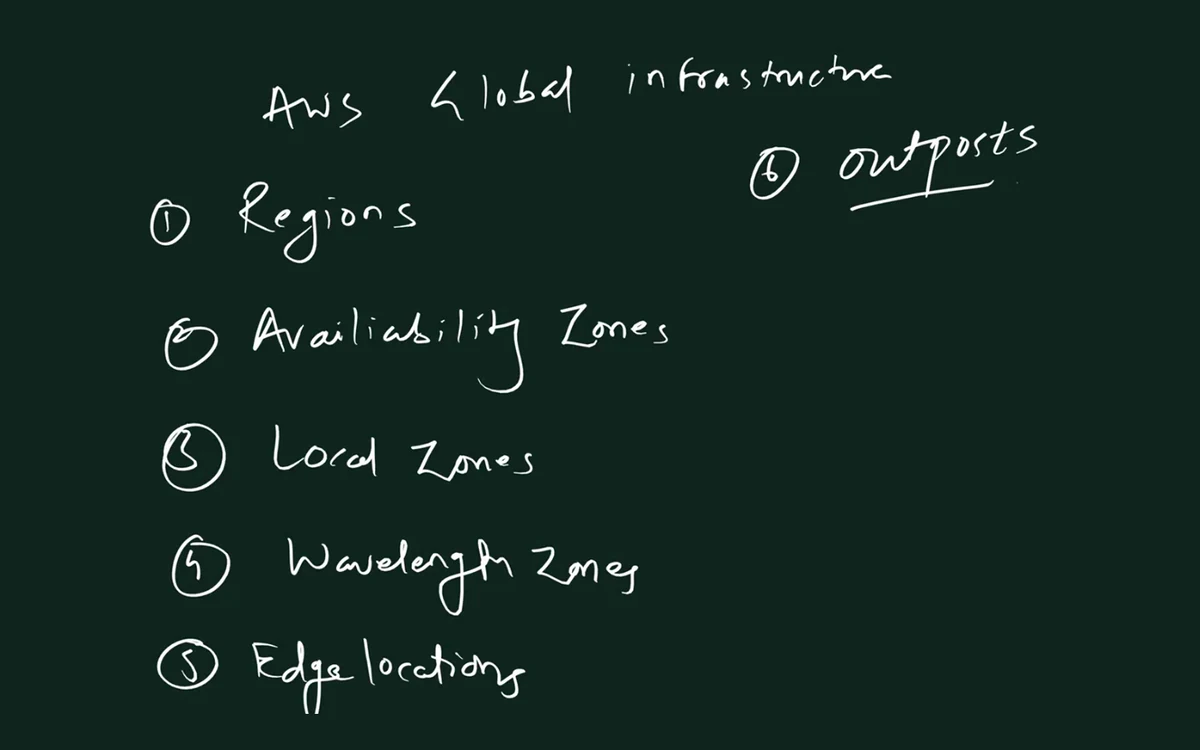
From the class board: AWS global infrastructure has six building blocks: Regions, Availability Zones, Local Zones, Wavelength Zones, Edge locations and Outposts.
How big is it today? These are AWS's own published numbers. They grow every year, so always check the live AWS Global Infrastructure page:
| What | AWS's published number |
|---|---|
| Regions | 39 launched (2 more announced: Saudi Arabia and Chile) |
| Availability Zones | 124 |
| Local Zones | 46 |
| Wavelength Zones | 33 |
| CloudFront Points of Presence (edge locations) | 750+, plus 15 Regional edge caches |
Figure 1. The six building blocks: a Region with its Availability Zones, a Local Zone inside a city, a Wavelength Zone inside a telecom network, edge locations near users, and an Outpost inside a company's own building.
2. Region, Availability Zone and data center
Why. Before you launch a server, AWS asks you two questions: which Region, and which AZ. So you must know exactly what each word means.
What. Three levels, from big to small:
- A data center is one building full of servers, with its own power, cooling and network.
- An Availability Zone (AZ) is one or more data centers, with redundant power, networking and connectivity.
- A Region is a geographic area with several AZs. AWS designs every Region with at least three AZs.
Where are the AZs of one Region?
- All AZs of one Region are in the same metro area.
- They are separated by a meaningful distance, many kilometres, so one local problem does not hit all of them.
- But all of them are within about 100 km (60 miles) of each other, so they can talk very fast.
- They are joined by AWS's own redundant, high-bandwidth, low-latency fibre, not by satellite or mobile towers. Traffic between AZs is encrypted.
India example (worked numbers).
| Region | Code | AZs |
|---|---|---|
| Asia Pacific (Mumbai) | ap-south-1 |
3 |
| Asia Pacific (Hyderabad) | ap-south-2 |
3 |
- Mumbai Region: 3 AZs, and each AZ has at least 1 data center, so at least 3 data centers.
- Hyderabad Region: 3 AZs, so at least 3 data centers.
- Total in India: 3 + 3 = 6 AZs in 2 Regions.
- All three Mumbai AZs are in the Mumbai area. All three Hyderabad AZs are in the Hyderabad area.
- AWS does not publish the exact address or the exact number of buildings. That is for security.
Figure 2. One Region, three AZs. Each AZ is one or more data centers. All AZs of a Region are in the same metro area, within about 100 km of each other, joined by AWS's own fibre.
Ravindra Bagale's Tip
Delhi and Kolkata are not AZs of the Mumbai Region. AZs never sit in different cities hundreds of kilometres apart. Delhi and Kolkata do have AWS Local Zones attached to the Mumbai Region. We see Local Zones in section 11.
3. Why one AZ can be more than one data center: the land story
Why. Students ask: if an AZ is "a data center", why does AWS say "one or more data centers"? The answer is land.
What. The board story (suppose numbers):
- Suppose one big data center needs 50 acres of land.
- In one part of the metro, AWS finds one 50-acre plot. It builds one data center there. That AZ = 1 data center.
- In a crowded part of the metro, no single 50-acre plot is free. AWS finds two plots of 25 acres each, close to each other.
- It builds two smaller data centers, and groups both under one AZ name.
- Total land is the same: 25 + 25 = 50 acres. Capacity is about the same. Only the number of buildings changed.
- For you, nothing changes. You pick the AZ, for example
ap-south-1b. AWS decides which building inside that AZ runs your server.
Worked example. Suppose the Mumbai Region looks like this:
| AZ | Buildings | Land (suppose) |
|---|---|---|
ap-south-1a |
1 data center | 50 acres |
ap-south-1b |
2 data centers | 25 + 25 = 50 acres |
ap-south-1c |
1 data center | 50 acres |
All three AZs, and all four buildings, are still inside the Mumbai metro area. These acre numbers are only to learn with; AWS does not publish them.
4. Disasters, and why you run servers in at least two AZs
Why. A data center is a building. A fire, flood, earthquake or long power failure can take one building down. If your only server is in that building, your website is down.
What. Because AZs are separate, a disaster in one AZ normally does not touch the others. So you spread your servers across at least two AZs, and put a load balancer in front that checks their health.
How failover works (board arrows):
- Users send requests to the load balancer.
- The load balancer sends some requests to servers in AZ
aand some to servers in AZb. - Suppose a fire hits AZ
a. Its servers stop answering. - The load balancer's health checks fail for those servers.
- After a few failed checks (you choose how often it checks, for example every 10 or 30 seconds), it stops sending requests to AZ
aand sends everything to AZb. - Users keep using the website. Some may see a slow request or a retry, but the site stays up.
Figure 3. Animation: the load balancer sends requests to both AZs. When AZ a fails its health checks, all requests go to AZ b and the website stays up.
Worked examples: how much capacity is left?
| Setup | Servers | One AZ fails | Left |
|---|---|---|---|
| 1 AZ only | 4 in a |
a fails |
0 of 4 = 0%, site down |
| 2 AZs | 2 in a, 2 in b |
a fails |
2 of 4 = 50%, site up |
| 3 AZs | 2 in a, 2 in b, 2 in c |
a fails |
4 of 6 = 66.7%, site up |
What AWS promises (EC2 SLA). AWS's service level agreement for EC2 shows the same idea in numbers:
- A single EC2 instance: 99.5% monthly uptime commitment.
- EC2 running across two or more AZs in a Region: 99.99% monthly uptime commitment.
- A 30-day month has 30 × 24 × 60 = 43,200 minutes.
- 99.5% allows 43,200 × 0.005 = 216 minutes (3 hours 36 minutes) of downtime in a month.
- 99.99% allows 43,200 × 0.0001 = 4.32 minutes in a month.
- Same servers, just spread across AZs, and the promise is 50 times stronger.
Ravindra Bagale's Tip
In interviews say it exactly: "high availability means running in multiple AZs behind a load balancer with health checks." Two servers in the same AZ do not protect you from an AZ failure.
5. Why Regions are isolated from each other
Why. If something goes wrong in one Region, it should not spread to the whole world, like a disease kept inside one area.
What.
- Every Region is physically separate and independent of the other Regions.
- A problem in the Mumbai Region stays in the Mumbai Region. Singapore, Tokyo and the rest keep running.
- Your data stays in the Region you chose. AWS does not copy it to another Region on its own.
- Regions are still connected through the AWS global network, so you can choose to copy data between them (for example, replicate a database or an S3 bucket).
Worked example.
- Website A runs only in Mumbai. If the whole Mumbai Region has a serious problem, website A is down.
- Website B runs in Mumbai, and keeps a copy ready in Singapore (
ap-southeast-1). - If Mumbai has a problem, website B switches its users to Singapore.
- Website B costs more (two copies), but survives even a whole-Region problem. You decide if your business needs that.
6. Restricted Regions: China and AWS GovCloud (US)
Why. Some Regions cannot be used from a normal AWS account. They exist for legal and compliance rules.
What. Two groups:
| Group | Regions | Who can use them |
|---|---|---|
| China | China (Beijing), China (Ningxia) | only with a separate AWS (China) account |
| AWS GovCloud (US) | AWS GovCloud (US-East), AWS GovCloud (US-West) | only vetted US government agencies, contractors and other US entities with strict compliance needs |
China Regions.
- They are run separately under Chinese law.
- The Beijing Region is operated by a local company, Sinnet. The Ningxia Region is operated by NWCD.
- You need an AWS (China) account. Your normal AWS account cannot see these Regions, and a China account cannot see the normal ones.
AWS GovCloud (US).
- Two isolated US Regions, operated by US citizens on US soil.
- The root account holder must pass a screening as a US person.
- They exist for US government compliance programmes (for example FedRAMP High) and for sensitive, controlled government data.
The board drawing: why governments care about shared hardware. In AWS, one big physical server (the host) is sliced into many virtual servers:
- Suppose a host has 1,000 GB of storage and 500 GB of RAM.
- Each virtual server you rent gets, suppose, 4 GB RAM and 8 GB of disk.
- By RAM: 500 ÷ 4 = 125 virtual servers. By disk: 1,000 ÷ 8 = 125 virtual servers.
- So up to about 125 customers can share one physical machine (a real host keeps a little for itself).
- AWS keeps virtual servers strongly isolated from each other. Still, some governments' rules demand separate Regions, special staff and special audits. That is why GovCloud exists.
Correction
Normal accounts cannot use 4 Regions: the 2 China Regions and the 2 AWS GovCloud (US) Regions. The GovCloud names are written exactly as "AWS GovCloud (US-East)" and "AWS GovCloud (US-West)".
7. Default Regions and opt-in Regions
Why. When you open a new AWS account, some Regions appear in the Region list and some don't. Students think the missing ones are broken or blocked. They are just switched off by default.
What. The rule (from AWS):
- Regions launched before 20 March 2019 are enabled by default. You can use them from day one, and you cannot disable them.
- Regions launched after 20 March 2019 are opt-in Regions. They are disabled by default for every account.
- A disabled opt-in Region does not show in the console's Region list until you enable it.
- Enabling is free. You pay only for what you create there.
Enabled by default (17):
| Region | Code |
|---|---|
| US East (N. Virginia) | us-east-1 |
| US East (Ohio) | us-east-2 |
| US West (N. California) | us-west-1 |
| US West (Oregon) | us-west-2 |
| Asia Pacific (Mumbai) | ap-south-1 |
| Asia Pacific (Osaka) | ap-northeast-3 |
| Asia Pacific (Seoul) | ap-northeast-2 |
| Asia Pacific (Singapore) | ap-southeast-1 |
| Asia Pacific (Sydney) | ap-southeast-2 |
| Asia Pacific (Tokyo) | ap-northeast-1 |
| Canada (Central) | ca-central-1 |
| Europe (Frankfurt) | eu-central-1 |
| Europe (Ireland) | eu-west-1 |
| Europe (London) | eu-west-2 |
| Europe (Paris) | eu-west-3 |
| Europe (Stockholm), in Sweden | eu-north-1 |
| South America (São Paulo), in Brazil | sa-east-1 |
Opt-in, disabled by default (17):
| Region | Code |
|---|---|
| Africa (Cape Town) | af-south-1 |
| Asia Pacific (Hong Kong) | ap-east-1 |
| Asia Pacific (Hyderabad) | ap-south-2 |
| Asia Pacific (Jakarta) | ap-southeast-3 |
| Asia Pacific (Malaysia) | ap-southeast-5 |
| Asia Pacific (Melbourne) | ap-southeast-4 |
| Asia Pacific (New Zealand) | ap-southeast-6 |
| Asia Pacific (Taipei) | ap-east-2 |
| Asia Pacific (Thailand) | ap-southeast-7 |
| Canada West (Calgary) | ca-west-1 |
| Europe (Milan) | eu-south-1 |
| Europe (Spain) | eu-south-2 |
| Europe (Zurich) | eu-central-2 |
| Israel (Tel Aviv) | il-central-1 |
| Mexico (Central) | mx-central-1 |
| Middle East (Bahrain) | me-south-1 |
| Middle East (UAE) | me-central-1 |
Worked example: counting.
- A normal AWS account sees 17 default + 17 opt-in = 34 Regions in AWS's Regions table.
- Mumbai is a default Region, so you can launch there on day one.
- Hyderabad is an opt-in Region, so you must enable it first.
- When you sign up from India, AWS may suggest enabling the nearer opt-in Region (Hyderabad) if it is closer to your contact address than Mumbai.
Correction
On the board we wrote Saudi Arabia in the opt-in list. The Saudi Arabia Region is announced but not launched yet, so it is not in the list. New Zealand (ap-southeast-6) is launched and opt-in, so it belongs in the list. The correct opt-in count today is 17. These lists change when AWS opens a new Region, so check the AWS Regions page before an interview.
How to enable an opt-in Region (console):
- Sign in as the root user or as an IAM user with permission to enable Regions.
- Click your account name at the top right.
- Click Account. This opens the Account page in Billing and Cost Management.
- Scroll down to the AWS Regions section.
- Select the Region, for example Asia Pacific (Hyderabad), and click Enable.
- Confirm with Enable region.
- Wait. It usually takes a few minutes, and sometimes several hours, because AWS copies your IAM users and credentials to that Region.
- When the status shows Enabled, the Region appears in the Region list at the top right.
8. Region codes, and why not city names
Why. City names change. Programs don't like change.
Classroom line
Earlier it was Bombay, now it has become Mumbai.
Class मधलं वाक्य
आधी Bombay होतं, आता Mumbai झालं.
Classroom line – हिंदी
"Pehle Bombay tha, abhi Mumbai ho gaya."
What. Suppose AWS had named the Region "bombay":
- Thousands of companies write the Region name inside their Python, Java and Node.js programs, scripts and settings files.
- The city is renamed to Mumbai. If AWS renamed the Region too, every one of those programs would break on the same day.
- So AWS uses a fixed code that never changes:
ap-south-1. The display name can say "Mumbai", but programs use the code.
How to read a Region code:
- Area:
ap= Asia Pacific,us= United States,eu= Europe,ca= Canada,sa= South America,af= Africa,me= Middle East,il= Israel,mx= Mexico. - Direction inside that area:
south,southeast,northeast,east,west,north,central. - Number: 1 for the first Region in that direction, 2 for the second, and so on.
Worked examples:
| Code | Read it as | Region |
|---|---|---|
ap-south-1 |
Asia Pacific, south, first | Mumbai |
ap-south-2 |
Asia Pacific, south, second | Hyderabad |
ap-southeast-1 |
Asia Pacific, southeast, first | Singapore |
ap-southeast-5 |
Asia Pacific, southeast, fifth | Malaysia |
us-east-1 |
US, east, first | N. Virginia |
us-west-2 |
US, west, second | Oregon |
eu-west-2 |
Europe, west, second | London |
eu-north-1 |
Europe, north, first | Stockholm |
eu-central-2 |
Europe, central, second | Zurich |
me-central-1 |
Middle East, central, first | UAE |
il-central-1 |
Israel, central, first | Tel Aviv |
af-south-1 |
Africa, south, first | Cape Town |
Figure 4. Reading the code ap-south-1a: area (Asia Pacific), direction (south), number (first Region), and the letter of the Availability Zone.
In a program it looks like this: region = "ap-south-1". If you write the city name instead, the AWS tools will not understand it.
Classroom line
If someone can tell you the codes, it means they have practised a lot.
Class मधलं वाक्य
"Jar koni code sangu shakte, yacha artha hai tyani lay practice kelela hai."
जर कोणी codes सांगू शकतो, तर त्याचा अर्थ त्याने खूप practice केलेली आहे.
Classroom line
If someone can tell you the codes, it means they have practised a lot.
Correction
On the board, a few Regions were placed under the wrong area. Malaysia is ap-southeast-5 (Asia Pacific), Tel Aviv is il-central-1, Mexico is mx-central-1, and Cape Town is af-south-1. The UK Region is London, eu-west-2. Stockholm (eu-north-1) is in Sweden.
9. AZ codes, and how many AZs a Region has
Why. When you launch a server you pick a subnet, and every subnet lives in exactly one AZ. So you will read AZ codes every day.
What. AZ code = Region code + one letter.
- Mumbai Region
ap-south-1has 3 AZs. - Their codes are
ap-south-1a,ap-south-1bandap-south-1c. - N. Virginia
us-east-1has 6 AZs:us-east-1atous-east-1f.
How many AZs? (AWS's Regions table today)
| Region | AZs |
|---|---|
US East (N. Virginia) us-east-1 |
6 |
US West (Oregon) us-west-2 |
4 |
Asia Pacific (Tokyo) ap-northeast-1 |
4 |
Asia Pacific (Seoul) ap-northeast-2 |
4 |
US East (Ohio) us-east-2 |
3 |
Asia Pacific (Osaka) ap-northeast-3 |
3 |
US West (N. California) us-west-1 |
3 (newer accounts can use only 2) |
| Mumbai, Hyderabad and most others | 3 |
Why does N. Virginia have so many?
- AWS adds AZs to a Region when demand there grows.
us-east-1is AWS's oldest Region, and it has grown to 6 AZs.
Correction
In class we said N. Virginia is next to Silicon Valley. It is not. Silicon Valley is in California, on the west coast. N. Virginia is on the east coast, near Washington DC. We also said N. California is the only Region with 2 AZs. AWS lists it with 3 AZs, but newer accounts can use only 2 of them.
Worked example: planning a high-availability website in Mumbai.
- Mumbai has 3 AZs.
- You need at least 2 for high availability, so pick
ap-south-1aandap-south-1b. - You make one subnet in each AZ.
- You launch 2 web servers in each subnet: 4 servers in total.
- If one AZ fails, 2 of 4 servers (50%) keep the site running, as in section 4.
Ravindra Bagale's Tip
The letter is a label for your account. AWS can map ap-south-1a in your account to a different physical AZ than ap-south-1a in your friend's account. When two accounts must use the very same AZ, compare the AZ ID, for example aps1-az1, which is the same for everyone.
10. How to choose a Region
Why. The Region decides how far your server is from your users, which services you get, where your data legally sits, and what you pay.
What. Check these four things, in this order:
- Distance to users. Pick the Region closest to most of your users. Users in India: Mumbai or Hyderabad. A client whose users are in the US: a US Region such as
us-east-1. - Law and data rules. Some data must stay inside a country. Pick a Region in that country.
- Services. New AWS services do not reach every Region on day one. Check that your Region has what you need.
- Price. Prices differ by Region. Compare on the AWS pricing page; never guess.
Worked example.
- A Pune coaching institute's website; all students are in Maharashtra. Choose Mumbai
ap-south-1. - An online shop with customers in the US. Choose a US Region, for example N. Virginia
us-east-1. - A company that must keep customer data inside India and wants a second copy far from Mumbai. Use Mumbai as the main Region and Hyderabad
ap-south-2(enable it first) for the copy.
Which Region does the console open in? The console opens in your default Region (you can set it in the console settings) or the one you used last. It does not pick a Region from your GPS.
Ravindra Bagale's Tip
The most common beginner panic: "Sir, my server disappeared!" It didn't. You launched it in Mumbai, and now the console is showing N. Virginia. Always check the Region name at the top right before you launch, and before you search for your servers.
11. Local Zones
Why. A Region's big data centers usually sit outside the city centre, where large plots of land are available. Think of IT parks on the edge of a city, like Hinjewadi or Kharadi on the edge of Pune. For most websites this is fine. But some users need answers really fast, and every kilometre adds delay.
What. A Local Zone is a smaller AWS site placed inside or near a big city, close to the users.
- It is an extension of a parent Region. For example, the Delhi Local Zone belongs to the Mumbai Region.
- You can run your own servers there: EC2, EBS volumes, VPC subnets, load balancers, and some other services.
- It connects back to its parent Region over AWS's own high-bandwidth network, so the rest of your setup can stay in the Region.
- AWS says Local Zones are for applications that need single-digit millisecond latency to users.
- Prices are set per Local Zone. Check the pricing page; don't assume they match the Region.
Classroom line
Taking space inside the city... is very expensive.
Class मधलं वाक्य
City मध्ये जागा घेणं... खूप महाग असतं.
Classroom line – हिंदी
"City mein jagah lena... bahut mehenga hota hai."
Who uses it? Anyone for whom a few milliseconds matter: real-time multiplayer games, live media and video editing, and stock traders.
Classroom line
Not even one second of delay.
Class मधलं वाक्य
एका second चा पण उशीर नको.
Classroom line – हिंदी
"1 second ka bhi der nako."
India Local Zones (AWS's list today):
| City | Local Zone name | Parent Region |
|---|---|---|
| Delhi | ap-south-1-del-1a |
Mumbai (ap-south-1) |
| Kolkata | ap-south-1-ccu-1a |
Mumbai (ap-south-1) |
How to read a Local Zone name: us-west-2-lax-1a = parent Region us-west-2 (Oregon), location lax (Los Angeles), group 1, zone a.
Worked example (suppose numbers).
- A trading app user in Delhi. Each request to a server in the Mumbai Region takes, suppose, 30 ms there and back.
- The same request to a server in the Delhi Local Zone takes, suppose, 3 ms.
- One screen makes 10 requests one after another.
- Region: 10 × 30 = 300 ms. Local Zone: 10 × 3 = 30 ms.
- For a normal website, 300 ms is fine. For a trader, the faster one wins.
Correction
Mumbai is a full Region, not a Local Zone. India's Local Zones are Delhi and Kolkata. Local Zone latency is measured in milliseconds, not nanoseconds, and a normal Region is not "1 second away"; it is usually tens of milliseconds.
12. Wavelength Zones
Why. Mobile users are the hardest to serve fast. Your phone's request goes to the tower, then through the telecom company's network, then out to the internet, then to the AWS Region. Each step adds delay. What if the AWS server sat inside the telecom network itself?
What. A Wavelength Zone is AWS compute and storage placed inside a telecom company's data center, at the edge of its mobile (5G) network.
- Phones on that telecom company's network reach your server without going out to the public internet first.
- That cuts the delay to a very small number of milliseconds.
- Like a Local Zone, it is an extension of a parent Region.
- You can run EC2 instances, EBS volumes and subnets there.
- Uses: multiplayer games, live video with less delay, AR/VR, machine learning on video at the edge, connected cars.
Classroom line
A Local Zone is in AWS's own data center... a Wavelength Zone is in the telecom company's data center.
Class मधलं वाक्य
Local Zone AWS च्या data center मध्ये असतो... Wavelength Zone telecom company च्या data center मध्ये असतो.
Classroom line – हिंदी
"Local zone AWS ka data center mein hota hai... Wavelength zone telecom company ke data center mein hota hai."
Where are they? AWS's Wavelength list today has partners such as Verizon (USA), KDDI (Japan), Bell (Canada), BT (UK), Orange (Morocco) and Sonatel (Senegal). A zone name looks like us-east-1-wl1-nyc-wlz-1 (parent Region us-east-1, New York City). There is no Wavelength Zone in India in AWS's list today.
Worked example (suppose hops).
- Without Wavelength: phone → tower → telecom network → internet → AWS Region. Suppose 12 network hops.
- With Wavelength: phone → tower → telecom network → Wavelength Zone. Suppose 4 hops.
- Fewer hops means less waiting. In a live game, the other player sees your move sooner.
Local Zone, Wavelength Zone, edge location: side by side
| Local Zone | Wavelength Zone | Edge location | |
|---|---|---|---|
| Where | AWS site in or near a big city | inside a telecom company's network | AWS sites in many cities |
| Can you launch your own EC2? | yes | yes | no |
| Main job | low latency for users in that city | low latency for mobile users on that telecom network | keep copies of your files close to users (CDN) |
| India today | Delhi, Kolkata | none | yes (section 14) |
Figure 5. The Region's data centers are outside the city. A Local Zone sits inside the city. A Wavelength Zone sits inside the telecom company's network, next to the mobile towers.
Classroom line
Did you understand this Wavelength Zone?
Class मधलं वाक्य
"Kalala he Wavelength zone?"
कळला हा Wavelength Zone?
Classroom line
Did you understand this Wavelength Zone?
Correction
Mobile networks today are 5G (and 5G-Advanced). 6G is still in research, and there is no 7G or 10G. India has commercial 5G. The telecom company in a Wavelength Zone must be an AWS Wavelength partner, and AWS lists none in India today.
13. The latency problem: distance and waiting time
Why. Users leave slow apps. If the first screen takes too long, they open a competitor's app.
Classroom line
The user doesn't like your application, because the data isn't coming back fast.
Class मधलं वाक्य
User ला तुमचं application आवडत नाहीये, कारण data चा response fast येत नाहीये.
Classroom line – हिंदी
"Aapka application usko pasand nahi aa raha hai, kyunki data ka response fast mein nahi aa raha hai."
What. The board example. The app's server is in the Mumbai Region. A user opens it and loads a photo of 1 MB.
To keep the maths easy, on the board we used a simple classroom number:
1 MB travelling 100 km takes 100 ms. (Only a teaching number, see the real-world note below.)
Worked example 1: a user in Pune, about 150 km from Mumbai.
- 150 km ÷ 100 km = 1.5.
- 1.5 × 100 ms = 150 ms per image.
- That is fast. Nobody notices.
Classroom line
Here it's good, everything is fine.
Class मधलं वाक्य
इथे छान आहे, सगळं ठीक आहे.
Classroom line – हिंदी
"Yaha pe acha hai, sab kuch theek hai."
Worked example 2: a user in Delhi, about 2,000 km from Mumbai.
- 2,000 km ÷ 100 km = 20.
- 20 × 100 ms = 2,000 ms = 2 seconds per image.
- The first screen of a photo app shows, suppose, 7 images (stories, profile photo, posts).
- 7 × 2 s = 14 seconds before the screen is ready.
- Users want it in 1 to 2 seconds. At 14 seconds, they have already left.
Figure 6. Classroom numbers for 7 images of 1 MB: Pune 1.05 s, Delhi from Mumbai 14 s, Agra from the Delhi edge location 1.05 s.
Real-world note
The "100 ms per 100 km" rule is a classroom simplification. In real fibre, light covers 100 km in about 0.5 ms one way. Real waiting time mostly comes from:
- Bandwidth: 1 MB is 8 megabits. On a 40 Mbps connection it needs 8 ÷ 40 = 0.2 s just to arrive.
- Round trips: opening a secure connection and asking for each file takes several trips there and back.
- Hops and congestion: every router on the way adds a little delay, and busy links add more.
The lesson stays true: the farther and the more hops, the slower. Bringing content closer cuts the round trips and hops.
14. Edge locations and CDN (Amazon CloudFront)
Why. We cannot build a full Region in every city. But we can keep copies of popular files in many cities. That is a CDN (Content Delivery Network). AWS's CDN is Amazon CloudFront, and the places where it keeps copies are edge locations.
What.
- Edge locations are smaller AWS sites in many big cities.
- AWS runs them. You cannot launch your own EC2 server in an edge location.
- You use them through CloudFront: you tell CloudFront where your real server (the origin) is, and CloudFront serves your files from the edge nearest each user.
- AWS publishes 750+ CloudFront Points of Presence in 100+ cities across 50+ countries, plus 15 Regional edge caches.
- In India, CloudFront Points of Presence are listed in Bengaluru, Chennai, Hyderabad, Kolkata, Mumbai, New Delhi and Pune.
- Edge locations connect to AWS Regions over the AWS global network backbone: AWS's own private fibre, not the public internet.
How. The Delhi story, step by step (classroom numbers):
- A user in Delhi opens the app. The image request goes to the Delhi edge location, not to Mumbai.
- The edge checks its cache. This image has never been asked for in Delhi. It's a miss.
- The edge fetches the image from the origin in Mumbai, over AWS's private backbone.
- The edge keeps a copy (caches it) and sends the image to the user.
- This first user still waits for the trip to Mumbai. On the board we estimated about 700 ms to 1 s for that first image. It is faster than 2 s because the private backbone has fewer hops than the public internet.
- Now a friend in Agra, about 150 km from Delhi, opens the same post. The request goes to the Delhi edge.
- The image is already there. It's a hit. No trip to Mumbai.
- Classroom maths: 150 km → 150 ms per image. 7 images × 150 ms = 1,050 ms, about 1.1 seconds, instead of 14 seconds.
Classroom line
It's a miss.
Class मधलं वाक्य
Miss झाला.
Classroom line – हिंदी
"Miss ho gaya."
Figure 7. Animation: the first Delhi user's request is a miss, so the edge fetches the image from the Mumbai origin and keeps a copy. The next request, from Agra, is a hit and is answered by the edge.
Public internet vs AWS backbone. The public internet is like a city bus: it stops at many stops (hops), tower by tower. The AWS backbone is like a private car on an expressway: fewer stops, a clear road.
Worked example 2: how much work the origin saves.
- Suppose one image is requested 1,000 times in a day from the Delhi edge.
- Only the first request is a miss. The other 999 are hits.
- The origin in Mumbai serves 1 request instead of 1,000.
- Hit ratio = 999 ÷ 1,000 = 99.9%.
Correction
The current CloudFront number is 750+ Points of Presence (AWS's page), not 414. India has 2 Regions (Mumbai and Hyderabad) with 3 AZs each, so 6 AZs and at least 6 data centers. Each AZ can have more than one data center, and AWS does not publish the exact count. The edge locations are a separate network on top of that.
15. Uploading through the edge
Why. A student asked: if downloads come from the nearest edge, can uploads also go through the edge instead of crossing the internet to the main server?
What. Yes.
- Your upload enters the nearest edge location.
- From there it travels over the AWS backbone to the origin, instead of the public internet.
- CloudFront can pass uploads (HTTP
PUTandPOST) through to your origin. - For S3, S3 Transfer Acceleration uses the CloudFront edge locations to speed up uploads to a bucket that is far away.
Worked example.
- A user in Pune uploads a 100 MB video to a bucket in N. Virginia (
us-east-1). - Without the edge: the upload crosses the public internet all the way. Like a public bus with many stops.
- With the edge: the upload enters the nearest Indian edge location (Pune or Mumbai), then rides the AWS backbone to N. Virginia. Like taking the expressway.
16. What the edge keeps, and what it deletes
Why. An edge location is small. It cannot keep every file of every website forever. So it must decide what to keep.
What. Rule 1: pull, don't push. The edge does not receive every file in advance. It waits for users to ask.
Classroom line
First let the requests come... if they are coming, it means people are watching. Then send it to the edge location.
Class मधलं वाक्य
आधी request येऊ द्या... येतायत म्हणजे लोक बघतायत. मग edge location मध्ये पाठवा.
Classroom line – हिंदी
"Pahile request aane do... aa raha hai iska matlab log dekh rahe hai. To edge location mein bhej do."
Classroom line
(A student's question) When we upload, how does the data get sent to the edge location?
Class मधलं वाक्य
"Edge location la upload kartana data kasa pathavto?"
(Student चा प्रश्न) Edge location ला upload करताना data कसा पाठवतो?
Classroom line
(A student's question) When we upload, how does the data get sent to the edge location?
Classroom line
The edge location asks for it (it pulls the file from the origin).
Class मधलं वाक्य
"Edge location maagun ghete."
Edge location मागून घेते.
Classroom line
The edge location asks for it (it pulls the file from the origin).
Rule 2: limited space, so the least recently used goes first (LRU).
- Suppose an edge has room for only 4 videos (real edges are far bigger; this is to learn with).
- Users ask in this order: A, B, C, D. All four are misses. The edge now holds A, B, C, D.
- Someone asks for A again. Hit. A is now the most recently used.
- Someone asks for E. Miss. The edge is full, so it deletes the least recently used video. That is B.
- The edge now holds A, C, D, E.
- If someone asks for B later, it is a miss again, and the edge fetches B from the origin again.
| Request | Hit or miss | Edge holds after |
|---|---|---|
| A | miss | A |
| B | miss | A, B |
| C | miss | A, B, C |
| D | miss | A, B, C, D |
| A | hit | A, B, C, D |
| E | miss, delete B | A, C, D, E |
| B | miss, delete C | A, D, E, B |
Rule 3: every copy has an expiry time. The website owner sets how long a copy may be reused, for example "suppose 14 days" for a reel. After that, the edge checks with the origin again.
The CDN domain. Big apps often serve images and videos from a separate CDN domain.
- A request to the main domain (suppose
example.com) goes to the origin servers. - A request to the CDN domain (suppose
mycdn.net, or a CloudFront domain liked111111abcdef8.cloudfront.net) goes to the nearest edge location.
17. See a CDN yourself in browser DevTools
Why. You don't have to believe me. Open any big website and you can see its CDN with your own eyes.
How (Firefox or Chrome on a laptop):
- Open a big website. In class we looked at instagram.com's login page, as an example.
- Press F12 to open DevTools.
- Click the Network tab, then the Images filter.
- Reload the page.
- Look at the Domain column. In class the images came from
static.cdninstagram.com, a separate CDN domain, not the main domain. - Click one image row, then look at Headers → Response headers.
- Find
cache-control. In class it was:public, max-age=31536000, immutable.
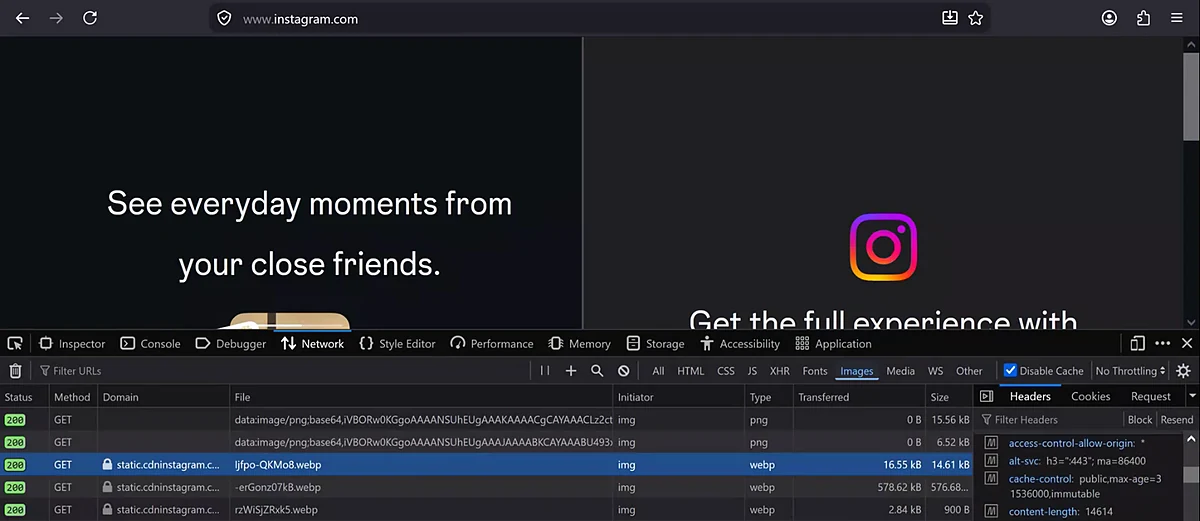
From the class board: Suppose you open a big app like Instagram. In DevTools → Network → Images, its images come from a separate CDN domain (static.cdninstagram.com). The response header cache-control: public, max-age=31536000, immutable lets the browser reuse the file for 31,536,000 seconds, which is 365 days.
Worked example: turn max-age into days.
max-ageis in seconds.- One day = 60 × 60 × 24 = 86,400 seconds.
- 31,536,000 ÷ 86,400 = 365 days.
- So the browser may reuse this image for one whole year without asking again.
immutablesays the file at this address never changes; a new version gets a new address.
What max-age means, and what it doesn't.
- It tells browsers and caches how long they may reuse the copy.
- It does not prove how long the CDN's edge keeps the file. The edge can still delete it earlier, by LRU, when space is needed.
Ravindra Bagale's Tip
DevTools wraps long values onto two lines. In class the value wrapped after max-age=3, so the second line showed only 1536000. Read the whole value before you calculate: 31,536,000 seconds is 365 days. Reading only 1,536,000 would give a wrong answer of about 17.8 days.
This website is only an example of what you can see in your own browser; it is not a statement about how that company runs its servers.
18. AWS Outposts
Why. Some companies want AWS services (EC2, RDS, S3) but must keep certain data or systems inside their own building. Reasons: data-residency or compliance rules, very low latency to machines on site, or local data processing. A suppose example: a bank that must keep some sensitive data in its own data center.
What. AWS Outposts puts AWS's own hardware in your building.
- AWS delivers and installs AWS-owned racks or servers in your data center. (Racks are standard 42U racks; Outposts servers are 1U or 2U.)
- AWS operates, monitors and maintains the hardware.
- You use the same AWS console, APIs and tools: EC2 instances, EBS volumes, and on racks also S3, RDS and more.
- The data you keep on the Outpost stays in your building.
- An Outpost is an extension of an AZ and its parent Region. It needs a network connection back to that Region, called the service link.
Classroom line
Outpost means the posting has gone outside (AWS is posted outside its own data center).
Class मधलं वाक्य
Outpost म्हणजे posting बाहेर झाली आहे (AWS स्वतःच्या data center च्या बाहेर posted आहे).
Classroom line – हिंदी
"Outpost matlab posting bahar ho gayi hai."
Figure 8. AWS Outposts: AWS-owned racks inside the customer's own data center, managed by AWS, connected back to the parent AWS Region through the service link.
The board numbers: durability and availability. On the board we wrote "11 nines". Here is exactly what that is:
- Amazon S3 (S3 Standard) is designed for 99.999999999% (11 nines) durability of objects over a year. Durability = your file is not lost.
- S3 Standard is designed for 99.99% availability. Availability = you can reach your file right now.
- These are S3's design numbers, not a promise for every AWS service. Other services have their own numbers.
Worked example: what 11 nines means.
- Store 10,000,000 objects (1 crore). Expected loss per year = 10,000,000 × 0.00000000001 = 0.0001 objects.
- That is, on average, one object lost every 10,000 years.
- Store 1,000,000,000 objects (100 crore). Expected loss = 0.01 objects a year, so on average one object every 100 years.
Worked example: what 99.99% availability means.
- One year = 365 × 24 × 60 = 525,600 minutes.
- 0.01% of that = 525,600 × 0.0001 = 52.56 minutes a year when it may be unreachable.
- Your own website's uptime still depends on your design: one server in one AZ is far weaker than servers in several AZs (section 4).
19. All six together
| Building block | What it is | Who runs it | Your own EC2 there? | Example |
|---|---|---|---|---|
| Region | an area with at least 3 AZs | AWS | yes | ap-south-1 Mumbai |
| Availability Zone | one or more data centers in a Region | AWS | yes | ap-south-1a |
| Local Zone | small AWS site in a city, extension of a Region | AWS | yes | ap-south-1-del-1a Delhi |
| Wavelength Zone | AWS compute inside a telecom network | AWS, in the partner's data center | yes | us-east-1-wl1-nyc-wlz-1 |
| Edge location | CDN site that keeps copies of files | AWS | no (you use CloudFront) | the Pune or Delhi edge |
| Outposts | AWS hardware in your own building | AWS manages it; you host it | yes | a rack in your data center |
20. Homework: try at home
Classroom line
From tomorrow, everyone bring your laptop.
Class मधलं वाक्य
"Udya pasun laptop aana saglyani."
उद्यापासून सगळ्यांनी laptop आणा.
Classroom line
From tomorrow, everyone bring your laptop.
Try at home
Test 1: see a CDN in your browser
- On your laptop, open any big website you use.
- Press F12, open Network, choose Images, and reload.
- Look at the Domain column. Do the images come from a different domain than the website?
- Click one image and find
cache-controlin the response headers. - Divide the
max-agenumber by 86,400 to get days.
Test 2: Regions and codes
- Open AWS's Regions page (search "AWS Regions and Availability Zones").
- Write down the codes of Mumbai and Hyderabad and the number of AZs in each.
- Count how many Regions say "Opt-in required".
- Without looking, write the codes of Singapore, N. Virginia, Oregon, London and Frankfurt. Then check.
Test 3: plan a website
- Your client's users are in Pune and Nashik. Which Region?
- Pick 2 AZs and write their codes.
- With 3 servers in each AZ, how many keep running if one AZ fails? (Answer: 3 of 6, which is 50%.)
Bring your laptop to the next class. We launch our first server.
Ravindra Bagale's Tip
In interviews, don't stop at "a Region has many AZs". Say: "A Region has at least three AZs in one metro area, each AZ is one or more data centers, and I run my servers in at least two AZs behind a load balancer." That one line shows you understand why, not just what.
Recap
In short
- Six building blocks: Regions, Availability Zones, Local Zones, Wavelength Zones, edge locations, Outposts.
- A Region has at least 3 AZs; an AZ is one or more data centers; all AZs of a Region are in one metro area, within about 100 km.
- India: Mumbai
ap-south-1and Hyderabadap-south-2, 3 AZs each. - Run servers in at least 2 AZs behind a load balancer; one AZ can fail and the site stays up.
- Regions are isolated; you choose if and when to copy data between them.
- China (Beijing, Ningxia) and AWS GovCloud (US-East, US-West) need separate accounts.
- Regions launched after 20 March 2019 are opt-in: enable them from Account → AWS Regions.
- Region codes never change (Bombay became Mumbai,
ap-south-1stayed). AZ code = Region code + letter. - Local Zones (India: Delhi, Kolkata) and Wavelength Zones (telecom 5G networks) bring servers closer to users.
- Edge locations cache copies: miss → fetch from origin → cache → hits. 7 images from the Delhi edge: about 1.1 s instead of 14 s (classroom numbers).
- The edge pulls on demand, has limited space, and deletes the least recently used files first.
max-age=31536000= 31,536,000 ÷ 86,400 = 365 days.- Outposts put AWS hardware in your building and connect back to the parent Region. 11 nines is S3's durability design.
Samjla ka? Try the DevTools test tonight. Udya laptop gheun ya, practical suru karu. Halu halu kalel.
Ravindra Bagale, trainer: linkedin.com/in/ravindra-bagale. Acre numbers, hop counts, latency figures marked "suppose" and the "100 ms per 100 km" rule are classroom numbers for learning. AWS counts are from AWS's own pages and change often, so check the live AWS pages. Instagram appears only as an example of what you can see in your own browser.