52.1 Get Data: Every Source and Connection Type
Chala mitrano — today we stop guessing which Get Data button to press. File, MySQL, IBM Db2, Azure, REST — each with auth, mode, M code and the error you will actually see.
चला मित्रांनो — आज Get Data वर कोणते button दाबायचे हे अंदाजाने नाही. File, MySQL, IBM Db2, Azure, REST — प्रत्येकाला auth, mode, M code आणि खरी error.
चला मित्रों — आज Get Data पर कौन-सा button दबाना है अंदाज़े से नहीं। File, MySQL, IBM Db2, Azure, REST — हर एक के auth, mode, M code और असली error।
- Open Get Data and find File, Database, Azure, Online services and Other connectors.
- Connect Excel, CSV, JSON, PDF, Folder and SharePoint folder with Import.
- Connect SQL Server, MySQL (Connector/NET), PostgreSQL (Npgsql), Oracle and IBM Db2 (Data Server driver).
- Choose Import vs DirectQuery vs Live vs Dual and the right authentication type.
- Call a Web / OData / REST source with headers or an API key safely.
- Explain privacy levels, native SQL, query folding, parameters and when a gateway is required (Ch 39).
Start with a problem (fictional). Priya Kulkarni (Pune) must build one model for fictional MH kirana sales: nightly CSV drops on a file server, a MySQL POS database, a small IBM Db2 stock table in the regional DC, plus a REST weather API for heat-wave demand. Her manager also asks for Azure SQL finance and a SharePoint list of store managers. Priya keeps clicking random connectors and failing on drivers and credentials. She needs one map: which connector, which mode, which auth, and whether the Service will need a gateway.
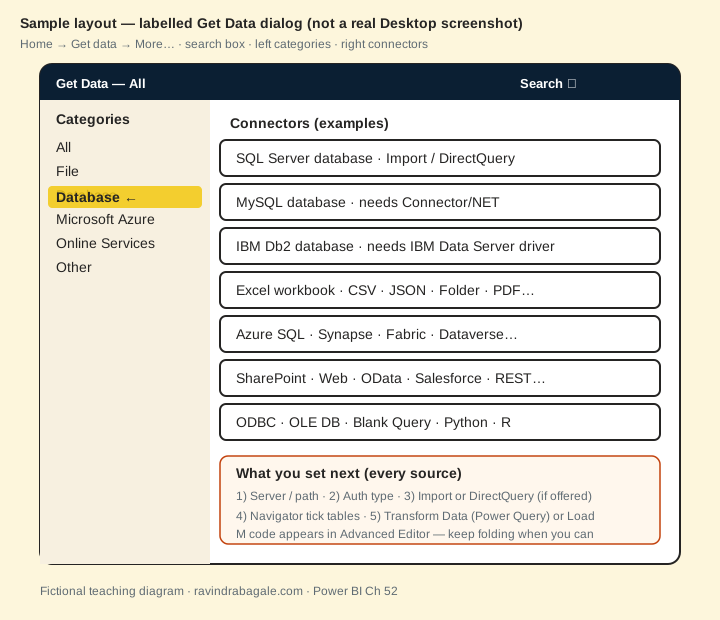
1. Get Data dialog — what you see
Why: If you cannot find the connector, you install the wrong driver or paste CSV into Enter Data forever.
What: Home → Get data → More… opens a window with a search box, left categories (All, File, Database, Microsoft Azure, Online Services, Other) and a right list of connectors. After you pick one you set server/path, auth and (when offered) Import or DirectQuery, then the Navigator.
How — open and read the dialog:
Vertical steps (one under another)
- In Power BI Desktop, Home, then Get data, then More… (or Get data from the ribbon list).
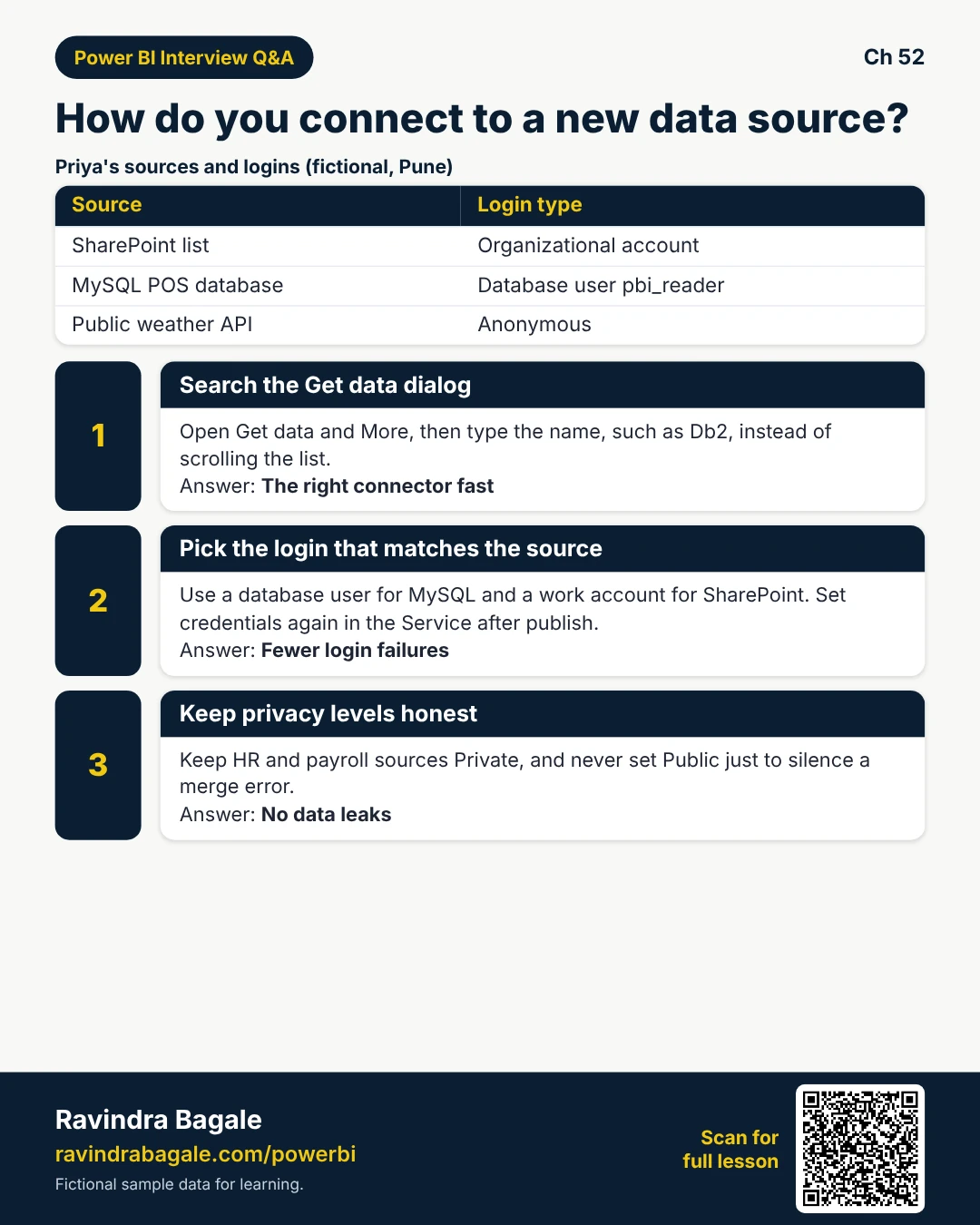
- Use Search for MySQL, Db2, Snowflake, SharePoint — faster than scrolling.
- Note the category: File vs Database vs Azure vs Online Services vs Other.
- Select the connector, then Connect, then fill server/path, then pick auth, then choose mode if asked.
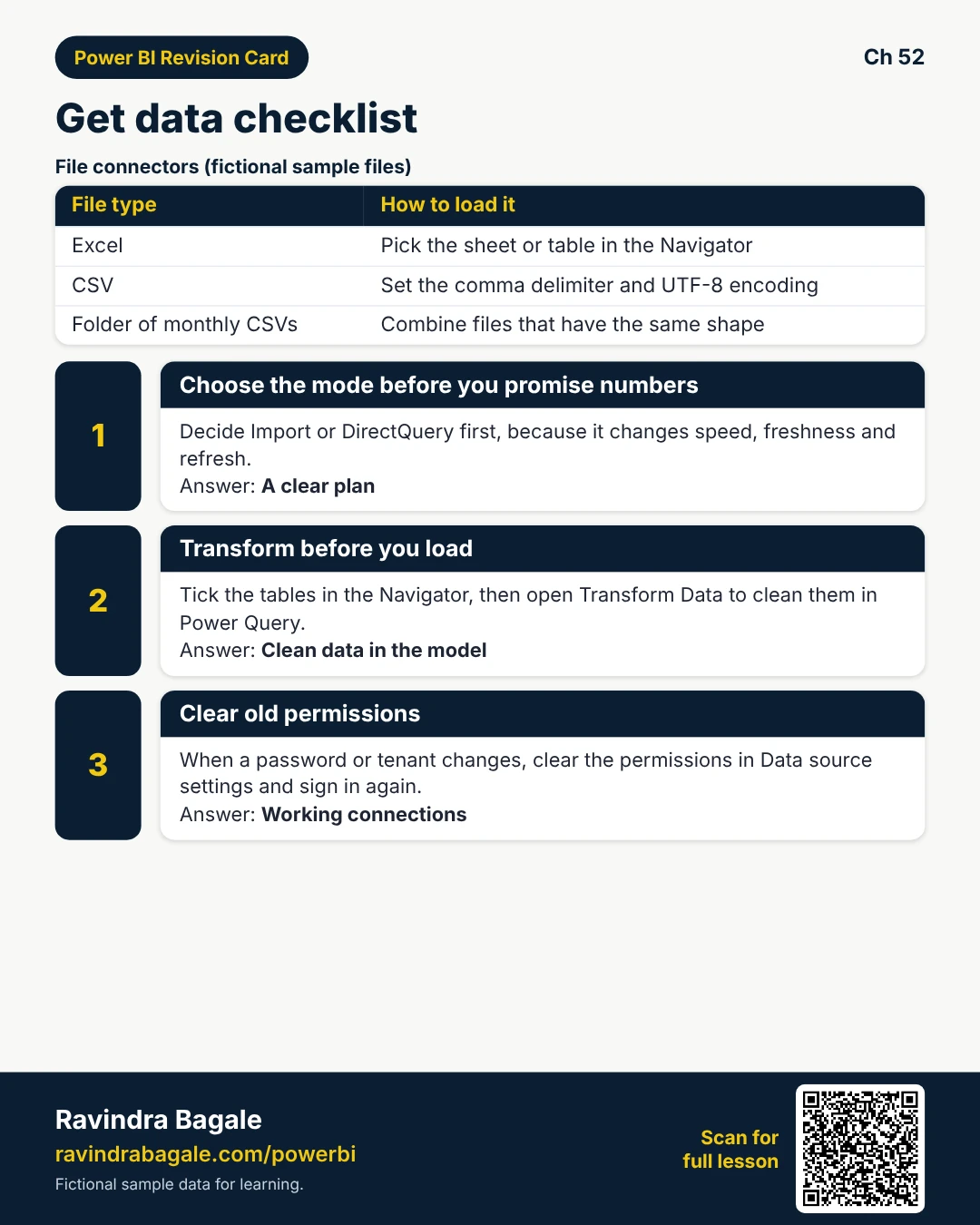
- Navigator: tick tables/sheets, then Transform Data (Power Query) or Load.
Tiny example: Priya types Db2 in Search, opens IBM Db2 database, instead of scrolling past fifty Azure tiles.
Ravindra Bagale's Tip
Friends, Search is your friend. Typing mysql or db2 beats hunting the list every Monday.
Ravindra Bagale's Tip – मराठी
मित्रांनो, Search मित्र आहे. mysql किंवा db2 टाइप करणे दर सोमवारी यादी शोधण्यापेक्षा श्रेयस्कर.
Ravindra Bagale's Tip – हिंदी
दोस्तों, Search आपका दोस्त है। mysql या db2 टाइप करना हर सोमवार सूची खंगालने से बेहतर है।
2. Import vs DirectQuery vs Live vs Dual
Why: Mode decides speed, freshness, refresh and whether a gateway schedule even matters.
What: Import copies data into the model (needs refresh). DirectQuery sends visuals back to the source at click time. Live connection uses a model that already lives elsewhere (Analysis Services / some Fabric). Dual lets a table act as Import or DirectQuery in composite models (see Ch 50).
How — pick a mode before you promise numbers:
Vertical steps (one under another)
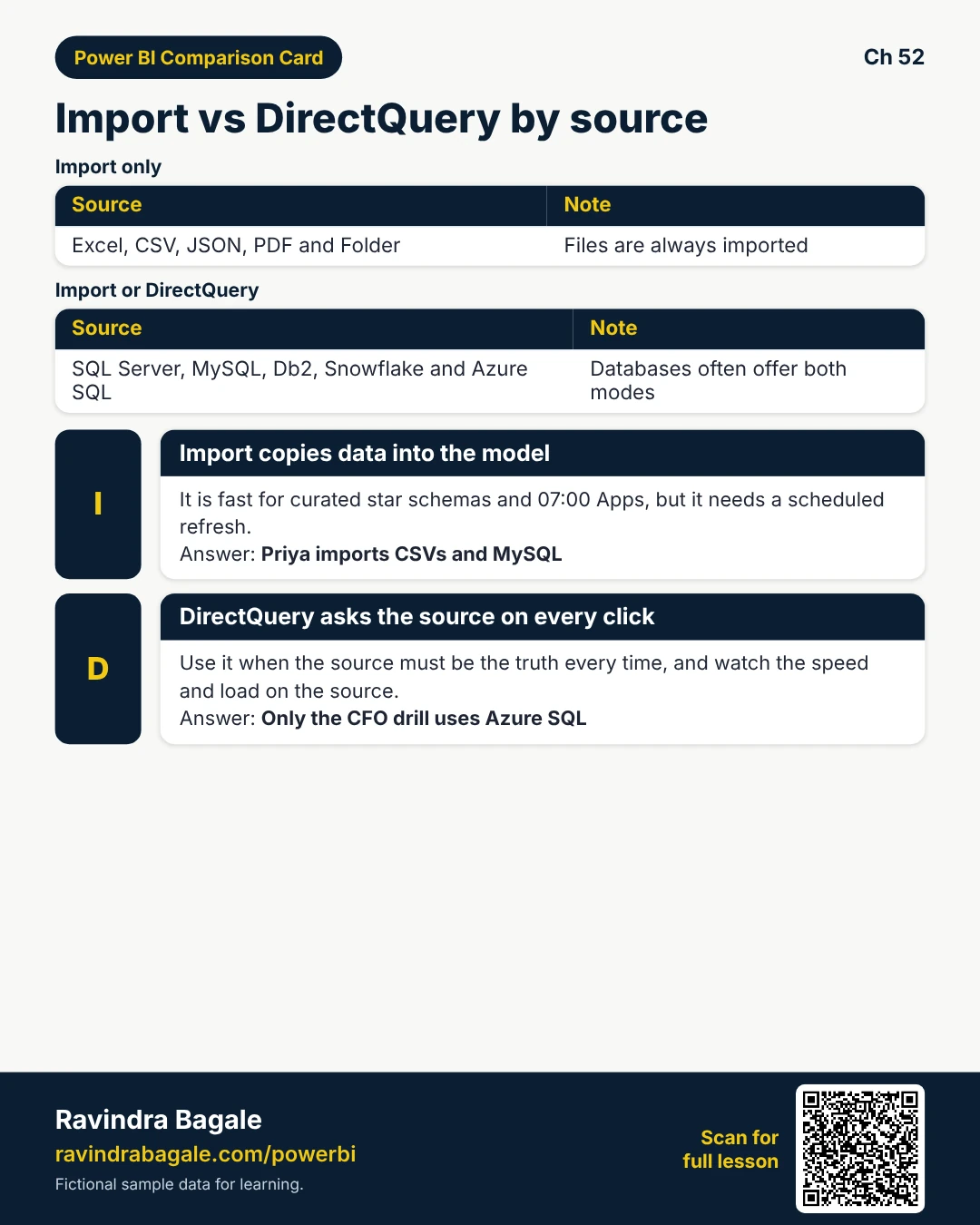
- Excel, CSV, JSON, PDF, Folder, then Import only.
- SQL Server, MySQL, Db2, Snowflake, Azure SQL, then often Import or DirectQuery.
- Choose Import for curated star schemas and 7:00 IST Apps (then schedule — Ch 39).
- Choose DirectQuery when the source must be the truth every click — watch latency and source load.
- Live when IT already hosts the semantic model; Dual when composite models need both behaviours.
Tiny example: Priya Imports CSVs + MySQL facts for the 09:00 MH standup. A DirectQuery page hits Azure SQL finance only for the CFO drill.
Ravindra Bagale's Tip
Friends, never say my Excel needs DirectQuery. Files Import. Databases may offer DirectQuery.
Ravindra Bagale's Tip – मराठी
मित्रांनो, Excel ला DirectQuery लागतो असे कधी म्हणू नका. Files Import होतात. Databases DirectQuery देऊ शकतात.
Ravindra Bagale's Tip – हिंदी
दोस्तों, Excel को DirectQuery लगता है ऐसा कभी न कहें। Files Import होते हैं। Databases DirectQuery दे सकते हैं।
3. Authentication types and privacy levels
Why: Most Get Data failures are login and privacy — not DAX.
What: Common auth: Windows (current user / alternate), Database (user + password), Organizational account (Entra / work account), Anonymous, API key (often via Web.Contents headers). Privacy levels Private / Organizational / Public stop unsafe combines across sources.
How — set auth without painting everything Public:
Vertical steps (one under another)
- When the credential dialog appears, pick the type that matches the source (Database for MySQL user, Organizational for SharePoint Online).
- Save credentials in Desktop; after publish, set them again in the Service / gateway.
- File, then Options, then Privacy (or combine level) — keep Private for HR/payroll sources.
- If a merge fails with a privacy error, fix the levels honestly — do not set Public to silence it.
- Data source settings, then clear permissions when you change password or tenant.
Tiny example: SharePoint list, then Organizational account (Priya's work sign-in). MySQL, then Database user pbi_reader. Public weather API, then Anonymous.
Ravindra Bagale's Tip
Friends, Public privacy is not a shortcut. It is a leak waiting for audit.
Ravindra Bagale's Tip – मराठी
मित्रांनो, Public privacy शॉर्टकट नाही. Audit साठी गळतीची वाट आहे.
Ravindra Bagale's Tip – हिंदी
दोस्तों, Public privacy शॉर्टकट नहीं। Audit के लिए लीक का रास्ता है।
4. Files — Excel, CSV/Text, XML, JSON, PDF, Folder, SharePoint folder
Why: Most first dashboards start as a file. Wrong connector wastes an hour on encoding and sheets.
What: File connectors load from disk or OneDrive/SharePoint. Folder / SharePoint folder combine many files with the same shape.
How — connect each file type (vertical):
Vertical steps (one under another)
- Excel workbook, then pick .xlsx, then Navigator sheets/tables, then Transform. M sketch:
Excel.Workbook(File.Contents("C:\\Lab\\appliance-sales-mh-sample.xlsx"), null, true) - Text/CSV, then set delimiter, encoding (UTF-8), data type detection, then Transform. M:
Csv.Document(File.Contents("…kirana-orders-sample.csv"), [Delimiter=",", Encoding=65001, QuoteStyle=QuoteStyle.Csv]) - XML, then File.Contents + Xml.Tables. JSON, then Json.Document + Record/List expand (try hospital-wards-sample.json).
- PDF, then Get Data, then PDF → tick tables Power BI detected (messy PDFs need clean-up — Ch 51 style).
- Folder, then point at a folder of monthly CSVs, then Combine, then Sample file. SharePoint folder, then Organizational auth, then same combine pattern.
- Common errors: wrong sheet; UTF-8 vs ANSI mojibake; locked Excel file; SharePoint path vs local OneDrive sync path.
Tiny example: Priya uses Folder on fictional D:\MH_Orders\ so October's 31 CSVs become one fact table.
Ravindra Bagale's Tip
Friends, prefer a SharePoint folder URL over a laptop path if the Service must refresh without your PC.
Ravindra Bagale's Tip – मराठी
मित्रांनो, Service ला तुमच्या PC शिवाय refresh हवे असेल तर laptop path पेक्षा SharePoint folder URL.
Ravindra Bagale's Tip – हिंदी
दोस्तों, Service को आपके PC के बिना refresh चाहिए तो laptop path से बेहतर SharePoint folder URL।
| File | You see | Typical fix |
|---|---|---|
| Excel | Sheet1 + Table1 | Prefer named Table over raw sheet |
| CSV | Broken Indian names | Encoding 65001 (UTF-8) |
| JSON | Record list | Convert to table, then Expand |
| Split tables | Append + promote headers carefully | |
| Folder | Attribute table only | Combine files / Sample file |
About this data: This table uses columns: File, You see, Typical fix. This table uses columns: Connector, Modes, Typical auth, Gateway in Service?, Driver notes. This table uses columns: Source, Connector, Mode, Rows (fictional). This table uses columns: Wrong, Better. Values shown are the lesson examples already on this page (not a new dataset).
5. SQL Server and Azure-friendly Microsoft SQL
Why: SQL Server is the default warehouse connector in many Indian IT shops.
What: Get Data, then SQL Server database. Enter server (and optional database). Choose Import or DirectQuery. Optional: SQL statement (native query).
How — connect SQL Server:
Vertical steps (one under another)
- Get Data, then SQL Server database.
- Server:
PUNE-SQL01(fictional) ortcp:myserver.database.windows.netfor Azure SQL. - Data Connectivity mode: Import or DirectQuery.
- Auth: Windows, Database, or Microsoft account / Entra as offered.
- Navigator, then tick dim/fact tables, then Transform. Native SQL only when folding-safe views are not enough.
- Error 'could not connect': firewall, VPN, wrong instance name, TCP not enabled.
Tiny example: M sketch: Sql.Database("PUNE-SQL01", "SalesMH", [Query="SELECT * FROM dbo.FactOrders WHERE OrderDate >= '2026-01-01'"]) — prefer views + folding over huge hard-coded SQL when you can.
Ravindra Bagale's Tip
Friends, a native SQL query often breaks query folding for steps after it. Use it on purpose, not by habit.
Ravindra Bagale's Tip – मराठी
मित्रांनो, native SQL नंतरचे steps folding तोडते. सवय म्हणून नाही — हेतूने वापरा.
Ravindra Bagale's Tip – हिंदी
दोस्तों, native SQL बाद के steps का folding तोड़ देता है। आदत से नहीं — इरादे से उपयोग करें।
6. MySQL — including MySQL Connector/NET
Why: POS and web apps in India often sit on MySQL. Desktop will not list or connect without the right .NET connector.
What: Get Data, then MySQL database. You need MySQL Connector/NET (Oracle MySQL) installed on the PC that runs Desktop (and on the gateway host for Service refresh).
How — install driver then connect:
Vertical steps (one under another)
- Download and install MySQL Connector/NET matching your Desktop bitness (usually 64-bit).
- Close and reopen Power BI Desktop.
- Get Data, then MySQL database, then Server
localhost(lab) or your host, then Databasepbi_lab_getdata. - Auth: Database user/password (example lab user only — never commit real secrets).
- Pick Import for the practice script; try DirectQuery only on a stable server.
- Run
mysql-sample-store-sales.sqlin MySQL first so Navigator showsstore_sales. - Common errors: connector not installed; SSL required by server; wrong port 3306; caching_sha2_password vs old client.
Tiny example: After install, Priya loads fictional six-row store_sales then points the same connector to the store's read replica.
Ravindra Bagale's Tip
Friends, install Connector/NET on the gateway machine too — Desktop-only install fixes your laptop but not 7 am refresh.
Ravindra Bagale's Tip – मराठी
मित्रांनो, Connector/NET gateway मशीनवरही बसवा — फक्त Desktop ने लॅपटॉप सुटतो, सकाळचा refresh नाही.
Ravindra Bagale's Tip – हिंदी
दोस्तों, Connector/NET गेटवे मशीन पर भी लगाएँ — केवल Desktop लैपटॉप ठीक करता है, सुबह का refresh नहीं।
// M sketch (fictional host)
MySQL.Database("localhost", "pbi_lab_getdata", [ReturnSingleDatabase=true])
7. PostgreSQL, Oracle, IBM Db2, Access, SQLite, Teradata, SAP HANA, Snowflake
Why: Enterprise shops mix engines. Each needs the right client library.
What: Same Get Data pattern: pick connector, then server/db, then auth, then mode, then Navigator. Drivers differ.
How — match engine to driver:
Vertical steps (one under another)
- PostgreSQL, then connector uses Npgsql. Install if Desktop cannot connect. Import or DirectQuery.
- Oracle, then Oracle Data Access client / recommended Oracle driver. Watch service name vs SID.
- IBM Db2, then install IBM Data Server Driver (or Driver Package). Get Data, then IBM Db2 database, then server, port, database. Use
db2-sample-store-sales.sqlin a lab Db2. - Access, then Access database connector (Import). File path; gateway if Service must refresh the .accdb.
- SQLite, then usually via ODBC DSN (Other, then ODBC). Point DSN at the .db file.
- Teradata / SAP HANA, then vendor client + Import/DirectQuery; HANA often needs gateway when on-prem.
- Snowflake, then Get Data, then Snowflake. Server account URL + warehouse + DB + schema. Auth: Database user, Org SSO, or key pair per your shop.
- Errors: missing driver, wrong port (Db2 often 50000), VPN, warehouse suspended (Snowflake).
Tiny example: Carlos installs IBM Data Server Driver, connects to fictional PBLAB, Imports STORE_SALES, then maps the same source on a standard gateway.
Ravindra Bagale's Tip
Friends, write the driver name in the runbook: Connector/NET, Npgsql, IBM Data Server. Future you will thank you.
Ravindra Bagale's Tip – मराठी
मित्रांनो, runbook मध्ये driver नाव लिहा: Connector/NET, Npgsql, IBM Data Server. भविष्यातील तुम्ही धन्यवाद द्याल.
Ravindra Bagale's Tip – हिंदी
दोस्तों, runbook में driver नाम लिखें: Connector/NET, Npgsql, IBM Data Server। भविष्य का आप धन्यवाद देगा।
// M sketches (fictional)
PostgreSQL.Database("pg-lab.example", "sales")
Oracle.Database("ora-lab.example:1521/ORCL", [HierarchicalNavigation=true])
DB2.Database("db2-lab.example:50000", "PBLAB")
Snowflake.Databases("xy12345.ap-southeast-1.snowflakecomputing.com", "COMPUTE_WH")
8. Cloud and Azure — SQL, Synapse, Databricks, Blob/ADLS, Fabric, Dataverse, Dataflows, semantic models
Why: Finance and IT move warehouses to the cloud. Wrong Azure tile means the wrong auth and mode.
What: Microsoft Azure and Fabric connectors talk to cloud resources with Organizational account, SQL auth, or keys/SAS.
How — connect cloud sources:
Vertical steps (one under another)
- Azure SQL Database — same SQL Server dialog with *.database.windows.net; firewall allow your IP / private link.
- Azure Synapse Analytics — dedicated SQL or serverless endpoint; Import or DirectQuery.
- Azure Databricks — workspace host + HTTP path + auth (token / Org as offered).
- Azure Blob Storage / Data Lake Gen2 (ADLS) — account + container; often Import parquet/CSV.
- Fabric Lakehouse / Warehouse — Desktop Fabric connectors; Live/Direct Lake patterns per capacity.
- Dataverse — Organizational account; tables for Dynamics-style apps.
- Power BI dataflows / semantic models — reuse curated entities or Live connect to an existing model (see Ch 41).
- Gateway: pure cloud sources usually skip on-prem gateway; hybrid still needs one for on-prem pieces.
Tiny example: Mei Lin (Singapore, fictional SaaS) Live-connects a Fabric warehouse for executive packs and Imports a Blob parquet drop for marketing experiments.
Ravindra Bagale's Tip
Friends, cloud does not mean zero credentials. Organizational account expiry breaks Monday refresh too.
Ravindra Bagale's Tip – मराठी
मित्रांनो, cloud म्हणजे credentials शून्य नव्हे. Organizational account expiry सोमवारचा refresh तोडते.
Ravindra Bagale's Tip – हिंदी
दोस्तों, cloud का मतलब credentials शून्य नहीं। Organizational account expiry सोमवार का refresh तोड़ता है।
9. Online services — SharePoint list, Google Analytics, Salesforce, Dynamics 365, Google Sheets, Web, REST, OData
Why: Ops teams live in lists and CRM. Analysts must pull them without copy-paste.
What: Online Services connectors + Web / OData. REST APIs often use Blank Query + Web.Contents with headers.
How — connect SaaS and web:
Vertical steps (one under another)
- SharePoint Online list, then site URL, then Organizational account, then pick list.
- Google Analytics / Salesforce / Dynamics 365, then sign in with the account your admin approved; follow consent prompts.
- Google Sheets, then connect via the connector or Web; keep sheet sharing tight.
- Web, then paste a page URL, then pick suggested tables (good for simple HTML tables).
- OData feed, then service root URL, then Import.
- REST API, then Blank Query →
Web.Contents(url, [Headers=[Authorization="Bearer …", #"x-api-key"="…"]])then Json.Document. Prefer RelativePath and Query options for folding-friendly and gateway-safe patterns. - Never paste production secrets into shared .pbix — use parameters + credential UI.
Tiny example: Priya pulls a SharePoint list StoreManagers and a fictional weather REST endpoint with an API key stored in the credential dialog, not in M text committed to email.
Ravindra Bagale's Tip
Friends, if the key is visible in Advanced Editor, treat the file as secret. Move secrets to credentials or a secure parameter store.
Ravindra Bagale's Tip – मराठी
मित्रांनो, key Advanced Editor मध्ये दिसत असेल तर फाइल secret समजा. Credentials किंवा सुरक्षित parameter वापरा.
Ravindra Bagale's Tip – हिंदी
दोस्तों, key Advanced Editor में दिखे तो फ़ाइल को secret मानें। Credentials या सुरक्षित parameter उपयोग करें।
// REST sketch — key via credential UI preferred; shown as header shape only
Json.Document(
  Web.Contents(
    "https://api.example.com",
    [RelativePath="v1/weather", Query=[city="Pune"], Headers=[#\"Accept\"="application/json"]]
  )
)
10. Generic — ODBC, OLE DB, Blank Query, Enter Data, Python and R scripts
Why: When there is no native connector, generic doors still open — carefully.
What: ODBC/OLE DB use system DSNs/providers. Blank Query is empty M. Enter Data is a typed table. Python/R run local scripts (Import).
How — use escape hatches safely:
Vertical steps (one under another)
- ODBC, then pick DSN or connection string, then Import (DirectQuery only if driver supports it).
- OLE DB, then provider string for legacy warehouses.
- Blank Query, then Advanced Editor — build M from scratch (Web.Contents, helpers).
- Enter Data, then small mapping tables (city, then region). Not for 50,000 rows.
- Python script / R script, then local runtime installed; Service refresh needs gateway + runtime on the gateway host.
- Prefer native connectors over ODBC when both exist — folding and support are usually better.
Tiny example: SQLite stock file has no first-class tile — Fatima Al-Sayed creates a User DSN and uses ODBC Import for a lab demo.
Ravindra Bagale's Tip
Friends, Enter Data is a notepad, not a warehouse. Big facts belong in CSV Folder or a database.
Ravindra Bagale's Tip – मराठी
मित्रांनो, Enter Data म्हणजे नोटपॅड, warehouse नाही. मोठे facts CSV Folder किंवा database मध्ये.
Ravindra Bagale's Tip – हिंदी
दोस्तों, Enter Data नोटपैड है, warehouse नहीं। बड़े facts CSV Folder या database में।
11. Native SQL, query folding, parameters, credentials and Data source settings
Why: These four habits separate a brittle class file from a model that survives Dev, then Prod.
What: Native SQL is a hand-written query in the connector. Query folding means Power Query steps become source SQL. Parameters store server/database/path. Data source settings hold credentials and privacy.
How — build habits that fold and switch environments:
Vertical steps (one under another)
- Create parameters: pServer, pDatabase, pFolderPath (type Text).
- Replace hard-coded server in M with the parameter reference.
- In Power Query, right-click a step, then View Native Query (when available) to confirm folding.
- Avoid breaking fold with heavy custom M before filters — filter early at the source.
- File, then Options & settings, then Data source settings, then edit permissions, clear, or change privacy level.
- After publish, set the same credentials on the semantic model / gateway (Ch 39).
Tiny example: Priya's Dev uses localhost; Prod parameter points to mysql-prod.mh.example without rewriting every query.
Ravindra Bagale's Tip
Friends, if View Native Query is grey, folding already broke. Fix steps before you add incremental refresh.
Ravindra Bagale's Tip – मराठी
मित्रांनो, View Native Query grey असेल तर folding तुटले आहे. Incremental आधी steps दुरुस्त करा.
Ravindra Bagale's Tip – हिंदी
दोस्तों, View Native Query grey हो तो folding टूट चुका है। Incremental से पहले steps ठीक करें।
12. Which sources need a gateway in the Service?
Why: A green Desktop refresh can still fail every night in the Service without a bridge.
What: The on-premises data gateway is required when the Service cannot reach the source on the public internet. Details and install choices are in Chapter 39.
How — decide gateway vs cloud-only:
Vertical steps (one under another)
- On-prem SQL Server / MySQL / Db2 / Oracle / HANA / local Folder / Access, then plan a standard gateway.
- SharePoint Online, Dataverse, Azure SQL (public), Snowflake cloud, SaaS connectors, then usually no on-prem gateway.
- Python/R and some ODBC sources, then gateway host must have the same runtimes/drivers.
- Personal gateway is a laptop trap for team Apps — prefer standard on always-on host.
- Map each Desktop data source to a gateway source with the same connection shape.
Tiny example: Priya's CSV folder on D: and MySQL lab both need the gateway; her SharePoint manager list does not.
Ravindra Bagale's Tip
Friends, list every source in a table: Connector | Mode | Auth | Gateway yes/no. Paste it in the runbook.
Ravindra Bagale's Tip – मराठी
मित्रांनो, प्रत्येक source ची टेबल करा: Connector | Mode | Auth | Gateway yes/no. Runbook मध्ये पेस्ट करा.
Ravindra Bagale's Tip – हिंदी
दोस्तों, हर source की टेबल बनाएँ: Connector | Mode | Auth | Gateway yes/no। Runbook में पेस्ट करें।
13. Big comparison — which connector should I use?
Why: Interviews and real projects ask you to choose fast without guessing.
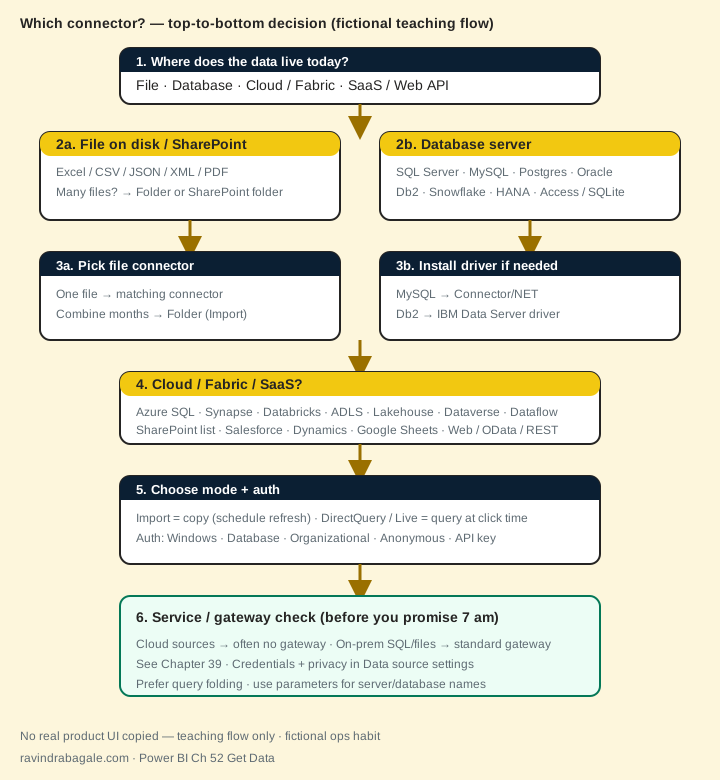
What: Use the decision flow (diagram above) and this comparison table. When two connectors work, prefer the native one with folding and clear auth.
How — read the table top to bottom:
Vertical steps (one under another)
- Find your source row.
- Check modes and auth.
- Note driver and gateway.
- Open Get Data, then Search, then Connect.
- Transform, then confirm folding, then parameterise, then document credentials.
Tiny example: Interview answer: For on-prem Db2 I install IBM Data Server Driver, use the IBM Db2 connector with Database auth, Import first, and a standard gateway for Service refresh.
| Connector | Modes | Typical auth | Gateway in Service? | Driver notes |
|---|---|---|---|---|
| Excel / CSV / JSON / XML / PDF | Import | None / Org (SharePoint) | On-prem file path, then yes; SharePoint Online, then usually no | — |
| Folder / SharePoint folder | Import | Windows / Org | Local folder, then yes | Combine files pattern |
| SQL Server | Import, DirectQuery | Windows, Database, Entra | On-prem, then yes | Built-in |
| MySQL | Import, DirectQuery | Database | On-prem, then yes | MySQL Connector/NET |
| PostgreSQL | Import, DirectQuery | Database | On-prem, then yes | Npgsql |
| Oracle | Import, DirectQuery | Database / Windows | On-prem, then yes | Oracle client |
| IBM Db2 | Import, DirectQuery | Database / Windows | On-prem, then yes | IBM Data Server driver |
| Access / SQLite (ODBC) | Import (DQ rare) | Database / None | File on PC, then yes | ODBC DSN for SQLite |
| Teradata / SAP HANA / Snowflake | Import, DirectQuery | Database / Org / Key pair | Cloud Snowflake often no; on-prem HANA/Teradata, then yes | Vendor client |
| Azure SQL / Synapse / Databricks | Import, DirectQuery | Database, Org, key | Usually no (cloud) | — |
| Blob / ADLS / Fabric Lakehouse | Import (some Live/DQ) | Org / key / SAS | Usually no | Fabric connectors in Desktop |
| Dataverse / Dataflows / Semantic model | Import / Live / DQ | Organizational | No (Microsoft cloud) | — |
| SharePoint list / Salesforce / D365 | Import (some DQ) | Organizational | Usually no | — |
| Web / OData / REST (Blank+Web.Contents) | Import | Anonymous, API key, Org | Public URL often no; private, then gateway | Headers in M |
| ODBC / OLE DB | Import, some DQ | Varies | Almost always yes on-prem | DSN / provider |
| Enter Data / Blank Query / Python / R | Import | N/A / local runtime | Python/R refresh needs gateway + runtime | Local installs |
Modes and gateway needs change with tenant policy — always confirm in your lab. Fictional teaching table.
14. Worked example — three industries connect different sources
All numbers are fictional sample data.
Kirana / quick commerce (Maharashtra)
Why: Priya Kulkarni in Pune gets nightly CSVs plus a MySQL store DB.
- Get Data, then Folder on
D:\MH_Orders\2026-10\(Import) — combine monthly CSVs. - Get Data, then MySQL →
localhost/pbi_lab_getdata— Importstore_sales. - Parameterise folder path and MySQL server for Dev vs Prod.
- Publish, then map credentials, then standard gateway for the PC folder + MySQL (Ch 39).
| Source | Connector | Mode | Rows (fictional) |
|---|---|---|---|
| CSV folder | Folder | Import | 48,200 |
| MySQL store_sales | MySQL | Import | 6 (lab) / 1.2L prod-like |
Hospital network
Dr. Amina Yusuf loads hospital-wards-sample.json (Web or JSON file) for bed occupancy, and Azure SQL for billing facts (DirectQuery for live beds, Import for yesterday's finance).
Bank branch analytics (fictional)
Carlos Mendes uses IBM Db2 on-prem for core transactions (Import + incremental later) with the IBM Data Server driver and a standard gateway — never a personal gateway on a teller laptop.
Recap. Open Get Data, then pick the matching connector, then set auth and mode, then Navigator, then Transform. Install drivers for MySQL/Db2/Oracle. Use parameters. Plan the gateway before you promise 7:00 IST numbers. Keep query folding when you write native SQL.
Common mistakes
| Wrong | Better |
|---|---|
| Hard-code server name in every query | Power Query parameter for server / database |
| DirectQuery to a sleeping laptop MySQL | Import for lab; stable server + folding for DQ |
| Skip MySQL Connector/NET / Db2 driver | Install vendor driver, restart Desktop, retry |
| Anonymous auth on a private REST API | API key / Org account in headers or credential UI |
| Set every privacy level to Public to silence errors | Fix the merge; use Organizational / Private correctly |
| Promise Service refresh with only a personal gateway | Standard gateway on always-on host (Ch 39) |
Practice files (download)
Use these fictional files with Get Data. Each has an About note.
- appliance-sales-mh-sample.xlsx — Excel workbook
- kirana-orders-sample.csv — CSV
- hospital-wards-sample.json — JSON
- mysql-sample-store-sales.sql — MySQL lab script
- db2-sample-store-sales.sql — IBM Db2-style lab script
Quiz (5 questions)
1. Excel workbook and CSV connectors support which mode?
2. Before MySQL Get Data works on many PCs you must install:
3. IBM Db2 in Power BI Desktop typically needs:
4. Query folding means:
5. On-prem MySQL + local Folder refresh in the Service usually need:
Practice tasks (12) — hints only, no full answers
- Task. Open Get Data, then More… and list five categories you see on the left.
Hint: section 1. - Task. Connect appliance-sales-mh-sample.xlsx and load only Sales_MH. Write the M line shape you see.
Hint: Excel.Workbook + File.Contents. - Task. Load kirana-orders-sample.csv with UTF-8. Note which currency columns are blank.
Hint: encoding 65001. - Task. Expand hospital-wards-sample.json into a flat ward table. Name three columns you keep.
Hint: Json.Document, then Expand. - Task. Write the install + connect steps for MySQL using the sample SQL script.
Hint: Connector/NET + section 6. - Task. Write the install + connect steps for IBM Db2 using the sample SQL script.
Hint: Data Server driver + section 7. - Task. Compare Import vs DirectQuery for Azure SQL in four bullets.
Hint: section 2 and 8. - Task. Draft Web.Contents headers for a REST API that needs an API key — without hard-coding the secret in a shared file.
Hint: section 9 tip. - Task. Create a plan: parameters pServer and pDatabase for MySQL Dev vs Prod.
Hint: section 11. - Task. Fill a four-column runbook row for: local CSV folder, MySQL, SharePoint list, Db2.
Hint: Connector | Mode | Auth | Gateway. - Task. Interview 60s: how do you connect on-prem Db2 and keep Service refresh healthy?
Hint: driver + connector + standard gateway. - Task. Name two ways query folding breaks and how you check it.
Hint: View Native Query; native SQL habit. - Task. When would you choose ODBC instead of a native connector?
Hint: section 10 — SQLite example. - Task. Privacy: why is setting everything Public a bad fix?
Hint: section 3 tip.
Ravi Sir's cards (Excel card style)
Standalone cards — no tip or photo sections. QR points to this lesson. Download PNG to revise offline.
Think like a professional
In a real tenant, rights and sharing are controlled by Fabric / Power BI admins. Always follow your company policy. This lesson uses fictional people and numbers so you can practise the ideas safely.