41.1 Dataflows, Pipelines, Lineage and Usage Metrics
Chala mitrano — stop copying the same Sales clean-up into five .pbix files. One dataflow, Dev, then Test, then Prod pipelines, lineage, and usage metrics keep MH Ops honest.
चला मित्रांनो — एकच Sales clean-up पाच .pbix मध्ये कॉपी करणे थांबवा. एक dataflow, Dev, then Test, then Prod pipelines, lineage आणि usage metrics MH Ops ला नीट ठेवतात.
चला मित्रों — एक ही Sales clean-up पाँच .pbix में कॉपी करना बंद करें। एक dataflow, Dev, then Test, then Prod pipelines, lineage और usage metrics MH Ops को सही रखते हैं।
- Explain why a dataflow beats copy-paste Power Query.
- Describe Dev, then Test, then Prod deployment pipelines.
- Use lineage view before a breaking column change.
- Read usage metrics to find unused reports.
- Walk a Friday Prod promotion checklist.
- Give a senior interview answer on governance.
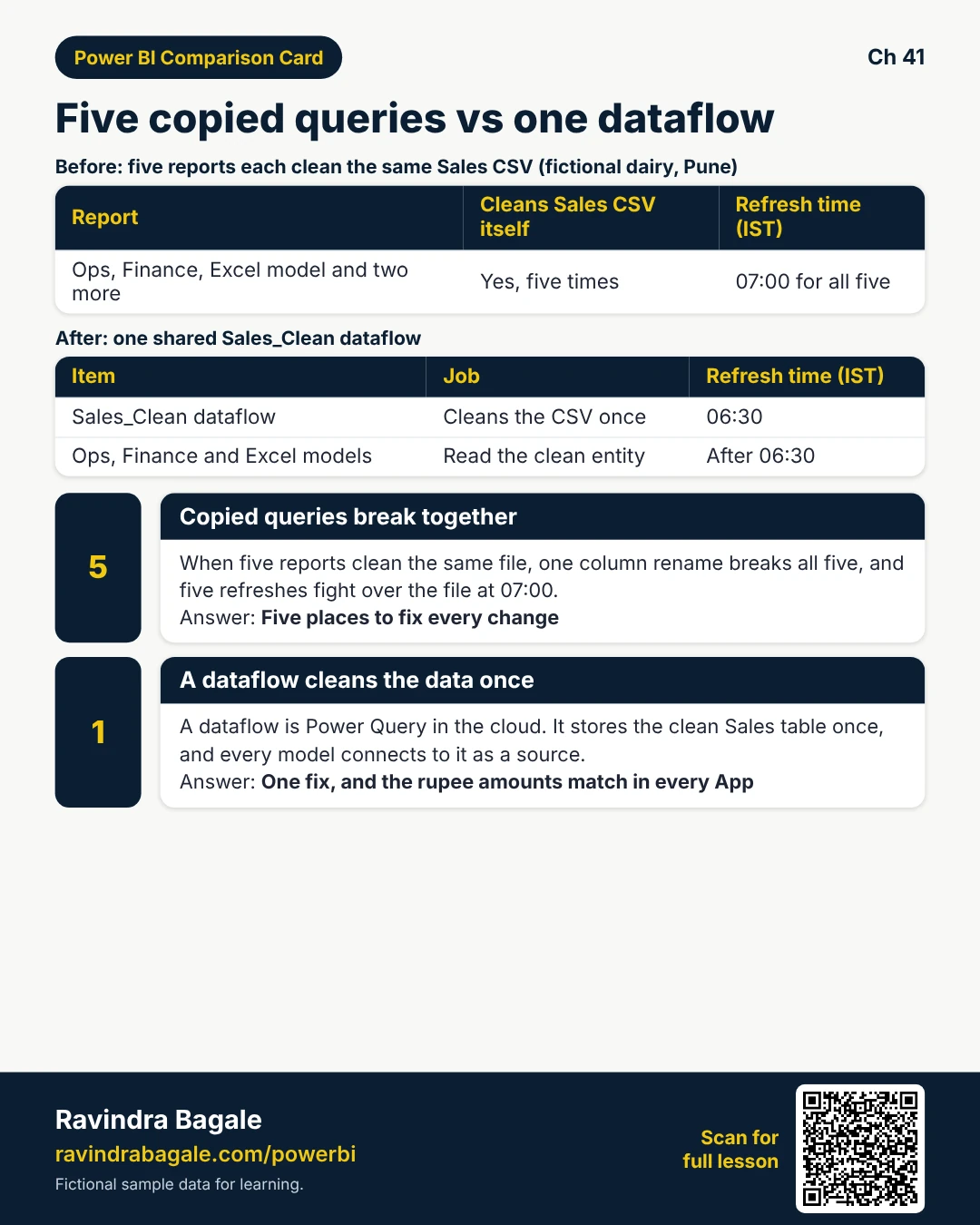
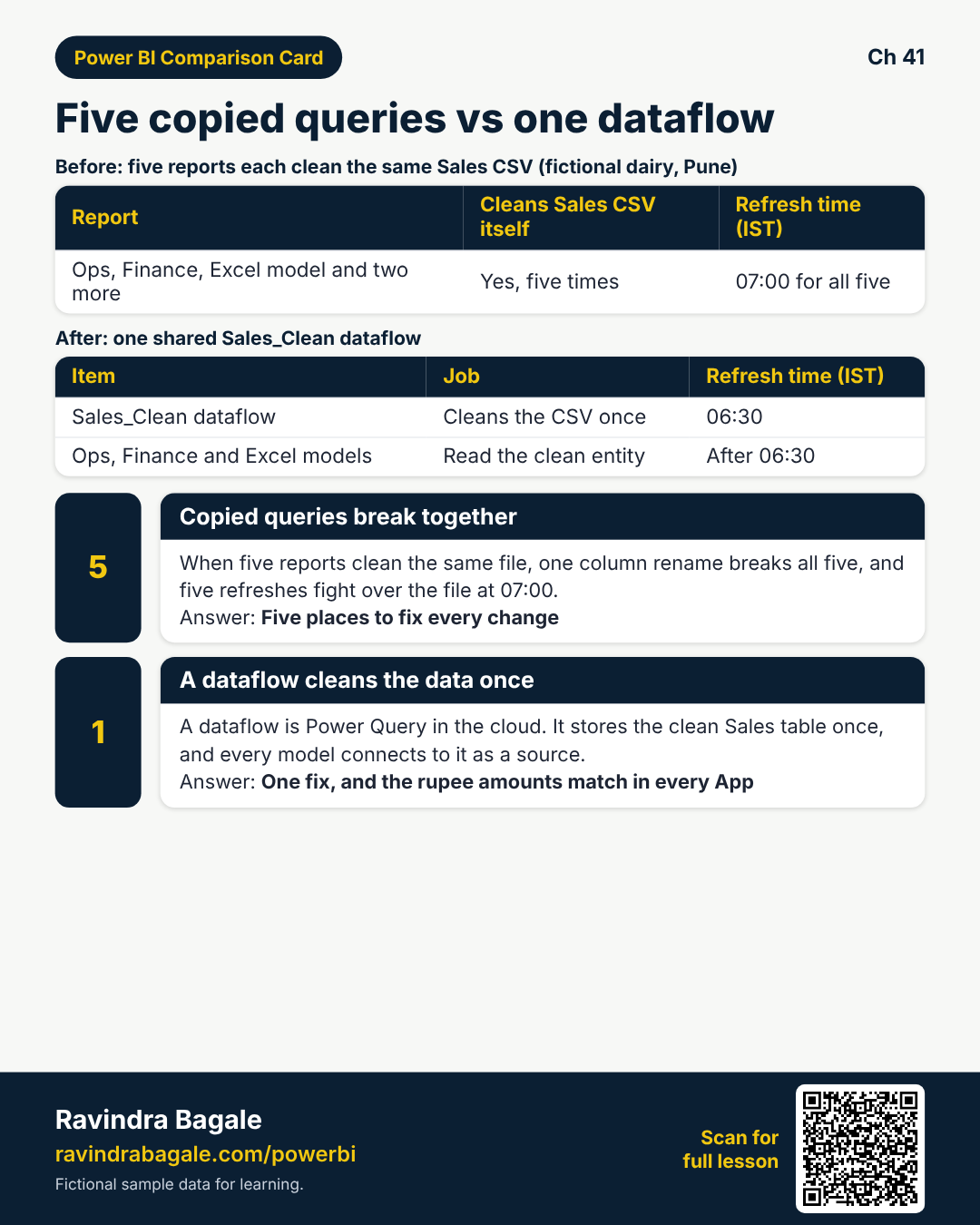
Start with a problem (fictional). Priya Deshmukh (Pune, fictional MH Ops) found five .pbix files each transforming the same dairy Sales CSV. At 07:00 IST five refreshes fought the file share. When she renamed CityKey, three Apps went blank. She needs one Sales_Clean dataflow, a pipeline, lineage checks, and usage metrics before the next Friday cutover.
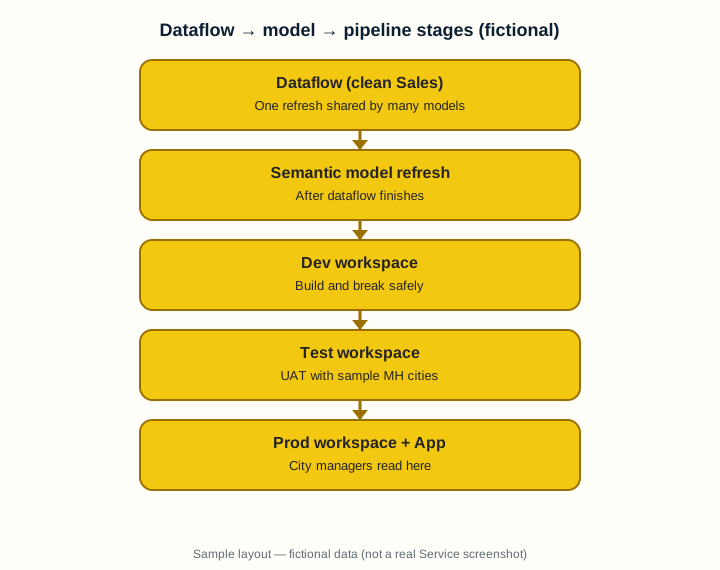
1. Why a dataflow beats five copy-paste queries
Why: Five .pbix files each load the same messy Sales CSV. One rename breaks all five, and five refreshes hit the file at 07:00 IST.
What: A dataflow is a cloud Power Query that stores cleansed entities once. Many semantic models connect to that dataflow as a source.
How — build and reuse one entity:
Vertical steps (one under another)
- In the workspace choose New, then Dataflow (or Dataflow Gen2 where Fabric is available).
- Build the same Power Query steps you would in Desktop — rename, types, merge CityDim.
- Save and refresh the dataflow on a schedule (example: 06:30 IST).
- In Desktop: Get data, then Power BI dataflows, then pick the entity, then build the model on top.
- Publish models that share the same clean Sales table.
Tiny example: Nashik dairy (fictional): Sales_Clean dataflow feeds Ops App, Finance App, and a small Analyze-in-Excel model — ₹ amounts stay consistent.
Ravindra Bagale's Tip
Friends, one dataflow refresh, then model refreshes that only pull the clean entity — fewer 07:00 fights.
Ravindra Bagale's Tip – मराठी
मित्रांनो, एक dataflow refresh, नंतर model — सकाळच्या refresh लढा कमी.
Ravindra Bagale's Tip – हिंदी
दोस्तों, एक dataflow refresh, फिर model — सुबह की refresh लड़ाई कम।
2. Deployment pipelines Dev, then Test, then Prod
Why: Editing in Prod while city managers are in a Monday standup is how you ship a blank card by accident.
What: A deployment pipeline links three workspaces (Dev, Test, Prod) and copies content forward after review.
How — promote safely:
Vertical steps (one under another)
- Create (or ask capacity admin for) a pipeline with three stages.
- Assign your Dev, Test, and Prod workspaces.
- Build in Dev — dataflow, model, report, App draft.
- Deploy to Test; run UAT with sample UPN (city manager of Pune).
- Deploy to Prod only after Test sign-off; rematch gateways and parameters if asked.
Tiny example: MH Ops pipeline (fictional): Dev breaks safely; Test has yesterday’s sample; Prod App goes live Friday 18:00 IST.
Ravindra Bagale's Tip
Friends, keep Prod parameters (gateway, folder path) different from Dev — pipelines can store stage rules.
Ravindra Bagale's Tip – मराठी
मित्रांनो, Prod parameters Dev पेक्षा वेगळे ठेवा — pipeline stage rules मदत करतात.
Ravindra Bagale's Tip – हिंदी
दोस्तों, Prod parameters Dev से अलग रखें — pipeline stage rules मदद करती हैं।
3. Lineage view — who breaks if I change this?
Why: Deleting CityKey from a dataflow can blank every city card overnight.
What: Lineage view draws source, then dataflow, then model, then report, then dashboard/App so you see dependents.
How — check before you break:
Vertical steps (one under another)
- In the workspace open Lineage view (or item, then View lineage).
- Click the dataflow or model you plan to change.
- List every report and App downstream.
- Message owners before a breaking rename.
- After change, refresh and spot-check one visual per dependent report.
Tiny example: Lineage shows Sales_Clean, then three models, then two Apps. Priya postpones the column drop until Friday after notice.
Ravindra Bagale's Tip
Friends, lineage is a conversation tool — send the screenshot to owners before you drop a column.
Ravindra Bagale's Tip – मराठी
मित्रांनो, lineage संवादाचे साधन आहे — column drop करण्यापूर्वी owners ला screenshot पाठवा.
Ravindra Bagale's Tip – हिंदी
दोस्तों, lineage बातचीत का औज़ार है — column drop से पहले owners को screenshot भेजें।
4. Usage metrics — what people actually open
Why: A pretty report that nobody opens still costs refresh and confusion.
What: Usage metrics show views, viewers, and popular reports for the workspace (capacity/Pro rules apply).
How — read and act:
Vertical steps (one under another)
- Workspace, then … View usage metrics report (admin may need to enable).
- Sort by views last 30 days.
- Flag reports with near-zero views for archive or training.
- Check which city managers never opened the App after go-live.
- Act: train, simplify, or retire — do not keep zombie reports.
Tiny example: After go-live, Kolhapur manager (fictional) never opened the App — Training books a 20-minute call, not another email blast.
Ravindra Bagale's Tip
Friends, usage is a conversation with managers — not a blame chart.
Ravindra Bagale's Tip – मराठी
मित्रांनो, usage म्हणजे managers शी संवाद — दोष दाखवणे नाही.
Ravindra Bagale's Tip – हिंदी
दोस्तों, usage managers से बातचीत है — दोषारोपण नहीं।
5. Worked example — MH Ops promotion Friday
Why: You need a calm Friday cutover, not a Monday surprise.
What: Combine dataflow refresh, pipeline deploy, and a short lineage check.
How — run the cutover:
Vertical steps (one under another)
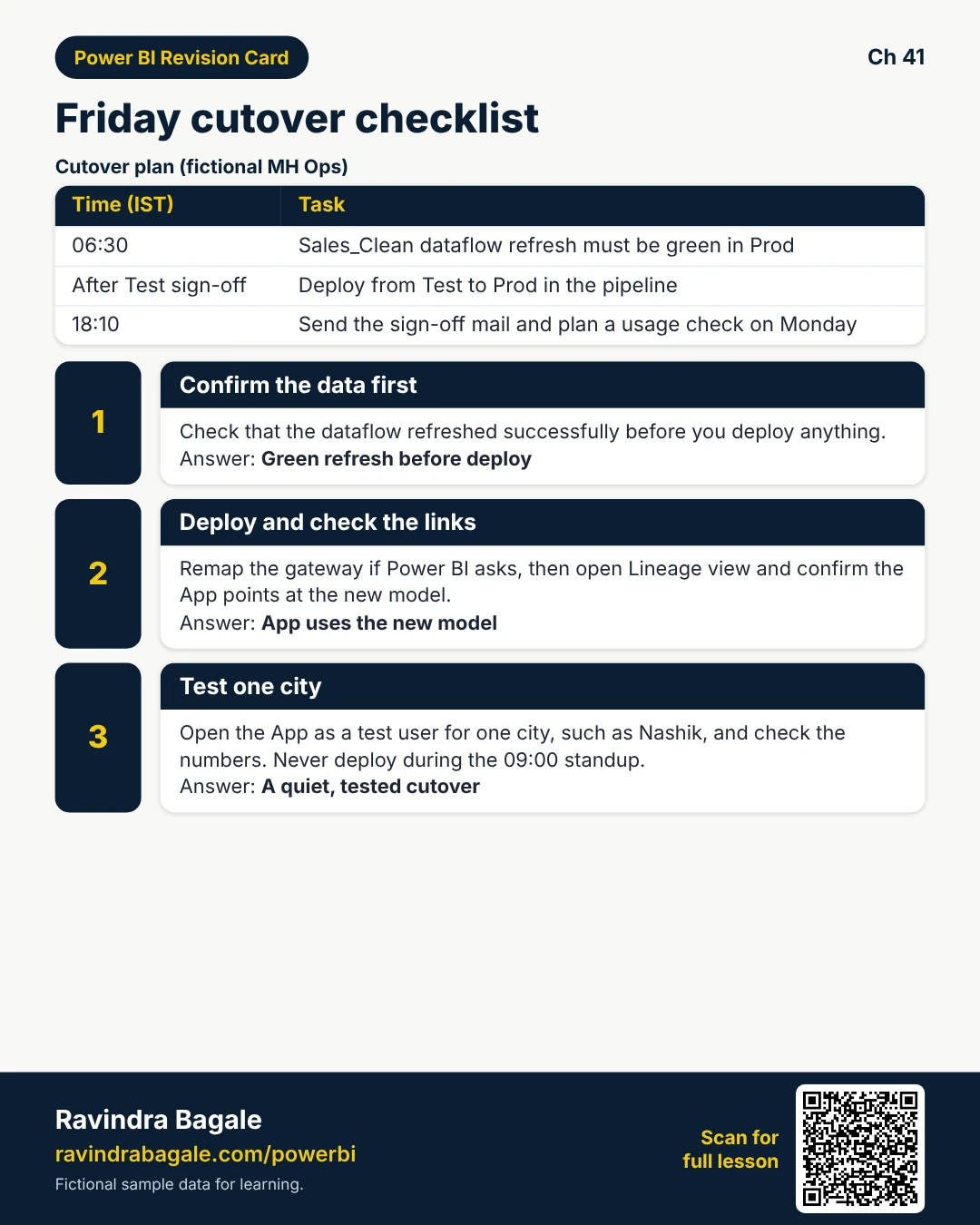
- Confirm Sales_Clean dataflow green at 06:30 IST in Prod.
- Deploy Test, then Prod in the pipeline after Test UAT email.
- Remap gateway if the dialog asks; save.
- Open lineage — confirm App points at the new model version.
- Smoke-test one city (Nashik) with Test as role / App link.
Tiny example: Sign-off mail (fictional): “Prod App updated 18:10 IST; usage check Monday.”
Ravindra Bagale's Tip
Friends, never deploy during the 09:00 IST standup — pick a quiet window and tell Teams first.
Ravindra Bagale's Tip – मराठी
मित्रांनो, 09:00 IST standup दरम्यान deploy करू नका — शांत वेळ निवडा आणि Teams ला आधी सांगा.
Ravindra Bagale's Tip – हिंदी
दोस्तों, 09:00 IST standup के दौरान deploy न करें — शांत समय चुनें और Teams को पहले बताएं।
6. Interview answers that sound senior
Why: Interviewers ask how you avoid copy-paste ETL and risky Prod edits.
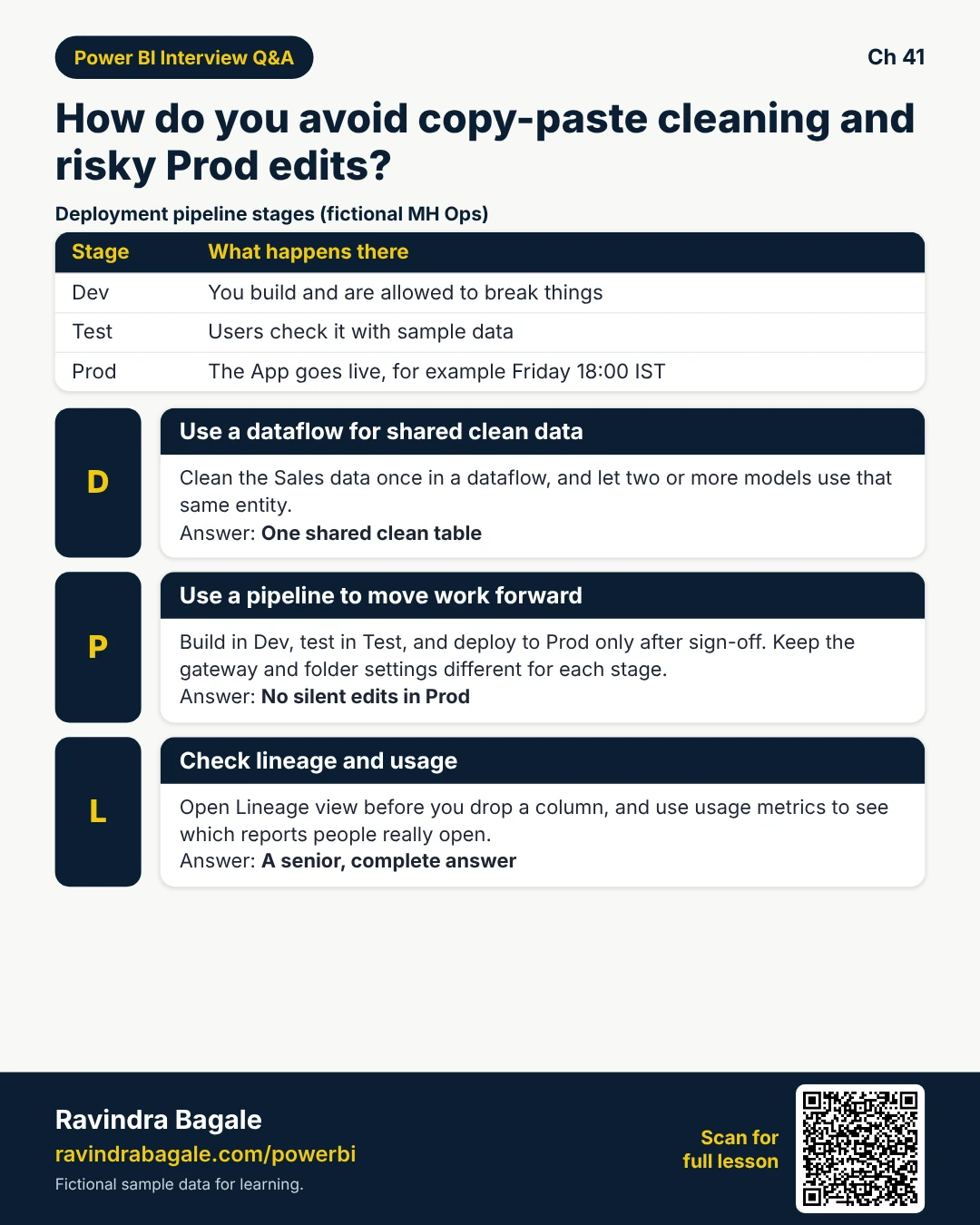
What: Say: dataflows for shared clean data; pipelines for Dev/Test/Prod; lineage before breaking changes; usage to prune.
How — practise the 60-second answer:
Vertical steps (one under another)
- Explain one shared entity and two consuming models.
- Name the three pipeline stages.
- Mention gateway/parameter rules between stages.
- Say you check lineage before dropping a column.
- Mention usage metrics for adoption.
Tiny example: Good line: “We refresh Sales_Clean once, promote with a pipeline, and refuse silent Prod edits.”
Ravindra Bagale's Tip
Friends, name a real failure you prevented (blank App) — stories beat buzzwords.
Ravindra Bagale's Tip – मराठी
मित्रांनो, तुम्ही रोखलेली खरी समस्या सांगा (blank App) — गोष्ट buzzwords पेक्षा भारी.
Ravindra Bagale's Tip – हिंदी
दोस्तों, जो असली समस्या रोकी वह बताएं (blank App) — कहानी buzzwords से बेहतर।
Quiz (5 questions)
1. A dataflow mainly helps you:
2. Deployment pipelines typically move content:
3. Lineage view is for:
4. Usage metrics help you:
5. Best time to deploy to Prod in the story:
Practice tasks (12) — hints only, no full answers
- Task. List three problems of five copy-paste Sales queries.
Hint: section 1. - Task. Write steps to connect Desktop to a dataflow entity.
Hint: Get data, then dataflows. - Task. Name the three pipeline stages and one UAT check.
Hint: section 2. - Task. Why remap gateway after Prod deploy?
Hint: paths/credentials differ. - Task. Using lineage, list what you check before dropping CityKey.
Hint: section 3. - Task. Draft a one-line mail to owners before a breaking rename.
Hint: lineage dependents. - Task. What does a near-zero-view report suggest?
Hint: section 4. - Task. Interview: dataflow vs copying Power Query into every .pbix.
Hint: shared entity. - Task. Schedule idea: dataflow 06:30, model 06:45, App open 07:05 IST — why this order?
Hint: order matters. - Task. Why not edit visuals only in Prod?
Hint: pipelines / Dev. - Task. MH Ops Friday cutover — five bullet checklist.
Hint: section 5. - Task. How does usage support training decisions?
Hint: who never opened App.
Ravi Sir's cards (Excel card style)
Standalone cards — no tip or photo sections. QR points to this lesson. Download PNG to revise offline.
Think like a professional
In a real tenant, rights and sharing are controlled by Fabric / Power BI admins. Always follow your company policy. This lesson uses fictional people and numbers so you can practise the ideas safely.